


Sky: Children of the Light Candles Top Up Guide and Uses
Candles serve as the core currency in Sky: Children of the Light. Players use regular White Candles to build friendships, send daily hearts, unlock friendship expressions (such as high-fives, hugs, and warp abilities), and purchase cosmetics from standard spirits as well as bi-weekly Traveling Spirits.
Collecting candles through standard daily gameplay involves completing candle runs across the realms of Sky, gathering social light, and returning polluted geyser and grandma dinner events. However, acquiring enough candles for time-limited Traveling Spirit cosmetics, seasonal instruments, or prop items often requires more currency than standard daily runs provide. A direct Sky: Children of the Light Candles top up allows you to obtain the exact number of candles you need without spending hours grinding daily wax limits.
How to Recharge Sky: Children of the Light Candles on BitTopup
To complete a candle recharge on BitTopup, follow these straightforward steps:
- Select Your Candle Package: Choose the desired denomination of Sky Candles from the product list.
- Enter Your User ID: Input your Sky User ID into the required
User IDfield. Make sure to copy and paste it directly from your in-game settings to avoid typos. - Review Order Details: Confirm your selected pack and verify that your User ID matches your active game profile.
- Complete Payment: Select your preferred payment method on the secure checkout screen and complete the transaction. Current rates and currency totals are displayed on the live checkout interface.
- Receive Your Candles: After the payment is confirmed, the candles will be delivered directly to your Sky account via your User ID.
How to Find Your Sky: Children of the Light User ID
Your User ID is a unique alphanumeric identifier assigned to your thatgamecompany account. You do not need to share passwords or login credentials; only this public identifier is required for order processing.
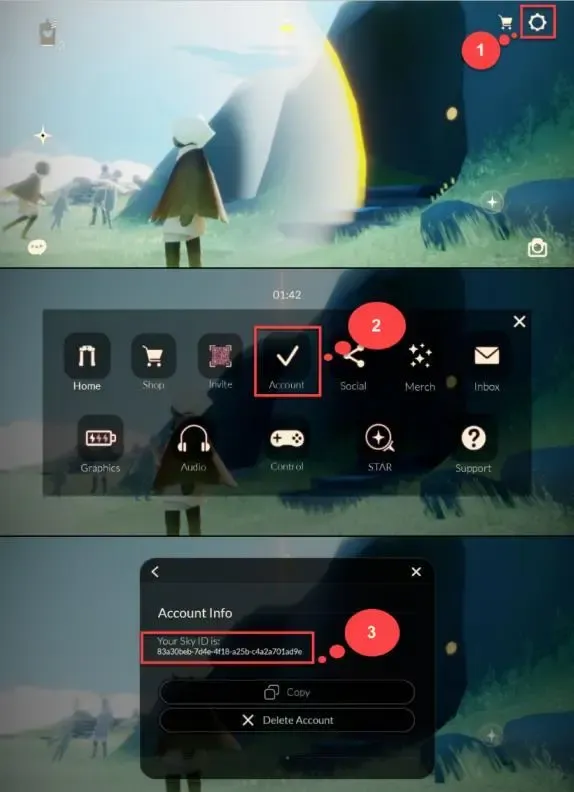
- Launch Sky: Children of the Light on your mobile device, PC, or console.
- Open the in-game menu by tapping the top-right corner of the screen (or pressing the Menu/Pause button on your controller or keyboard).
- Select the Settings gear icon.
- Tap or click on the Account tab.
- Find the User ID field listed under your account information.
- Tap the copy icon next to your User ID to copy the full string to your clipboard, then paste it directly into the order field on BitTopup.
Regular Candles vs Seasonal Candles: What You Need to Know
Sky features multiple currency types, each serving distinct purposes in the game economy. Understanding how each candle functions helps you plan your cosmetic purchases and friend upgrades effectively.
| Candle Type | Primary Sources | Core In-Game Uses | Season Expiration Rule |
|---|---|---|---|
| Regular White Candles | Daily wax runs, light events, BitTopup top up | Friendship trees, standard Spirit cosmetics, Traveling Spirits, Heart trades | Permanent; never expires |
| Seasonal Candles | Daily seasonal quests, seasonal light nodes, Season Passes | Unlocking nodes in active Seasonal Spirit trees | Converts 1:1 into Regular White Candles at the end of each season |
| Ascended Candles (AC) | Eye of Eden completion, Shard Eruptions | Permanent Wing Buffs from spirits, advanced friendship interactions | Permanent; never expires |
Standard candle packs purchased online credit Regular White Candles. If you require Regular Candles for an upcoming Traveling Spirit visit or to unlock capes and instruments in standard constellations, a direct recharge provides the necessary balance immediately.
Cross-Platform Candle Compatibility: Switch, PlayStation, PC, and Mobile
Sky: Children of the Light supports cross-play and cross-progression across iOS, Android, PC (Steam), PlayStation, and Nintendo Switch through thatgamecompany account linking. However, platform-specific wallet policies apply to purchased currencies:
- Mobile, PC, and PlayStation Sync: Candles purchased using your User ID synchronize across iOS, Android, PC (Steam), and PlayStation. If you purchase candles on BitTopup, your updated balance will show across these connected platforms automatically.
- Nintendo Switch Ecosystem: Nintendo maintains an isolated wallet ecosystem for purchased currencies. Candles purchased directly on the Nintendo eShop are stored in a Switch-exclusive balance. Conversely, candles delivered via standard mobile/PC User ID recharge may not display while logged in on Nintendo Switch.
- Cosmetics Are Universal: Any cosmetic item, emote upgrade, or friendship node unlocked with candles on mobile or PC remains permanently accessible on your account across all platforms, including Nintendo Switch.
Safe & Secure Top Up: Why UID-Only Processing Protects Your Account
Account safety is essential when purchasing in-game currencies. BitTopup processes your Sky: Children of the Light candle order using only your public User ID.
- No Password Sharing: You never need to provide your Google, Apple ID, Steam, Nintendo, PlayStation, or thatgamecompany account passwords.
- Zero Third-Party Account Access: Nobody logs into your account. The delivery is handled externally via the player ID system, preventing unauthorized account alterations or privacy leaks.
- Encrypted Checkout: BitTopup uses secure payment processing protocols to ensure your transaction information is protected.
- 24/7 Order Assistance: Dedicated customer support is available around the clock to answer inquiries and confirm order status.
Delivery Times and Troubleshooting Order Issues
Candle recharges are processed promptly after payment verification. If you have completed an order and do not see your updated candle balance immediately, follow these troubleshooting steps:
- Restart the Game Client: Fully close Sky: Children of the Light on your device and relaunch it. This forces the game to fetch the latest account data from the official game servers.
- Trigger a Realm Transition: Travel from Home or Aviary Village to any realm (such as Daylight Prairie or Hidden Forest) and return. Moving between server zones refreshes your wallet counter.
- Check Your Active Profile: Ensure that the device you are checking is logged into the exact account matching the User ID entered during checkout.
- Verify Platform Constraints: If you play on Nintendo Switch, log in on a mobile device or PC to confirm your candle balance update due to platform wallet segregation.
- Contact BitTopup Support: If your balance does not update after restarting, reach out to BitTopup customer support with your order ID and User ID for prompt assistance.
Frequently Asked Questions
How do I find my User ID in Sky: Children of the Light?
Open the in-game Settings menu, tap the Account tab, and locate the alphanumeric string listed as your User ID. Use the copy button to capture the exact ID.
Do I need to share my account password to top up Sky Candles?
No. BitTopup requires only your in-game User ID to send candles to your profile. Never share your password or login credentials with anyone.
Can I use candles purchased online on Nintendo Switch?
Because Nintendo uses an isolated wallet system, purchased candle balances reflect on iOS, Android, PC (Steam), and PlayStation. To spend your candles for your Switch account, simply log into the game on mobile or PC, unlock the desired cosmetics or friendship nodes, and the unlocked items will remain accessible when you switch back to playing on Nintendo Switch.
What is the difference between regular Candles and Seasonal Candles?
Regular White Candles are used for general spirit constellations, Traveling Spirits, and friend interactions. Seasonal Candles are exclusive to active seasonal events; once a season concludes, any leftover Seasonal Candles automatically convert into regular White Candles on a 1:1 basis.
How long does it take for Sky Candles to reflect in my account after recharge?
Orders are processed promptly once payment clears. In most cases, restarting your game client or traveling between realms immediately displays the updated candle total.
How can I get more Candles in Sky: Children of the Light in 2026?
Players can earn candles in 2026 by completing daily wax collection runs across all realms, attending timed social light events like Grandma's dinner and the Sanctuary Islands geyser, converting Seasonal Candles at the end of each season, or purchasing candle packs directly through BitTopup using their User ID.