

WTFast Subscription Top Up: Gamers Private Network (GPN) and Ping Optimization
Online competitive gaming requires stable, direct routing to game servers. Standard Internet Service Providers (ISPs) often route internet traffic through inefficient public hubs designed for web browsing and media streaming rather than low-latency data exchange. This leads to latency spikes, high ping, rubberbanding, and packet loss.
Completing a WTFast subscription top up provides access to the WTFast Gamers Private Network (GPN). Unlike general network tools, the GPN specifically isolates and accelerates game connection data. By routing game packets through dedicated, optimized private network servers across the globe, WTFast ensures that your connection takes the shortest and most direct path to the match server. This reduces ping variance, eliminates packet loss, and stabilizes your connection across competitive multiplayer titles.
How to Recharge and Redeem a WTFast Subscription Prepaid Code
Redeeming your subscription key takes only a few minutes. Follow these steps to activate your prepaid code on your official account:
- Select your preferred subscription duration on BitTopup and proceed through checkout.
- Once your purchase is confirmed, locate your digital redemption code in your BitTopup Order Center.
- Open your browser and navigate to the official WTFast account management portal.
- Log in using your registered WTFast account credentials (email and password).
- Click on your profile name in the upper-right corner and select Account or Enter Key / Promo Code.
- Paste your digital prepaid activation code into the input field and click Submit or Activate.
- Launch the WTFast desktop client on your PC. Your account status will reflect the updated subscription period immediately.
How to Find Your WTFast Account Details and Manage Licenses
To ensure your subscription applies to the correct profile, verify your account details inside the client or web portal before redeeming your voucher.
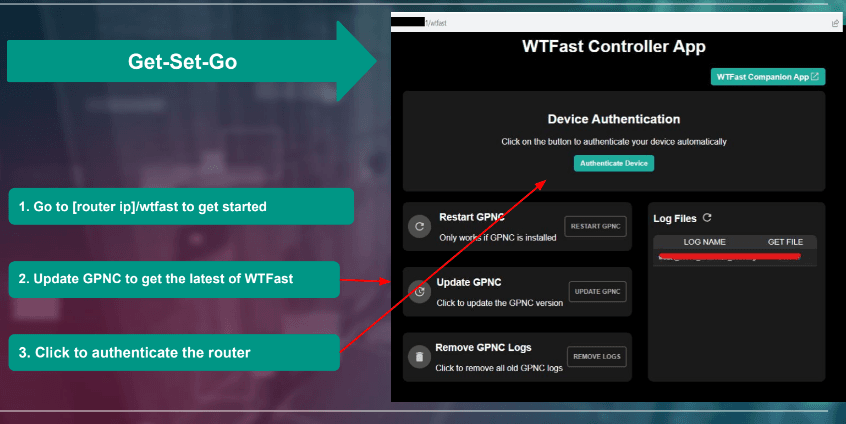
Locating Your Account Information:
- Desktop Application: Open the WTFast client on your computer. Your account email appears in the upper navigation bar. Clicking on your account name displays your current subscription tier, active days remaining, and account status.
- Web Portal: Log in to the official WTFast website. Go to the Member Area dashboard. Here you can inspect your active licenses, past redemption history, and assigned computer hardware IDs linked to your plan.
WTFast Subscription Plans, Features, and Performance Benefits
WTFast provides specialized network routing configurations designed for performance-critical games, including first-person shooters, MOBAs, MMORPGs, and battle royales.
| Plan Type | Core Features | Best For |
|---|---|---|
| Monthly Plan | Access to full GPN server network, real-time ping analytics, single-device priority | Short-term optimization and competitive tournament play |
| Multi-Month Plan | Continuous automated server chaining, packet loss reduction, priority support | Active competitive players seeking uninterrupted performance |
| Annual Plan | Maximum cost efficiency, complete GPN server route selection, zero bandwidth caps | Dedicated gamers maintaining stable low-latency connections year-round |
Key Benefits of an Active WTFast Subscription:
- Intelligent Network Routing: Automatically selects the fastest physical path between your router and the game server.
- Ping Smoothing & Jitter Elimination: Minimizes sudden latency jumps during crucial gameplay moments.
- Packet Loss Prevention: Uses redundant private server pathways to prevent lost data packets and avoid rubberbanding.
- Real-Time Connection Analytics: Displays live ping differentials and connection telemetry comparing standard ISP routes against the GPN route.
WTFast vs Standard VPN: Connection Routing and Packet Loss Prevention
Understanding the architectural difference between WTFast and a traditional Virtual Private Network (VPN) is essential for online competitive gaming.
Standard ISP Route:[Your PC] ---> [Local ISP Hub] ---> [Congested Public Switch] ---> [Game Server] (High Ping / Jitter)WTFast GPN Route:[Your PC] ---> [Optimized GPN Node] === (Direct Private Backbone) ===> [Game Server] (Low Ping / Stable)- Traffic Scope: A standard VPN encrypts all incoming and outgoing computer traffic, including web browsers, operating system background tasks, and downloads. WTFast only touches game client data packets (UDP/TCP game communication), leaving all other internet activity untouched.
- Latency Impact: Standard VPNs add encryption layers and overhead, which frequently increases overall ping. WTFast does not encrypt the packet payload to avoid processing delay; instead, it optimizes the transit route to reduce milliseconds.
- IP Masking vs. Route Peering: A typical VPN changes your IP address to bypass geographic blocks. WTFast focuses on routing optimization and server peering, keeping your connection stable without introducing connection anomalies that trigger security locks.
Anti-Cheat Safety and Account Security When Using WTFast
Account safety is a top priority for competitive gamers. Using WTFast is safe and compliant with leading anti-cheat engines.
- Anti-Cheat Engine Compatibility: WTFast works alongside industry-standard anti-cheat systems including Easy Anti-Cheat (EAC), BattlEye, Valve Anti-Cheat (VAC), and Riot Vanguard. It operates strictly at the network layer and does not modify local game files, execute memory injection, or hook into rendering pipelines.
- Game Publisher Recognition: Because WTFast functions solely as a network optimizer, major game publishers classify it as a network utility rather than third-party cheating software.
- Zero Account Risk on BitTopup: Purchasing your WTFast subscription recharge through BitTopup requires zero account sharing. You never need to supply your WTFast password or gaming platform credentials. You receive an independent digital code that you redeem yourself directly on the official WTFast portal.
Troubleshooting WTFast Code Redemption and Activation Issues
If you encounter any difficulty activating your prepaid code, consult the following solutions:
- Code Input Errors: Digital keys are case-sensitive. Copy and paste the key directly from your BitTopup order details to avoid mistaking characters like uppercase
Ofor number0or uppercaseIfor lowercasel. - Active Subscription Stacking: If your account already has an active recurring subscription billed through a third-party channel, you may need to wait until the current billing cycle completes or cancel auto-renewal before applying a new standalone prepaid voucher.
- Client Refresh Issues: If your desktop client still shows an expired account after web activation, log out of the WTFast software, close the client completely from your Windows system tray, and log back in to force a profile synchronization.
- Network Firewall Interference: Ensure that the WTFast desktop client and its background service (
wtfast.exe) are whitelisted in your Windows Defender or third-party firewall rules to allow route analysis.
Why Choose BitTopup for WTFast Subscription Top Up
BitTopup delivers a secure, streamlined purchasing process for gamers worldwide:
- Instant Digital Delivery: Your prepaid activation code is displayed directly in your order history immediately after checkout confirmation.
- Complete Account Privacy: No passwords or login credentials are required. Your gaming accounts remain completely under your control.
- Flexible Payment Methods: Complete your transaction securely using a wide range of global and localized payment gateways available at live checkout.
- Dedicated Support: Our 24/7 customer service team is available to assist you with order verification and delivery inquiries at any time.
Frequently Asked Questions
What is WTFast and how does it reduce gaming lag?
WTFast is a Gamers Private Network (GPN) designed exclusively to optimize connection data between your PC and online game servers. It bypasses congested public ISP pathways by routing game traffic through dedicated, direct network nodes, effectively lowering ping, reducing jitter, and preventing packet loss.
Is WTFast safe to use with anti-cheat software in online games?
Yes. WTFast is completely safe and does not trigger anti-cheat bans. It functions purely at the network routing layer without altering game memory, binaries, or game files. It is fully compatible with Easy Anti-Cheat, BattlEye, VAC, and other major security systems.
How do I activate and redeem my WTFast subscription code?
Log in to your account on the official WTFast website, navigate to the Account or Enter Key section, paste the digital code received from your BitTopup order, and confirm. Once applied, log in to the WTFast PC client to enjoy your active subscription.
Can I use a single WTFast subscription across multiple devices?
A standard WTFast subscription license is designed to accelerate one active PC connection at a time. While you can install the software on multiple computers, simultaneous acceleration on multiple devices requires an upgraded plan that supports concurrent connections.
What is the difference between WTFast GPN and a standard VPN?
A standard VPN encrypts all computer traffic and routes it through a single remote server, which often increases latency. WTFast only routes game-specific data packets across private, speed-optimized network backbones without encrypting the game stream, ensuring minimal ping and maximum stability.
What should I do if my WTFast digital code does not activate?
Check that you copied the complete code without accidental spaces before or after the text. Ensure you are entering the key into the official WTFast web portal while logged into your target account. If the issue persists, take a screenshot of the error prompt and contact BitTopup 24/7 customer support for immediate assistance.