
BitTopup Logohow to top-up in bittopup
ค้นหา
วิธีเติมเงิน ROBLOX Canada

ROBLOX Canada

Excellent
Trustpilot
CACA
Instant Deliveryจัดส่งทันที
Safe & Secure paymentชำระเงินปลอดภัยและมั่นใจได้

Instant digital code delivery for ROBLOX Canada with zero hassle on BitTopup.

เลือกมูลค่า

15 CAD

฿ 370.32

ยอดรวม · x1

ROBLOX Canada คู่มือการเติมเงิน

ROBLOX Canada Top Up & Digital Code Redemption Guide

A ROBLOX Canada top up provides Canadian players with digital gift card codes denominated in Canadian Dollars (CAD). When you purchase a digital voucher, you receive an official PIN code that adds Roblox Credit directly to your account balance. This balance gives you complete flexibility across the entire Roblox ecosystem, allowing you to convert your funds directly into Robux, purchase exclusive avatar accessories, access paid experiences, or subscribe to Roblox Premium.

Digital codes purchased on BitTopup are delivered instantly to your order screen without requiring access to your personal login credentials. You maintain full ownership and control of your Roblox profile while enjoying the benefits of local CAD purchasing options.

Roblox Canada CAD Denominations and Robux Conversion Rates in 2026

When redeeming a Canadian Dollar gift card on a computer or mobile web browser, your CAD credit converts into Robux. Purchasing digital codes and redeeming them via the official Roblox browser redemption portal grants higher Robux values compared to standard mobile in-app purchases, avoiding third-party mobile app store processing surcharges.

The following table outlines the standard CAD denominations and their corresponding Robux values in 2026:

CAD DenominationStandard Robux ReceivedWeb-Exclusive Bonus RobuxRoblox Premium Equivalent
$10 CAD800 RobuxUp to 880 RobuxTier 1 (450 Robux/mo) + Balance
$15 CAD1,200 RobuxUp to 1,320 RobuxTier 1 (450 Robux/mo) + Balance
$25 CAD2,000 RobuxUp to 2,200 RobuxTier 2 (1,000 Robux/mo) + Balance
$50 CAD4,500 RobuxUp to 4,950 RobuxTier 3 (2,200 Robux/mo) + Balance
$100 CAD10,000 RobuxUp to 11,000 RobuxMulti-Month Premium / Bulk Robux

Note: Exact Robux conversion rates and promotional bonus items depend on active Roblox events and real-time platform updates. Check the live BitTopup checkout for real-time pricing and available card amounts.

How to Recharge Roblox Canada Gift Card & Redeem Digital Codes

Roblox requires all gift card PIN codes to be redeemed through an internet browser. You cannot redeem digital voucher codes directly inside the standard iOS or Android Roblox mobile applications due to app store technical restrictions.

Follow these step-by-step instructions to redeem your code:

  1. Obtain Your Code: Select your desired CAD amount on BitTopup, complete checkout, and copy your digital PIN code from your order confirmation screen.
  2. Open a Web Browser: Launch Chrome, Safari, Edge, or Firefox on your PC, Mac, tablet, or phone.
  3. Go to the Redemption Page: Head directly to roblox.com/redeem.
  4. Log In to Your Account: Ensure you are signed in to the specific Roblox account you wish to credit.
  5. Enter the PIN: Paste or type the digital code into the text box labeled Code.
  6. Click Redeem: Press the white Redeem button to submit the code.
  7. Convert Your Credit: A success message will appear showing your newly added Roblox Credit in CAD. Select Convert to Robux to immediately turn your balance into in-game currency, or keep it as cash credit to buy a monthly Roblox Premium membership.

Verifying Your Roblox Account ID and Currency Settings

Before redeeming a Canadian gift card, verify that your Roblox account profile settings match your intended region. Canadian gift cards credit accounts with Canadian Dollar balances.

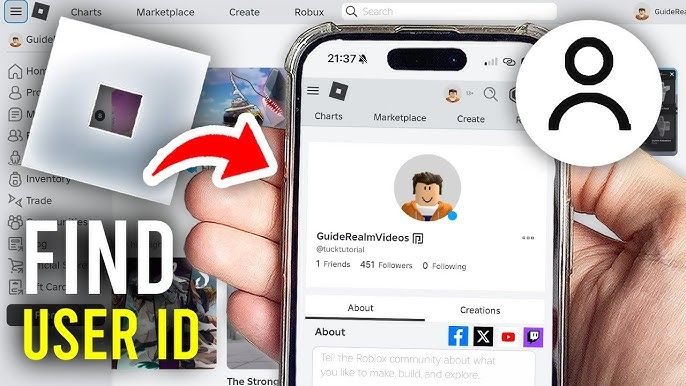
To check your account details and user ID:1. Log into your account on the Roblox website.2. Click on your profile picture or username in the top right corner.3. Your numeric User ID is visible in the browser address bar: roblox.com/users/[YOUR_USER_ID]/profile.4. Go to Settings (gear icon) > Account Info.5. Confirm that your location displays Canada so your account is properly structured to receive CAD currency credits.
How to recharge ROBLOX Canada

Converting Roblox Credit into Robux or Roblox Premium Subscriptions

Once you redeem a digital code, your balance appears as Roblox Credit in Canadian Dollars. You have two primary ways to spend this credit:

1. Instant Robux Purchase

  • Navigate to the official Roblox Robux page via browser.
  • Select the Robux package that matches your credit balance.
  • On the payment selection screen, choose Roblox Credit as your payment method.
  • Click Submit Order to complete the purchase without entering external banking details.

2. Roblox Premium Subscription

  • Go to the Roblox Premium page.
  • Select your desired membership tier (450, 1,000, or 2,200 Robux per month).
  • Choose Roblox Credit during checkout.
  • Premium grants a monthly Robux allowance, a 10% bonus on all future direct Robux purchases, access to avatar item trading, and higher payout percentages in developer experiences.

Roblox Canada Regional Currency Rules & Account Settings

Roblox uses regional currency matching for gift card redemption. When you buy a Roblox Canada card, the digital code is generated specifically for CAD-denominated accounts.

  • Region Matching: If your account currency is set to USD, EUR, or GBP, you may encounter a currency mismatch error during redemption.
  • Adjusting Regional Settings: Ensure your account location is set to Canada. If you recently moved to Canada or set your location incorrectly, update your country in the Account Info tab under Roblox Account Settings.
  • Parental Controls: For accounts managed by a parent or guardian, check that spending restrictions allow code redemptions and in-game item transactions.

Troubleshooting Common Roblox Gift Card Redemption Errors

If you experience an issue when entering your digital code, use this troubleshooting checklist:

  • Code Not Recognized / Invalid Code: Carefully check for common character confusion. Numbers and letters like 0 (zero) and O (capital o), or 1 (one) and I (capital i) can look similar. Ensure no trailing spaces were copied alongside the code.
  • Code Already Redeemed: Check your Roblox Credit balance on the redemption page or view your transaction history under Settings > Billing. In most cases, the code successfully processed on the first attempt.
  • App Redemption Issues: If you try entering the PIN inside the mobile game client, it will not work. You must open a browser and use roblox.com/redeem.
  • Balance Display Delay: If your Robux total does not update immediately after converting your credit, log out of Roblox and log back in, or perform a hard refresh (Ctrl + F5 on Windows, Cmd + Shift + R on Mac).

Why Recharge Roblox Canada on BitTopup

BitTopup provides a straightforward and secure checkout experience for Canadian Roblox players:

  • Code-Only Security: BitTopup only delivers digital redemption PINs. We never request your Roblox account password, email login, or two-factor authentication codes. Your account security remains in your hands.
  • Instant Digital Delivery: After completing payment, your digital code appears directly on your screen and is saved in your BitTopup user center for immediate redemption.
  • Transparent Live Pricing: View up-to-date CAD rates and transparent processing options before completing your transaction.
  • 24/7 Customer Support: If you have questions about order delivery or redemption steps, BitTopup customer support is available around the clock to assist you.

Frequently Asked Questions

Can I buy and redeem a Roblox Canada gift card on any account?

Roblox Canada digital gift cards are designed for accounts configured to Canadian Dollars (CAD) or regions that accept CAD vouchers. To avoid regional redemption errors, verify that your Roblox account location is set to Canada under your Account Settings.

How much Robux is $25 Canadian in 2026?

A $25 CAD Roblox gift card converts to approximately 2,000 Robux when redeemed via the official web redemption portal, with promotional periods offering up to 2,200 Robux or exclusive in-game virtual items.

How do I recharge my Roblox balance using a digital code?

Go to roblox.com/redeem in any web browser, sign in to your Roblox account, enter your digital PIN code in the designated box, and click Redeem. Your account will immediately receive the corresponding CAD Roblox Credit.

Can I redeem my Canadian Roblox gift card inside the Roblox mobile app?

No. The Roblox mobile application on iOS and Android does not support direct gift card PIN entry. You must open a mobile browser (such as Safari or Chrome) and visit roblox.com/redeem to redeem your code.

Do Roblox Canada digital gift card codes expire?

No, Roblox digital gift card codes do not have an expiration date. Once you purchase your code, you can redeem it whenever you choose. However, we recommend redeeming the PIN promptly to ensure your credit is active.

What should I do if my Roblox Canada code shows an invalid error?

First, verify that you entered the characters correctly without accidental spaces. Check that you are redeeming the code at roblox.com/redeem. If the error continues, check your Roblox Billing settings to see if the credit was already applied, or contact BitTopup support with your order ID for fast assistance.

ROBLOX Canada ข่าวสารแนะนำ

สปอยล์ฉลองครบรอบ 5 ปี Genshin Impact: ฟรี 20 โรล + เลือก 5 ดาวเองได้, ในที่สุดเวอร์ชัน 6.0 Nordkalen ก็มาถึงแล้ว!

พูดตามตรง ในฐานะบรรณาธิการเก่าที่ติดตาม Genshin Impact มาห้าปี การคาดการณ์สิทธิประโยชน์ครบรอบ 5 ปีครั้งนี้ทำให้ฉันตื่นเต้นเล็กน้อย การเฉลิมฉลองในวันที่ 28 กันยายน 2025 อาจเป็นการลงทุนครั้งใหญ่ที่สุดของ miHoYo: ฟรี 20 โรล, เลือกตัวละคร 5 ดาวเองได้, 1600 Primogem และรีเซ็ตโบนัสเติมเงินครั้งแรกสองเท่า ไม่ต้องพูดถึงแผนที่ใหม่ Nordkalen ที่ทุกคนรอคอยมาเกือบสองปีแล้ว

แนวทางการจัดทีมของลาอูม่าใน Genshin Impact 6.0: การจับคู่สิ่งประดิษฐ์และการแนะนำทีม

อันที่จริงแล้ว เมื่อพูดถึงตัวละครที่น่าจับตามองที่สุดในเวอร์ชัน 6.0 ลาอูม่าถือเป็นตัวละครที่ถูกพูดถึงมากที่สุด ตัวละครธาตุไม้ระดับห้าดาวตัวนี้ไม่เพียงแต่นำกลไกปฏิกิริยาการบานของดวงจันทร์แบบใหม่มาให้เท่านั้น แต่ยังมีสิ่งประดิษฐ์เฉพาะตัว "เพลงราตรีแห่งการปั่นด้ายจันทรา" และอาวุธ "อาณาจักรราตรีแห่งการปั่นด้าย" ด้วย – พูดตามตรง การออกแบบของ MiHoYo ในครั้งนี้ค่อนข้างน่าสนใจ จากการทดสอบเชิงลึกของฉันในช่วงที่ผ่านมา วิธีการเล่นลาอูม่าที่ดีที่สุดคือการจัดทีมร่วมกับเทพแห่งไม้ และเพิ่มค่าความชำนาญธาตุให้ถึง 800+ ซึ่งจะทำให้ผลลัพธ์ความเสียหายเพิ่มขึ้นอย่างก้าวกระโดด

คุณคือตัวละคร Genshin ตัวไหน? ทำแบบทดสอบบุคลิกภาพขั้นสุดยอด 2025

ค้นพบตัวละคร Genshin Impact ที่เข้ากับคุณที่สุดผ่านแบบทดสอบบุคลิกภาพที่ครอบคลุม ซึ่งจะวิเคราะห์ลักษณะนิสัย ความชอบ และธาตุของคุณ ตั้งแต่การประเมินผลอย่างละเอียดของ uQuiz ไปจนถึงแบบทดสอบด่วนของ BuzzFeed ค้นหาตัวละครที่สะท้อนความเป็นคุณอย่างแท้จริง

วิธีมอง Genshin Impact ให้ไม่น่ากลัว: คู่มือสร้างความมั่นใจสำหรับมือใหม่

สิ่งหนึ่งเกี่ยวกับ Genshin Impact คือมันรู้สึกท่วมท้นเพราะระบบที่ซับซ้อนและกลไกกาชา แต่สิ่งที่ผมได้เรียนรู้จากการคลุกคลีกับเกมนี้คือ: เริ่มต้นด้วยเควสต์เนื้อเรื่อง, ไม่ต้องสนใจแรงกดดันเรื่องการปรับแต่งตัวละคร, กำหนดขอบเขตความเร็วในการเล่นของตัวเอง, และเน้นการสำรวจมากกว่าความต้องการของเมต้าเพื่อสร้างความมั่นใจอย่างเป็นธรรมชาติ

Genshin Impact ตัวละครธาตุไฟฟ้ายังคงใช้ Emblem of Severed Fate + ค่าคริ + ถ้วยโบนัสความเสียหายไฟฟ้าอยู่ไหม? วิเคราะห์การจัดอาร์ติแฟกต์ล่าสุดปี 2025

อันที่จริงคำถามนี้ผมถูกถามมานับครั้งไม่ถ้วนในช่วงนี้ พูดง่ายๆ คือ เซ็ต Emblem of Severed Fate + ค่าคริ + ถ้วยโบนัสความเสียหายไฟฟ้ายังคงเป็นกระแสหลัก แต่แนวคิดการจัดอาร์ติแฟกต์ในปัจจุบันมีความยืดหยุ่นมากกว่าเมื่อก่อนมาก ตัวละครอย่าง Raiden Shogun และ Yae Miko ต่างก็มีแนวทางที่ดีที่สุดของตัวเอง และการเกิดขึ้นของปฏิกิริยา Quicken ก็ได้นำความเป็นไปได้ใหม่ๆ มาสู่การจัดอาร์ติแฟกต์ของตัวละครธาตุไฟฟ้า

ตัวละครธาตุไม้ตัวใหม่ใน Genshin Impact เป็นตัวแบกของแพทช์นี้จริงหรือ? การวิเคราะห์เชิงลึกจะบอกความจริงให้คุณ

พูดตามตรง ในฐานะผู้เล่นเก่าที่ศึกษาเกี่ยวกับกลไกตัวละครใน Genshin Impact มานานกว่าสามปี ผมต้องขอบอกตามตรงว่า ตัวละครธาตุไม้ตัวใหม่นี้ในสภาพแวดล้อมธาตุน้ำปัจจุบันเป็นเหมือนซับ DPS ที่เน้นประโยชน์ใช้สอยมากกว่า อย่าคาดหวังว่ามันจะสามารถแบกทีมได้

สินค้าแนะนำ

ROBLOX Canada คำถามที่พบบ่อยเกี่ยวกับการเติมเงิน

ใช้เวลานานเท่าใดกว่าที่คำสั่งซื้อจะเสร็จสมบูรณ์?
โดยปกติแล้ว คำสั่งซื้อจะเสร็จสมบูรณ์ภายในไม่กี่นาที หากมีความล่าช้าใดๆ โปรดติดต่อฝ่ายสนับสนุนลูกค้าของเรา
BitTopup คืออะไร?
BitTopup คือแพลตฟอร์มออนไลน์สำหรับเติมเกมและบริการต่าง ๆ ได้อย่างรวดเร็วและปลอดภัย
เวลาทำการของฝ่ายบริการลูกค้า?
ฝ่ายบริการลูกค้าของ BitTopup พร้อมให้บริการตลอด 24 ชั่วโมงทุกวัน

ROBLOX Canada รีวิวจากลูกค้าเกี่ยวกับการเติมเงิน

รีวิวทั้งหมด: 744

คะแนนเฉลี่ย

how to top-up in bittopup

4.9

customer avatar
Galo Andrade2026/09/07
เว็บไซต์น่าเชื่อถือมาก ช่องทางชำระเงินสะดวก ฝ่ายสนับสนุนช่วยเหลือเร็วสุดๆ และราคาย่อมเยา
customer avatar
Hlaine Aykari Phyoe2026/09/07
ช่วยด้วย ฉันต้องการ PUBG Global UC
customer avatar
Bili Tali2026/09/06
ไม่มีปัญหาอะไรเลย
customer avatar
A almutairi2026/09/06
บริการดีมากครับ
customer avatar
Ahmed2026/09/07
ความเร็วในการเติมเงินยอดเยี่ยมมากและดำเนินการได้รวดเร็วมาก
customer avatar
Alberto Togonon2026/09/08
ซื่อสัตย์และช่วยเหลือดีมาก
customer avatar
Samantha2026/09/06
สะดวกรวดเร็ว บริการดีมาก
customer avatar
Muksal Mina2026/09/06
น่าเชื่อถือ
ROBLOX Canada รีวิวทั้งหมด

ทำไมต้องเลือกเรา?

ธุรกรรมปลอดภัย 100%

ทุกการเติมเงินได้รับการปกป้องด้วยระบบรักษาความปลอดภัยในการชำระเงินที่เข้ารหัสตามมาตรฐานอุตสาหกรรม ซึ่งจะรักษาข้อมูลส่วนตัวและข้อมูลการชำระเงินของคุณไว้เป็นความลับอย่างสมบูรณ์ ช้อปได้อย่างมั่นใจ ปลอดภัย 100% ทุกครั้ง

บริการลูกค้าตลอด 24 ชั่วโมงทุกวัน

ทีมสนับสนุนที่เป็นมิตรของเราพร้อมให้บริการตลอด 24 ชั่วโมงเพื่อช่วยเหลือคุณทั้งก่อน ระหว่าง และหลังการซื้อ รับความช่วยเหลือที่รวดเร็วและเชื่อถือได้ทุกเมื่อที่คุณต้องการ ไม่ว่าจะเป็นกลางวันหรือกลางคืน

รับประกันคืนเงินเต็มจำนวน

เพลิดเพลินกับราคาที่คุ้มค่าที่สุดพร้อมการจัดส่งที่รวดเร็วและเชื่อถือได้ หากคำสั่งซื้อของคุณไม่ได้รับการจัดส่งหรือไม่สามารถใช้งานได้ เรารับประกันการคืนเงิน 100% เงินของคุณจะได้รับการคุ้มครองเสมอ

ช่องทางการชำระเงินที่รองรับ

PM_PIX - ช่วยเหลือด้านการชำระเงิน | BitTopupWG_PIX - ช่วยเหลือด้านการชำระเงิน | BitTopupPMKakaoPay - ช่วยเหลือด้านการชำระเงิน | BitTopupPMTNG - ช่วยเหลือด้านการชำระเงิน | BitTopupWG_TNG - ช่วยเหลือด้านการชำระเงิน | BitTopupPMGCASH - ช่วยเหลือด้านการชำระเงิน | BitTopupPM_WALLET_NAVERPAY - ช่วยเหลือด้านการชำระเงิน | BitTopupPM_WALLET_PMPROMPTPAY - ช่วยเหลือด้านการชำระเงิน | BitTopupAlipay HK - ช่วยเหลือด้านการชำระเงิน | BitTopupDANA - ช่วยเหลือด้านการชำระเงิน | BitTopupAM_SBP - ช่วยเหลือด้านการชำระเงิน | BitTopupPM_OXXO - ช่วยเหลือด้านการชำระเงิน | BitTopupOVO - ช่วยเหลือด้านการชำระเงิน | BitTopupPMToss - ช่วยเหลือด้านการชำระเงิน | BitTopupWG_PAY_NOW - ช่วยเหลือด้านการชำระเงิน | BitTopupWG_BLIK - ช่วยเหลือด้านการชำระเงิน | BitTopupPM_CARD_SA - ช่วยเหลือด้านการชำระเงิน | BitTopupWG_PAYU - ช่วยเหลือด้านการชำระเงิน | BitTopupPM_WALLET_JKOPAY - ช่วยเหลือด้านการชำระเงิน | BitTopupWG_STCPAY - ช่วยเหลือด้านการชำระเงิน | BitTopupPM_WALLET_SAMSUNGPAY - ช่วยเหลือด้านการชำระเงิน | BitTopupPM_7_ELEVEN - ช่วยเหลือด้านการชำระเงิน | BitTopupAIRWALLEX_APPLEPAY - ช่วยเหลือด้านการชำระเงิน | BitTopupPM_WALLET_WECHATPAYHK - ช่วยเหลือด้านการชำระเงิน | BitTopupPM_NET_BANKING_FPX - ช่วยเหลือด้านการชำระเงิน | BitTopupAIRWALLEX - ช่วยเหลือด้านการชำระเงิน | BitTopupPM_WALLET_QRIS - ช่วยเหลือด้านการชำระเงิน | BitTopupAM_CARD_KZ - ช่วยเหลือด้านการชำระเงิน | BitTopupAM_CARD_BY - ช่วยเหลือด้านการชำระเงิน | BitTopupWG_SADAD - ช่วยเหลือด้านการชำระเงิน | BitTopupWG_MADA - ช่วยเหลือด้านการชำระเงิน | BitTopupAM_TBANK - ช่วยเหลือด้านการชำระเงิน | BitTopupAM_SBERPAY - ช่วยเหลือด้านการชำระเงิน | BitTopupPM_REALTIME_PAYMENT - ช่วยเหลือด้านการชำระเงิน | BitTopupPM_WALLET_GASH - ช่วยเหลือด้านการชำระเงิน | BitTopupPM_OKMART - ช่วยเหลือด้านการชำระเงิน | BitTopupPM_HILIFE - ช่วยเหลือด้านการชำระเงิน | BitTopupPM_FAMILYMART - ช่วยเหลือด้านการชำระเงิน | BitTopupPM_CARD_SA_CD - ช่วยเหลือด้านการชำระเงิน | BitTopupAM_CARD - ช่วยเหลือด้านการชำระเงิน | BitTopupPM_CARD_EU - ช่วยเหลือด้านการชำระเงิน | BitTopupPM_CARD_KNET - ช่วยเหลือด้านการชำระเงิน | BitTopupBIN_DO_PAY_ME - ช่วยเหลือด้านการชำระเงิน | BitTopupPM_CARD_JP - ช่วยเหลือด้านการชำระเงิน | BitTopupBIN_DO_OCTOPUS - ช่วยเหลือด้านการชำระเงิน | BitTopupPM_CARD_US - ช่วยเหลือด้านการชำระเงิน | BitTopupPM_CARD - ช่วยเหลือด้านการชำระเงิน | BitTopupPM_WALLET_SHOPEEPAY - ช่วยเหลือด้านการชำระเงิน | BitTopupPM_WALLET_PAOTANGPAY - ช่วยเหลือด้านการชำระเงิน | BitTopupPM_WALLET_LINEPAY - ช่วยเหลือด้านการชำระเงิน | BitTopupPM_WALLET_TRUEMONEY - ช่วยเหลือด้านการชำระเงิน | BitTopupD_LOCAL_MX_IO - ช่วยเหลือด้านการชำระเงิน | BitTopupD_LOCAL_MX_BQ - ช่วยเหลือด้านการชำระเงิน | BitTopupD_LOCAL_MX_SE - ช่วยเหลือด้านการชำระเงิน | BitTopupD_LOCAL_MX_SM - ช่วยเหลือด้านการชำระเงิน | BitTopupD_LOCAL_MX_BV - ช่วยเหลือด้านการชำระเงิน | BitTopupD_LOCAL_PK_HB - ช่วยเหลือด้านการชำระเงิน | BitTopupD_LOCAL_PK_JK - ช่วยเหลือด้านการชำระเงิน | BitTopupD_LOCAL_PK_ES - ช่วยเหลือด้านการชำระเงิน | BitTopupD_LOCAL_PK_IO - ช่วยเหลือด้านการชำระเงิน | BitTopupPMPayco - ช่วยเหลือด้านการชำระเงิน | BitTopupGOPAY - ช่วยเหลือด้านการชำระเงิน | BitTopupPMPAYMAYA - ช่วยเหลือด้านการชำระเงิน | BitTopupPMGRABPAYPH - ช่วยเหลือด้านการชำระเงิน | BitTopupPMGRABPAYMY - ช่วยเหลือด้านการชำระเงิน | BitTopupPMBOOST - ช่วยเหลือด้านการชำระเงิน | BitTopupAIRWALLEX_GOOGLEPAY - ช่วยเหลือด้านการชำระเงิน | BitTopupWG_PAYTM - ช่วยเหลือด้านการชำระเงิน | BitTopupPM_BANK_TRANSFER_PSE - ช่วยเหลือด้านการชำระเงิน | BitTopupPM_BANK_TRANSFER_EFECTY - ช่วยเหลือด้านการชำระเงิน | BitTopupWG_BPI - ช่วยเหลือด้านการชำระเงิน | BitTopupWG_GCASH - ช่วยเหลือด้านการชำระเงิน | BitTopupWG_BANCOMAT_PAY - ช่วยเหลือด้านการชำระเงิน | BitTopupWG_iDEAL - ช่วยเหลือด้านการชำระเงิน | BitTopupWG_BANCONTACT - ช่วยเหลือด้านการชำระเงิน | BitTopupPM_CARD_APPLE_US - ช่วยเหลือด้านการชำระเงิน | BitTopupPM_APPLEPAY - ช่วยเหลือด้านการชำระเงิน | BitTopupD_LOCAL_PH_PM - ช่วยเหลือด้านการชำระเงิน | BitTopupD_LOCAL_PH_GY - ช่วยเหลือด้านการชำระเงิน | BitTopupWG_BHIM - ช่วยเหลือด้านการชำระเงิน | BitTopupPM_WALLET_STCPAY - ช่วยเหลือด้านการชำระเงิน | BitTopupPM_GOOGLEPAY_US - ช่วยเหลือด้านการชำระเงิน | BitTopupPM_GOOGLEPAY - ช่วยเหลือด้านการชำระเงิน | BitTopupD_LOCAL_TH_TK - ช่วยเหลือด้านการชำระเงิน | BitTopupGATE_IO_PAY - ช่วยเหลือด้านการชำระเงิน | BitTopupBINANCE_PAY - ช่วยเหลือด้านการชำระเงิน | BitTopupWG_PHONE_PE - ช่วยเหลือด้านการชำระเงิน | BitTopupPAY_LOCO_ESumLifeET - ช่วยเหลือด้านการชำระเงิน | BitTopupPAY_LOCO_ESumFamilyMart - ช่วยเหลือด้านการชำระเงิน | BitTopupPAY_LOCO_ESum711 - ช่วยเหลือด้านการชำระเงิน | BitTopupBIT_WALLET - ช่วยเหลือด้านการชำระเงิน | BitTopupPayPal - ช่วยเหลือด้านการชำระเงิน | BitTopup

10 Years Trusted Game & Live Streaming Top-Up Platform

Since 2016 | 5,000,000+ Users Worldwide

KAMAGEN LIMITED

Room 1508, 15/F, Grand Plaza Office Tower II, 625 Nathan Road, Mong Kok, Kowloon, Hong Kong

BUSINESS COOPERATION: ibittopup@gmail.com

© 2016-2026 BitTopup. All Rights Reserved.


Trusted & Verified by

ScamAdviser review of BitTopupGridinsoft review of BitTopupTrustpilot review of BitTopup
customer service