Multi-Guest vs Standard Broadcasting
Standard broadcasts limit interaction to host-viewer dynamics. Multi-guest rooms distribute screen space among participants, affecting:
- Bandwidth requirements (12-seat needs robust upload speeds)
- Moderation complexity
- Content liability (hosts responsible for ALL guest behavior)
Drag-and-drop screen arrangement lets you customize layouts dynamically without interrupting streams.
Who Should Use Multi-Guest Features
Best for experienced hosts with moderation teams. New broadcasters should master standard streaming first. Ideal for:
- Interviews, podcasts, gaming tournaments
- Talent showcases, educational panels
- PK-week competitions (higher engagement but requires rigorous compliance)
Complete Host Setup Process
Technical Requirements
Minimum specs:
- Devices from last 3 years
- 5+ Mbps upload (4-seat), 15+ Mbps (12-seat)
- Test connection/lighting/mic 15-30 min before going live
Audio setup: Position mic 6-8 inches from mouth. Recommend same to all guests. Inconsistent levels increase viewer drop-off.
Accessing Multi-Guest Rooms
- Select Multi-guest Live from broadcast interface
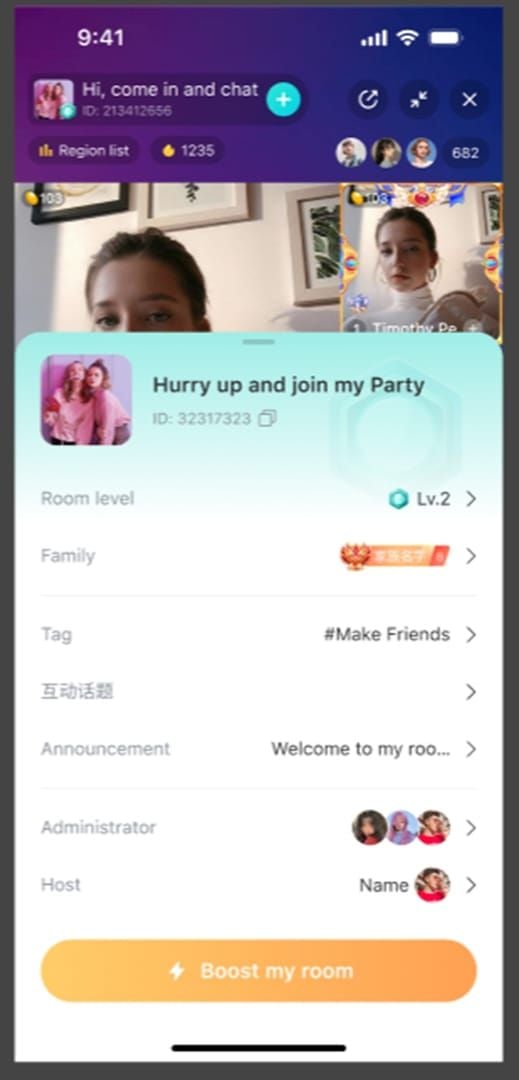
- Choose seat configuration (4/6/9/12)
- Configure stream title and tags (use specific keywords—misleading tags violate policies)
Configuring Room Settings
Management panel controls:
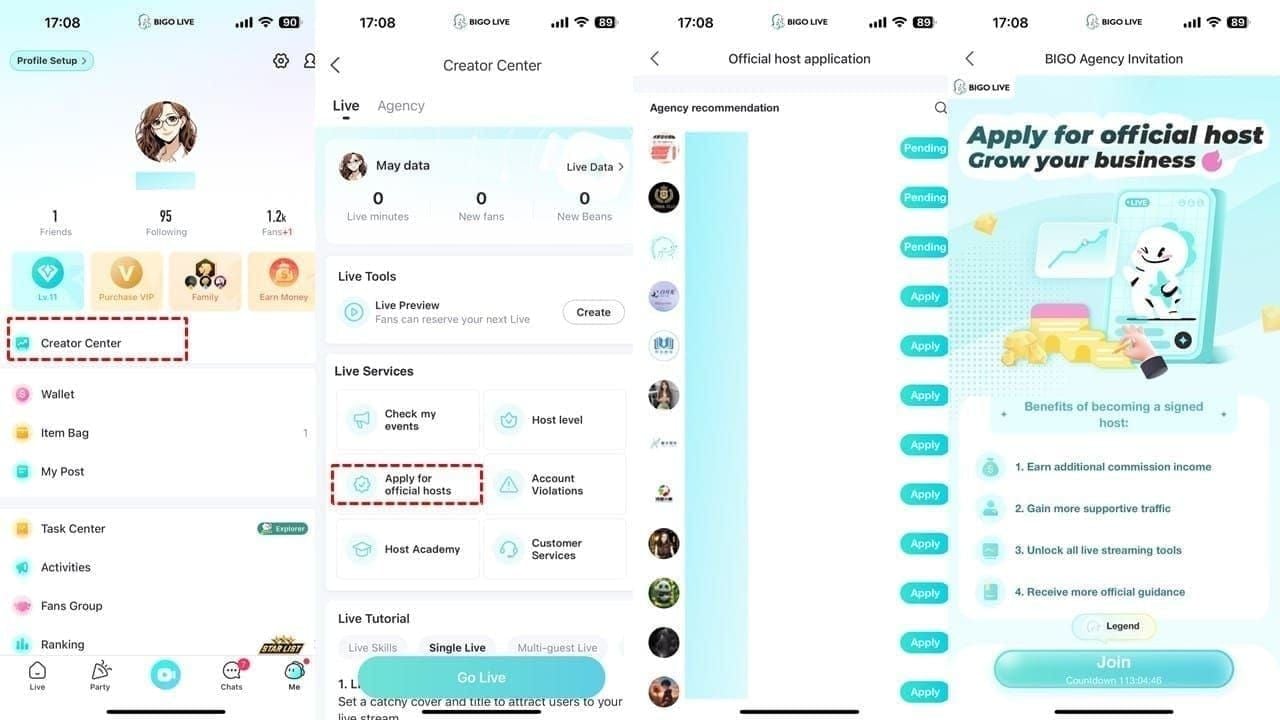
- Room level visibility
- Chat administrators (appoint before going live)
- Gift ratio distribution (set transparently before inviting guests)
Yellow coin icons show real-time gift values per participant.
Guest Queue and Approval
Two invitation methods:
- Direct friend invitations (+ icon) for pre-planned content
- Viewer requests for spontaneous participation
When viewers request seats, review profiles before approval:
- Account age
- Violation history
- Follower counts
Approve camera/mic access individually. Use Boost button during peak hours to increase visibility in recommendations.
Moderator Controls and Permissions
Role Hierarchy
Three tiers:
- Hosts: Absolute control, can't be removed/muted
- Administrators: Delegated moderation, manage chat/remove viewers, can't control other admins
- Guests: Basic participation under restrictions
Assigning Moderator Permissions
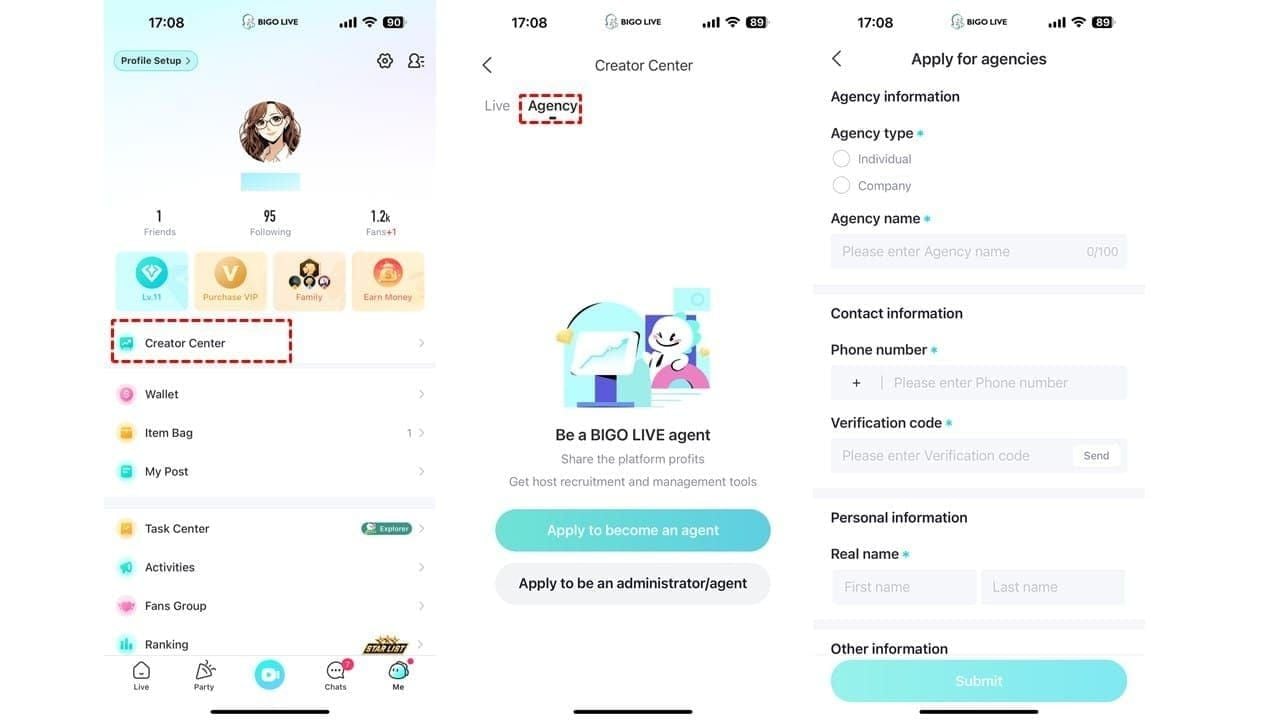
Tap participant profiles → Appoint as Administrator. Choose trusted members familiar with BIGO policies.
Admin capabilities:
- Message deletion
- User muting
- Temporary viewer removal
- Cannot control guest audio/video or remove other admins
Essential Tools
Host toolkit:
- Camera controls (individual video toggle)
- Beauty effects
- Integrated games (Truth or Dare, Draw & Guess)
- Per-participant audio/video controls
Mute disruptive guests while maintaining video, or disable video while preserving audio.
Real-Time Guest Management
Tap video feeds to access:
- Mute: Audio only, temporary disruptions
- Kick: Temporary removal, can rejoin
- Block: Permanent ban, prevents future access
- Admin assignment
Emergency Protocols
Establish escalation before going live:
- Minor disruptions → Mute
- Repeated violations → Kick
- Policy breaches → Block + terminate stream if necessary
Delayed responses expose your account to strikes. For seamless gifting, top up BIGO Live diamonds online through BitTopup to reward compliant guests.
PK-Week Violation Rules & Compliance
2026 PK-Week Updates
Stricter automated detection and reduced tolerance during competitions. Warnings in standard periods become immediate strikes during PK-weeks. Multi-guest rooms amplify risks—each guest introduces compliance exposure.
Common Violation Triggers
Unique to multi-guest:
- Guest-to-guest harassment
- Coordinated heckling
- Sensitive topic discussions by participants
Establish upfront rules banning harassment and sensitive topics. Display prominently in chat.
Host Responsibility
You're fully responsible for ALL broadcast content, regardless of which participant violates. Document moderation efforts through chat announcements—strengthens appeals.
Automated Detection
Machine learning analyzes:
- Audio (prohibited keywords, hate speech)
- Visual (inappropriate imagery, gestures, backgrounds)
- Chat (harassment patterns, spam)
- Behavioral patterns
Detects across all participant feeds simultaneously.
Strike Prevention Strategies
BIGO Strike System
Cumulative tracking with escalating penalties:
- First strike: Warning + educational content
- Second strike: 24-72 hour suspension
- Third strike: Extended suspension or permanent ban
During PK-weeks, thresholds compress—two strikes may trigger suspension. Minor infractions clear after 30-90 days; serious violations stay permanent.
Proactive Monitoring
- Use headphones to isolate individual feeds
- Assign dedicated admins to monitor chat/guests simultaneously
- Intervene within seconds, not minutes
Automated Content Filters
Configure keyword blocking before going live:
- Input prohibited terms, sensitive topics, harassment phrases
- Filters prevent flagged terms in chat
- Alert when guests use blocked language
Combine with human moderation for comprehensive coverage.
Guest Vetting
Review accounts before inviting:
- Broadcasting history
- Follower engagement
- Previous content for policy compliance
Conduct pre-stream briefings covering room rules, BIGO policies, PK-week restrictions.
Real-Time Violation Response
- Issue immediate verbal warnings on-stream
- Follow with chat-based admin announcements (documentation)
- If ineffective, escalate to muting/removal without hesitation
- Explain removals briefly, continue content
Account protection outweighs individual guest participation.
Guest Management Best Practices
Screening Before Entry
Application process for recurring shows:
- BIGO username
- Content interests
- Streaming experience
- Room rules acknowledgment
Spontaneous formats: Restrict to accounts 30+ days old with minimum followers/activity.
Clear Room Rules
Display via pinned chat + verbal announcements:
- Prohibited topics (be specific: no elections, government policies, political figures vs vague no politics)
- Behavioral expectations
- Language standards
- Violation consequences
Update based on emerging issues.
Quick Removal Procedures
Practice during test streams until automatic. Communicate removal authority during briefings—creates deterrent effect.
Managing Multiple Guests
Rotate focus every 30-60 seconds across all participants. Use visual cues to track engagement. Proactive check-ins prevent issues.
Handling Conflicts
Intervene immediately:
- Redirect topics
- Enforce speaking order
- Call brief breaks
If conflicts persist, remove both participants. Your account protection supersedes guest rights.
Advanced Safety Controls
Automated Moderation Filters
Enable profanity filters, hate speech detection, spam prevention at maximum sensitivity during PK-weeks. Customize with context-specific terms for your content category.
Keyword Blocking Systems
Tiered approach:
- Absolute blocks: Severe violations
- Warning triggers: Borderline terms
- Monitoring flags: Context-dependent language
Update weekly based on emerging slang and violation patterns.
Real-Time Content Scanning
Enable all scanning features during PK-weeks. Analyzes audio/video continuously, flags violations for review. Combine with human oversight—automated systems struggle with context/sarcasm.
Multi-Layer Protection
Redundant systems:
- Automated filters (obvious violations)
- Administrators (chat/guest behavior)
- Hosts (overall content direction)
Document all measures for strike appeals.
Emergency Stream Termination
Identify termination control before going live. Immediate termination limits exposure and demonstrates decisive action. Brief breaches generate lesser penalties than extended violations.
Common Mistakes to Avoid
Host Liability Misconception
Guest-generated violations affect your account regardless of removal speed. BIGO assigns full responsibility. Prevent violations through screening/rules/monitoring, not reactive removal.
Overlooked Permission Settings
Default settings increase risks. Review before each stream:
- Restrict guest requests to followers/friends during PK-weeks
- Disable unrestricted chat permissions
Inadequate Preparation
Technical issues distract from monitoring. Conduct 15-30 min pre-stream testing. Full rehearsals before important streams identify issues in low-stakes environments.
Delayed Violation Response
Hesitation extends breach duration. Establish clear decision frameworks before going live. When uncertain, err toward caution—removing a guest carries minimal consequences vs allowing violations.
Insufficient Moderator Training
Provide written guidelines covering BIGO policies, room rules, escalation procedures. Update reflecting policy changes.
Troubleshooting & Account Recovery
If You Receive a Strike
Document immediately:
- Timestamp
- Involved participants
- Content discussed
- Moderation actions taken
Review notification to understand specific violation.
Strike Appeal Process
Submit within 48 hours via account settings. Provide:
- Violation timestamps
- Screenshots of room rules/moderation actions
- Prevention measures implemented
- Evidence of violating guest's removal
Acknowledge breach while highlighting prevention systems and future enhancements. Shows accountability.
Preventing Future Violations
Analyze each strike to identify system failures:
- Did screening miss red flags?
- Were rules insufficiently specific?
- Did moderators lack quick intervention authority?
Implement corrective measures before resuming multi-guest streams.
Account Suspension Prevention
After one strike, consider reducing multi-guest streaming until violation clears. Diversify content formats (solo streams, pre-recorded content, small controlled groups).
Long-Term Compliance
Treat as ongoing practice:
- Regular policy reviews
- Moderator training updates
- System audits
Accounts with long compliance histories receive favorable appeal consideration and reduced strike severity for first violations.
Optimizing Performance
Technical Optimization
Prioritize upload speed over download. Consider dedicated streaming internet. Recommend ring lights/softbox setups to guests for uniform lighting quality.
Engagement Strategies
Structured formats prevent chaotic cross-talk:
- Speaking order systems
- Timed segments
- Moderated Q&A
Use built-in games (Truth or Dare, Draw & Guess) for high participation.
Maximizing Beans and Gifts
Display gift ratios prominently. Explain distribution logic at stream start. Recognize top gifters publicly—collaborative shoutouts amplify appreciation.
Using BitTopup for Seamless Purchases
BitTopup provides reliable BIGO Live diamond recharge with competitive pricing, instant delivery, and secure transactions. Thousands of satisfied customers rate the platform highly for wide game coverage and excellent service. Fast recharging ensures uninterrupted gifting during critical multi-guest sessions, supporting rankings and Popularity List positions.
FAQ
How many guests can join in 2026?
Maximum 12 participants including host. Configurations: 4 (interviews), 6 (discussions), 9 (debates), 12 (competitions).
What are new PK-week violation rules?
Stricter enforcement with reduced tolerance. Warnings become immediate strikes. Hosts fully responsible for guest behavior. Accumulated strikes cause suspensions and disqualification.
How do moderators remove disruptive guests?
Tap guest profile: mute (audio only), kick (temporary removal), block (permanent). Hosts have exclusive removal authority. Admins manage chat/viewers only.
Can rooms get strikes for individual guest behavior?
Yes. Hosts receive strikes for all broadcast content regardless of violation source. Guest screening and proactive moderation essential.
What settings prevent automatic strikes?
Enable max sensitivity filters, configure keyword blocking, restrict guest requests to followers/friends, appoint trained admins, establish clear rules banning harassment/sensitive topics. Combine automated protections with human moderation.
How to assign moderator permissions?
Management panel → tap participant profile → Appoint as Administrator. Admins get chat moderation tools but can't control other admins or guest audio/video (host-exclusive).
Stay compliant and keep streams running smoothly! Top up BIGO Beans instantly with BitTopup to reward guests and grow your audience. Fast, secure, trusted by thousands worldwide. Visit BitTopup now for exclusive deals!






















































































































