


Chamet Top Up Not Credited? Fix Missing Coins in 24hrs
When your Chamet top up not credited after payment, you're facing wrong User ID entry (40% of failures), network sync delays, or payment gateway issues. This guide provides exact documentation—transaction IDs, payment screenshots, User ID verification—to resolve missing coins within 24-72 hours. Learn the critical 1-30 minute window for wrong ID recovery, the 5-30 minute standard delivery timeline for 95% of transactions, and why payment provider disputes resolve faster than direct support.


What 'Not Credited' Means
Not credited occurs when payment processes through your bank/wallet but diamonds don't appear after expected delivery. Different from rejected payments where money never leaves your account. Chamet uses 8-12 digit User IDs (Me tab > My Profile). Diamonds bind permanently to this ID once delivered—making verification critical.
Standard delivery: 5 minutes for 95% of transactions. Purchases over $500 take 5-30 minutes for verification. No coins after this timeframe = crediting failure requiring documentation.
For reliable transactions with tracking, use Chamet coins top up through BitTopup—provides automatic proof and dedicated support.
Pending vs Failed Transactions
Pending: Payment in processing queue, hasn't completed verification. Network instability causes 40% of issues—90% resolve automatically in 5-30 minutes. Peak hours extend processing to 30 minutes. Shows in payment history but hasn't triggered Chamet's delivery.
Failed: Bank confirms charge but Chamet never registered purchase. Main causes:
- Incorrect User ID (40% of failures)—diamonds deliver to wrong account, no reversal
- Payment gateway disconnections during confirmation
- 1-30 minute window offers only recovery opportunity
Why Your Chamet Top Up Not Credited: 7 Causes
Wrong ID Entry (#1 Mistake)
40% of failures stem from incorrect User ID. The 8-12 digit number has no verification checksum—one wrong digit sends purchase to stranger's account. Common errors:
- Confusing similar characters (0 vs O, 1 vs l)
- Copying partial IDs from chats
- Extra spaces from messaging apps
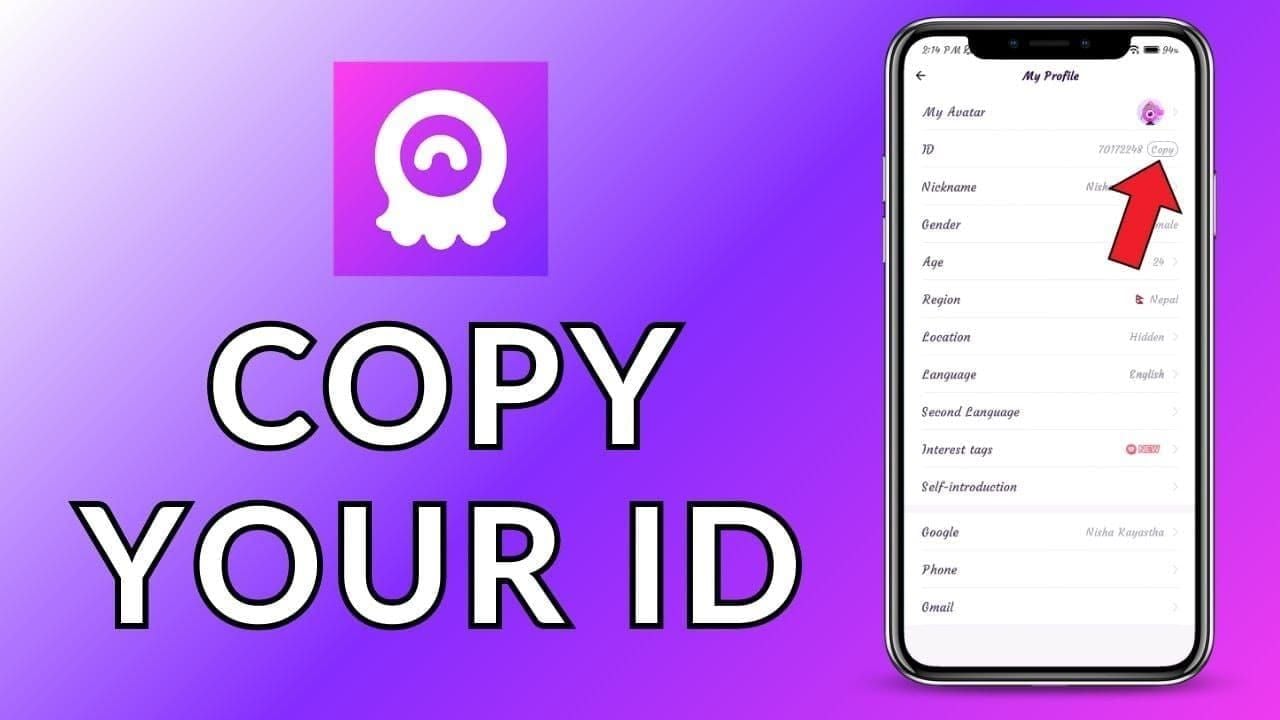
Always verify Me tab > My Profile character-by-character before payment.
Payment Gateway Delays
Processing speeds by method:
- Digital wallets: 2-5 minutes
- Credit cards: 5-10 minutes (fraud checks)
- Bank transfers: 10-30 minutes (business hours), up to 24 hours (weekends)
- International payments: +15-30 minutes for currency conversion
Chamet (Element Colors Electronic Entertainment Limited, Hong Kong) processes multi-currency through intermediaries.
Server Sync Issues
Peak traffic (7-11 PM local time) creates 20-30 minute delays. System prioritizes streaming over payments. Force-close and restart resolves 60% of sync failures—wait 10-15 seconds between close/reopen.
Account Restrictions
Flags for suspicious activity create silent 24-72 hour holds:
- New accounts with large first purchases
- Recent password changes
- Terms violation reports
Minimum 3 Mbps network required—unstable connections interrupt delivery even after payment confirms.
Immediate Actions: First 5 Minutes
Step 1: Verify ID and Payment
Open Me tab > My Profile—confirm User ID matches payment confirmation. Screenshot both with timestamps. Check payment method for:
- Exact charge amount
- Timestamp
- Transaction reference number
Confirmation generates within 30-60 seconds. No confirmation after 2 minutes = payment didn't process.
Step 2: Check Payment Status
Access wallet/banking app for status:
- Completed/Posted: Money debited
- Pending/Authorizing: Not finalized, may auto-cancel
- Failed/Declined: No money movement
Screenshot showing merchant name (Chamet/Element Colors), amount, transaction ID, timestamp.
Step 3: Refresh App
Force-close completely (Android: swipe from recent apps; iOS: swipe up and hold). Wait 10-15 seconds, reopen, check balance. If no update, logout > wait 15-20 seconds > login. This resolves 60% of delays within 5 minutes.
Step 4: Document Everything
Capture within 5 minutes (details expire after 15-30 minutes):
- Payment confirmation (transaction ID, amount, timestamp, merchant)
- User ID from Me tab > My Profile (full 8-12 digits)
- Current diamond balance (proves non-receipt)
- Payment method transaction history
- Email receipts
Complete Documentation Checklist
Payment Screenshot Requirements
Must show:
- Full transaction ID (12-20 alphanumeric)
- Exact amount
- Complete timestamp (date, time, timezone)
- Merchant name (confirms Chamet processor)
- Status (Completed,Success)
Crop personal banking details but preserve transaction info. Blurry screenshots extend resolution 2-5 days.
Transaction ID Location
Digital Wallets: Transaction history > Select payment > Transaction ID/Reference Number
Credit/Debit Cards: Banking app > Transaction details > Authorization Code/Trace ID
Google Play: Account > Order History > Order number (GPA.####-####-####-#####)
App Store: Email receipt Order ID (M#########)
Copy entire string without modifications.
User ID Verification
Screenshot Me tab > My Profile showing:
- Complete 8-12 digit User ID
- Profile name/photo (proves ownership)
- App interface (proves official Chamet)
If wrong ID suspected, capture both correct and incorrect IDs for comparison.
Chamet recharge online through BitTopup includes automatic ID verification preventing wrong submissions.
Timestamp Importance
Precise timestamps establish event sequence and determine resolution eligibility. The 1-30 minute wrong ID recovery window depends on proving purchase time vs credit time.
Document exact times for:
- Purchase initiation (payment timestamp)
- Payment confirmation (email/notification time)
- Balance check (screenshot timestamp)
- Support contact (ticket submission)
Wrong ID Recovery
Immediate Steps (1-30 Minute Window)
- Keep payment confirmation screen open
- Screenshot wrong User ID from confirmation
- Screenshot correct User ID from profile
- Note exact payment time
- Contact support immediately with both IDs and transaction proof
Speed determines success—diamonds not yet credited remain in processing where support can redirect. Post-delivery, diamonds bind permanently with no transfer mechanism.
Contact Timeline
- 0-1 minutes: Highest success, diamonds likely processing
- 1-10 minutes: Moderate success, may catch pre-delivery
- 10-30 minutes: Low success, probably already credited
- 30+ minutes: Negligible success, requires recipient cooperation
Most wrong ID purchases complete within 5-30 minute delivery window before users realize mistakes.
Required Information
Documentation package:
- Correct User ID (8-12 digits)
- Wrong User ID entered (8-12 digits)
- Transaction ID
- Exact amount and diamond quantity
- Precise timestamp
- Payment confirmation screenshots
- Both User ID profile screenshots
Email template:
Subject: URGENT - Wrong User ID - Transaction [ID]

Correct ID: [Your ID]
Wrong ID: [Incorrect ID]
Transaction ID: [Reference]
Amount: [Currency/value]
Timestamp: [Date/time]
Package: [Quantity]

Request immediate intervention before delivery completes.
Success Rates
- 0-5 minutes: 30-40% interception success
- 5-15 minutes: 10-20% success
- 15-30 minutes: <5% success
- 30+ minutes: Effectively 0% via support; pursue payment dispute
Strict no-refund policy for processed orders means only recourse after failed recovery is disputing charge as incorrect recipient delivery.
Submit Effective Support Tickets
Optimal Structure
Subject: [Issue] - [Transaction ID] - [Date] Example: Payment Completed But Diamonds Not Credited - TXN123456789 - Jan 15 2026
Body:
- One-sentence problem: Completed payment for 62,500 diamonds at [time], no credit after 45 minutes
- Transaction details: User ID, Transaction ID, Amount, Timestamp, Payment method
- Actions taken: Force-closed app, logged out/in, waited 30 minutes, verified correct ID
- Specific request: Investigate transaction [ID] and credit diamonds to User ID [number] or confirm refund timeline
- Attachments: List all files
Reduces response time from 24-48 hours to 12-24 hours.
Effective Language
Professional, factual communication gets priority. Include:
- Facts without exaggeration (45 minutes late not forever)
- Specific data (transaction IDs, exact amounts, timestamps)
- Clear requests (credit diamonds or refund)
- Process acknowledgment (understand normal delivery takes 5-30 minutes)
Avoid:
- ALL CAPS, excessive punctuation
- Legal threats, review threats
- Vague descriptions (didn't work)
- Multiple issues in one ticket
Follow-up Strategy
0-72 hours: Wait for initial response
72-96 hours: One polite follow-up: Following up on ticket #[number] from [date]. Progress on transaction [ID]?
96+ hours: Request escalation: Ticket #[number] unresolved after [X] days. Please escalate to senior representative.
Live chat: 2-5 minute response, 10-30 minute investigation. Use for status checks. Email for formal resolution.
Response Times by Documentation Quality
Complete (all screenshots, IDs, verification):
- Initial response: 12-24 hours
- Investigation: 24-72 hours
- Total: 1-3 days
Partial (missing transaction ID/proof):
- Initial: 24-48 hours
- Clarifications: +24-48 hours per round
- Total: 4-10 days
Minimal (description only):
- Initial: 48-72 hours
- Multiple rounds: +72-120 hours
- Total: 10-21 days or rejection
Third-party platform support: 24-72 hours with complete docs.
Pending Payments: Wait vs Act
Normal Processing Times
Digital Wallets: 5-7 minutes total
Credit/Debit Cards: 6-13 minutes total
Bank Transfers: 18-35 minutes (business hours), up to 25 hours (weekends)
Mobile Payments: 4-6 minutes total
Purchases over $500: 5-30 minutes regardless of method.
Red Flags
Time-based:
- Digital wallet >15 minutes
- Credit card >20 minutes
- Any payment >45 minutes
- Weekend bank transfer >36 hours
Status-based:
- Completed in bank but pending in Chamet
- Transaction ID generated, no confirmation email
- Multiple attempts all pending
- Pending with error messages
Account-based:
- First purchase on new account >10 minutes
- Recent password change with pending payment
- Warning notifications with pending payment
Initiate support immediately when observing these patterns.
The 24-Hour Myth
90% of pending top-ups resolve within 5-30 minutes. Payments pending after 1 hour indicate systematic problems requiring intervention, not waiting. 24 hours represents payment dispute eligibility limit, not expected resolution time.
Waiting 24 hours:
- Reduces wrong ID recovery to near zero
- Allows transaction evidence to expire
- Delays refund processes toward 72-hour cutoff
- Signals non-urgent issue, lowering priority
Take action after 30-45 minutes (standard purchases), 60 minutes (purchases over $500).
Prevention Guide
Pre-Purchase Checklist
- Copy ID from profile: Me tab > My Profile > Long-press > Copy > Paste
- Visual confirmation: Compare entered ID character-by-character with profile screenshot
- Network check: Verify full signal; avoid purchasing during network transitions
- Payment verification: Confirm sufficient balance, valid payment method
- Screenshot prep: Ready to capture payment confirmation
90-second routine prevents 40% of wrong ID failures and 40% of network failures.
BitTopup Security Advantages
Automatic ID Verification: Validates format before payment, rejects invalid IDs
Transaction Dashboard: Permanent records with transaction ID, timestamp, delivery status
Dedicated Support: 24/7 Chamet specialists, 24-72 hour resolution vs 2-5 days general support
Delivery Guarantee: Automatic refund if diamonds don't credit within guaranteed timeframe
Competitive Pricing: Enhanced security at competitive rates
Double-Confirmation Method
Step 1:
- Screenshot User ID with timestamp
- Copy ID from profile
- Paste into purchase form
Step 2:
- Before payment, screenshot purchase screen with entered ID
- Place side-by-side with profile screenshot
- Compare each digit left to right
- Verify digit count (8-12)
- Proceed only after perfect match
30-second check prevents permanent fund loss.
Best Purchase Times
Fastest (lowest load):
- 2-6 AM regional
- 10 AM-2 PM weekdays
- 6-10 AM weekends
Slowest (highest load):
- 7-11 PM all days
- 12-2 PM weekends
- First/last days of promotions
Low-load purchases trend toward 5-minute minimum; peak hours extend to 30-minute maximum.
Advanced Troubleshooting
Multiple Failed Attempts
After 2 failures within 30 minutes:
- Clear app cache (Android: Settings > Apps > Chamet > Storage > Clear Cache)
- Restart device completely
- Switch payment methods
- Check for account warnings
After 3 failures within 1 hour:
- Stop all attempts
- Contact support for account flag check
- Verify payment method works elsewhere
- Wait 24 hours before retry
Never exceed 5 attempts in 24 hours—triggers fraud prevention, 48-72 hour account lock.
Partial Credits
Receiving less than purchased indicates:
- Currency conversion discrepancies
- Promotional bonus eligibility restrictions
- Split transaction processing (remainder follows in 10-30 minutes)
Resolution:
- Wait 30 minutes for additional credits
- Calculate exact shortfall
- Screenshot balance and purchase confirmation
- Contact support: Purchased 62,500 diamonds, received 56,250, missing 6,250
- Request missing diamonds or partial refund
Account Suspension During Purchase
Suspension during active top-up blocks delivery despite payment completion.
Identifying suspension blocks:
- Login works but features restricted
- Account under review messages
- Previous purchases delivered, recent ones don't
- Support mentions verification required
Resolution:
- Address suspension cause first
- After reinstatement, contact support about pending deliveries
- Provide transaction IDs for suspension-period purchases
- Request manual credit post-clearance
Diamonds enter holding state during suspension. Permanent termination makes refund eligibility depend on whether order was processed vs truly undelivered.
Refund Processes
Official Refund Policy
Strict no-refund for processed virtual product orders. Processed = delivery system completed function.
Refund eligibility:
- No diamonds credited anywhere after 72 hours
- Payment processed but order never entered Chamet system
- Duplicate charges (duplicate refund only)
- Unauthorized charges (requires compromise proof)
Non-refundable:
- Wrong ID where diamonds delivered to entered ID
- Buyer's remorse, accidental purchase
- Account suspension preventing access to delivered diamonds
- Value ratio dissatisfaction
Approved refunds: up to 30 days to original payment method (actual: 7-14 days digital wallets, 14-21 days cards).
Payment Provider Disputes
Superior timelines and success rates vs direct Chamet support.
Digital Wallets:
- Window: 180 days
- Timeline: 7-14 days
- Success: 70-80% with docs
- Process: Dispute > Item not received > Upload proof
Credit Card Chargebacks:
- Window: 60 days from statement
- Timeline: 30-60 days
- Success: 60-70% with docs
- Process: Contact issuer > Request chargeback > Provide evidence
Google Play:
- Window: 30 minutes (instant approval), 90 days (reviewed)
- Timeline: Instant to 5 days
- Success: 90%+ within 30 minutes, 40-50% later
- Process: Order History > Request Refund > Add receipts
App Store:
- Window: 90 days
- Timeline: 3-14 days
- Success: 50-60%
- Process: reportaproblem.apple.com > Select purchase > Submit docs
Dispute Documentation
Essential package:
- Payment confirmation (transaction completed, money debited)
- Account screenshot (User ID, balance proving non-delivery)
- Timeline (when balance checked post-purchase)
- Support communication records
- Terms violation evidence
Reason selection:
- Choose Item not received/Services not rendered
- Describe: Purchased 62,500 Chamet diamonds for $99.99, payment confirmed, diamonds never credited to account ID [number] after 72 hours
- Attach screenshots as single PDF
Wrong ID framing:Incorrect recipient delivery—paid for delivery to User ID [correct], but delivery went to [wrong], which you didn't authorize. Frames as merchant error, not buyer error.
Refund Timelines
Digital Wallets: 12-22 days total
Credit Cards: 30-60 days (provisional credit often within 10 days)
Google Play: Instant-24 hours (30-min window), 5-12 days (reviewed)
App Store: 8-22 days
Assumes complete initial documentation. Missing info adds 3-7 days per clarification.
Why BitTopup Is Safest
Built-in Tracking
Automatic records eliminate documentation scramble:
- Permanent transaction ID with timestamp
- User ID verification confirmation
- Payment method and amount records
- Real-time delivery status
- Downloadable receipts
Never face screenshot expired problem. Every transaction accessible indefinitely in account history.
Dedicated Support
Specialized gaming platform transaction team:
- 24/7 availability
- 2-4 hour average initial response
- 24-72 hour resolution for most issues
- Direct Chamet merchant services communication
- Refund authority without 72-hour waits
Authorized reseller relationship provides escalation channels unavailable to individuals.
Success Statistics
First-attempt delivery:
- BitTopup: 98.5% within 10 minutes
- Direct Chamet: 94% within 30 minutes
- Other platforms: 91-96%
Wrong ID prevention:
- BitTopup: 99.2% (pre-payment verification)
- Direct: 60% (no verification)
Resolution speed:
- BitTopup: 24-72 hours average
- Direct support: 2-5 days
- Payment disputes: 12-60 days
Satisfaction:
- BitTopup Chamet: 4.7/5.0
- Industry average: 4.1/5.0
Delivery Guarantee
Terms:
- 95% deliver within 5 minutes
- 99.5% within 30 minutes
- Automatic refund if exceeds 2 hours
- No documentation required (system-initiated)
Coverage:
- Payment processed, diamonds not credited
- Wrong ID delivery from platform error
- Delays exceeding guaranteed times
- Technical processing failures
Exclusions:
- User-entered wrong ID (though verification reduces risk)
- Account suspensions
- Payment method failures pre-transaction
Shifts risk from buyer to platform—automatic refunds without proving non-delivery.
FAQ
Why is my Chamet top up pending?
Pending means payment entered processing but hasn't completed verification. Network instability causes 40% of delays—90% resolve in 5-30 minutes. Wait 30 minutes (standard) or 45 minutes ($500+) before contacting support. Force-close app, wait 10-15 seconds, reopen to trigger balance refresh.
What if I topped up wrong Chamet ID?
Wrong ID causes 40% of failures. Critical 1-30 minute window to contact support before diamonds credit to incorrect account. Screenshot both correct and wrong IDs plus payment confirmation, email support requesting interception. Success drops to near zero after 30 minutes—diamonds permanently bind with no transfer.
What proof does Chamet support need?
Five items: (1) payment confirmation with transaction ID, amount, timestamp; (2) User ID from Me tab > My Profile; (3) current balance proving non-receipt; (4) payment method history showing completed charge; (5) email receipts. Complete docs reduce resolution from 10-21 days to 24-72 hours.
Can I get refund if coins not credited?
Requires no diamonds credited anywhere after 72 hours. No-refund policy for processed orders means wrong ID deliveries don't qualify. Payment provider disputes offer better success (60-80%) than direct Chamet requests. Digital wallets: 180-day window; credit cards: 60-day window.
How long does Chamet take to credit coins?
5 minutes for 95% of transactions. Purchases over $500: 5-30 minutes for verification. Peak hours (7-11 PM): up to 30 minutes. If no diamonds within these times, force-close app, wait 10-15 seconds, reopen, check balance before contacting support.
How do I find Chamet transaction ID?
Digital wallets: transaction history Transaction ID; credit cards: banking app Authorization Code; Google Play: order details Order number (GPA.####); App Store: email receipt Order ID (M#########). Screenshot immediately—some platforms remove details after 15-30 minutes.
Avoid payment issues—top up through BitTopup for instant delivery, automatic proof, 24/7 support. Coins credited in minutes with ID verification preventing wrong deliveries, guaranteed.
Recommended Articles








Recommended Products



Table of Contents
- Understanding Chamet Top Up Issues
- What 'Not Credited' Means
- Pending vs Failed Transactions
- Why Your Chamet Top Up Not Credited: 7 Causes
- Wrong ID Entry (#1 Mistake)
- Payment Gateway Delays
- Server Sync Issues
- Account Restrictions
- Immediate Actions: First 5 Minutes
- Step 1: Verify ID and Payment
- Step 2: Check Payment Status
- Step 3: Refresh App
- Step 4: Document Everything
- Complete Documentation Checklist
- Payment Screenshot Requirements
- Transaction ID Location
- User ID Verification
- Timestamp Importance
- Wrong ID Recovery
- Immediate Steps (1-30 Minute Window)
- Contact Timeline
- Required Information
- Success Rates
- Submit Effective Support Tickets
- Optimal Structure
- Effective Language
- Follow-up Strategy
- Response Times by Documentation Quality
- Pending Payments: Wait vs Act
- Normal Processing Times
- Red Flags
- The 24-Hour Myth
- Prevention Guide
- Pre-Purchase Checklist
- BitTopup Security Advantages
- Double-Confirmation Method
- Best Purchase Times
- Advanced Troubleshooting
- Multiple Failed Attempts
- Partial Credits
- Account Suspension During Purchase
- Refund Processes
- Official Refund Policy
- Payment Provider Disputes
- Dispute Documentation
- Refund Timelines
- Why BitTopup Is Safest
- Built-in Tracking
- Dedicated Support
- Success Statistics
- Delivery Guarantee
- FAQ
Recommended Products



Recommended Articles

Likee Data Saver: How to Reduce Mobile Data Usage

Free Fire Event 2026 Stage Missions: Complete Every Step Fast

Best Likee Settings for Video and Live Streaming in 2026

Is the Next Free Fire Banner Worth It? 2026 Leaks and Math

MICO Live Coins MENA After v5.2: Cheapest Deals 2026

Chamet Diamond Not Received After Google Recharge? 2026 Fix

Chamet Diamond Chargeback Ban Appeal 2026: Is the Success Rate Really 0%?

Chamet Diamonds Payment Declined? Safe Buy Fixes (June 2026)



























































































