What 'Invalid Code' Means
Invalid code errors represent the system's inability to match your input against any active or historical code. Blood Strike codes follow specific 8-15 character requirements, combining uppercase letters, numbers, and occasionally special symbols. Deviations from these patterns trigger immediate invalid errors.
Common triggers: extra spaces before/after the code, substituting similar characters (0 for O, 1 for I, 5 for S), or missing special characters. The system performs exact string matching without autocorrection—a single character difference causes rejection.
Regional restrictions also generate invalid errors when codes designed for specific server regions are entered on incompatible accounts. A Southeast Asian server code appears invalid to North American players, even if entered perfectly.
Expired Code Mechanics
Blood Strike implements time-based expiration using server timestamps rather than local device time. Codes like BSREWARD10K and MARCH21ST were last verified active December 26, 2025, but expiration dates depend on official announcements rather than fixed durations.
Expiration pattern: codes released during major events typically remain active throughout the event duration plus 3-7 days. Codes associated with the Blood Purge event (December 4, 2025 to January 18, 2026) likely expire within one week after event conclusion. Standard promotional codes without event ties usually expire after 14-21 days.
Maximum redemption caps of 100,000 uses per code can trigger early expiration. Once the global usage limit is reached, the code transitions to expired status regardless of original time window.
System vs User Error Messages
Blood Strike's error messaging distinguishes between technical failures and user mistakes:
- Invalid Code: Input problems or non-existent codes
- Code Expired: Code existed but no longer active
- Redemption Limit Reached: Hit 3-5 codes per session cap or already used this code
- Reward Already Claimed: Previously used on your account (each code redeemable once per account)
- Region Restricted: Geographic limitations
- Server Maintenance: Redemption system temporarily disabled
- Connection Failed/Verification Timeout: Network problems requiring minimum 1 Mbps upload/download speeds
Top 7 Reasons Codes Fail in 2026
1. Input Formatting Errors
Blood Strike codes are case-sensitive including all symbols and capitals. Entering bsreward10k instead of BSREWARD10K results in immediate rejection. The system treats lowercase and uppercase as completely different characters.
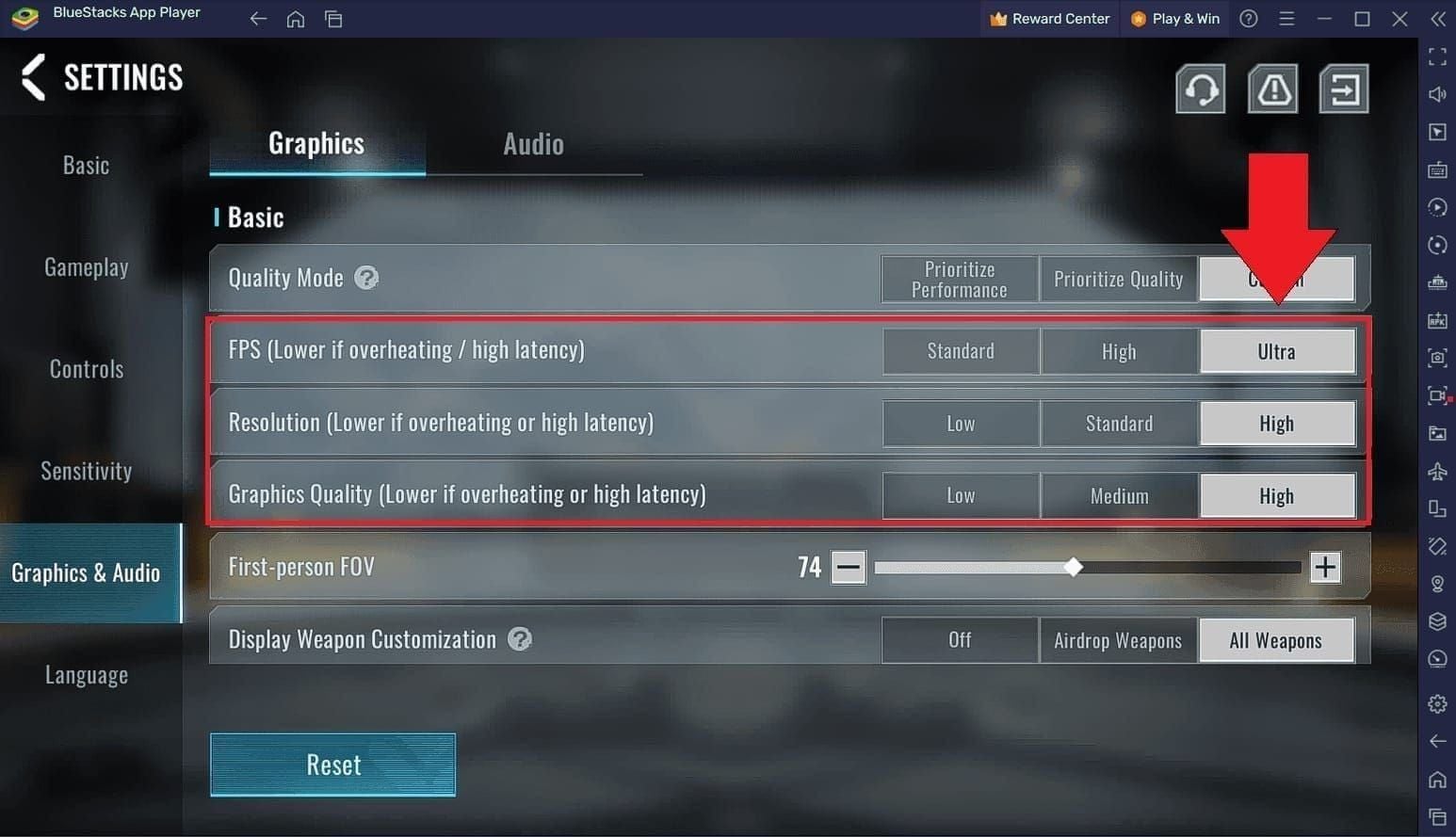
Hidden formatting characters copied from websites or social media cause frequent failures. When copying codes from Discord, Reddit, or Facebook, invisible Unicode characters sometimes attach. These appear identical visually but register as different characters during validation.
Extra spaces represent the most common formatting error. Codes must be entered as continuous strings without leading, trailing, or internal spaces. MARCH 21ST fails while MARCH21ST succeeds. Manual typing introduces fewer formatting issues than copy-paste, though it increases character substitution risk.
Special characters like hyphens or underscores must be included exactly as specified.
2. Account Level and Eligibility Requirements
Incomplete tutorial completion blocks access to the Events tab where redemption occurs. New players must complete their first tutorial match (15-20 minutes) before the redemption interface becomes available. The Events menu icon appears on the left side of main lobby only after this requirement.
Account standing affects eligibility. Suspended or banned accounts can't redeem codes regardless of input accuracy. Temporary restrictions from recent violations may also block redemption features without explicit notification.
Some codes target specific player segments. Veteran player codes require minimum account age or level thresholds, while new player codes like LAUNCHGIFT may expire after reaching certain progression milestones.
3. Regional Restrictions
Blood Strike implements geographic restrictions on certain promotional codes. Codes distributed through regional partnerships or local events only function for accounts registered in those territories. The system validates your account's server region against the code's allowed regions.
VPN usage doesn't bypass these restrictions because validation checks your account registration data rather than current IP address. An account created on North American servers remains locked to that region regardless of connection location.
4. Code Already Redeemed
Each code is redeemable once per account, with the system maintaining permanent records of all successful redemptions. Attempting to reuse a code triggers Already Claimed errors. This restriction applies even if you didn't receive rewards due to mailbox issues or connection problems during original redemption.
Device fingerprinting may impose additional limitations on certain codes. Some promotional codes restrict redemption to one use per device to prevent multi-account farming.
The system doesn't provide redemption history, making it difficult to track which codes you've used. Maintain personal records to prevent wasted attempts.
5. Redemption Limits
Blood Strike enforces session limits of 3-5 codes per redemption attempt. Exceeding this threshold triggers temporary lockouts requiring 5-10 minute waiting periods. These session limits reset automatically, but attempting redemption during cooldown generates limit-reached errors.
The system tracks redemption frequency to prevent automated abuse. Rapid successive attempts, even with valid codes, may trigger anti-spam protections that temporarily disable redemption access. Space attempts by 5-10 minutes between each code entry.
Global usage caps of 100,000 redemptions per code mean popular codes expire quickly during high-traffic periods.
6. Network Connectivity Issues
Code validation requires stable internet connection with minimum 1 Mbps upload and download speeds. The system performs real-time server queries to verify code status, check usage limits, and validate account eligibility. Connection interruptions cause timeout errors.
Unstable mobile data connections frequently trigger these errors. Switch to stable WiFi networks before attempting redemption. Verification typically completes within 3-5 seconds under optimal conditions, but poor connections extend this to 15-20 seconds before timing out.
Firewall or security software blocking game server communication prevents successful validation. Temporarily disable VPNs, ad blockers, or restrictive firewall rules.
7. Active Maintenance Windows
Scheduled server maintenance temporarily disables the redemption system to prevent database inconsistencies during updates. Attempting code entry during these windows generates generic error messages without specifying maintenance as the cause.
Maintenance windows typically occur during off-peak hours for each server region, lasting 2-4 hours. Official announcements provide advance notice, but players attempting redemption during these periods experience failures regardless of code validity.
Emergency maintenance for critical bugs may occur without warning, temporarily blocking all redemption attempts. These unscheduled downtimes usually resolve within 30-60 minutes.
Step-by-Step Fix Guide
Pre-Redemption Checklist
Before attempting redemption, confirm the code's legitimacy through official sources. Verified codes like BLOODSTRIKEFB, TYSTRIKERS, 5MSTRIKERS, and LAUNCHGIFT appear in official announcements or trusted community channels.
Check the code's expiration status by reviewing official social media channels. Codes last verified December 26, 2025 may have expired if sufficient time has passed. Cross-reference multiple sources to confirm current validity.
Verify your account meets all eligibility requirements: tutorial completion, account standing, and you haven't previously redeemed the specific code.
Correct Input Method
Manual typing reduces formatting errors but increases character substitution risks. When manually entering codes like BSREWARD10K, carefully distinguish between: zero (0) vs capital O, number one (1) vs capital I, number five (5) vs capital S.
Copy-paste preserves exact character sequences but may introduce hidden formatting. When copying codes, paste into a plain text editor first to strip invisible characters, then copy the cleaned text into Blood Strike's redemption field. This two-step process eliminates Unicode artifacts.
For codes containing special characters, verify each symbol's exact type. Hyphens, underscores, and dashes appear similar but register as different characters.
Account Verification
Access the Events menu by tapping the left icon in main lobby. If this icon doesn't appear, complete your tutorial match to unlock the feature.
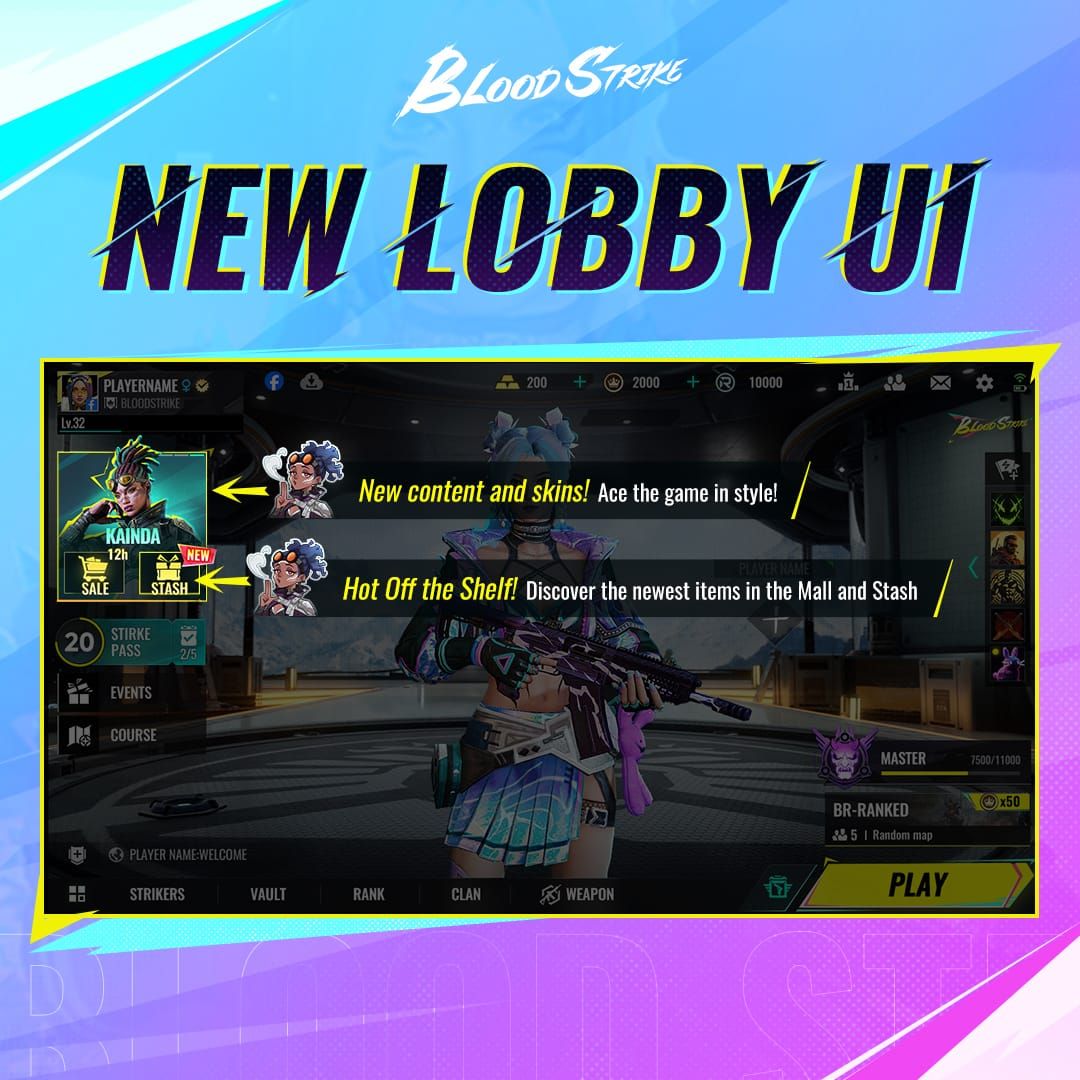
Navigate to the Megaphone icon within Event menu, then select Redemption Code option. This multi-step access path confirms your account has proper permissions. Inability to reach this interface indicates eligibility problems rather than code issues.
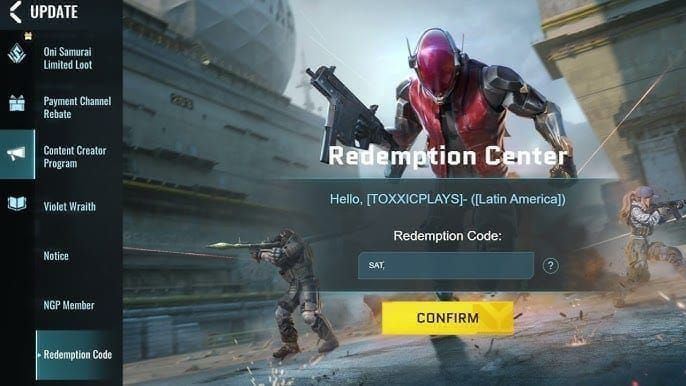
Check your account level and registration date for codes with specific requirements.
Clearing Cache and Restarting
Session data corruption occasionally causes persistent invalid errors even with correct codes. Completely close Blood Strike and clear the app cache to reset the redemption system's local state. On mobile devices, force-stop the application through system settings rather than simply backgrounding it.
After clearing cache, wait 2-3 minutes before relaunching to ensure complete session termination. This cooling period allows server-side session data to expire.
Restart your device if cache clearing doesn't resolve the issue. Full device reboots clear memory-resident data that survives app-level cache clearing.
Solving Expired Code Problems
Identifying Expiration Dates
Official announcements typically include expiration dates or duration information when releasing codes. Codes tied to specific events like Blood Purge (December 4, 2025 to January 18, 2026) usually expire shortly after event conclusion. Add 3-7 days to event end date for estimated code expiration.
Community-maintained code lists often include verification dates. Codes verified within the past 48 hours have higher success rates than those last confirmed weeks ago.
Deactivation announcements appear 24-48 hours before expiry through official channels. Following Blood Strike's social media provides advance warning.
Time Zone Considerations
Blood Strike uses server time rather than local device time for expiration validation. Codes may appear active based on your local timezone but have already expired according to server timestamps.
Server regions operate on different time zones: Asian servers typically use UTC+8, European servers use UTC+1, American servers use UTC-5 to UTC-8 depending on location. Convert announced expiration times to your server's timezone for accurate deadline tracking.
Codes often expire at midnight server time on the specified date. Last-minute redemption attempts within hours of expiration carry higher failure risks.
Setting Up Alerts
Follow official Blood Strike social media accounts and enable push notifications to receive alerts within minutes of announcements, maximizing your redemption window before global usage caps are reached.
Community Discord servers and Reddit communities often share codes faster than official channels. Join these communities and enable relevant channel notifications.
Bookmark trusted code aggregation resources and check them daily during active event periods.
When You Miss Codes
Missed codes offering gold currency or standard items can be replaced through buy Blood Strike golds online via BitTopup platform. This alternative provides guaranteed delivery without expiration concerns, offering competitive pricing and instant processing.
For exclusive cosmetic items from expired codes, monitor future events that may reintroduce similar rewards. Blood Strike occasionally recycles popular skins through different distribution methods.
Focus redemption efforts on currently active codes. The MARCH21ST code providing 3x Geometry Skin Chests and 5MSTRIKERS offering MP155 Gun Skin represent rewards worth prioritizing when active.
Advanced Troubleshooting
Server Region Mismatch
Verify your account's registered server region through game settings menu. This registration is permanent and can't be changed without creating a new account. Codes restricted to specific regions only function for accounts registered in those territories.
Regional codes often appear in local language announcements or through region-specific partnerships. If you obtained a code from a source targeting a different geographic market, it likely carries regional restrictions incompatible with your account.
No workaround exists for legitimate regional restrictions. Creating new accounts in different regions violates terms of service and risks permanent bans.
Multiple Account Usage
Blood Strike's one-redemption-per-account rule applies strictly across all codes. The system maintains permanent records linking codes to account IDs, preventing any reuse regardless of time elapsed.
Device fingerprinting adds additional restrictions on certain promotional codes. The system generates unique identifiers based on hardware characteristics, blocking redemption attempts from devices that previously claimed specific codes.
Using different devices for separate accounts may bypass device-level restrictions, but violating multi-account farming policies risks coordinated bans across all associated accounts.
Event-Specific Requirements
Event codes like those tied to Blood Purge may require participation in specific activities before redemption becomes available. Check event requirements to ensure you've completed prerequisite tasks like playing minimum match counts or achieving specific objectives.
Some codes unlock progressively as events advance through different phases. Early-phase codes may expire before later-phase codes activate.
Event interfaces sometimes include dedicated redemption sections separate from the standard code entry system. Verify you're using the correct redemption interface.
Server-Side Technical Errors
Server-side database issues occasionally cause widespread redemption failures affecting all players. These systemic problems generate identical error messages across different accounts and codes.
Monitor community channels for reports of widespread redemption problems. If multiple players report identical failures with different codes, server-side issues are likely. These problems require developer intervention and typically resolve within 2-4 hours.
Submit support tickets for persistent technical errors that don't match common user-error patterns. Provide specific details: exact error messages, attempted codes, timestamps, and troubleshooting steps already completed.
Common Input Mistakes
Case Sensitivity
Blood Strike codes treat uppercase and lowercase letters as completely different characters. BLOODSTRIKE differs from bloodstrike, BloodStrike, and any other capitalization variation. The system performs no automatic case conversion.
Codes typically use all uppercase letters for consistency, but exceptions exist. Always match the source material's exact capitalization.
Mixed-case codes require particular attention to each character's capitalization. Verify each letter individually rather than relying on visual memory.
Hidden Characters from Copy-Paste
Copying codes from websites, social media posts, or messaging apps frequently captures invisible formatting characters. These Unicode artifacts appear identical to standard text but contain additional data that invalidates the code string.
Paste codes into plain text editors like Notepad (Windows) or TextEdit (Mac) to strip formatting before copying the cleaned text into Blood Strike. This intermediate step removes invisible characters while preserving the actual code sequence.
Some sources use special typography that substitutes visually similar characters for standard letters and numbers. Manual retyping using standard keyboard characters eliminates these substitutions.
Confusing Similar Characters
Character confusion represents a primary cause of manual entry errors. Zero (0) and capital O appear nearly identical in many fonts, as do number one (1) and capital I. Number five (5) and capital S cause similar confusion.
Context clues help distinguish ambiguous characters. Codes mixing letters and numbers typically alternate between character types. BSREWARD10K clearly uses number one and zero rather than letters based on surrounding context.
When uncertain, attempt both variations systematically. Try the code with zero first, then with capital O if it fails.
Extra Spaces
Leading and trailing spaces are invisible but cause immediate rejection. Codes must begin and end with alphanumeric characters without whitespace padding. Copy-paste methods frequently introduce these invisible spaces from source formatting.
Internal spaces break code continuity. MARCH21ST must be entered as a continuous string without spaces between words or segments. The system doesn't interpret spaces as separators—they're treated as invalid characters.
Visually inspect the redemption field after pasting codes. Cursor positioning reveals hidden spaces: if the cursor appears offset from visible text, spaces are present. Delete all content and re-enter without spaces.
Account-Level Restrictions
Minimum Level Requirements
Tutorial completion represents the primary eligibility gate. New accounts must finish their first tutorial match (15-20 minutes) before accessing the Events menu where redemption occurs. This requirement prevents immediate code farming on fresh accounts.
Some promotional codes specify minimum account levels or playtime requirements. These restrictions appear in official announcements but aren't always clearly communicated in secondary sources.
Account age restrictions apply to certain new-player-focused codes. Codes like LAUNCHGIFT targeting new players may become unavailable after your account reaches specific age thresholds or progression milestones.
New Player vs Veteran Codes
Blood Strike segments promotional codes by player experience level. New player codes offer starter resources like basic currency and common skins to accelerate early progression. These codes often expire for individual accounts after reaching level thresholds around 10-15.
Veteran codes provide advanced rewards like premium weapon skins (BLOODSTRIKEFB) or exclusive cosmetics (Glacier Axe from LAUNCHGIFT that stuns enemies on hit). These codes may require minimum account age or level requirements.
The system doesn't clearly label codes by category. High-value rewards typically indicate veteran-focused codes with stricter eligibility requirements.
Tutorial Completion
The tutorial requirement blocks Events tab access entirely, making redemption impossible regardless of code validity. New players attempting redemption before tutorial completion see no redemption interface.
Tutorial completion registers server-side, so logging out and back in after finishing the tutorial may be necessary to refresh interface availability. The Events menu icon appears on the left side of main lobby immediately after successful tutorial completion and account refresh.
Skipping or abandoning tutorial matches doesn't satisfy the requirement. Complete the entire tutorial sequence through victory or defeat.
Banned or Suspended Accounts
Active bans or suspensions disable redemption features without explicit notification. Attempting code entry on restricted accounts generates generic invalid errors rather than explaining the account status issue.
Temporary restrictions from recent violations may impose cooldown periods before redemption access restores. These penalties aren't always communicated clearly.
Check account status through settings menu or support channels if redemption consistently fails across multiple verified codes.
Preventing Future Problems
Best Practices for Immediate Redemption
Redeem codes within 24-48 hours of announcement to avoid expiration and usage cap issues. Early redemption ensures availability before global limits of 100,000 uses are reached on popular codes.
Enable notifications from official Blood Strike channels to receive immediate alerts about new code releases. Faster awareness translates to higher redemption success rates.
Maintain tutorial completion and good account standing to ensure constant redemption eligibility.
Verifying Code Sources
Prioritize official announcements over community-shared codes. Official sources provide accurate codes with correct formatting and clear expiration information.
Cross-reference codes across multiple trusted sources before attempting redemption. Consistent formatting across sources indicates accuracy, while variations suggest transcription errors or fake codes.
Avoid codes from unverified social media accounts or suspicious websites. Fake codes waste redemption attempts and trigger session limits.
Maintaining Account Good Standing
Follow game rules and community guidelines to prevent bans or suspensions that block redemption access. Account restrictions often disable features without clear notification.
Regular gameplay maintains account activity status. Dormant accounts may face additional verification requirements or temporary feature restrictions.
Complete verification processes like email confirmation or phone number linking if required by your server region.
Tracking Used Codes
Maintain personal records of successfully redeemed codes to prevent duplicate attempts. The game doesn't provide redemption history, making manual tracking necessary.
Note redemption dates alongside code names to track when you claimed specific rewards.
Record failed redemption attempts with error messages to identify patterns. Repeated failures with specific error types indicate account-level issues requiring targeted troubleshooting.
Guaranteed Alternatives When Codes Fail
BitTopup: Reliable Blood Strike Resources
BitTopup platform offers instant Blood Strike gold delivery without redemption code complications. The service eliminates expiration dates, regional restrictions, and usage limits that plague promotional codes, providing consistent access to in-game currency regardless of code availability.
Competitive pricing on BitTopup often matches or exceeds the value of promotional codes when accounting for redemption failure rates and time investment. Guaranteed delivery within 24 hours surpasses the uncertainty of limited-time codes that may expire before you can claim them.
Secure transaction processing and excellent customer service distinguish BitTopup from unreliable code sources. High user ratings reflect consistent performance and trustworthy service.
Comparing Code Rewards vs Direct Purchase
Promotional codes like BSREWARD10K providing 10,000 currency units offer significant value when successfully redeemed. However, expiration risks, usage caps, and redemption failures reduce their effective value compared to guaranteed purchase options.
Direct purchases through BitTopup provide predictable costs and guaranteed delivery. While codes offer free rewards, the time investment in monitoring releases, troubleshooting failures, and racing against expiration deadlines carries opportunity costs.
Exclusive items from codes like the Glacier Axe weapon skin (LAUNCHGIFT) that stuns enemies on hit represent unique value unavailable through direct purchase. Prioritize redemption efforts on these exclusive rewards while using direct purchase for standard currency needs.
Why BitTopup Offers Better Reliability
Code redemption depends on multiple factors outside player control: server availability, global usage caps, regional restrictions, and expiration timing. BitTopup eliminates these variables through direct transaction processing that doesn't rely on promotional systems.
Fast delivery times ensure you receive resources when needed rather than waiting for code releases that may not align with your gameplay schedule. Immediate access supports time-sensitive purchases like limited-time store offers or battle pass progression.
Wide game coverage on BitTopup extends beyond Blood Strike, providing centralized resource management for multiple games through a single trusted platform.
Exclusive BitTopup Benefits
Customer service support resolves transaction issues quickly, unlike code redemption failures that require community troubleshooting or developer intervention. Direct assistance ensures problem resolution.
Flexible purchase amounts allow precise resource acquisition matching your specific needs. Codes provide fixed reward amounts that may not align with your current requirements, while direct purchase offers customization.
No account-level restrictions apply to BitTopup purchases beyond standard payment verification. Tutorial completion requirements, level thresholds, and regional limitations that block code redemption don't affect direct purchase eligibility.
Expert Tips from Veteran Players
Community-Discovered Workarounds
Session limit resets occur after 5-10 minute waiting periods. When hitting redemption caps, set a timer and attempt additional codes after the cooldown expires rather than repeatedly trying during the restriction window.
Switching between WiFi and mobile data occasionally resolves persistent connection errors. Network changes force new session establishment, potentially bypassing corrupted connection states.
Accessing redemption through alternative menu paths sometimes succeeds when the standard Events menu route fails. The Reward Code option accessible from the right side main menu below Data Recovery provides a secondary redemption interface.
Optimal Timing
Off-peak hours reduce server load, improving redemption success rates during high-traffic periods following major code releases. Early morning hours (2-6 AM server time) typically experience lowest player counts and fastest validation processing.
Avoid redemption attempts during the first 30-60 minutes after code announcements when server load peaks from simultaneous redemption attempts. Waiting 1-2 hours allows initial traffic to subside while maintaining code availability before usage caps are reached.
Redemption during active gameplay sessions maintains stable server connections. Attempting codes immediately after launching the game or during loading screens increases timeout risks.
When to Contact Support
Exhaust self-troubleshooting steps before contacting support: verify code validity, check account eligibility, clear cache, test network connection, and wait for maintenance windows to conclude.
Contact support for account-specific problems like persistent redemption blocks despite meeting all requirements, missing rewards from successful redemptions after 24-hour delivery windows, or error messages that don't match documented issues.
Provide comprehensive information in support tickets: exact error messages, specific codes attempted, timestamps of redemption attempts, account ID, server region, and troubleshooting steps already completed.
FAQ
Why does my Blood Strike code say invalid when it's new?
Invalid errors on new codes typically result from input formatting mistakes like incorrect capitalization, extra spaces, or character substitutions. Blood Strike codes are case-sensitive and require exact entry matching the source material. Verify you've entered the code precisely as announced, completed the tutorial requirement, and aren't attempting redemption during server maintenance windows.
How long do Blood Strike redeem codes last before expiring?
Blood Strike codes remain active 7-30 days depending on their type and associated events. Event-tied codes typically expire 3-7 days after event conclusion, while standard promotional codes last 14-21 days. Deactivation announcements appear 24-48 hours before expiry. Codes also expire early when reaching maximum redemption caps of 100,000 uses.
Can I use the same Blood Strike code on multiple accounts?
Each code is redeemable once per account, but you can use the same code across different accounts you own. However, device fingerprinting on certain promotional codes restricts redemption to one use per device regardless of account, preventing multi-account farming. The system maintains permanent records of code usage per account.
What does 'redemption limit reached' mean in Blood Strike?
This error indicates you've exceeded the session limit of 3-5 codes per redemption attempt. The system imposes these caps to prevent automated abuse. Session limits reset after 5-10 minute waiting periods. Space redemption attempts by several minutes to avoid hitting session caps.
Are Blood Strike codes case sensitive when entering?
Yes, Blood Strike codes are completely case-sensitive including all symbols and capital letters. The system treats uppercase and lowercase as different characters without automatic conversion. BSREWARD10K differs from bsreward10k and will fail validation if capitalization doesn't match exactly. Always enter codes matching the source material's exact capitalization.
Why do some Blood Strike codes only work in certain regions?
Regional restrictions apply to codes distributed through local partnerships or region-specific events. The system validates your account's registered server region against the code's allowed regions during redemption. Codes released for Asian servers won't function on North American accounts regardless of current location or VPN usage, as validation checks account registration data rather than IP address.