What Triggers the Invalid User ID Message
Chamet performs real-time validation against multiple criteria:
- Numeric format compliance (8-12 digits only)
- Account existence verification
- Profile completion status (must exceed 80%)
- Account type eligibility (registered vs guest)
Profile completion below 80% triggers validation failures even with correct ID entry. First-time purchasers face 24-48 hour review periods that may temporarily show IDs as invalid.
Outdated top-up gateways cause 52% of validation errors. Users accessing Chamet through older app versions encounter compatibility issues. System synchronization delays after account changes create temporary invalid status periods lasting 30-60 minutes.
Common Scenarios When This Error Appears
Guest accounts encounter this error most frequently. Guest mode provides limited access without full registration, but payment systems require verified accounts with permanent User IDs. Guest accounts receive temporary identifiers that payment gateways automatically reject.
New users attempting their first diamond purchase within 24-48 hours of registration often see invalid ID messages due to mandatory security review periods.
Peak hours (18:00-22:00 UTC+8) increase error frequency due to server load, causing 10-15 minute processing delays that display as invalid ID messages.
Recent account changes—phone numbers, email addresses, or linked social media—face synchronization delays that temporarily invalidate IDs.
Chamet User ID Format Requirements (2026)
Valid Chamet User IDs consist exclusively of 8-12 digit numeric strings with no letters, symbols, or spaces. The system generates these during account creation, assigning unique numbers that remain permanent.
Valid vs Invalid Formats
Valid examples:
- 12345678 (8 digits)
- 987654321 (9 digits)
- 123456789012 (12 digits)
Invalid formats that fail:
- user12345678 (text prefix)
- @45678901 (symbol)
- 4567-8901 (hyphens)
- 45 678 901 (spaces)
Username confusion causes frequent errors. If your username is CoolUser123, this differs entirely from your User ID. Usernames allow letters and symbols; User IDs are strictly numeric backend identifiers.
Recent Format Updates
Enhanced synchronization between app versions ensures consistent ID display across devices. Two-factor authentication now links User IDs with verified contact info, strengthening validation by cross-referencing IDs with phone numbers or emails.
Guest Account Limitations for Top Ups
Guest mode severely restricts payment capabilities. Guest accounts cannot receive diamond top-ups through any payment method.
Why Guest Accounts Trigger Invalid ID Errors
Guest account identifiers differ structurally from registered User IDs. While registered accounts receive permanent 8-12 digit numeric IDs, guest accounts use temporary session-based identifiers that change with each login. These temporary codes don't exist in payment validation databases.
The validation system specifically checks account registration status before processing IDs. When detecting guest account markers, the system immediately returns an invalid ID error.
Temporary vs Permanent Account Status
Guest Accounts:
- Cannot receive diamond top-ups
- Temporary session-based identifiers only
- No transaction history storage
- Restricted from all monetization features
Registered Accounts:
- Full payment processing enabled
- Permanent 8-12 digit numeric User IDs
- Complete transaction history
- Access to all premium features
For Chamet guest account recharge limit concerns, BitTopup requires registered account User IDs for all transactions.
How to Find Your Correct Chamet User ID (5 Methods)
Method 1: Profile Settings
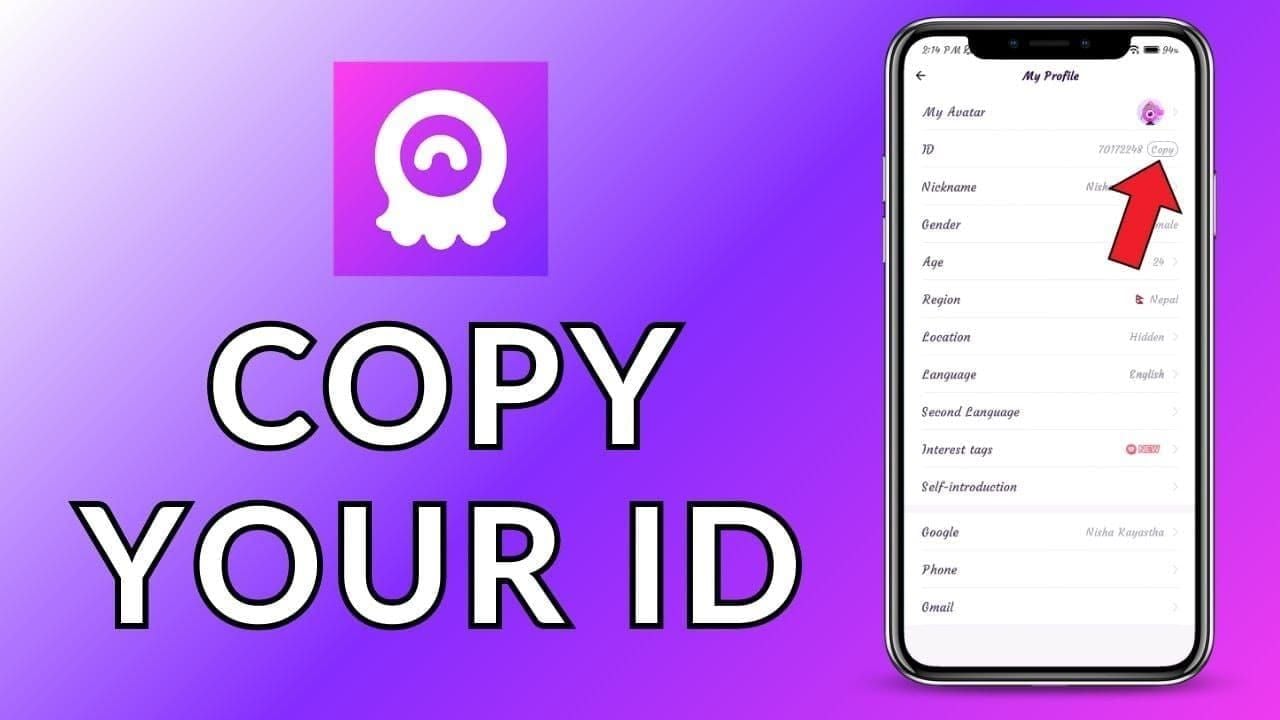
Open Chamet app → tap profile icon (bottom right) → your User ID appears below your display name as 8-12 digits. Long-press to copy without manual typing.
Navigate to Settings > Account Management to view your ID with a dedicated copy button.
Desktop: Click profile picture (top-left) → select Profile Info → User ID appears below username.
Method 2: Chat Interface
Access Add Friends → select Share My Profile → extract numeric portion from generated URL.
Tap information icon in your chat profile → User ID appears in expanded profile view.
Method 3: Account Dashboard
Main account dashboard displays User ID prominently at top of screen. Tap your avatar on profile page for detailed account view showing User ID, registration date, and verification status.
Method 4: Email Confirmation
Check registration confirmation email from Chamet—welcome message includes your assigned User ID. Account verification emails also contain your User ID for official record-keeping.
Method 5: Previous Transactions
Review past diamond purchase receipts—successful top-up records always include recipient User ID. Check BitTopup transaction histories for Chamet purchases to reference previous successful transactions.
Chamet Account Verification Requirements
Phone Number Verification
Settings > Security > Phone Verification → enter mobile number with correct country code → system sends SMS code within 2-3 minutes → input received code → payment capabilities activate within 5-10 minutes.
If code doesn't arrive, wait 10 minutes before requesting new code. Multiple rapid requests trigger anti-spam protections.
Email Authentication
Account Settings → Email Verification → enter valid email address → check inbox and spam folder → click confirmation link (expires after 24 hours).
Email verification provides account recovery options and secondary authentication for sensitive actions.
Identity Document Verification (When Required)
High-value transactions or flagged accounts trigger ID document requirements. Platform accepts passports, national ID cards, and driver's licenses. Document verification processes within 24-48 hours for first-time submissions.
Verification Timeline
- Phone verification: Immediate code delivery, instant validation, 5-10 minute payment activation
- Email verification: 5-20 minutes including email delivery, instant activation upon link click
- First purchases: 24-48 hour mandatory review for all new accounts
- Subsequent top-ups: 1-3 minutes for verified accounts, 95% complete within 5 minutes
Complete Solution: Fixing Invalid User ID Errors
Immediate Troubleshooting Checklist
Copy-paste User ID exactly from Chamet profile - Avoid manual typing (causes 40% of failures). Long-press ID to copy, paste directly without modifications.
Remove all spaces and non-numeric characters - Paste into notes app first, verify only 8-12 digits, recopy cleaned version.
Verify profile completion exceeds 80% - Check Settings > Profile Completion, add missing bio, photos, interests.
Clear app cache - Resolves 60% of synchronization failures. Device Settings > Apps > Chamet > Storage > Clear Cache, force close, restart app.
Update Chamet to latest version - Outdated apps cause 52% of gateway errors. Install available updates before retrying.
Wait 30-60 minutes after account changes - Recent verification or profile updates require synchronization time.
Log out completely then log back in - Forces fresh ID synchronization with payment databases.
Verify system requirements - Android 8.0+ or iOS 12.0+ with stable 3+ Mbps internet connection.
Upgrading from Guest to Registered Account
Tap Register from guest mode → enter username, password, verification method (phone recommended) → complete verification with received code → system assigns unique 8-12 digit User ID within seconds.
Link additional verification methods: Settings > Security → add email or Facebook linking. Wait 30-60 minutes after linking before attempting top-ups.
Verifying ID Format Before Top-Up
Double-check copied User ID contains only numbers. Count digits to confirm 8-12 characters. Test by pasting into text editor to reveal hidden characters or spaces.
Compare against format example: 45678901. Your ID should be identical—only numbers, no symbols, letters, or spaces. Delete any prefix text like User ID: 45678901.
Clearing Cache and App Data
Device settings → Apps/Application Manager → Chamet → Storage → Clear Cache (resolves 60% of synchronization issues) → Force Stop.
If cache clearing fails, tap Clear Data for comprehensive reset. Requires re-login but ensures no corrupted local data interferes with validation.
Using BitTopup for Chamet Diamond Purchases
Correct User ID Input on BitTopup
BitTopup's Chamet top-up page features dedicated User ID field with format validation. Paste your 8-12 digit numeric ID directly—platform performs instant format checking, displaying errors if non-numeric characters or incorrect length detected.
BitTopup requires only your User ID for diamond delivery—no Chamet login credentials needed. Enter recipient's User ID, select diamond quantity, complete payment through secure gateways.
Avoiding Common ID Entry Mistakes
Never manually type your User ID (introduces 40% error rate). Always copy-paste from Chamet profile.
Verify pasted ID immediately—confirm pure digits without spaces, letters, or symbols.
Don't include explanatory text like My ID is 45678901—system accepts only numeric string.
BitTopup's ID Validation System
Multi-layer validation prevents transaction failures:
- Format checking (numeric-only, correct digit length)
- Real-time account existence verification (queries Chamet database)
- Delivery confirmation tracking (monitors transaction status)
95% of transactions complete within 5 minutes. 24/7 customer support available for delivery delays.
Common Misconceptions About Chamet User IDs
Username vs User ID
Usernames: Customizable display names with letters, numbers, symbols (e.g., CoolUser123). You choose during registration.
User IDs: Platform-assigned 8-12 digit numeric strings (e.g., 45678901). Permanent, no customization allowed.
Payment systems exclusively recognize User IDs. Entering username in ID fields guarantees validation failure.
Display Name vs Numeric ID
Display names appear prominently with emojis and special characters. Users frequently change them.
Numeric User IDs remain constant regardless of display name changes. This permanence makes User IDs reliable for payment processing.
Profile Link vs Actual User ID
Profile links embed User ID within longer URL: chamet.app/user/45678901 where 45678901 is actual User ID.
Payment fields require only numeric User ID, not full profile link. Extract numeric portion (45678901) from profile links for successful transactions.
Prevention Tips: Avoiding Future Invalid ID Errors
Best Practices for Account Setup
Complete full registration immediately—takes 3-5 minutes, provides permanent payment capability.
Verify account through multiple methods during setup. Link both phone number and email address.
Save User ID in secure location immediately after registration. Store in password manager, secure notes app, or written record.
Maintaining Updated Verification Status
Review account verification status monthly: Settings > Security. Ensure all linked contact methods remain current.
Respond promptly to verification renewal requests. Ignoring these can result in payment restrictions.
Enable two-factor authentication for enhanced security. Verified, secured accounts experience fewer validation issues and faster transaction processing.
Saving Your User ID Securely
Create dedicated note in secure notes app labeled Chamet User ID containing only your 8-12 digit number.
Use password manager to store User ID alongside Chamet login credentials.
Take screenshot of profile page showing User ID clearly. Store in secure folder for quick reference.
FAQ: Chamet Invalid User ID
What is a Chamet User ID and where do I find it?
An 8-12 digit numeric string assigned during registration. Find it: Open Chamet app → tap profile icon (bottom right) → number below display name. Long-press to copy. Also in Settings > Account Management.
Why does Chamet say my User ID is invalid during top-up?
Incorrect ID entry (63% of cases), typing mistakes (41%), or incomplete profile verification below 80%. Guest accounts lack permanent User IDs. Other causes: outdated app versions (52% of errors), recent account changes requiring 30-60 minute sync, or 24-48 hour first-purchase review.
Can guest accounts receive diamond top-ups?
No. Guest mode uses temporary session-based identifiers that payment systems don't recognize. Register a full account (3-5 minutes) to receive permanent 8-12 digit User ID required for transactions.
What is the correct Chamet User ID format for 2026?
8-12 numeric digits only—no letters, symbols, spaces, or special characters. Examples: 45678901, 987654321, 123456789012. Always copy-paste from profile to ensure correct format.
How do I verify my Chamet account for top-ups?
Settings > Security > Phone Verification → enter mobile number → enter SMS code → payment activates within 5-10 minutes. Add email verification for additional security. First purchases require 24-48 hour review; subsequent transactions process in 1-3 minutes.
How long does Chamet account verification take?
Phone: 5-10 minutes. Email: 5-20 minutes. First purchases: 24-48 hour mandatory review. Accounts 30+ days with completed verification: 1-3 minutes, 95% complete within 5 minutes.
Avoid Invalid User ID errors—top up Chamet diamonds instantly on BitTopup with guaranteed ID validation, secure transactions, and 24/7 support. Get your diamonds in seconds!