The Evolution of Likee's Editing Capabilities
The 2025 interface consolidates all tools—scissors, split, music, sound effects, filters, AR effects, text animation, stickers, speed controls, transitions—into one workspace via icon-based navigation.
The January 19, 2025 algorithm update prioritizes AR-enhanced content. Videos using 4D Magic effects and AR filters get preferential For You page distribution. Internal data shows AR effects boost engagement 30% vs standard video.
What Makes 15-30 Second Loops the Most Viral Format
15-30 second videos achieve 70% more engagement than longer formats. The algorithm rewards videos with 80%+ watch completion rates, making short loops strategically advantageous.
Viral loop structure:
- 1-3 second hook: Immediate visual/audio grab using AR effects or transitions
- 4-15 second content: Core message with synchronized captions and music
- 16-30 second CTA: Clear call-to-action encouraging engagement
The 3-Minute Benchmark: Why Speed Matters
If each video requires 20 minutes to edit, three daily videos consume 60 minutes. At 3 minutes per video, that's 9 minutes total—freeing resources for ideation, filming, and audience engagement.
A creator producing three videos weekly at 20 minutes each invests 60 minutes editing. Using AI workflow, the same creator produces three videos daily—21 weekly—in 63 minutes total. That's 21x output increase with equivalent time.
Understanding the Three Pillars: AI Cut, Auto-Captions, and Smart Effects
AI Cut Explained: Intelligent Scene Detection and Trimming
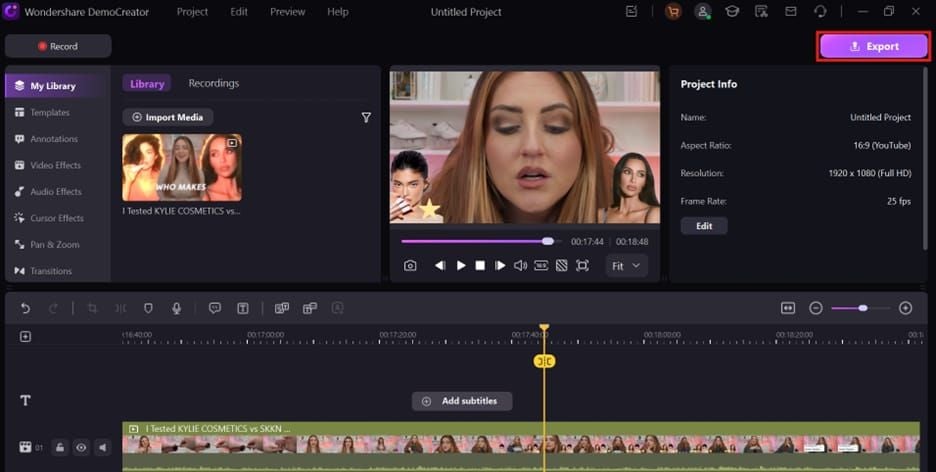
AI Cut analyzes footage to identify optimal cut points based on motion changes, audio peaks, and visual composition shifts. Access via scissors icon—the system suggests trim points by detecting scene boundaries, eliminating manual scrubbing.
Dual-slider interface adjusts beginning/end points with AI-suggested markers. Split function enables precise division at any playhead position for multi-segment editing.
Auto-Captions Technology: Speech Recognition on Likee
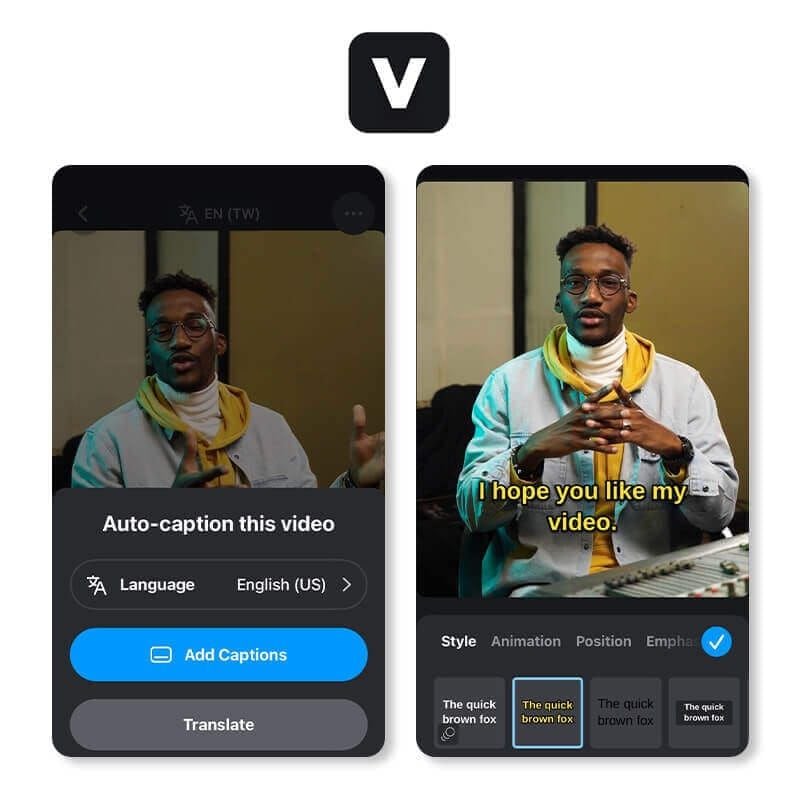
Auto-caption system transcribes spoken audio into synchronized text overlays. Access through text icon—generates timed captions that align with dialogue automatically.
Customization controls: font style, color, size, placement. Text animation options make captions appear/disappear with dynamic effects. Supports multiple language recognition.
Smart Effects Library: What's New in 2025
2,000+ effects library includes AR filters, dynamic transitions, overlay effects. Sparkle icon accesses categorized libraries: Popular, New, Gaming, Beauty, Seasonal.
Post-January 19 update elevated 4D Magic effects to priority status for FYP promotion. These create depth and dimensionality that standard filters lack.
How These Features Work Together
True power emerges when combining all three. Example: AI Cut identifies strongest 15-second segment from 45 seconds raw footage, auto-captions generate synchronized text, Smart Effects layer AR enhancements that complement caption positioning.
Workflow becomes circular rather than linear—apply effects, generate captions, refine cuts in iterative cycles with real-time preview.
The Complete 3-Minute Viral Loop Workflow
Minute 0:00-0:45: Recording and Uploading
0:00-0:15 - Capture: Tap + icon, choose recording or upload. Shoot 9:16 vertical ratio.
0:15-0:30 - Review: Tap Next, scrub timeline to identify strongest moments—energy peaks, clear dialogue, visually interesting segments.
0:30-0:45 - Planning: Map your 1-3 second hook, 4-15 second content body, 16-30 second CTA structure.
Minute 0:45-1:30: Applying AI Cut
0:45-1:00 - Primary Trim: Tap scissors icon, adjust beginning slider to hook start, end slider to conclusion. Use AI suggestions as guides, prioritize creative vision.
1:00-1:15 - Segment Refinement: Drag playhead to transition points, tap split icon. For loops, ensure final frame creates visual continuity with opening.
1:15-1:30 - Pacing Adjustment: Tap speed icon to modify playback. 0.5x slow-motion emphasizes drama, 2x compresses less critical content.
Minute 1:30-2:15: Activating Auto-Captions
1:30-1:45 - Generation: Tap text icon, select auto-caption. Review generated text for accuracy.
1:45-2:00 - Customization: Adjust font, color, size for mobile readability. Position captions in lower third. Use white text with black outlines for maximum legibility.
2:00-2:15 - Animation: Apply text animation—fade-in at 0.3 seconds, snap-out for punchlines. Align animation timing with speech rhythm.
Minute 2:15-3:00: Layering Smart Effects
2:15-2:30 - Primary AR: Tap sparkle icon, select from categories. Apply 4D Magic effects at 70-80% intensity for algorithmic priority.
2:30-2:45 - Effect Stacking: Layer compatible secondary effects. Proven combos:
- 4D Magic + Sparkles (celebration content)
- 4D Magic + Beauty + Music Magic (performance videos)
- Superpower + Confetti (achievement moments)
Avoid stacking more than three effects.
2:45-3:00 - Final Review: Tap preview, verify captions remain readable, audio balances properly, loop endpoint connects smoothly. Tap Save to export.
Workflow Checklist
- 15-30 second duration
- 9:16 vertical format
- Hook within first 3 seconds
- Captions readable at mobile size
- AR effects enhance, don't obscure
- Audio levels avoid clipping
- Loop endpoint creates seamless replay
- Strong hook + clear CTA present
Mastering AI Cut: Advanced Techniques
Navigating to AI Cut
Scissors icon appears in bottom toolbar after tapping Next from recording/upload screen. Timeline displays full video with waveform visualization showing audio peaks—helps identify dialogue, music beats, silence gaps without playing entire clip.
Adjusting AI Cut Sensitivity
AI Cut prioritizes motion changes, lighting shifts, audio transitions. Shooting with deliberate pauses between segments creates clear detection markers. For dance videos synchronized to music, waveform visualization provides more reliable cut points than motion detection.
Manual Override: When to Fine-Tune
AI Cut excels at obvious scene changes but may miss subtle narrative transitions. Manual adjustment takes priority when automated suggestions don't align with creative vision.
Override scenarios:
- Comedic timing where pauses create impact
- Emotional moments needing extended duration
- Dialogue requiring complete sentences
- Visual reveals benefiting from delayed cuts
- Transitions working better on off-beat timing
Best Practices from 1M+ Follower Creators
Top creators shoot with editing in mind, creating natural pause points aligning with intended cut locations. They use split function to create segment variations for A/B testing—publish variants, analyze which timing generates superior completion rates.
Auto-Captions Optimization: From Accurate to Engaging
Enabling Auto-Captions
Text icon > automated option triggers speech recognition. Processing completes in 3-5 seconds for 30-second videos. Review generated text immediately—corrections during initial review prevent compounding errors.
Customizing Caption Style
Select fonts with clear letterforms and adequate weight. White text with black outlines provides maximum versatility. Position captions in lower third, avoiding bottom 15% where platform UI may overlap.
Size captions for mobile viewing—preview on actual phone before publishing.
Editing Auto-Generated Text
Review for common errors:
- Homophone confusion (their/there/they're)
- Proper noun misidentification
- Slang misinterpretation
- Number vs word confusion (2 vs two)
- Punctuation affecting meaning
Caption Timing for Comedic Effect
Delaying caption appearance 0.5-1 second after speech creates anticipation. Premature display spoils punchlines. Snap-in effects create punchy emphasis, slow fades suit emotional content.
Multi-Language Auto-Captions
System supports multiple language recognition. Verify correct language identification before generating captions. For multiple language markets, produce separate versions with language-specific captions rather than multilingual captions in single videos.
Smart Effects Combinations That Drive Viral Engagement
Trending Categories in 2025
Post-January 19 algorithm prioritizes AR and 4D Magic effects. 4D Magic creates dimensional depth for transformation content, before/after reveals, product showcases.
Beauty filters provide subtle improvements. Gaming effects appeal to younger demographics. Seasonal effects provide timely relevance. New category deserves regular monitoring—early adoption provides competitive advantage.
Layering Multiple Effects
Platform handles up to three simultaneous effects reliably. Prioritize primary effect at 70-80% intensity, add compatible secondary effects at lower intensities.
Proven stable combinations:
- 4D Magic + Sparkles: Dimensional depth with celebratory accents
- 4D Magic + Beauty + Music Magic: Enhanced appearance with audio visualization
- Superpower + Confetti: Achievement emphasis with festive elements
Niche-Specific Recommendations
Dance: Music Magic effects visualizing audio beats, 1.25x speed for energy. Avoid heavy facial AR obscuring movement.
Comedy: Minimal effects not competing with verbal humor. Subtle background enhancements, text animation for punchlines.
Lifestyle: Beauty filters at 40-50% for natural enhancement, warm color grading. 4D Magic adds production value.
Tutorial: Clear, minimal effects maintaining instructional clarity. Text overlays and arrows provide functional enhancement.
Creating Signature Effect Combinations
Consistent effect usage creates visual brand recognition. Select 2-3 effect combinations aligning with content style, apply consistently. Establish effect categories for different content types within your niche.
Common Workflow Mistakes and How to Avoid Them
Over-Relying on AI Without Creative Input
AI handles technical execution but lacks creative judgment. Use AI features as efficiency multipliers for your creative decisions, not replacements. Let AI Cut identify potential trim points, then select based on storytelling impact.
Caption Readability Issues
Desktop editing screens don't reflect mobile viewing conditions. Always preview on actual mobile device before publishing. Increase caption size 20-30% beyond what seems necessary on editing screen.
Effect Overload
Establish maximum three effects rule: one primary AR, one complementary enhancement, one functional element like captions. This forces prioritization of effects genuinely serving content.
Ignoring Algorithm Preferences
January 19, 2025 update explicitly prioritizes AR and 4D Magic effects. Develop content concepts naturally benefiting from these effects—transformation content, product showcases, visual storytelling.
Measuring Success: Metrics That Matter
Completion Rate: The #1 Indicator
Algorithm requires 80%+ watch completion for FYP consideration. 15-second video averaging 12+ seconds watch time meets threshold.
Optimize by frontloading value, maintaining tight pacing, ensuring video length matches content substance.
Engagement Velocity in First Hour
Algorithm assesses engagement velocity—how quickly likes, comments, shares accumulate after publication. Videos generating strong engagement within first 60 minutes receive amplified distribution.
Analyze follower analytics to identify peak activity windows, schedule publications to coincide with high-traffic periods.
Share Rate and Remix Potential
Share rate measures what percentage of viewers send your video to others. High share rates indicate viral potential.
Create share-worthy content: humor, useful information, impressive skills, emotional resonance. Remix potential extends reach through derivative works.
Using Likee Analytics
Track which effect combinations correlate with higher completion rates, which caption styles generate more engagement, which video lengths perform best.
Log key variables: primary effect, caption style, video length, publication time, resulting completion rate and engagement velocity. After 20-30 videos, patterns emerge.
Scaling Your Content Production
Batch Recording Strategies
Record 5-10 raw videos in 30-60 minute sessions, edit and publish across subsequent days. Separation of recording and editing prevents creative fatigue.
Batch recording enables outfit and location consistency across multiple videos.
Template Creation
Document standard settings in reference note for quick replication: 4D Magic at 75%, white captions with black outline, lower-third positioning as starting points.
Fueling Your Workflow: Getting Likee Diamonds
Premium features require Likee Diamonds. Cheap Likee top up for live gifts and boosts through BitTopup provides cost-effective access with competitive pricing, fast delivery, secure transactions.
Regular Diamond purchases enable exclusive effects, premium filters, advanced editing capabilities differentiating your content.
Time Management: From 3 Videos/Week to 3 Videos/Day
9 minutes editing time for three videos fits most schedules. Develop content pillars generating repeatable formats: Tutorial Tuesdays, Transformation Thursdays, FAQ Fridays.
Batch record content for each pillar during dedicated sessions, edit and publish according to schedule.
Advanced Tips from Top Creators
Pre-Planning Content for AI Cut Efficiency
Script videos with editing in mind, building natural pause points aligning with intended cut locations. Shoot 1-3 second hook, pause, shoot 4-15 second content, pause, shoot 16-30 second CTA. Natural breaks create obvious AI Cut detection points.
Voice Modulation for Better Auto-Caption Recognition
Slightly slower speech than natural conversation, emphasized consonants for word clarity, deliberate pauses between sentences. Speak as if addressing someone across a room rather than next to you.
Secret Smart Effect Combos
Browse full effect library regularly rather than only trending categories. Effects with lower usage rates create novelty. Combine underutilized effects with trending elements: trending 4D Magic as primary, obscure background effect for subtle differentiation.
Cross-Posting Strategy
Create Likee-optimized versions first, then adapt for other platforms. Export Likee video, create platform-specific versions by adjusting aspect ratios, removing platform-specific effects, extending duration as needed.
Troubleshooting Guide
AI Cut Not Detecting Scene Changes
Solutions:
- Add deliberate pauses between segments during recording
- Use manual split function at specific playhead positions
- Rely on audio waveform visualization for music-synced content
- Shoot with lighting changes creating visual detection markers
Auto-Captions Generating Incorrect Text
Improvements:
- Record in quieter environments
- Use external microphones
- Speak more slowly, enunciate clearly
- Add music after caption generation
- Manually correct recurring errors
Smart Effects Causing Crashes
Troubleshooting:
- Limit simultaneous effects to two or fewer
- Reduce effect intensity to 70-80%
- Close background apps
- Update Likee app
- Restart device before editing
- Export at lower resolution
Device Compatibility Issues
Check Likee's official device requirements. For older devices, focus on manual trimming, simple text overlays, basic filters instead of complex AR effects.
Future-Proofing Your Skills
Upcoming AI Features
Likee plans enhanced AI capabilities: improved scene detection, multi-language caption support, automated music synchronization. Creators mastering current AI features position themselves to quickly adopt enhanced versions.
Staying Updated
Likee releases feature updates monthly, major algorithm changes quarterly. Follow official creator channels, community forums for update notifications and early access.
Building Sustainable Systems
Develop content calendars planning 2-4 weeks ahead. Create engagement routines for responding to comments. Establish weekly analytics review sessions.
Community Resources
Engage with creator community through forums, Discord servers, collaborative groups. Share discoveries, ask questions, contribute to collective knowledge.
FAQ
What is AI Cut in Likee and how does it work?
AI Cut analyzes video footage to identify optimal cut points based on motion changes, audio peaks, visual composition shifts. Access via scissors icon—displays suggested trim points while allowing manual override. Combines automated detection with manual precision for faster editing without sacrificing quality.
How do I enable auto-captions on Likee videos?
Tap text icon > automated caption generation. System analyzes audio track, creates synchronized text overlays in 3-5 seconds. Customize font, color, size, positioning, edit transcription errors, apply text animation. Works best with clear audio, minimal background noise.
What are Likee Smart Effects and where to find them?
AI-powered visual enhancements including AR filters, dynamic transitions, overlay effects. Access via sparkle icon. 2,000+ effects in categories: Popular, New, Gaming, Beauty, Seasonal. Post-January 19, algorithm prioritizes 4D Magic effects and AR enhancements for FYP promotion.
Can I create viral content on Likee in under 3 minutes?
Yes. 2025 AI workflow combines AI Cut for trimming, auto-captions for text, Smart Effects for visuals. Pre-plan content structure (1-3s hook, 4-15s content, 16-30s CTA) before editing, use AI tools to execute creative vision efficiently.
How long should Likee loop videos be for maximum engagement?
15-30 seconds achieves 70% more engagement than longer formats. Algorithm rewards 80%+ completion rates, making shorter content strategically advantageous. Structure: immediate hooks (1-3s), core content (4-15s), clear CTAs (16-30s).
Do auto-captions improve Likee video performance?
Yes. Enable sound-off viewing, increase accessibility for hearing-impaired and non-native speakers, provide visual anchors maintaining attention. Strategic caption styling and animation transform functional text into engagement-enhancing visual elements contributing to 80%+ completion rates required for FYP promotion.























































































































