Understanding FPS and Performance in PUBG Mobile 4.2
Frame rate determines competitive advantage in S28 Ranked Arena (January 27 - February 24, 2026). Higher FPS means smoother tracking, faster reactions, reduced input lag. The 4.2 update (January 7, 2026) makes 90-120 FPS achievable on devices previously limited to 30-40 FPS.
60 FPS vs 120 FPS: input lag drops from 45-50ms to 28-35ms, frame time decreases to 8.3ms. This 20ms advantage updates your screen twice as fast—critical in close combat.
For premium weapon cosmetics and Battle Pass rewards, pubg mobile uc recharge for ranked arena weapon cosmetics through BitTopup provides instant delivery at competitive prices.
Device Requirements for 90-120 FPS
Minimum specs:
- Android 8.0+
- 4GB RAM (Smooth graphics)
- 6GB RAM (Balanced graphics)
- 20GB+ free storage
Processor performance:
- Snapdragon 888/865: 90-120 FPS on Smooth
- Snapdragon 778G/780G: stable 60 FPS
- Snapdragon 660+/Helio G85: 30-60 FPS
Thermal metrics:
- 120 FPS: 42-45°C after 20 minutes
- Battery drain: 18-24% per hour
Complete Graphics Settings for Low-End Devices
Step-by-Step 90 FPS Configuration
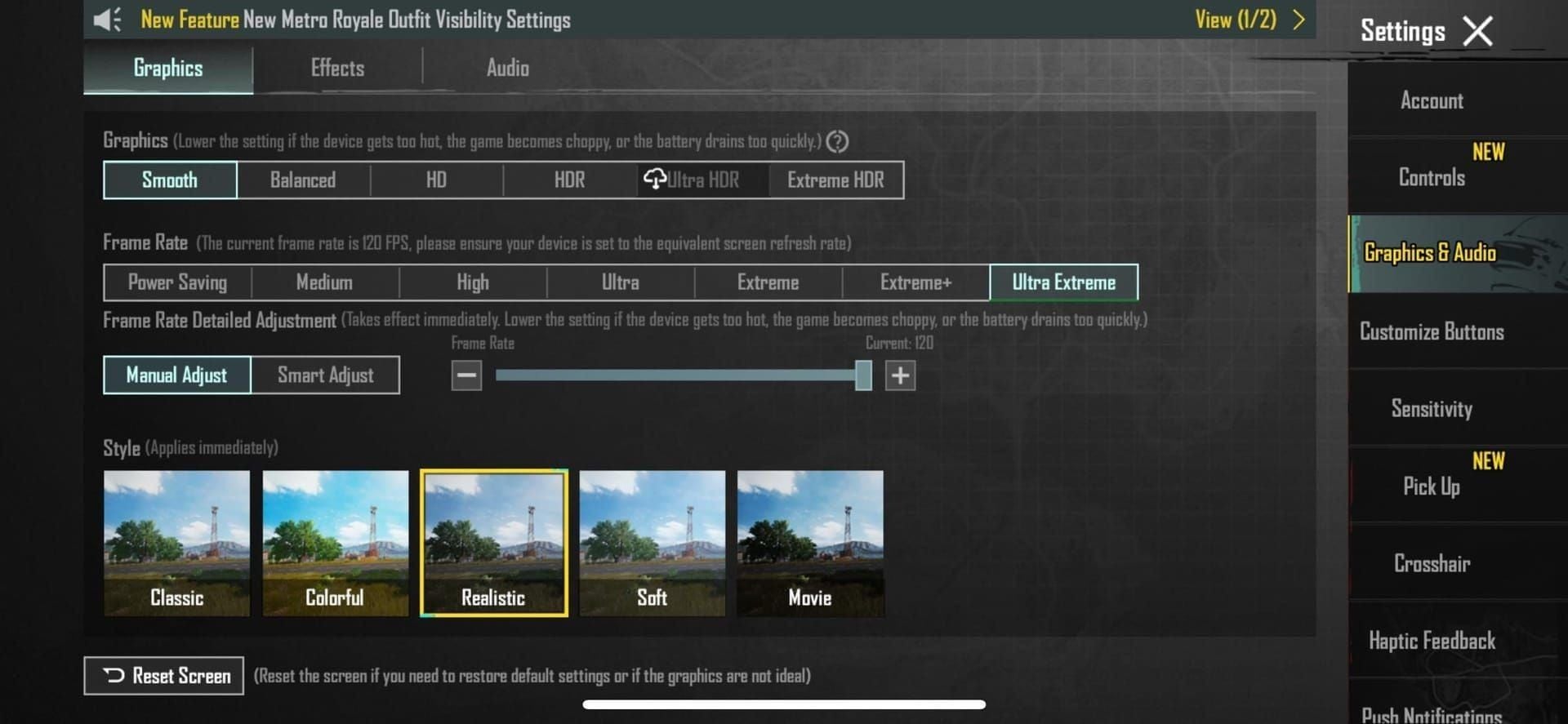
- Graphics → Smooth (unlocks higher frame rates)
- Frame Rate → Extreme (enables 90 FPS)
- Advanced Settings:
- Disable Shadows (frees 70% resources, adds 15-30 FPS)
- Disable Anti-Aliasing (adds 8-12 FPS)
- Enable Vulkan API (10-15% performance boost)
- Restart game completely
Unlocking 120 FPS
Requirements:
- Flagship processors (Snapdragon 888/865)
- 90Hz or 120Hz display
- Smooth graphics + Extreme frame rate
Set Brightness to 125-150% for visibility without performance cost.
Performance notes:
- World Tree: 10-15 FPS drop from 500m
- Guardian Flowers: 5-10 FPS drop per cluster
Why Avoid GFX Tools in 2026
Third-party tools trigger anti-cheat detection. First offense: temporary suspension. Repeated violations: permanent ban.
Official Alternatives
Android Developer Options:
- Force GPU rendering
- Disable HW overlays
- Background process limit → No background processes
- Animation scales → 0.5x or off
iOS optimizations:
- Enable Reduce Motion
- Disable Auto-Brightness
- Close all background apps
Perfect Sensitivity Settings for S28
Camera Sensitivity
- 3rd Person Free Look: 120%
- 1st Person: match 3rd person for consistency
ADS Sensitivity by Scope
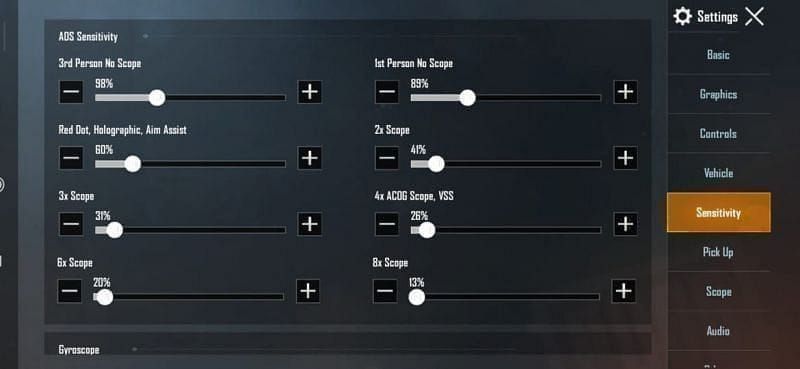
- Red Dot/Holo: 50%
- 2x: 40%
- 3x: 35%
- 4x: 20-30%
- 6x: 18-25%
- 8x: 12-18%
- Sniper 8x: 90% (gyroscope mode)
Gyroscope Settings
Enable: Scope On or Always On
Sensitivity levels:
- No Scope: 300-400%
- Red Dot: 365-400%
- 4x: 150-200%
- 8x: 90%
Pro Player Sensitivity Codes
Universal Zero-Recoil: 7435-8846-3421-0303-0728
Android-Optimized: 7462-2496-3022-3831-210
Training Room: 7307-1085-6780-4282-435
Import via Settings → Sensitivity → Import. Test in training mode for 15-20 minutes before ranked.
Mastering Recoil Control in 4.2
Weapon-Specific Techniques
M416: Pull down at 30% ADS sensitivity speed. Vertical recoil, slight horizontal drift at rounds 15-20.
Beryl M762: Immediate downward compensation. Left-right-left horizontal pattern. Combine vertical pull with horizontal counter-movements.
AKM: Limit bursts to 5-7 rounds beyond 50m. Strongest vertical recoil among 7.62mm rifles.
Vector/UMP45: Gyroscope-heavy control. Tilt device downward during fire. Vector needs more aggressive tilt than UMP45.
50-50 Technique
Apply 50% recoil compensation through thumb, 50% through gyroscope tilt. Prevents over-reliance on single input method.
Practice progression:
- Single-fire (perfect placement)
- 3-round bursts
- 5-round bursts
- Full-auto sprays
For competitive advantages, buy cheap pubg mobile uc for 120 fps ready gear and passes on BitTopup with fast delivery and secure payments.
Device-Specific Optimization
Android Developer Options
Access: Tap Build Number 7x in Settings → About Phone
Critical settings:
- Force GPU rendering (shifts load from CPU to GPU)
- Background process limit → No background processes
- Disable HW overlays (prevents frame stuttering)
- Animation scales → 0.5x or off
Processor-Based Settings
Snapdragon: Enable Performance mode in battery settings. Update GPU drivers.
MediaTek Helio: Smooth + Extreme, disable advanced options, Medium render distance.
Exynos (Samsung): Game Launcher Performance mode, enable Priority mode, use Game Booster.
RAM and Storage Management
- Clear cached data before sessions
- Maintain 20GB+ free storage
- Use Lite app versions
- Restart device before ranked matches
Network and Ping Optimization
Low Latency Settings
- Enable Network Acceleration in-game
- Disable auto-updates and cloud sync during play
- Use 5GHz WiFi over 2.4GHz
- Mobile data: enable LTE Only mode
Server Selection
- Choose lowest ping server
- Accept longer matchmaking for better connection
- Play off-peak hours (reduces ping 10-20ms)
Troubleshooting Performance Issues
Frame Drops During Combat
Thermal throttling:
- Remove phone case
- Use fan or cooling accessory
- Reduce brightness to 70-80%
RAM saturation:
- Force-close all apps
- Reduce graphics to lowest setting
Overheating Solutions
- Disable haptic feedback
- Reduce audio volume
- Use wired headphones (not Bluetooth)
- Play in air-conditioned environments
Battery Drain Solutions
- Enable battery saver, override PUBG to full performance
- Reduce refresh rate to 90Hz (15% less drain than 120Hz)
- Use airplane mode + WiFi enabled
Enhancing Competitive Edge in S28
Best Weapon Loadouts for Low-End Devices
Primary: M416 + vertical foregrip + compensator (most forgiving at 60 FPS)
Secondary: Kar98k/M24 (bolt-action eliminates recoil control issues)
CQC: Vector + extended mag (high DPS, gyroscope-friendly)
Landing Spots with Optimal Performance
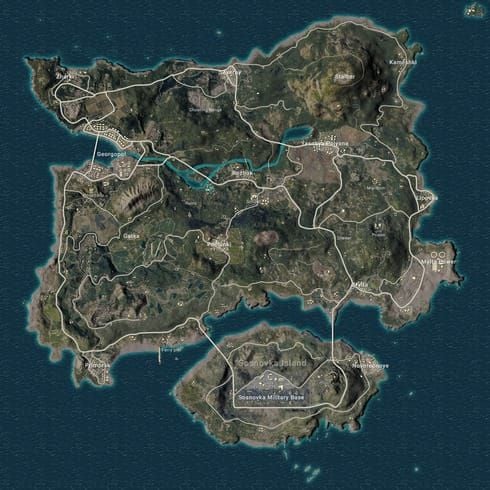
Avoid: Primewood Genesis central area (World Tree causes 10-15 FPS drop)
Recommended: Mylta Power, Shelter (stable performance)
Hot drops: Pochinki, School (minimal environmental effects)
Guardian Flowers: Memorize locations, avoid combat near them (5-10 FPS drop per cluster)
UC Top-Up Benefits
- Legendary skins: cleaner iron sights, less visual clutter
- S28 Battle Pass: weapon upgrades without frame rate impact
- Faster attachment unlocks (compensators, vertical foregrips)
Maintaining Settings and Future-Proofing
When to Update Settings
- After every major update (verify configuration)
- Before new seasons (test in training mode)
- Monitor patch notes for performance changes
Backing Up Settings
- Screenshot all settings tabs
- Save sensitivity codes in cloud notes
- Export control layout regularly
Future Preparation
- Maintain 25-30GB free storage
- Join official communities for early update info
- Consider Snapdragon 778G+ devices for future-proofing
FAQ
How to get 90 FPS in PUBG Mobile 4.2 on low-end devices?
Set Graphics to Smooth, Frame Rate to Extreme. Disable Anti-Aliasing and Shadows, enable Vulkan API. Restart game. Snapdragon 660+ achieves 60 FPS; 90 FPS needs Snapdragon 778G+.
Can I get banned for using GFX tools in 2026?
Yes. Third-party tools violate terms of service. First offense: temporary suspension. Repeated violations: permanent ban. Use official settings and Developer Options instead.
What sensitivity settings do pro players use in S28?
Code 7435-8846-3421-0303-0728 for balanced control. Typical: 120% Camera (3rd Person), 50% Red Dot ADS, 20-30% 4x Scope, 300-400% Gyroscope No Scope.
Which devices support 120 FPS in PUBG Mobile?
Snapdragon 888/865 or equivalent with 120Hz display, Android 8.0+, 6GB+ RAM. Requires Smooth graphics + Extreme frame rate. Input lag: 28-35ms vs 45-50ms at 60 FPS.
How to reduce recoil in PUBG Mobile 4.2?
ADS: 50% Red Dot, 20-30% 4x Scope. Gyroscope: 300-400% Red Dot, 90% 8x Scope. Use 50-50 technique: half thumb, half gyroscope tilt.
Does smooth graphics give advantage in ranked arena?
Yes. Enables 90-120 FPS, reduces input lag, improves tracking. Performance advantage outweighs visual quality. Pro players choose Smooth for ranked.
Ready to dominate S28 Ranked Arena? Top up UC instantly on BitTopup for exclusive weapon skins, Battle Pass upgrades, and performance-boosting items. Fast, secure, trusted by millions worldwide!