

Free Fire Diamonds LATAM Top Up: Instant In-Game Delivery
Free Fire Diamonds serve as the primary premium currency in Garena Free Fire, enabling players across the Latin American (LATAM) region to purchase rare weapon finishes, character abilities, exclusive bundles, and active seasonal battle passes. Performing a Free Fire Diamonds LATAM top up allows you to credit your account directly without sharing sensitive account credentials.
BitTopup provides a direct-to-account recharge process designed specifically for LATAM server players. By submitting your unique numeric Free Fire User ID (UID), the ordered diamond balance credits straight to your profile, letting you participate in limited-time events and store sales without delay.
How to Recharge Free Fire Diamonds in LATAM Using User ID
Completing your recharge takes only a few simple steps on BitTopup:
- Select Diamond Amount: Choose the diamond denomination or special bundle that matches your in-game goals from the package options above.
- Enter Your User ID: Type your numeric Free Fire Player ID into the User ID field. Double-check your numbers to ensure accurate delivery.
- Proceed to Checkout: Click the buy button to move to the secure payment portal. Live pricing and available regional checkout methods will display immediately.
- Complete Payment: Finalize your order using your preferred payment option.
- Receive Diamonds: Once payment confirms, your diamonds transfer automatically to your Free Fire LATAM profile. Open your game app to verify your updated balance.
Finding Your Free Fire LATAM User ID (UID)
Locating your numeric User ID is straightforward and requires only access to your in-game lobby.
- Launch the Free Fire application on your mobile device or emulator.
- Tap your profile banner located in the upper-left corner of the main lobby screen.
- Stay on the Gallery tab of your profile overview.
- Look directly below your in-game nickname to find your numeric UID.
- Tap the copy icon next to your ID to copy the digits directly to your clipboard.
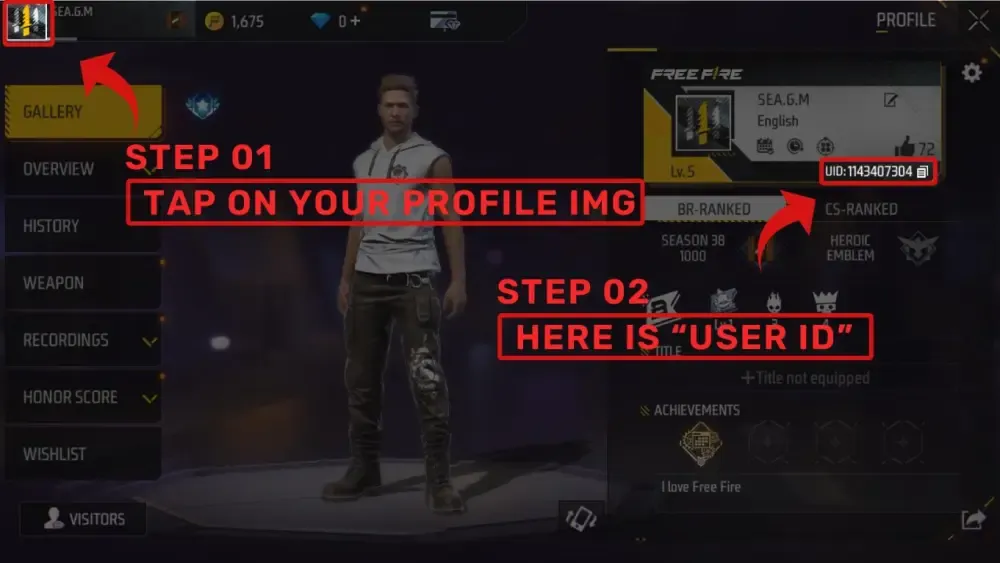
Paste this copied UID directly into the order field on BitTopup to prevent manual entry errors.
LATAM Server Compatibility and Account Validation Rules
Free Fire operates distinct regional servers to manage matchmaking, latency, and game economics. Before completing your order, ensure your game profile is assigned to the LATAM server territory.
- Covered Territories: Accounts registered in Mexico, Central America, and South American nations (excluding Brazil, which operates on its own dedicated regional server) belong to the LATAM server cluster.
- Server Verification: You can verify your active server region by opening the Free Fire settings menu (gear icon in the top-right corner). Your assigned server region is listed at the bottom-left corner of the settings window.
- UID Cross-Region Lock: Free Fire systems reject direct diamond crediting if a non-LATAM UID is submitted for a LATAM catalog item. Make sure your account region matches before ordering.
Free Fire LATAM Diamond Packages and In-Game Benefits in 2026
Acquiring diamonds unlocks access to competitive, visual, and progression features in Garena Free Fire throughout 2026.
| Item / Event Type | Typical Diamond Cost | In-Game Utility |
|---|---|---|
| Booyah Pass Premium | ~399 to 899 Diamonds | Unlocks seasonal tier rewards, legendary outfits, and unique gun skins. |
| Luck Royale Spins | ~40 to 500+ Diamonds | Grants chances at high-tier weapon skins, character bundles, and rare emotes. |
| Direct Character Purchase | ~499 to 599 Diamonds | Immediately grants specialized character abilities for ranked battle royale matches. |
| Name Change Card | ~390 Diamonds | Modifies your public in-game handle and clan tag. |
| Pet Unlocks & Skills | ~299 to 499 Diamonds | Equips tactical battlefield support pets with passive skill boosts. |
Note: Exact in-game event costs and conversion rates vary depending on active seasonal promotions inside the Free Fire client. Real-time product pricing is displayed directly on the BitTopup checkout screen.
Secure Direct-to-UID Delivery Without Account Login
Account safety is critical when purchasing game currency online. BitTopup handles Free Fire LATAM recharges through direct system requests that only require your public numeric UID.
- No Password Required: You will never be asked to provide your Garena account password, Facebook credentials, Google login, or verification codes.
- Zero Risk of Compromise: Because your login information stays private on your own device, your account remains secure from unauthorized access or password changes.
- 100% Legitimate Crediting: Diamonds purchased through direct UID top-up integrate straight into your official balance without triggering account risk flags.
Troubleshooting Common Free Fire Recharge Issues
If you experience an unexpected delay or issue during your transaction, check these standard verification steps:
- Delayed In-Game Refresh: Occasionally, server traffic causes a slight delay in visual balance updates. Close Free Fire completely from your device app switcher, restart the game, and check your top banner again.
- Incorrect UID Submission: If you typed an invalid UID during checkout, delivery cannot process automatically. Contact BitTopup customer support with your transaction reference number and the corrected UID for manual review.
- Pending Payment Clearances: Certain payment methods require extra fraud verification from your provider. Check your payment receipt to ensure the funds successfully cleared.
- Server Maintenance: When Garena performs scheduled patch maintenance on LATAM servers, top-up delivery pauses until the maintenance window concludes.
Frequently Asked Questions
How do I find my Free Fire User ID for LATAM recharge?
Tap your player avatar or profile banner in the top-left corner of the Free Fire main screen. On the Gallery tab, your numeric UID is displayed right beneath your username. Click the copy icon next to the number to copy your UID.
How much is 10,000 diamonds in Free Fire?
The total cost for 10,000 diamonds depends on the specific package combinations and current exchange rates. You can view real-time package pricing by checking the item selection on BitTopup before placing your order.
Do I need to share my Garena login details to recharge diamonds?
No. BitTopup only requires your numeric Free Fire User ID (UID) to credit diamonds to your account. You never need to share your password, email address, or third-party login credentials.
Can I recharge a LATAM Free Fire account if I am outside the region?
Yes, as long as the recipient Free Fire profile is registered on the LATAM game server. The physical location of the buyer does not prevent crediting, provided the target UID belongs to the LATAM server.
How long does diamond delivery take after completing payment?
Orders on BitTopup process automatically via direct UID routing. Once your payment confirms, your diamonds typically credit to your Free Fire account in seconds.
What should I do if the diamonds do not show up on my Free Fire account?
First, restart your Free Fire game app to refresh your account data from the server. If your balance does not update within a few minutes, check your BitTopup order dashboard to confirm payment status, then reach out to customer support with your Order ID for assistance.