


Free Fire Diamonds ID Top Up – Direct In-Game Delivery
Free Fire Diamonds serve as the core premium currency in Garena Free Fire, giving players access to exclusive weapon skins, character bundles, Booyah Passes, and special event spins. When purchasing for Indonesia-based accounts, a Free Fire Diamonds ID top up provides direct crediting to your account balance without requiring voucher codes or third-party redemptions.
BitTopup provides a direct recharge system designed specifically for the Indonesia (ID) server region. You only need to enter your in-game Player ID (UID) at checkout. Once your payment processes, the Diamonds transfer automatically to your Free Fire account balance, allowing you to jump straight back into the action.
How to Recharge Free Fire Diamonds with Player ID
Recharging your Free Fire balance on BitTopup takes only a few quick steps. Follow this guide to complete your order:
- Select Your Diamond Package: Choose the diamond amount you want from the product selection list.
- Enter Your Free Fire Player ID: Type or paste your numerical UID into the Player ID field. Double-check your numbers to ensure accuracy.
- Check Live Pricing: Review the total price and active payment options displayed in real time on the checkout screen.
- Complete Checkout: Select your preferred payment method and finalize the transaction.
- Receive Diamonds In-Game: Once the payment completes, open Free Fire on your mobile device to verify your updated Diamond balance.
How to Find Your Free Fire Player ID (UID)
Your Player ID (UID) is a unique sequence of numbers assigned to your Free Fire account upon creation. You do not need to provide your account username or login credentials—only this numerical ID.
- Launch the Free Fire application on your mobile device or emulator.
- Tap on your Profile Banner / Avatar located in the top-left corner of the main lobby.
- Stay on the Basic profile overview tab.
- Locate your UID displayed directly beneath your character nickname.
- Tap the small Copy Icon next to the numbers to copy your Player ID to your clipboard.
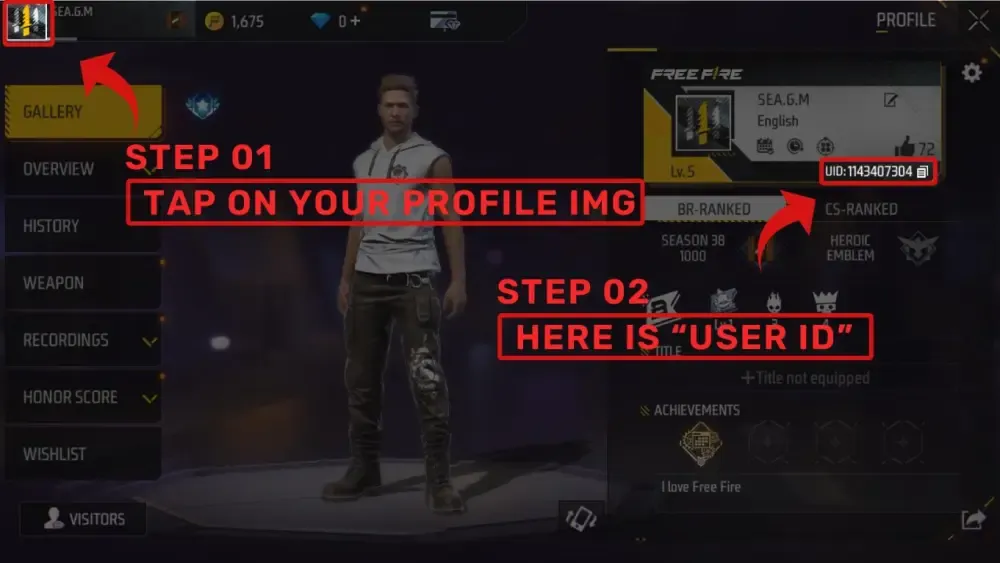
Paste this copied UID directly into the Player ID input field on BitTopup before placing your order.
Indonesia (ID) Server Region Requirements and Account Verification
Free Fire accounts operate on region-locked servers. This product listing is dedicated exclusively to accounts registered within the Indonesia (ID) server zone.
Before purchasing, ensure your account matches the specifications outlined below:
| Specification | Details |
|---|---|
| Target Server Region | Indonesia (ID) Server |
| Required Account Information | Numerical Player ID (UID) Only |
| Password / Login Required | None (Zero account access needed) |
| Delivery Method | Direct In-Game Top-Up |
| Supported Platforms | Android, iOS, PC Emulators |
| Usage Scope | In-Game Store, Luck Royale, Events, Passes |
How to Verify Your Account Region
To check your account region in-game, open Free Fire, tap the Settings (Gear Icon) in the top-right corner of the lobby screen, and scroll to the bottom of the Basic Settings menu. Your registered region (e.g., Indonesia) is displayed in the bottom-left corner. If your account is registered to another region, please select the appropriate regional product on BitTopup.
What Free Fire Diamonds Can Buy in 2026
Diamonds provide access to premium progression tracks, character customization, and tactical enhancements in Free Fire:
- Booyah Pass Unlocks: Unlock premium tier progression in the active Booyah Pass season to earn exclusive mythic outfits, vehicle skins, and custom death loot boxes.
- Evo Gun Skins and Upgrades: Participate in Faded Wheel and Weapon Royale events to obtain and level up Evo weapons with custom kill effects, firing animations, and upgraded combat attributes.
- Character Unlocks and Skill Slots: Acquire tactical characters, unlock additional active/passive skill slots, and purchase pet companions with unique utility perks.
- Luck Royale and Limited-Time Web Events: Spin for limited-edition collaboration cosmetics, rare bundle crates, and thematic crossover outfits.
- Utility Items and Custom Rooms: Purchase Name Change Cards, Custom Room Cards to host competitive matches with friends, and direct bundle gift packages.
Safe Top Up on BitTopup: No Password Required
Account security is essential. BitTopup ensures complete safety for your Free Fire account by utilizing a direct API-based UID recharge mechanism:
- Zero Password Access: You never need to reveal your Garena, Facebook, Google, Apple ID, VK, or Twitter/X login passwords.
- No Risk of Account Sharing: Transactions occur externally through the official server delivery route. Your account remains entirely in your control without third-party logins.
- Anti-Ban Compliance: Because purchases follow standard top-up protocols, your account remains safe from game suspensions and payment disputes.
Payment Options, Live Pricing, and Order Tracking
BitTopup provides real-time pricing directly on the live checkout interface. Live exchange rates and payment methods are updated dynamically based on your selected region and currency.
- Transparent Live Checkout: All processing details and total amounts are presented clearly before you submit payment, with no hidden extra fees.
- Multiple Payment Channels: Choose from available local e-wallets, bank transfers, credit/debit cards, and digital payment methods presented on the checkout screen.
- Live Order Tracking: After completing your payment, track your order status in real time through the BitTopup order history page. Most transactions process immediately.
Troubleshooting Free Fire Diamond Delivery and Support
If your Diamonds do not reflect immediately in your in-game balance after purchase, use the following troubleshooting steps:
- Restart the Game App: Close Free Fire completely from your device's background applications and relaunch it. This forces the client to sync with the server database.
- Check Order Status: Go to your BitTopup order confirmation screen to confirm that payment status shows as completed.
- Verify Player ID Accuracy: Confirm that the Player ID submitted during checkout matches your in-game profile UID.
- Check Regional Compatibility: Ensure the account belongs to the Indonesia server.
- Contact 24/7 Customer Support: If your balance has not updated after restarting, reach out to BitTopup customer service with your Order ID and Player UID for immediate assistance.
Frequently Asked Questions
How do I find my Free Fire Player ID?
Open Free Fire on your device and tap your profile banner in the top-left corner of the main lobby. In the profile overview tab, your numerical Player ID (UID) is shown directly under your nickname. Tap the copy icon next to it to copy your ID.
Do I need to share my Garena password to recharge Free Fire Diamonds?
No. BitTopup only requires your numerical Player ID (UID). You should never share your account passwords, login credentials, or verification codes.
Is this Free Fire top-up valid only for Indonesia (ID) server accounts?
Yes. This product is specifically intended for Free Fire accounts registered on the Indonesia (ID) server. Verify your server region in the in-game Settings menu before ordering.
How quickly will the Diamonds be credited to my Free Fire account?
Top-ups are processed directly via UID delivery. In most cases, your Diamonds will reflect in your account balance immediately after payment confirmation.
What should I do if my Free Fire Diamonds do not appear after purchase?
First, restart your Free Fire game app to force a balance refresh. If the Diamonds still do not show, check your BitTopup order status and contact our 24/7 customer support team with your order number and Player ID for rapid resolution.
What can I purchase with Diamonds in Free Fire in 2026?
In 2026, Free Fire Diamonds can be used to unlock the Booyah Pass, spin in Luck Royale and Faded Wheel events, level up Evo weapons, purchase exclusive character bundles and pets, and buy utility items like Name Change Cards and Custom Room Cards.