Core Abilities and Combat Functions
Barkle operates through seven commands via Command Wheel:
- Attack: Launches rocks every 2 seconds dealing 15-25 HP with auto-targeting
- Defend: Creates 180-degree bullet-blocking arc with 200-300 HP durability, 15-20 second cooldown

- Search: Scans 30-meter radius for loot, marks gold-tier Level 3 gear, 30-45 second cooldown
- Carry: Lifts players to marked locations in 3 seconds, 45-60 second cooldown
- Revive: Auto-triggers within 50 meters of downed teammates, completes in 3-4 seconds, grants 200 HP, gives Barkle 50% increased damage plus 25% damage resistance during animation
- Heal: Provides health restoration
- Hide: Reduces visibility and hitbox
Primewood Genesis Mode Exclusivity
Barkle only spawns in Primewood Genesis mode queues on Erangel and Livik. Standard Classic, Arcade, or other event modes don't support this AI companion. You must specifically select Primewood Genesis from mode selection to access Barkle recruitment.
Prime Eye Portals activate at 4:00 match timer in 60-second loops throughout 10-minute windows, providing 6-7 second transit times for rapid map traversal with strategic synergy to Barkle's Carry ability.
Exact Barkle Spawn Rules: Locations, Timing & Map Coverage
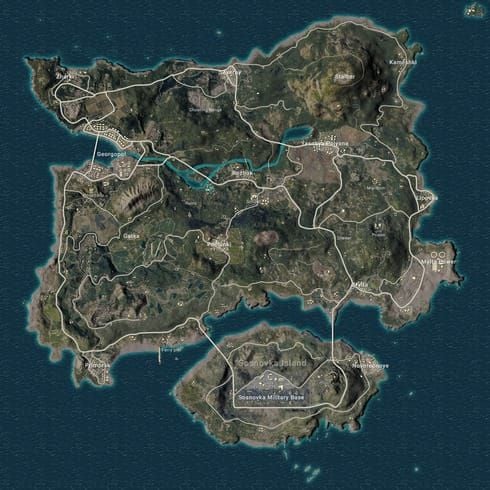
Barkle spawns appear as green icons visible from 50 meters across designated hot drop zones.
Erangel guaranteed spawn locations:
- Pochinki
- Yasnaya Polyana
- Mylta
- Sosnovka Military Base
- Hospital
- Georgopol
Livik: Similar high-density spawn patterns in major named locations.
Land within 20 meters of green icons to initiate recruitment. Interaction prompt appears at 3-meter range, requiring tap/hold of interaction button. Recruitment animation completes in 1-2 seconds, after which Barkle follows at 5-meter distance.
Sacred Fruits Alternative Recruitment
Sacred Fruits found throughout Primewood Genesis maps provide alternative recruitment when initial hot drop spawns are contested. These consumables typically appear near environmental anomalies and Prime Eye Portal locations.
Spawn Timing and Match Phase Availability
Green icons persist from initial landing through final circles. Each player can only maintain one active Barkle at a time.
If your Barkle is eliminated, new recruitment opportunities appear at subsequent green icon locations or through Sacred Fruit acquisition. No fixed respawn timer—recruitment depends on finding available spawn markers or consumables.
Command Wheel Setup: Optimal Configurations for Combat
Command Wheel opens by holding bottom-right ally icon. Seven command options radiate from center: Attack, Defend, Heal, Revive, Search, Carry, Hide.
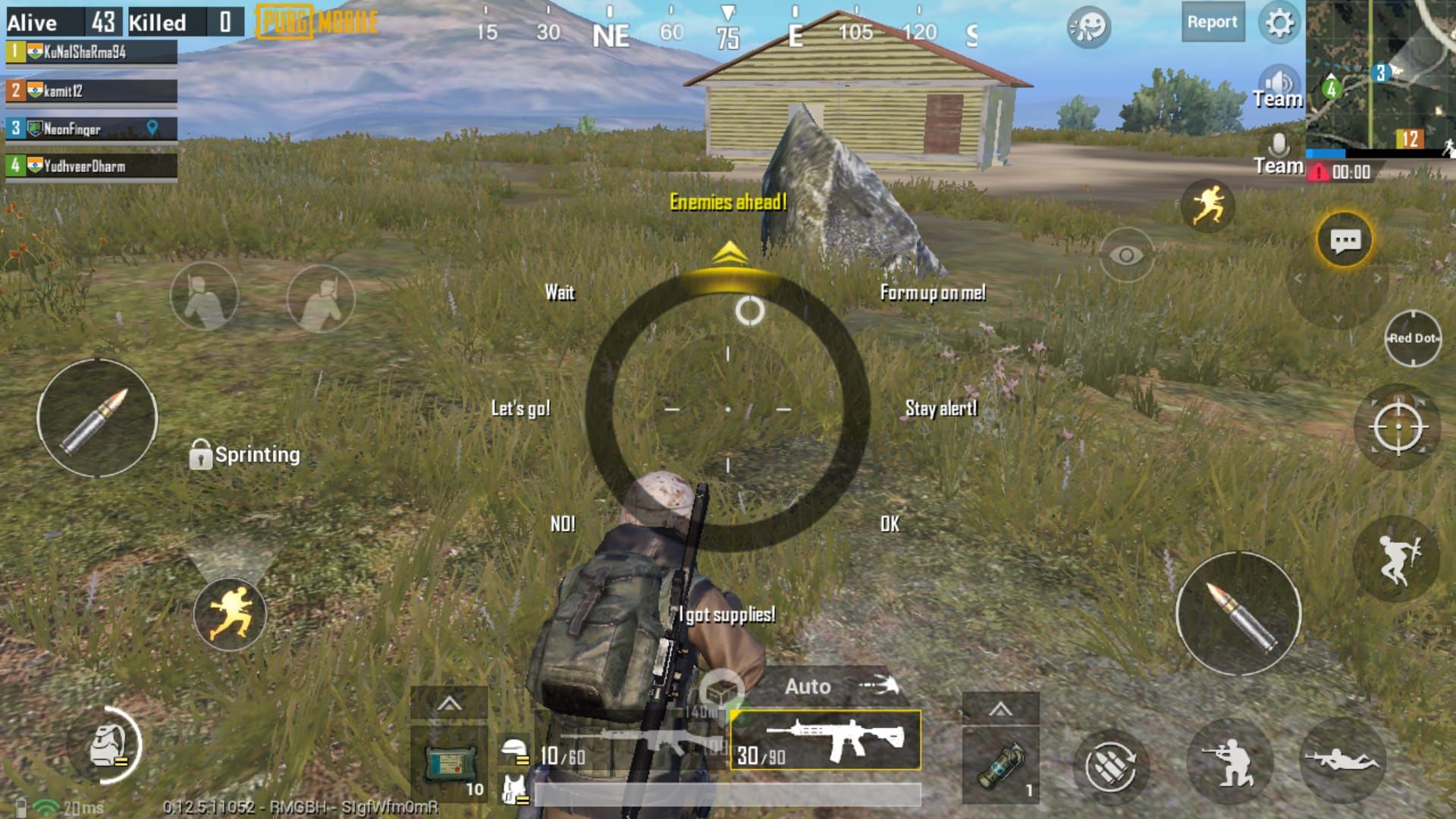
Sensitivity settings:
- 5.5-6 inch screens: 100-120% for quick swipe gestures without accidental triggers
- 6.5+ inch devices: 80-100% accounting for increased finger travel distance
These settings prevent mis-inputs when rapidly switching between Attack and Defend during close-quarters engagements.
Device-Specific Performance Optimization
2-4GB RAM devices: Disable AI Ally Effects in graphics settings. Reduces visual clutter from Barkle's ability animations while maintaining full command functionality. Critical during squad fights where multiple Barkles and player abilities activate simultaneously.
Tablet users: Place ally icon near primary fire controls in HUD layout editor. Reduces thumb travel time, enabling sub-200ms command execution speeds for defensive barrier deployment.
Voice Command Integration
Voice commands provide hands-free Barkle control in English, Arabic, Turkish, and Russian. Saying Barkle, attack! or Barkle, shield! triggers corresponding abilities without opening Command Wheel. Excels during vehicle combat or when maintaining aim while directing support actions.
Voice recognition requires clear pronunciation and minimal background noise. Competitive players reserve voice commands for non-critical situations, relying on Command Wheel precision for clutch defensive plays.
Barkle Auto-Defend Mechanics and Trigger Conditions
Defend creates 180-degree arc barrier with 200-300 HP durability positioned in direction Barkle faces when activated. Blocks all incoming bullets until destroyed or 15-20 second cooldown expires. Strategic placement converts Barkle into mobile cover during building pushes or open-field rotations.
Auto-Revive triggers automatically when teammates fall within 50 meters. The 3-4 second resurrection grants Barkle temporary buffs: 50% increased damage output and 25% damage resistance. Creates protective window where Barkle suppresses enemies while completing revive.
Manual Override Strategies
Manual command override offers tactical advantages. Experienced players delay Revive activation until enemies reload or reposition, maximizing buffed damage window. Holding Revive command prevents automatic triggering.
Hide command instructs Barkle to crouch behind cover, reducing visibility and hitbox. Essential when enemies focus fire on your companion—preserves Barkle's health for critical late-game revives or defensive barriers during final circles.
Winning Close-Range Fights with Barkle Support
Pre-fight positioning determines effectiveness. Before engaging, use Attack command to initiate rock-throwing sequence. The 15-25 HP damage every 2 seconds forces enemies into cover or damages armor, creating openings for your primary weapon fire.
During building assaults, deploy Defend barriers at doorways or stairwell entrances. The 200-300 HP shield absorbs initial enemy volleys while you advance to superior angles. Coordinate your push with Barkle's Attack cooldown—enter immediately after Barkle throws a rock.
Distraction Tactics and Flanking Synergy
Position Barkle on one flank while you attack from another. Enemies often prioritize the visible AI threat, exposing positions to your crossfire. Search reveals enemy locations within 30 meters, providing real-time intelligence for coordinated flanks.
In squad scenarios, assign one player to manage Barkle commands while others focus on gunplay. This division maximizes both AI utility and human accuracy during multi-team third-party situations.
For premium features, how to top up UC in PUBG Mobile safely through BitTopup ensures secure transactions with fast delivery.
Advanced Squad Coordination with Multiple Barkles
Four-player squads can field four Barkles simultaneously. Coordinate Defend barriers to form 360-degree protective perimeters during zone rotations. Stagger barrier cooldowns by assigning each player a 5-second deployment window—maintains continuous cover throughout 15-20 second cooldown cycle.
Multiple Search commands provide comprehensive loot intelligence across large compounds. Designate one Barkle for offensive Attack spam while others maintain defensive Defend readiness.
Communication Protocols for Barkle Commands
Establish clear callouts: Barrier north,Revive active, or Search Pochinki apartments. Verbal confirmation prevents duplicate commands that waste cooldowns. When one player's Barkle initiates Revive, others should deploy Defend barriers around resurrection point.
Carry enables creative squad rotations. One player uses Carry to reach rooftop positions, then provides covering fire while teammates advance through ground-level approaches. This vertical-horizontal pincer overwhelms enemies expecting single-axis attacks.
Common Barkle Mistakes and How to Avoid Them
Overreliance on auto-Revive: Creates predictable patterns enemies exploit. Skilled opponents bait Barkle revives, then grenade the resurrection location during 3-4 second animation. Manually control Revive timing and reposition before activation.
Poor Command Wheel placement: Causes mis-inputs during critical moments. Players accidentally trigger Search when intending Defend, wasting 30-45 second cooldown. Customize HUD layouts in training mode, practicing rapid command selection until muscle memory eliminates errors.
Spawn Location Misconceptions
Green icons and Sacred Fruits remain available throughout the game, enabling mid-match recruitment if your initial Barkle is eliminated. Regularly scan for green markers during rotations.
Ignoring Barkle's 5-meter follow distance leads to separation during vehicle travel or rapid sprints. Barkle can't board vehicles and struggles to maintain pace during sustained running. Periodically check companion positioning, especially when entering buildings or navigating complex terrain.
Optimizing Barkle Performance: Loadouts and Resource Management
Barkle's Attack synergizes with suppression-focused loadouts. Pair LMGs or high-capacity ARs with rock-throwing to maintain continuous enemy suppression. While you reload, Barkle's 2-second Attack intervals prevent enemies from peeking.
Defensive loadouts benefit from Carry ability. Snipers use Carry to rapidly reposition between vantage points, maintaining unpredictable angles. The 45-60 second cooldown aligns with typical sniper engagement intervals.
Premium Barkle Customization
Barkle skins offer visual customization and potential stat bonuses in future updates. Acquiring these requires UC, PUBG Mobile's premium currency. BitTopup provides secure UC top-up services with competitive pricing, fast delivery, and 24/7 customer support.
Prioritize functional upgrades over purely cosmetic items. Invest UC in Barkle abilities or stat enhancements before purchasing skins, maximizing competitive advantage per currency spent.
V4.2 Barkle Meta: Competitive Strategies and Future Predictions
Current competitive meta emphasizes Defend ability for zone edge rotations. Top-tier players deploy barriers perpendicular to circle movement, blocking third-party fire from teams already positioned in safe zones. Reduces rotation damage by 40-60%, preserving health for final circle engagements.
Pro player Command Wheel setups prioritize Defend and Revive in primary positions (top and right quadrants), relegating Search and Hide to secondary slots. Optimizes access to survival-critical commands during high-pressure situations.
Ranked Push Strategies
Ace-tier players leverage Search for early-game loot efficiency. Scanning compounds before entry reveals Level 3 gear locations, reducing looting time by 30-40%. Enables faster rotations to central positions before mid-game circles form.
Tournament-level coordination involves pre-planned Barkle sacrifice plays. Teams intentionally expose Barkle to draw enemy fire, revealing opponent positions while preserving human player health. Effective during stalemate situations where neither team can safely peek.
Future Update Predictions
Based on PUBG Mobile's update patterns, expect Barkle ability adjustments in V4.3 or V4.4. Potential changes include extended Defend cooldowns to reduce barrier spam, or increased Revive animation time to balance clutch potential.
Primewood Genesis event's March 10, 2026 end date suggests Barkle may transition to permanent availability in subsequent updates, possibly expanding to additional maps like Miramar or Sanhok.
FAQ
Where does Barkle spawn in PUBG Mobile V4.2?
Green icons visible from 50 meters in Primewood Genesis mode on Erangel (Pochinki, Yasnaya Polyana, Mylta, Sosnovka Military Base, Hospital, Georgopol) and Livik hot drops. Sacred Fruits provide alternative recruitment throughout matches.
How do you unlock Barkle Smart Ally in PUBG Mobile?
Queue Primewood Genesis mode on Erangel or Livik, land within 20 meters of green spawn icons, approach to 3-meter range, then tap/hold interaction button. Recruitment completes in 1-2 seconds.
What are the best command wheel settings for Barkle?
100-120% sensitivity for 5.5-6 inch screens, 80-100% for 6.5+ inch devices. Position Defend and Revive in primary quadrants, disable AI Ally Effects on 2-4GB RAM devices.
How does Barkle's auto-defend system work?
Defend creates 180-degree arc barrier with 200-300 HP durability facing Barkle's direction, blocking bullets for 15-20 seconds. Auto-Revive triggers within 50 meters of downed teammates, completing in 3-4 seconds while granting Barkle 50% damage boost and 25% resistance.
Can Barkle help you win fights in PUBG Mobile?
Yes—Attack deals 15-25 HP every 2 seconds with auto-targeting, Defend provides mobile cover during pushes, and Revive enables clutch squad resurrections. Coordinated use increases squad survival rates by 30-40% in close-range engagements.
Is Barkle available in all game modes?
No—Barkle only appears in Primewood Genesis mode on Erangel and Livik maps from January 7 to March 10, 2026. Classic, Arcade, and other event modes don't support this AI companion.
Ready to dominate with Barkle? Power up your PUBG Mobile experience with instant UC top-ups at BitTopup. Enjoy secure payments, competitive rates, fast delivery, and 24/7 customer support. Unlock premium Barkle skins and features today—visit BitTopup for the best deals and service quality trusted by millions of players worldwide!




























































































































