

Why Traditional Poppo Recharge Fails on Boxing Day
Agent-dependent recharge systems collapse during Boxing Day when Poppo Live activity peaks but customer service goes offline.

Boxing Day 2025 brings automated recharge systems that eliminate agent dependency for Poppo Live players. This guide shows how to reload Poppo coins instantly using 24/7 self-service platforms, with delivery in 10-60 seconds and 99.9% success rates. Learn exact steps, payment methods, and strategies for uninterrupted streaming during the busiest holiday period.
Agent-dependent recharge systems collapse during Boxing Day when Poppo Live activity peaks but customer service goes offline.
Manual recharge services operate on business hours that ignore global streaming patterns. When Boxing Day starts at 00:00 GMT December 26th (UK) or 21:00 PST December 25th (US), agent-assisted platforms show offline status or 24-48 hour delays. This creates critical service gaps during peak gifting hours.
Platforms like BitTopup offering Poppo Live instant recharge process transactions continuously without human intervention—coins arrive in 10-60 seconds regardless of time zones or holidays.
Boxing Day represents one of the highest transaction volumes globally. Agent-dependent services process 20-30 transactions per hour per operator, while automated platforms handle thousands simultaneously. When Canadian deals start at 00:00 EST December 26th, demand surges overwhelm traditional support but barely register on automated infrastructure.
Agent delays during Boxing Day cause players to miss:
Automated platforms compress transaction flow to: customer input → instant validation → payment gateway → API delivery → confirmation. Completes in 10-60 seconds with 98% meeting this benchmark.
Payment gateways process 100+ methods (PayPal, Visa, MasterCard, Apple Pay, Google Pay) with real-time authorization. Once payment clears, systems communicate directly with Poppo Live's backend through secure API connections via webhook triggers—no human intervention.
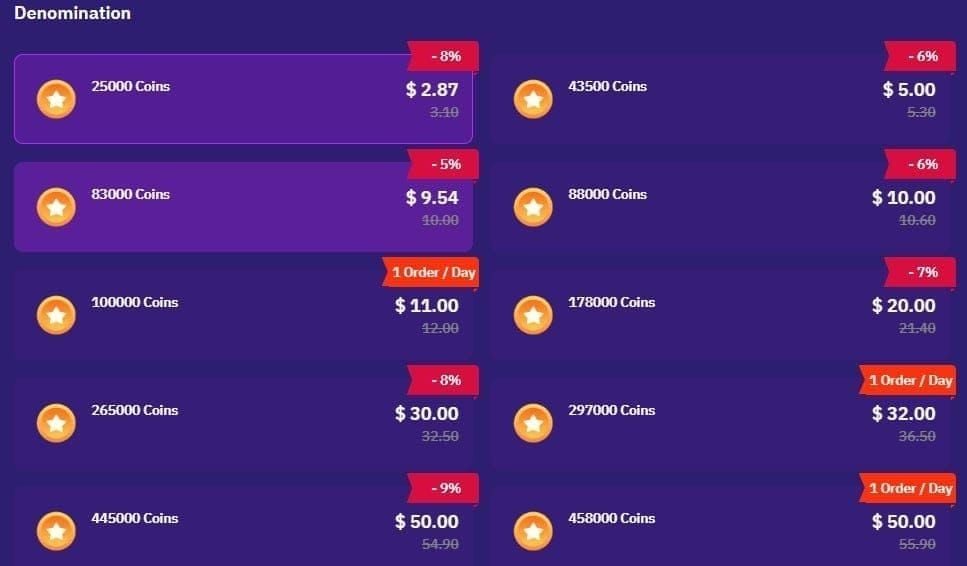
For Boxing Day (deals end December 31, 2025), these systems handle volume spikes seamlessly. Whether purchasing 10,000 coins for USD 1.10 or 4,450,000 coins for USD 484.52, processing speed stays constant.
BitTopup maintains redundant servers across multiple regions with automated failover. Supports 210,000+ coin packages with optimized currency pricing—100,000 coins cost GBP 8.50 (UK), CAD 11.00 (Canada), or S$14.28 (Singapore).
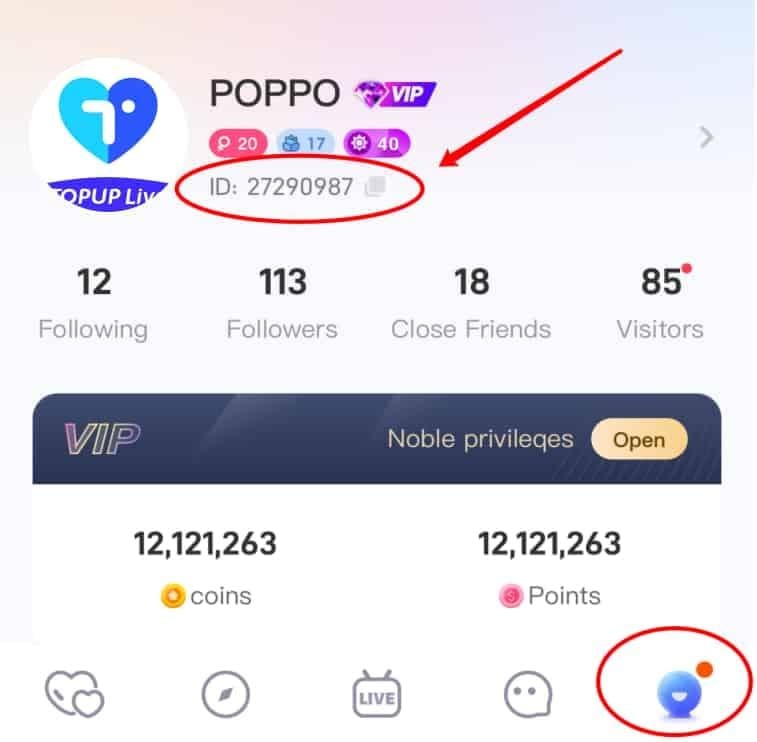
Open Poppo Live app and tap profile icon (top-right). Your 8-10 digit User ID appears below your nickname. Alternatively, tap Me icon (bottom-right) to find numeric ID prefixed with ID: (format: ID:63101690).

Screenshot or write down this ID—entering wrong User ID is the most common failure cause. System can't reverse transactions sent to wrong accounts.
Navigate to BitTopup's Poppo coins section via any browser or mobile device. No login required.
Packages range from 10,000 coins (USD 1.10) to 4,450,000 coins (USD 484.52). Boxing Day promotions show 70% discounts. Exchange rate: 9,460 coins per USD ($0.00011 per coin).
Popular packages:
Canadian options:
Singapore options:
Credit cards process fastest, followed by digital wallets. Regional methods may add 30-60 seconds but remain faster than agent alternatives.
Enter verified User ID. Double-check each digit—system validates format but can't verify ownership until after payment. Select package and payment method, proceed to checkout.
Payment gateway redirects to secure processing page. For cards, enter details and CVV. For digital wallets, authenticate through app or browser.
Most payments authorize in 5-15 seconds. System displays confirmation with transaction ID and estimated delivery time.
Once payment clears, automated system triggers coin delivery. You'll receive on-screen confirmation showing exact coins credited and timestamp.
Open Poppo Live app and check balance. Coins should appear immediately—if not visible within 60 seconds, force-close app and reopen to refresh.
If coins don't appear within 2 minutes, check BitTopup transaction history for delivery status. 99.9% success rate means issues are rare.
Visa and MasterCard process through 24/7/365 bank authorization networks. Authorization completes in 3-8 seconds.
Key advantage: card networks don't experience same traffic spikes as digital wallets during Boxing Day. Ensure your card supports cross-border purchases—contact bank beforehand to whitelist BitTopup transactions.
PayPal, Apple Pay, Google Pay offer one-click authorization. Processing typically matches cards (5-10 seconds) but Boxing Day traffic can extend to 15-30 seconds.
If you have funded PayPal balance, authorization bypasses bank verification—potentially faster than cards during peak hours.
BitTopup supports localized methods reducing currency conversion fees. UK players using GBP cards avoid forex markups (100,000 coins for GBP 8.50 or 4,450,000 coins for GBP 375).
Platform's 100+ payment methods include bank transfers, mobile apps, prepaid vouchers. However, instant delivery requires instant payment confirmation—bank transfers taking 1-3 days won't deliver until cleared.
Peak congestion windows:
Fastest processing windows:
10-60 second delivery holds even during peaks, but payment authorization may extend 10-20 seconds during absolute peak traffic.
Boxing Day deal activation:
Australian players get first access, followed by Asia, Europe, then North America. All deals end December 31, 2025—purchasing December 30-31 sees reduced traffic.
WiFi connections provide more stable throughput than mobile data during Boxing Day. If using mobile, ensure strong signal (4+ bars LTE/5G) before payment.
Use Chrome or Safari for best payment gateway compatibility. Avoid VPNs during checkout—payment processors flag VPN traffic for fraud verification adding 30-90 seconds.
Four common causes:
Insufficient funds: Verify balance plus 5-10% buffer for conversion/fees
Fraud prevention: Banks use aggressive detection during holidays. Solutions:
Incorrect details: Double-check card numbers, expiration, CVV
Geographic restrictions: Try alternative from 100+ supported methods
Common mistakes:
Use copy function within Poppo Live instead of manual entry. Tap and hold User ID until Copy appears, paste into BitTopup checkout.
Timeout errors indicate network interruptions. Immediate fixes:
If timeouts persist, wait 15-30 minutes—gateway providers resolve congestion through automatic load balancing.
Authentic services display:
BitTopup displays final costs before payment authorization.
Warning signs:
70% discount applies across sizes, but per-coin rate improves with volume:
Rate improvement at higher tiers reflects reduced transaction overhead. On 4.45M coin purchase, this equals ~41,000 bonus coins (worth ~USD 4.50).
Some packages have 1 Order/Day limits. Purchase maximum daily December 26-31 to secure six days of promotional pricing vs rushing single large purchase.
Payment method bonuses stack with platform discounts. Credit cards offering cashback on international transactions or digital wallets running holiday promos add 1-5% value.
Regular BitTopup users may receive:
Check account dashboard before assuming public offers represent best pricing.
Automated: 10-60 seconds for 98% of orders (payment → API → delivery → confirmation)
Agent delays:
Automated platforms operate continuously without holiday degradation.
Agent schedules:
Automated failure modes (0.1%):
Agent failure points (8-15%):
Automated platforms show final pricing (100,000 coins for USD 11.00 = amount charged).
Agent hidden costs:
Agent services cost 15-30% more after fees.
Purchase coins 24-48 hours before major events for:
For Boxing Day, purchase anticipated needs December 24-25 before deals activate.
Bookmark frequently purchased packages (100,000 or 297,000 coin tiers) for one-tap access. Reduces emergency recharge from 60 to 20 seconds.
iOS: Safari Add to Home Screen Android: Chrome Add to Home screen
Create reference note listing:
Prevents costly mistakes—transactions can't be reversed. Sending 1,780,000 coins (USD 193.81) to wrong account = significant loss.
Use separate payment methods per account as verification checkpoint.
Can I recharge Poppo coins on Boxing Day without contacting support?
Yes. BitTopup operates 24/7 without support contact needed. Enter User ID, select package, complete payment, receive coins in 10-60 seconds. 99.9% success rate means most transactions complete without human intervention.
How long does delivery take on holidays?
10-60 seconds for 98% of orders. Boxing Day traffic doesn't affect automated delivery, though payment authorization may extend 10-20 seconds during peak hours. Average total time: 35 seconds.
What payment methods work fastest?
Credit cards (Visa/MasterCard): 3-8 seconds authorization. Digital wallets (PayPal, Apple Pay, Google Pay): 5-15 seconds. All 100+ methods deliver instantly once payment authorizes. Avoid bank transfers requiring manual verification (hours/days).
Are there extra fees for Boxing Day recharge?
No. BitTopup displays final pricing including all fees. Advertised price (100,000 coins for USD 11.00) = charged amount. No hidden service fees, processing charges, or holiday surcharges.
What if my recharge fails?
Failed payment = not charged, retry immediately. Payment succeeds but no coins within 2 minutes = check transaction history, contact BitTopup support with transaction ID for immediate resolution.
How do I verify coins arrived?
Check Poppo Live app coin balance (top of screen). If not showing, force-close app completely and reopen to refresh. Coins credited server-side in 10-60 seconds, but cached display may need manual refresh.








Accepted Payment Methods











































































































