Redeemed your voucher but see zero Ringgit? Learn how to fix your psn card malaysia code redeemed but balance not showing error across PS5, PS4, and mobile.
You enter a 12-character digital code, get a green confirmation message, but your wallet still displays RM0.00. The code is marked as spent, so re-entering it triggers an error stating it has already been used. Meanwhile, your cart sits unpaid.
This sync glitch is common on the PlayStation Network. Your money is almost never lost. It is usually cached locally, waiting in a server batch queue, or credited to a parent family wallet. Here is how to track your missing Malaysian Ringgit balance and force the system to display your funds.
Why Your MYR PSN Wallet Shows Zero After a Successful Redemption
The PlayStation Store interface caches account data locally. While Sony's backend registers your redemption almost immediately, the graphical user interface on your PS5, PS4, or PlayStation App can lag behind.
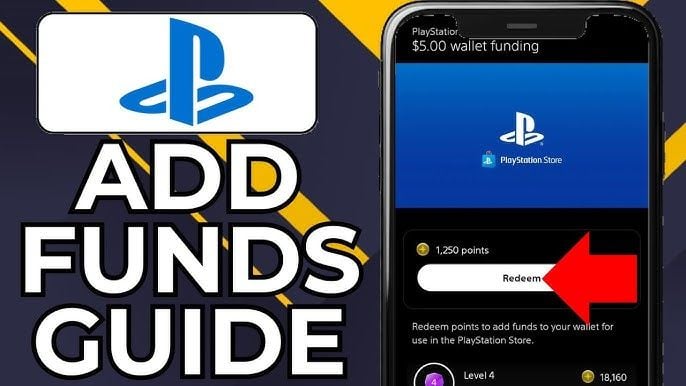
This interface caching is the main reason a PSN Malaysia wallet balance fails to update after redemption. Your console continues showing the balance snapshot captured before you submitted the code until a system event forces a refresh.
Server-side queue backups also cause delays. Wallet vouchers usually clear within seconds, but transaction processing can take up to 24 hours during network maintenance or major sale events. Sony's official PSN status page may even show green across all services while top-up settlement queues backlog.
To ensure your code activates without retail validation delays, buying a verified PlayStation Network Card (MY) guarantees a clean serial ready for immediate account credit.
How to Check True Wallet Funds Across Devices
Do not rely on the balance counter in the top-right corner of the PlayStation Store home page—it is the slowest element to refresh. You should verify your true balance directly through your core payment settings or transaction history.
The Account Transaction History logs every top-up, digital purchase, subscription fee, and refund from the past 90 days. If your 12-character code appears as a completed transaction in this log, the funds are safely credited to your account ID and ready to spend at checkout, even if the main store banner has not refreshed.
| Platform / Client | Direct Navigation Path | Sync Verification Behavior |
|---|
| PS5 Console | Settings > Users and Accounts > Account > Payment and Subscriptions > Wallet | Accessing this menu forces an account credential ping and updates cached MYR values. |
| PS4 Console | Settings > Account Management > Account Information > Wallet | Selecting Add Funds or Payment Management pulls fresh wallet records from the server. |
| PlayStation App (iOS/Android) | PS Store Tab > Avatar Icon (Top Right) > Payment Methods / Wallet | Tapping the profile avatar forces a sync request against your cloud profile. |
| Web Browser (store.playstation.com) | Sign In > Profile Icon (Top Right) > Payment Management | Directly reads settled server database records and bypasses console OS cache. |
Checking via a desktop browser is the fastest check. Web sessions bypass local console storage partitions to query Sony's live database directly.
Region Locks and Account Traps: Error E-82000134 Explained
PlayStation Network accounts remain permanently locked to the country selected during initial registration. Sony does not allow region migrations. If your account is registered in Singapore (SGD), the United States (USD), or the United Kingdom (GBP), you cannot redeem a Malaysian Ringgit (MYR) voucher on it.
Submitting an incompatible voucher triggers error code E-82000134, confirming the voucher code does not match your account's registered country.
To verify your account currency:
1. Sign in on your console or browser.
2. Open the PlayStation Store.
3. Check listed game prices. Malaysian accounts strictly display prices in MYR.
If prices appear in SGD, US$, or £, your account belongs to a foreign territory. A Malaysian 12-character voucher will never credit that wallet. In that case, you must set up a dedicated Malaysian PSN profile or buy a voucher matching your existing account's region.
Family Accounts and Child Profile Balance Confusion
If a child profile redeems a voucher successfully but the balance still shows RM0.00, the system is working as designed.
Child profiles cannot hold independent funds. All voucher redemptions and payment card top-ups credit the Family Manager's master wallet directly. Child accounts can only draw from that balance once the Family Manager sets a monthly spending allowance.
To grant a child account access to master wallet funds on a PS5:
1. Sign into the Family Manager profile.
2. Go to Settings > Family and Parental Controls > Family Management.
3. Choose the relevant Child Account.
4. Select Parental Controls > Monthly Spending Limit.
5. Change the spending cap from RM0.00 to your preferred monthly amount.
After updating the cap, the child profile can make purchases directly against the master wallet balance.
Step-by-Step Fixes to Refresh and Force Sync Your PSN Balance
Work through these troubleshooting steps in order if your voucher was accepted but the balance counter will not update.
1. Sign Out and Sign Back In
Signing out flushes your session token and forces the local store cache to rebuild. On PS5, go to Settings > Users and Accounts > Account > Sign Out. Wait 30 seconds, sign back in with your password, and reopen the PlayStation Store. This clears the majority of visual balance glitches.
2. Check the 90-Day Transaction History
Confirm that Sony's ledger processed the top-up:
- On PS5: Settings > Users and Accounts > Account > Payment and Subscriptions > Transaction History.
- Set the date filter to include today.
- Confirm the voucher face value is listed in MYR.
Once the entry appears in your ledger, the money is active. Proceed to checkout, and the system will apply your wallet balance automatically.
3. Restore Account Licenses
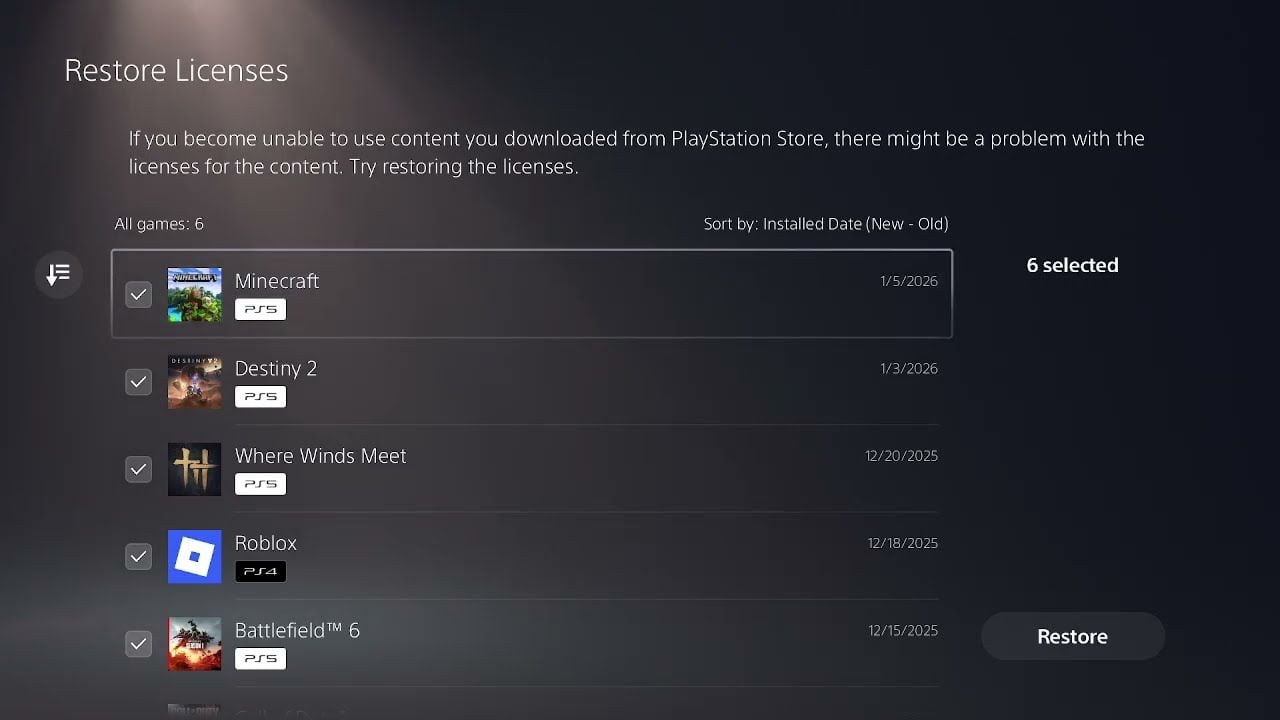
If you redeemed a code for specific DLC, an expansion pack, or virtual currency that has not shown up in-game, run a license refresh. Under PS5 firmware 24.06-10.00.00, license restoration lets you target individual titles:
- Go to Settings > Users and Accounts > Other > Restore Licenses.
- Select the specific game missing its add-on content and run the tool.
4. Close Running Game Applications
Games running in the background will not detect balance changes or newly granted microtransaction entitlements. Save your game, press the Options button on the home screen card, select Close Game, and relaunch the title.
| Issue Symptom | Underlying Cause | Corrective Action |
|---|
| Code success prompt, balance shows RM0.00 | Local console GUI cache displaying stale data. | Sign out of PSN, reboot console, and sign back in. |
| Error E-82000134 on redemption | Account region does not match Malaysian MYR voucher. | Verify store currency; redeem code on a native MY account. |
| Child profile shows zero after top-up | Sub-accounts cannot hold independent wallets. | Family Manager must increase monthly spending limit. |
| Voucher accepted but in-game coins missing | Game application running during transaction. | Force-close game title, restart console, and restore licenses. |
| Redemption button unresponsive | Temporary PSN server queue degradation. | Wait out the 24-hour settlement window; verify via web ledger. |
These steps isolate whether the issue is a local client cache delay or an actual account configuration conflict.
If you are buying digital releases on launch day, an authentic MYR PSN wallet top-up avoids regional account errors and ensures direct redemption.
Retail Activation Glitches vs Online Digital Codes
Physical cardboard PSN cards purchased at brick-and-mortar stores in Malaysia will fail at redemption if the cashier did not complete the register activation scan. Physical cards carry no value until their barcode registers with Sony at checkout.
If the cash register misses the activation handshake, the code stays locked, and the console will flag it as invalid. Sony Support will not activate the code without a physical sales receipt showing the barcode serial number.
Digital vouchers from online platforms do not encounter cashier scan errors because codes are drawn directly from active digital pools.
Before assuming a code is dead, check for common character typos:
- Typing the letter O instead of the number 0.
- Mistaking the letter I for the number 1.
- Confusing B and 8.
- Adding hyphens or spaces manually (the console redemption box formats dashes automatically).
Spending Strategy and Wallet Allocation by Player Tier
PlayStation Store always charges wallet balances first before drawing from linked credit cards or payment methods. Structuring your top-ups prevents leaving unused MYR balances sitting in your account.
| Spender Tier | Typical Monthly Spend | Recommended Wallet Top-Up Strategy |
|---|
| Free-to-Play / Low Spender | RM0 – RM50 | Top up only the exact amount needed for a season pass or specific skin; avoid high-value vouchers. |
| Mid Spender / Value Gamer | RM50 – RM250 | Purchase mid-tier vouchers during seasonal discount promotions; combine wallet credit with PS Plus savings. |
| Heavy / Day-One Collector | RM250+ | Maintain a buffered wallet balance for pre-orders and Deluxe editions; pre-load funds to avoid launch-day payment gateway timeouts. |
Match your voucher purchases to your buying frequency:
Free-to-Play & Budget Players
If you only buy an occasional battle pass, top up exact sums. Settled PSN funds do not expire, but they cannot be transferred between accounts or cashed out. Only add what you intend to spend immediately.
Mid-Tier Gamers
If you grab two or three sale titles each month, keep a modest balance loaded. The PlayStation Store refreshes discounts every two weeks, and maintaining wallet credit bypasses SMS OTP delays and bank card checkout drops.
Heavy Spenders and Pre-Order Fans
For day-one AAA releases, keeping funds in your wallet avoids late-night payment gateway blocks. Local banks sometimes flag midnight automated transactions. Using verified prepaid PlayStation MY codes ensures pre-orders unlock without billing interruptions.
Safe Voucher Top-Up Practices
Watch out for social media scams advertising "PSN code generators" or "wallet glitch exploits."
Protect your account by noting how official top-ups operate:
Legitimate Top-Ups:
- Require only a 12-character alphanumeric code entered inside the official PlayStation Store menu.
- Never ask for your PSN email, password, or 2FA backup codes.
- Deliver a code string formatted as
XXXX-XXXX-XXXX.
Scam Red Flags:
- Websites prompting you to sign in with your PSN credentials to claim free wallet cash.
- Sellers asking for screen sharing or remote desktop access to "activate" your balance.
- Offers claiming to double your wallet funds via system setting codes.
Never hand out account credentials for a top-up. Voucher codes are client-side keys entered directly by the account owner.
FAQ
Why is my PSN wallet balance showing zero after successfully redeeming a Malaysia card?
The console or mobile app interface is showing cached local data rather than querying the live database. Sign out of your PSN account on your console, restart the system, and sign back in to force the store interface to refresh its balance counter.
How can I verify if my redeemed MYR voucher actually credited my account?
Open your Transaction History by heading to Settings > Users and Accounts > Account > Payment and Subscriptions > Transaction History. If the voucher redemption appears in your 90-day activity log, the credit is permanently tied to your profile and ready to use.
Can a Malaysian PSN account redeem a PlayStation card purchased in USD or SGD?
No. PlayStation Network codes are strictly region-locked to the country where the account was registered. A Malaysian PSN account uses MYR pricing and will immediately reject foreign gift cards with error code E-82000134.
Why is the wallet balance not showing on my child's PlayStation account?
Child profiles cannot hold personal wallet balances under Sony's account architecture. Funds redeemed on family setups flow into the Family Manager's master wallet, and the manager must allocate a monthly spending limit before the child profile can make purchases.
What should I do if a physical PSN card bought in a retail store gives an error when redeemed?
Check the code carefully for common character misreads like typing 'O' instead of '0'. If the code still fails, return to the retail store with your purchase receipt to ensure the cashier activated the barcode serial at the checkout register.
How long does it take for a redeemed PSN gift card to show up?
Under normal operating conditions, funds reflect within a few seconds of confirming redemption. If Sony's transaction servers are experiencing heavy network loads or routine maintenance, processing and settlement can take up to 24 hours.
Do redeemed PlayStation Network wallet funds in Malaysia expire?
No, settled wallet funds on an active Malaysian PSN account never expire. However, once funds are added to a specific wallet, they cannot be transferred to a different PlayStation account or refunded back to cash.
Final Verdict
If your Malaysian PSN code redeemed successfully but your wallet counter shows RM0.00, do not try re-entering the code or raising a billing dispute immediately. Your balance is almost certainly settled on the backend.
Check your 90-Day Transaction History on a web browser first. If the top-up appears in that ledger, your balance is safe; sign out of your console, reboot, and sign back in to clear the interface cache. If the transaction ledger remains empty after 24 hours while the code shows as spent, collect your purchase receipt, digital invoice, and PSN ID, then submit a support ticket to PlayStation Support Malaysia.