Pilots hunting for free Striker customization, pilot gear, and premium currency without opening their wallets can acquire rewards through external promotional hooks—specifically official Twitch drops campaigns and friend recruitment referral codes—alongside in-game farming on the Matrix Marketplace. However, these systems demand precision: watch time only tracks on single live streams, drops require manual claims before campaigns shut down, and rewards fail to route properly if your numerical Player ID and server cluster do not match.
Earning promotional freebies sounds simple until a campaign wraps up and your hangar stays bare. In Mecha BREAK, where Corite funds your Strikers, custom paints, pilot gear, and seasonal Battle Passes, working every free reward pipeline saves real money. Here is how you lock down your account connections, run your watch timers, recruit squadmates, and track down missing loot.
Setting Up: Mecha BREAK Twitch Drops Link Account Steps
Twitch Drops tie external viewing time directly to your in-game inventory. Miss a single verification handshake, and you will stream hours of mech brawls for zero return.
The immediate trap is assuming Steam handles everything automatically. As platform analysis from Raidline points out, publishers frequently run separate launcher ecosystems or external login portals for Steam releases. Before idling on any channel, confirm whether the active drop campaign directs you to link Twitch directly to Steam or through a dedicated publisher portal.
| Promotion Channel | Linking Requirement | Verification Point | Visual Guide |
|---|
| Twitch Drops | Twitch Connections settings | Drops inventory badge |  |
| Friend Referral | Numerical Player ID & Region | Pilot Profile menu |  |
| Marketplace Trading | In-game hangar access | Matrix Marketplace terminal | 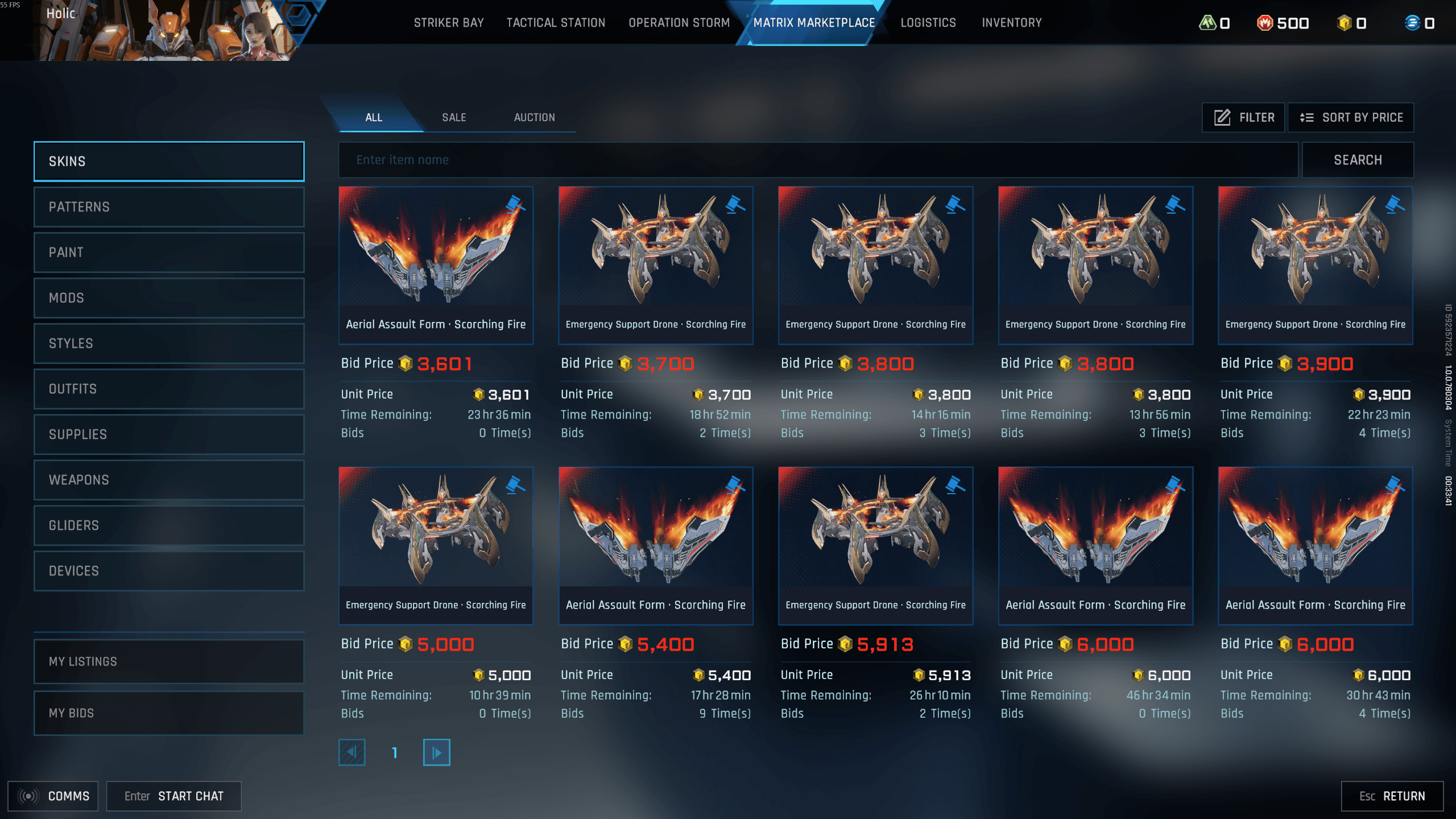 |
To lock down your integration without errors:
- Log into your Twitch account and head to Settings > Connections.
- Locate the official connection prompt specified by the campaign (either direct Steam linking or the publisher's external portal).
- Confirm authorization permissions between Twitch and your gaming profile.
- Verify that the eligible channel displays the active "Drops Enabled" tag before idling in chat.
Do not expect a permanent drop program running in the background. Publishers launch Twitch drops as isolated, temporary events with limited advance notice (The Finals Twitch Drops Guide), completely uncoupled from Steam's storefront schedule.
Watch-to-Earn Rules: How Stream Tracking Actually Works
Can you open five muted tabs across different partners and finish a four-hour watch marathon in forty minutes? Absolutely not.
Streaming platforms strictly enforce anti-stacking rules. Documented campaign mechanics on The Finals Twitch Drops Guide confirm that watch time tallies on only one eligible channel at a time. Opening five browser tabs will not speed up your progress by a single minute.
Broadcast status matters just as much. Platform data from Raidline confirms that drop counters only tick while the streamer is actually live. Muting the tab and letting it run in the background works fine. Queueing up past broadcasts (VODs), however, earns you zero progress.
One critical detail: Twitch will not automatically push unlocked items into your hangar. You must open your Twitch Drops Inventory and click "Claim" before the promotional window closes. Miss that deadline, and your earned loot is gone for good.
Missing Items: Mecha BREAK Claim Twitch Drops Not Showing
You watched the stream, claimed the loot in your inventory, and booted up the client—yet your hangar shows nothing new. Before assuming your profile is bugged, check the delivery cycle.
According to The Finals Drops Support, inventory synchronization requires a hard session restart. If you claimed your drop while the game client was actively open, the server cannot inject the assets into your running session. Shut down the client completely, relaunch, and log back in to force a profile refresh.
Account tracking also depends entirely on your regional server hub. Promotional routing data from BitTopup's Mecha BREAK Catalog confirms that accounts route through regional partitions:
- Asia-Pacific: Tokyo, Singapore, Seoul, Sydney hubs
- N.America: US East, US West, Canada hubs
- S.America: Brazil and regional routes
- Europe: Frankfurt, London clusters
If you swap between regions, remember where your callsign lives. Drops and promo items bind strictly to the regional server partition tied to your numerical Player ID.
To find your exact ID for manual customer support escalations or linking checks: open the game, click your Pilot Avatar / Profile Icon in the top-left corner of the hangar screen, select the Personal Info tab, and copy the numerical string displayed next to your callsign (BitTopup).
Friend Recruit Codes and Player Invites
Recruitment codes solve an entirely different problem than stream drops: squad acquisition rather than solo viewership. That structural difference shapes how the technical tracking and rewards work.
As analyzed by promotional tracking platform Upgrader.pro, universal promo codes provide a static bonus to anyone who enters the string. Referral codes, conversely, function as user-specific acquisition mechanisms tied to an inviting pilot or content creator ID. When an invited pilot inputs your referral link, binds your invite code, or reaches key account milestones, milestone-based payouts trigger for both parties.
Do not expect an endless payout stream, either. Referral setups enforce an invite code rewards cap, limiting the total volume of recruits or milestone bonuses a single account can bank. This keeps power-users and creators from stockpiling infinite premium assets.
| Promotion Method | Mechanism Type | Reward Scope | Source Reference |
|---|
| Stream Drop | Live Watch Duration | Universal per tier completed | Raidline Analysis |
| Creator Referral Code | User-Specific ID Linking | Account-specific milestone bonuses | Upgrader.pro Analysis |
| Universal Promo Code | Static Public String | Fixed single-use gift bundle | Upgrader.pro Analysis |
| Marketplace Trade | In-Game Barter / Sale | Free Corite accumulation | AOEAH Currency Guide |
Free Corite: The Matrix Marketplace Alternative
Promotional drops and referral bonuses are periodic. What do you do when there are no live Twitch campaigns running?
Your cosmetic progression does not stall out when official Twitch campaigns go dark. Corite remains the core currency needed for Strikers, mecha paints, pilot gear, and Battle Passes. According to the progression economy documented by AOEAH, non-paying players can reliably generate Corite in-game through the player-to-player Matrix Marketplace.
Drop into extraction zones like Mashmak to scavenge high-value tradeables: research modules, Striker mods, top-tier weapons, pilot cosmetics, and rare custom paints. Selling those items on the Matrix Marketplace lets you convert high-demand loot into Corite. It demands solid survival skills and patience, but it offers a reliable, year-round income stream when promotional drop campaigns are offline.
If you want to skip the extraction grind entirely and unlock Strikers or Battle Pass tiers right away, you can grab direct Mecha BREAK top-ups via BitTopup.
Frequently Asked Questions
Can you watch multiple streams at the same time to earn Twitch drops faster?
No. Twitch drop progress only tracks on a single active eligible channel at any time. Opening multiple simultaneous streams will not stack watch time or accelerate reward unlocking (The Finals Twitch Rules).
Does watching recorded VODs count toward Twitch drop watch time?
No. Drop timers only progress while watching live broadcasts. While running a muted live stream in the background is acceptable, recorded stream VODs do not count (Raidline Steam Drops Breakdown).
How do you find your Mecha BREAK Player ID for promotional tracking or account linking?
Log in to the game, click your Pilot Avatar / Profile Icon in the top-left corner of the hangar screen, open the Personal Info profile tab, and locate the numerical sequence beside your pilot callsign (BitTopup).
Follow BitTopup for more Mecha BREAK news~