When Mobile Legends: Bang Bang displays a "Region Not Supported" or regional mismatch notice, the voucher you are attempting to redeem is locked to an account territory that does not match your profile's registration origin. Codes such as Mobile Legends Russia PINs only activate on game accounts registered within the Russian Federation and designated CIS regional server clusters. Because Moonton verifies eligibility against internal server infrastructure rather than your dynamic IP address, turning on a VPN or spoofing your GPS coordinates will not bypass the block.
How Moonton validates account region and Zone IDs
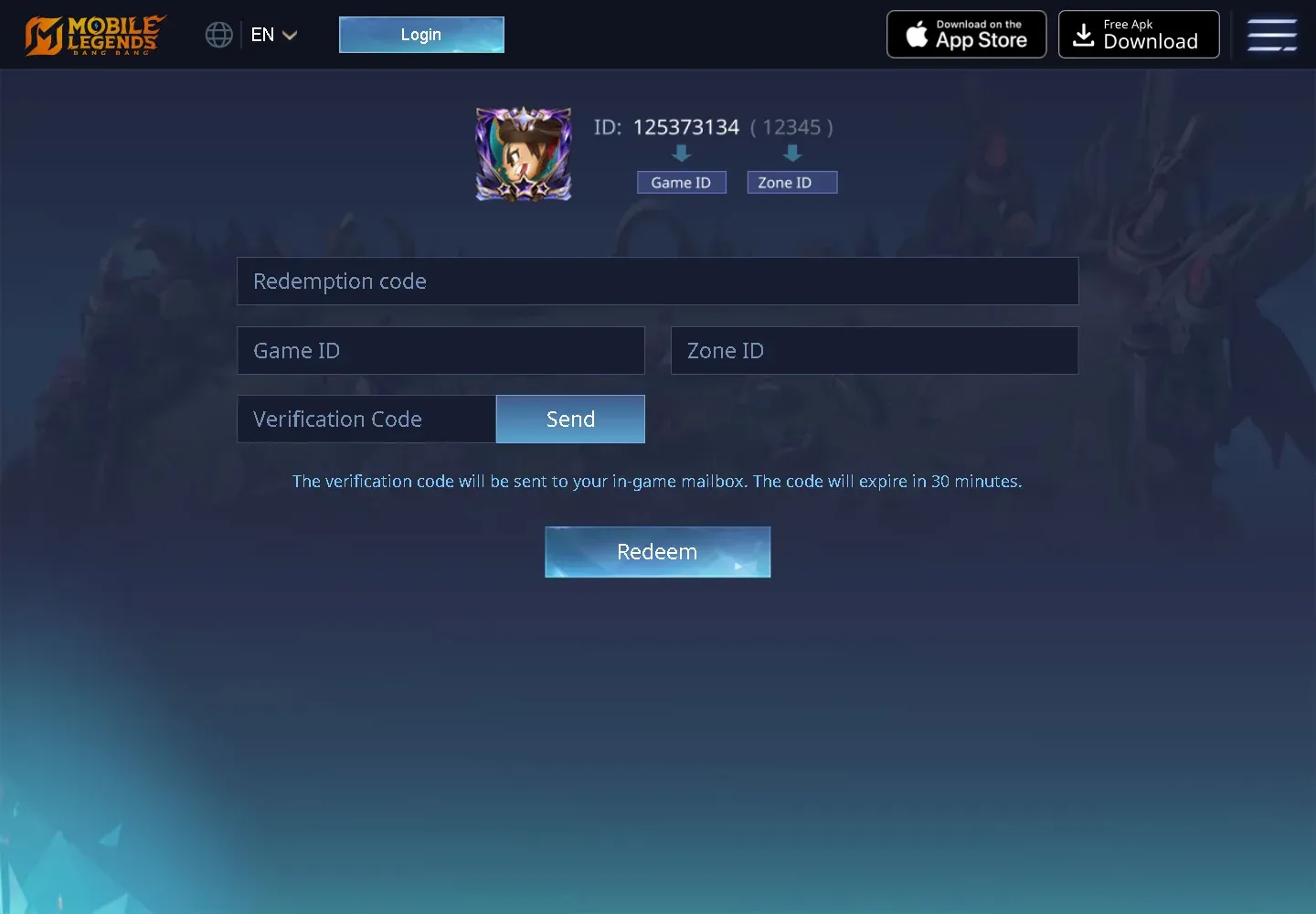
Every Mobile Legends player profile consists of two distinct numbers: a 9–10 digit Game User ID and a 4-digit Zone ID located in parentheses next to it. As documented by PlayAware guides, the Zone ID represents the server shard where an account lives rather than a simple, readable country code. Two players located in the same city can sit on completely different Zone IDs depending on when and where their accounts were generated.
When promotional vouchers or digital PINs are created for regional distribution, Moonton restricts their activation to specific server clusters. If a prepaid voucher requires a CIS or Russian account origin according to BitTopup specifications, the redemption portal checks the account record tied to that User ID and Zone ID pair. If your profile was registered on a server shard outside that regional territory—such as Southeast Asia, Western Europe, or Latin America—the system rejects the redemption before granting the reward.
Why a VPN does not work for MLBB codes
Some community blogs, including BuffBuff, suggest that players can simply switch on a VPN to change their location before redeeming region-specific codes. This advice fails to account for how Moonton processes account identities.
Technical analyses by Tenorshare iAnyGo explain that altering device GPS coordinates or routing traffic through a VPN cannot relocate an account to a different server cluster. Matchmaking routing and profile metadata remain anchored to initial registration parameters and server architecture. A VPN only changes your browser's external IP address; it leaves Moonton's underlying database record untouched.
If an account was initialized on a non-CIS server shard, spoofing a Russian IP still results in the same regional mismatch error.
Official redemption steps and the 30-minute timer
To verify whether a code error stems from a region lock or invalid input, test the code through the official portal rather than third-party forms:
- Open the official Mobile Legends Code Exchange portal (
m.mobilelegends.com/en/codexchange). - Enter the alphanumeric redemption code in the Redemption Code field.
- Type your 9–10 digit User ID into the Game ID field, followed by your 4-digit Zone ID.
- Click Send next to the Verification Code box.
- Open your in-game mailbox in Mobile Legends to retrieve the 6-digit verification code.
- Enter the 6-digit code into the portal and click Redeem.
Per BitTopup's redemption instructions, that 6-digit verification code remains valid for exactly 30 minutes. If you exceed the window, you must click Send again to generate a fresh verification code.
Rate limits vs. regional mismatch errors
Repeatedly clicking the redemption button after an initial failure activates a secondary, unrelated lockout.
Moonton caps code exchange attempts per account per hour to deter automated spam, as confirmed by BitTopup. Triggering the Redemption Limit Exceeded warning locks your profile out of the redemption system, requiring a 30- to 60-minute cooldown before the portal accepts further attempts.
Regional PIN vouchers vs. direct UID recharges
Delivery mechanisms dictate whether diamond purchases face regional server restrictions.
| Delivery Type | Operating Mechanism | Account Restriction | Source |
|---|
| Direct UID Recharge | Automatic delivery directly to in-game diamond balance; requires UID & Zone ID at checkout | Credits accounts universally or based on direct storefront support; cannot be gifted as an unredeemed code | BitTopup |
| MLBB Russia PIN Voucher | Digital alphanumeric code delivered to order history; requires UID & Zone ID entry on code exchange portal | Region-locked strictly to accounts registered within the Russian Federation / CIS server cluster | BitTopup |
If you hold an unredeemed regional PIN that your account cannot accept, your only recourse is gifting the code to a player whose account was originally registered within that designated service territory.
Frequently asked questions
Can I change my MLBB account registration region by contacting support?
Moonton binds your account profile to the server shard assigned at creation. In-game customer service cannot manually alter your core Zone ID or migrate registration metadata to bypass regional promotional restrictions.
How do I check if my account is eligible for a Russian PIN?
Compare your server cluster origin. If your account was registered outside the Russian Federation and designated CIS regional server territory, the voucher will fail with a regional mismatch error per BitTopup. You can verify your Zone ID in your in-game profile menu beside your Game User ID.