Superlive in 60 seconds: what the official pages confirm
Superlive is a live-streaming social app. You watch streams, chat, follow people, send gifts bought with Coins, or go live yourself. Official Google Play shows 4.5 stars from about 254K reviews, a "10+ million" install band and a Mature 17+ rating, updated Oct 26, 2026. The Terms (no date on the page) say 18+ only, for using the service, buying Coins and withdrawing Diamonds. Coins "cannot be exchanged for cash". Play lists in-app items from "$0.99 - $399.99 per item" but no pack list. Help email: help@superlivellc.com (Terms §13).
Quick note on words: the Terms say Diamonds for what hosts earn, so I do too.
Why people see charges they didn't expect: two different things
This is the part that costs real money, so I'll be careful. There are two separate mechanisms, and people mix them up:
- The purchase prompt. A pop-up with a big "Continue" button that, according to users, starts a purchase. Superlive itself called its design "genuinely misleading" on Oct 14, 2026.
- Auto-Refill. A setting described in the Terms that buys a coin bundle for you when a gift costs more than your balance.
I can't prove from public pages that the pop-up and Auto-Refill are linked. Superlive's reply doesn't name Auto-Refill. Keep them apart in your head, and check both.
What Superlive said about the prompt (Oct 2026)
On Google Play, a reviewer dated Sep 16, 2026 wrote that a welcome prompt has "a big 'Continue' button" and, underneath, "a very small text" saying "continue without". At the time I fetched the page, 24 people had marked that review helpful. A second reviewer on Sep 12, 2026 described "a big continue button that charges you and a hidden button to decline".
Official Superlive Tech, developer reply on Google Play, Oct 14, 2026: "That purchase prompt design is genuinely misleading and we completely understand why you pressed Continue without realizing it was a charge. Your feedback has been escalated to our product team. Please contact support immediately with your transaction details so a live agent can personally process your refund."
Read that twice. The company says the design is misleading and invites you to contact support for a refund. That's one reply to one reviewer, and not a written policy. But it's the best official signal I found, and it's dated. If you pressed that button by mistake, quote this reply when you write to support.
How many people report it? A dated tally
I counted at least 10 separate 2026 reports of accidental or unexpected Superlive charges, at least 8 of them in Sep and Oct. Here are six of them. These are user claims on public pages, and I haven't verified any of them with Superlive.
| Date | Where | What the user says |
|---|
| Jul 27, 2026 | Community Sikayetvar | US$29.99 charged to a card without authorization, shown under a name starting "LiveStreamingsServic / SuperLive" |
| Sep 12, 2026 | Community Google Play review | "A big continue button that charges you and a hidden button to decline" |
| Sep 16, 2026 | Community Google Play review | Pressed "Continue" on a welcome prompt, wants money back. Developer replied Oct 14, 2026. |
| Oct 8, 2026 | Community Reclame AQUI (Brazil) | Accidental purchase on Sep 29, coins untouched, emailed the same day. User says no reply by Oct 13. |
| Oct 20, 2026 | Community Sikayetvar | Two debits on Oct 11, US$40 and US$28, so US$68 in total (Computed 40 + 28). Statement text spelled "Mobiteck". |
| Oct 24, 2026 | Community Sikayetvar | About 100 EUR taken after a subscription was "activated by mistake" a month earlier |
Sikayetvar cards don't print the year; I dated them from dates quoted inside each complaint. Counts are my tally of pages I could open on Oct 28, 2026. One more review (AppBrain, Oct 10, 2026) says a saved card was charged without a confirmation step.
Auto-Refill: what the Terms actually say
Auto-Refill lives in section 7.a of the Terms ("Recurring Charges & Auto-Refill"). I read the page on Oct 28, 2026. It shows no effective date. No other Superlive page I found explains it, and the one vendor post I saw that mentions Auto-Refill doesn't quote the clause.
| Part | What the Terms say (exact words in quotes) | What it means in plain words |
|---|
| §7.a.i How it starts | Official "By enabling the Auto-Refill feature within the platform, or by explicitly opting-in during your transaction", you let the operator charge your filed payment details "without requiring further manual entry or confirmation for each individual transaction". | You turn it on, or you tick an opt-in at checkout. After that, no more "are you sure?" per charge. |
| §7.a.ii When it fires | Official It is "triggered at the exact moment you attempt an in-app action (such as sending a virtual Gift) and your existing Coin balance is insufficient". It charges "the nearest available pre-defined Coin bundle that successfully covers that deficit". | You tap a gift you can't afford, and a whole bundle gets bought. The amount depends on the gift. |
| §7.a.iii How to stop it | Official You can change it "directly through the 'Settings' menu". Turning it off stops future automated billing, but "does not affect, cancel, or entitle you to a refund for any automated purchases that were successfully processed prior to the deactivation". | Switch it off now. Past charges stay charged. |
Google describes the same idea in its help page "Automatic, balance-based purchases", and even uses "virtual gifts" in a live stream as the example. It says you can cancel such a plan under Subscriptions on Google Play, and that cancelling "won't affect any items already purchased": support.google.com/googleplay/answer/16007932.
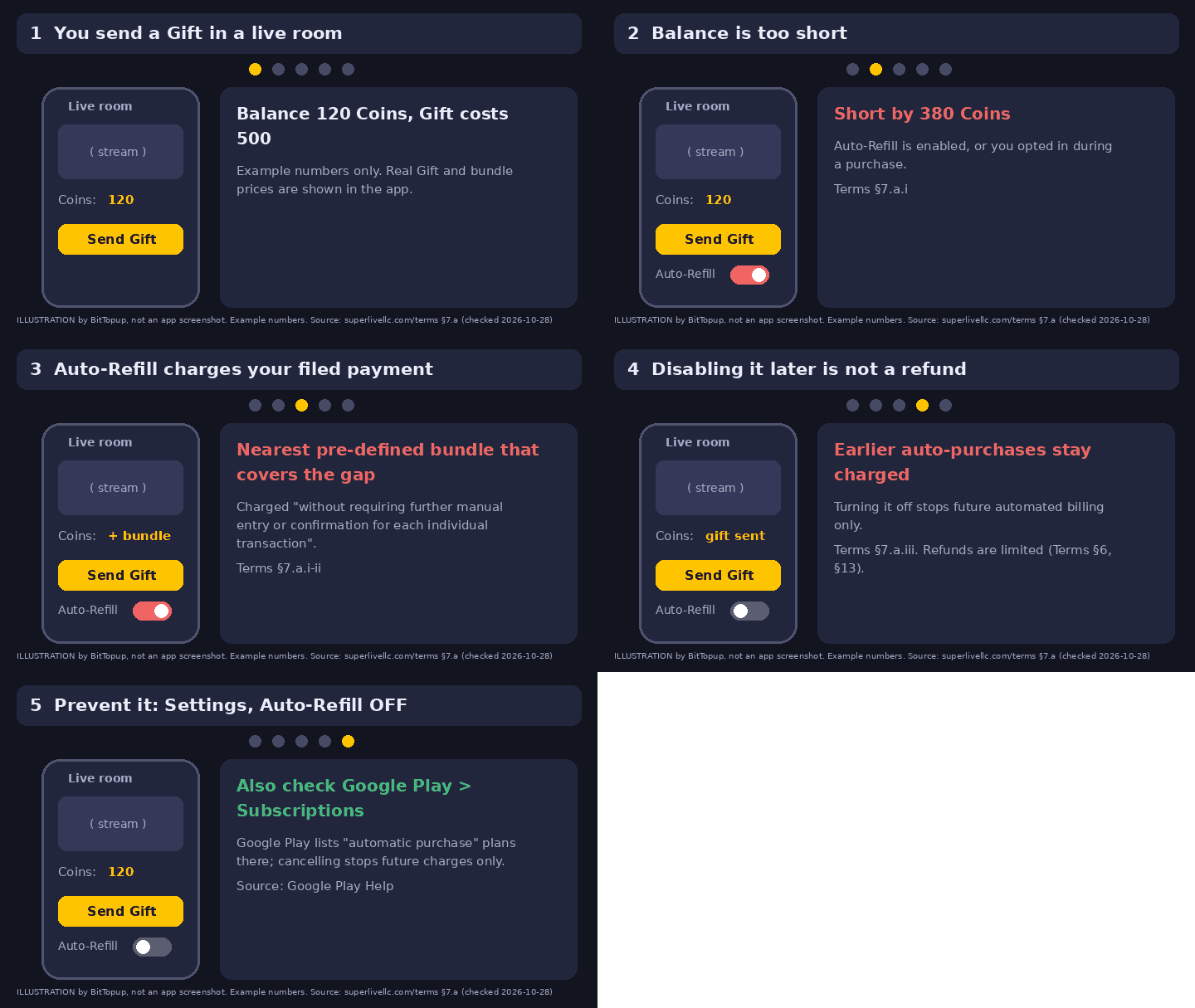
Illustration by BitTopup with made-up example numbers. It is not an app screenshot and not real data. Based on Superlive Terms §7.a (superlivellc.com/terms, checked Oct 28, 2026) and Google Play Help (support.google.com/googleplay/answer/16007932).
Turn Auto-Refill off: steps
I don't have a live Superlive account to screenshot, so I can't show you the exact switch. The Terms say it's in "Settings", and Superlive's account-deletion path ("Me > Settings > Connected Account") confirms a Settings menu exists. The label and position of the switch: not verified by me. Check it on your own phone.
- Open Superlive, go to Me, then Settings.
- Look for an Auto-Refill option and switch it off. Take a screenshot with the date on it.
- On Android, open Google Play, tap your profile picture, then Payments & subscriptions, then Subscriptions. If an automatic-purchase plan for Superlive is listed, cancel it there.
- In the same area, open Budget & order history. Match every Superlive charge to a date and an amount.
- Check your email for Google Play receipts. Google says it sends one after each automatic charge.
- Before you gift in a live room, look at your coin balance and the gift's price. If the gift costs more, stop. That's exactly the moment Auto-Refill fires.
I was charged. What now? A decision table
First, find out which kind of charge you have. The public pages don't say whether Superlive bills through Google Play or straight to your card. The Terms talk about "Filed Payment Details" and "payment processors", and some users quote a statement line starting with a company name rather than "Google". That's my inference from the pages. Your own bank app or Play order history will tell you which one you have.
| What happened | What the Terms say | First move |
|---|
| I pressed "Continue" by mistake | Official Purchases are "final and non-refundable". Refunds for "exceptional circumstances" are at the operator's "sole discretion". Superlive's Oct 14, 2026 reply invites you to contact support with transaction details. | Email help@superlivellc.com the same day. Include date, amount, receipt, and a link to the Oct 14 reply. |
| Auto-Refill bought a bundle | Official Turning it off gives no refund for charges already processed (§7.a.iii). If you never switched it on, the Terms don't say what happens. | Turn it off first. Then ask support, and say whether you ever enabled it. |
| Double charge, or coins never arrived | Official "Duplicate transactions" and coins "not properly credited" are named cases (§6). §13 names "a technical issue with the purchase". | Send the receipts and your Superlive ID to support. |
| A charge I don't recognize at all | Official "Unauthorized charges" and "fraudulently made" purchases are named cases (§6 and §13). | Check family members first. Then report it to support and, if billed by Google, use Google's report route. |
| A subscription I didn't mean to start | Official Plans auto-renew until canceled. Fees are "generally non-refundable" except under a Money-Back Policy "displayed on the purchase screen" (text not found by me). | Cancel first. Screenshot the purchase screen next time you see it. |
The Terms also say "except where required by applicable law", so local consumer rules may give you more. I'm not a lawyer, so check yours.
Refund route, step by step
- Stop the bleeding. Switch Auto-Refill off and cancel any automatic-purchase plan in Google Play.
- Within 48 hours, if Google billed you: Google Play Help says you "may be able to get a refund" in that window. Use support.google.com/googleplay/answer/15574908. Google says to allow 1 to 4 days.
- After 48 hours: Google says to contact the developer, who "can process refunds according to their policies". For Superlive that's help@superlivellc.com (Terms §13).
- Write a short, calm email with your Superlive ID, date and time, amount, receipt or order ID, and a screenshot of your balance. Keep every reply, because several users say support went quiet (I can't verify that).
- If the charge truly isn't yours: Google says to report unauthorized charges "within 120 days" (support.google.com/googleplay/answer/15574897). Your card issuer has its own rules too.
Chargebacks are a last resort, not a shortcut. The Terms say a dispute filed "in bad faith" can end in a suspended or terminated account and forfeited Coins and Diamonds. Use your bank's dispute process only for charges that are truly unauthorized, after you've tried the routes above. If your account holds Diamonds, think twice. This isn't legal advice.
What is that odd name on my statement?
The Terms name the operator as "Mobitech Marketing Software Limited" and "UNICODE GROUP LTD". Two complaints (Jul 27 and Oct 20, 2026) show statement text starting "LiveStreamingsServic" and spelled "Mobiteck". That's Community evidence from two people, so your own statement may differ. If a line like that matches the date and amount of a Superlive purchase, it's probably that.
Superlive Coin prices: same coins, up to 38.5% apart
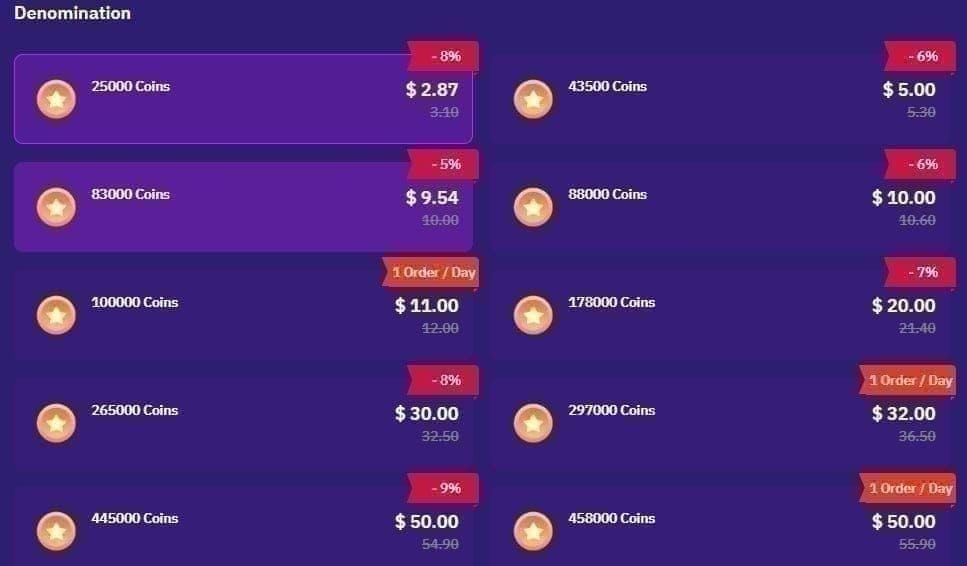
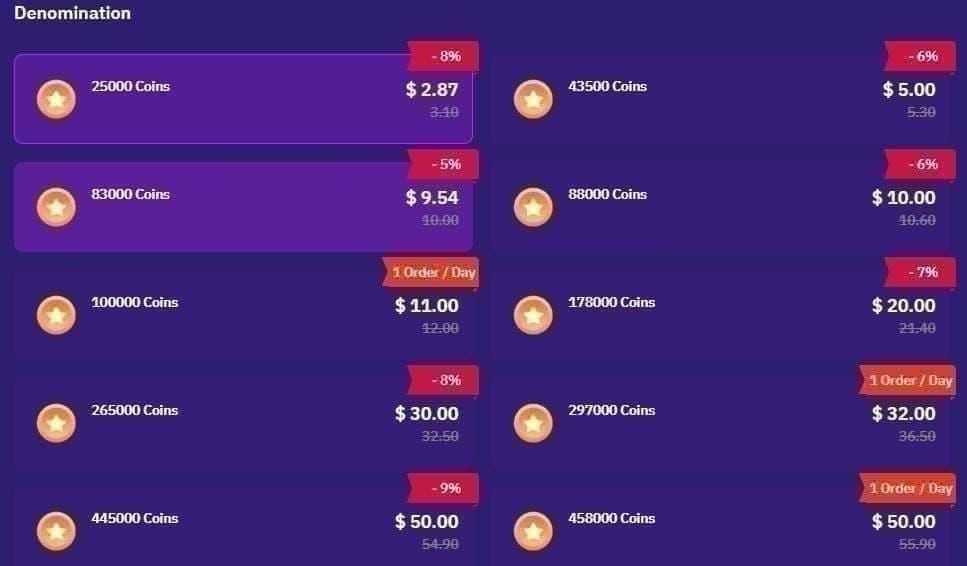
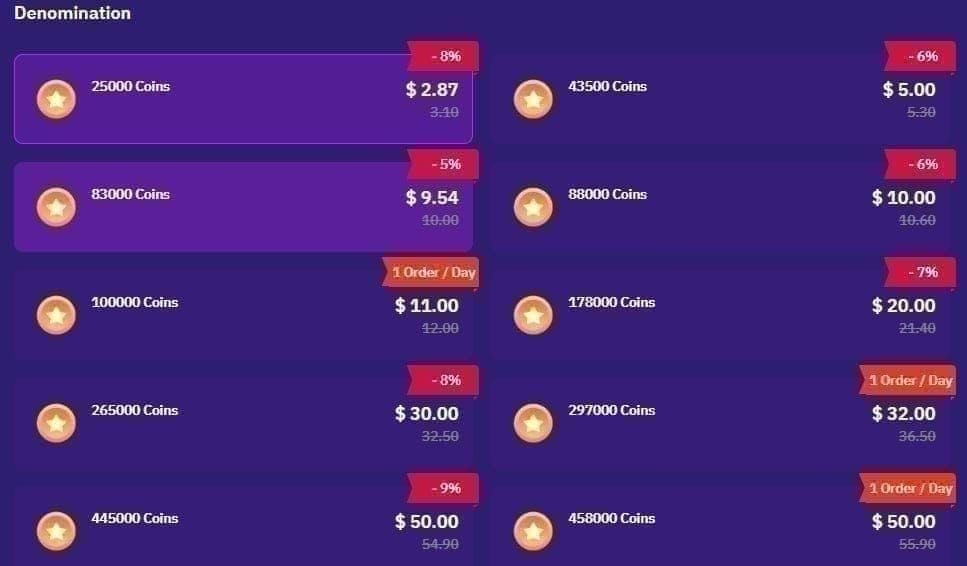
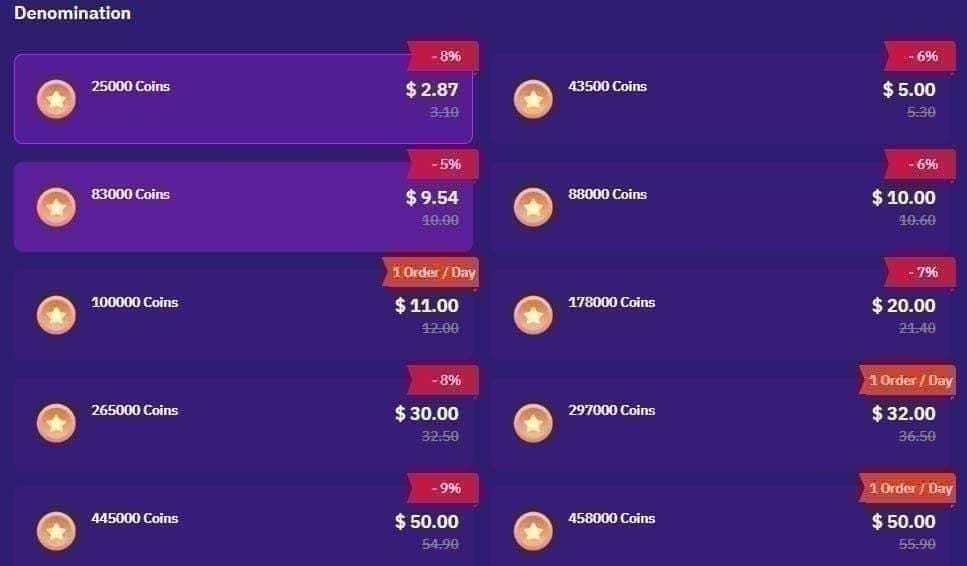
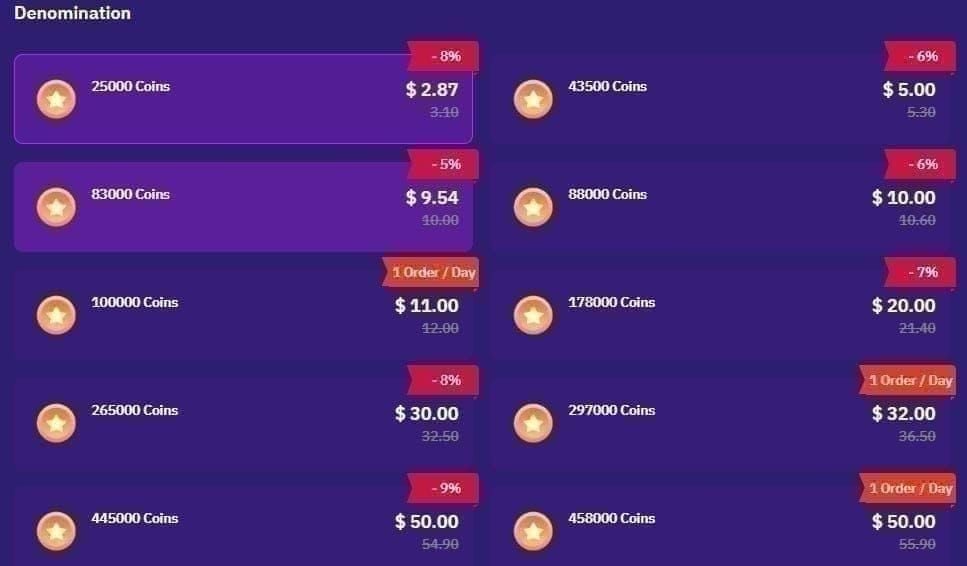
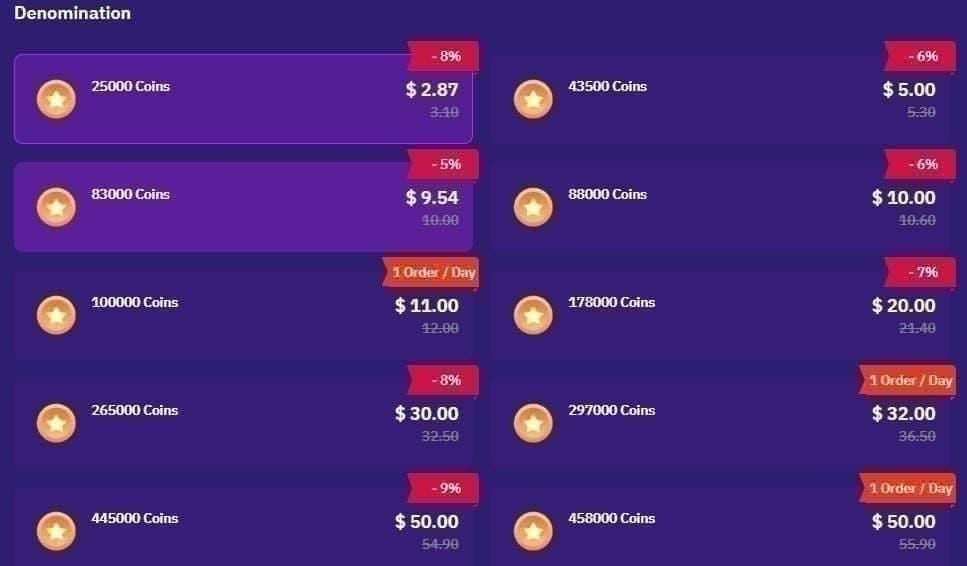
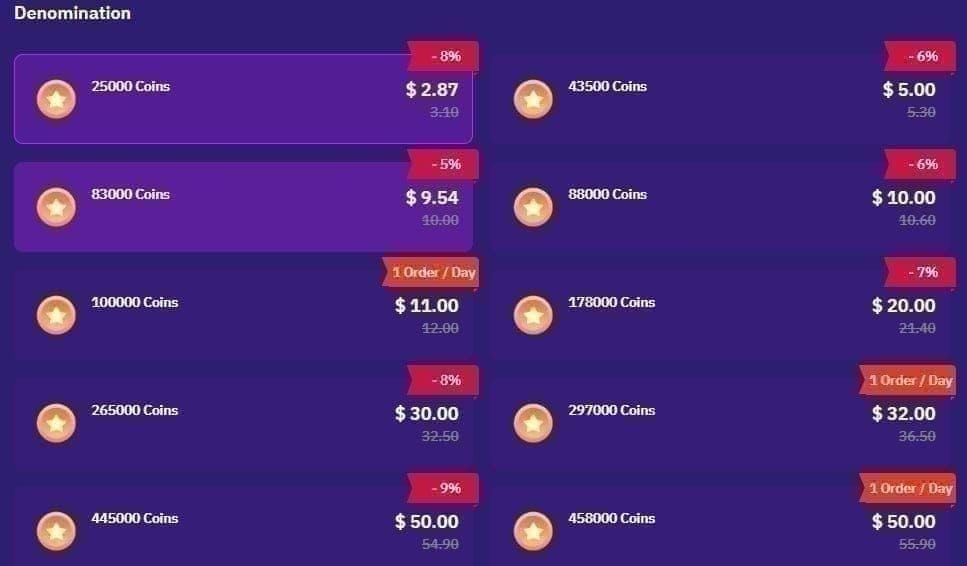
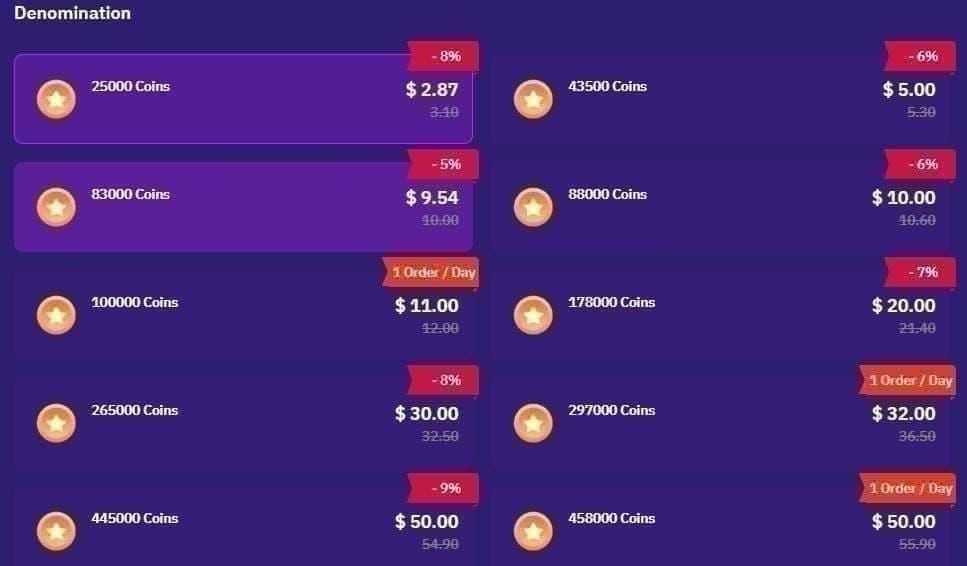
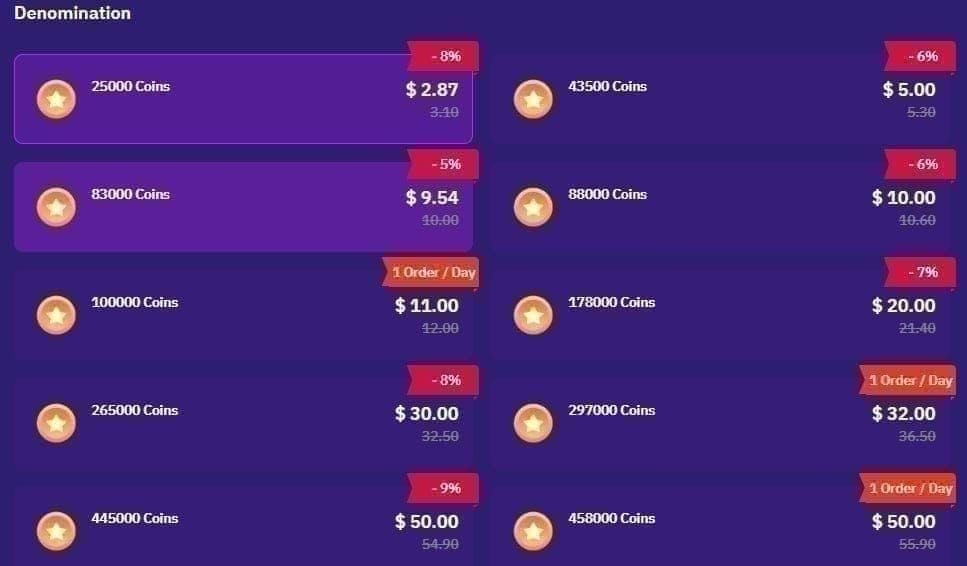
Superlive doesn't publish a coin price list on its official sites. Google Play shows only a range, "$0.99 - $399.99 per item", and no pack-by-pack list on the web page. So a price comparison has to start with shop pages. I opened ten and compared the five pack sizes they all sell: 605, 1,230, 3,125, 6,250 and 10,000 coins.
How to watch the buying screen first
Before any shop, look at your own in-app price screen. Here's a short walkthrough of the in-app Purchase Coins list. One thing to know: the prices on screen are in BDT (a Bangladesh storefront), not US dollars. Don't read them as USD.
Credit: How To Tuts on YouTube, "How To Purchase Coins On SuperLive Stream & Chat App" (Aug 27, 2025, 0:50). One user's screen. Prices shown are BDT, and the "Limited Time Special Offer" pop-up at about 0:17 to 0:27 may or may not be the same prompt that Play reviewers complain about. Not an official Superlive video.
Notice the pack sizes in that video (216, 540, 1,080 coins and so on). They differ from the ladders shops list (605, 1,230, 3,125). So in-app packs change by storefront, and you should compare by coins per dollar, not by pack name.
The in-app price: what I could and couldn't find
Google Play shows only the range ($0.99 to $399.99 per item), and the App Store listing is gone, so I found no current official pack list. Two old iOS captures disagree: an Adapty paywall capture (Sep 3, 2024, Secondary) works out to 120 coins per $1 (Computed 600 ÷ 4.99), while a cached, undated Armenia storefront snippet (Secondary, unverified) gives about 134 to 139. Don't trust an "in-app price" you can't date. Screenshot your own screen instead.
Shop-by-shop: the five packs everyone sells
All prices are USD, taken from each shop's page on Oct 28, 2026 (Singapore time), as a guest, before tax, card fees or coupons. Computed columns: coins per $1 = coins ÷ price. Extra = (shop price ÷ cheapest price) − 1. The last two columns use the 10,000-coin pack.
| Shop | 605 | 1,230 | 3,125 | 6,250 | 10,000 | Coins per $1 (10k) | Extra (10k) |
|---|
| BitTopup (goods) | $3.97 | $7.94 | $20.10 | $40.19 | $64.31 | 155.5 | 0% |
| ARCTopup | $4.19 | $8.37 | $21.17 | $42.33 | $67.74 | 147.6 | +5.3% |
| Z2U (lowest seller) | n/a | n/a | n/a | n/a | $72.46 | 138.0 | +12.7% |
| EnjoyGM / GameBar | $4.66 | $9.30 | $23.53 | $47.07 | $75.32 | 132.8 | +17.1% |
| Durmaplay | $4.61 | $9.39 | $23.84 | $47.67 | $76.27 | 131.1 | +18.6% |
| EZG | $4.71 | $9.60 | $24.30 | $48.59 | $77.76 | 128.6 | +20.9% |
| SEAGM / TopUpLive | $5.50 | $11.00 | $27.50 | $55.00 | $88.00 | 113.6 | +36.8% |
| Gap, dearest vs cheapest | +38.5% | +38.5% | +36.8% | +36.8% | +36.8% | | |
Seller claim every price is the shop's own listing. Pages: bittopup.com/goods/superlive-coins, arctopup.com/top-up/superlive, z2u.com/superlive/Top-Up-2-36215, enjoygm.com/top-up/superlive, gamebar.gg/top-up/superlive, durmaplay.com/en/superlive-coin-3901, ezg.com/superlive/coins (5% promo applied), seagm.com/en-us/superlive-top-up, topuplive.com/superlive. Formula for the headline gap: 605 coins, $5.50 ÷ $3.97 = 1.385; 10,000 coins, $88.00 ÷ $64.31 = 1.368.
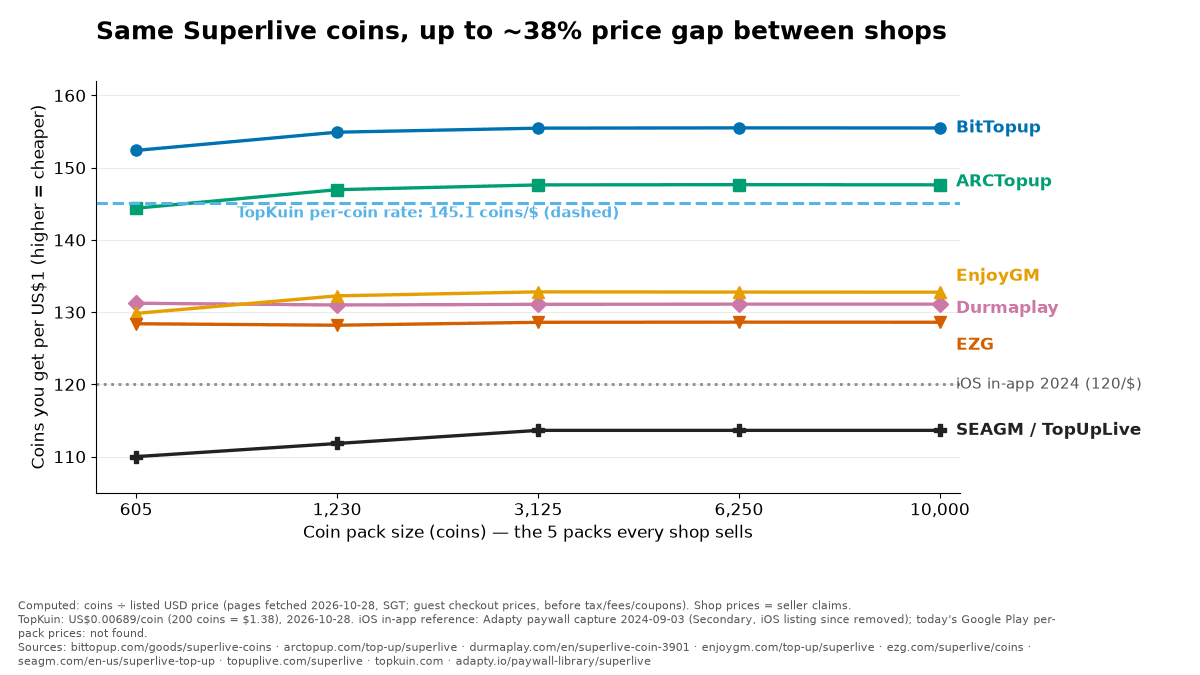
Original chart by BitTopup. Data: shop product pages fetched Oct 28, 2026 (Singapore time), listed in the chart footer. Higher = more coins per dollar. Seller claims; Computed = coins ÷ price. The dashed 120/$ line is a 2024 iOS capture (Secondary) from adapty.io; the other dashed line is TopKuin's per-coin rate of 145.1/$ (1 ÷ 0.00689, Seller claim, topkuin.com).
What I take from this table
- The same coins cost up to 38.5% more at the dearest listing. On the 10,000 pack that's $23.69 extra (Computed $88.00 − $64.31).
- BitTopup's goods page was the lowest on the five shared packs on Oct 28, 2026. ARCTopup was second, about 5% higher.
- A shop isn't automatically cheaper than the app. SEAGM and TopUpLive list 110 to 114 coins per dollar, below even the 120 of the 2024 iOS capture. Today's Android per-pack prices are not shown on Google Play, so check your screen.
Our own pages disagree. BitTopup's goods page showed 605 coins at $3.97 on Oct 28, 2026. Our older comparison page (price.bittopup.com, "Prices updated 2026-07-08") showed $4.19, and our homepage showed the 3,125 pack at $23.89 against $20.10 on the goods page, the same day. I used the goods page, and I'd check checkout before you pay. That page also lists competitor prices I could not verify, so I haven't used them.
Bigger packs: the ladders don't match
Above 10,000 coins, shops use two ladders: 13,800 / 20,850 / 43,000 / 50,050 / 71,500 / 100,000 at some, 13,200 / 19,800 / 41,250 / 48,125 / 68,750 / 97,020 at others. Comparing "a 100k pack" can fool you, because 100,000 is not 97,020.
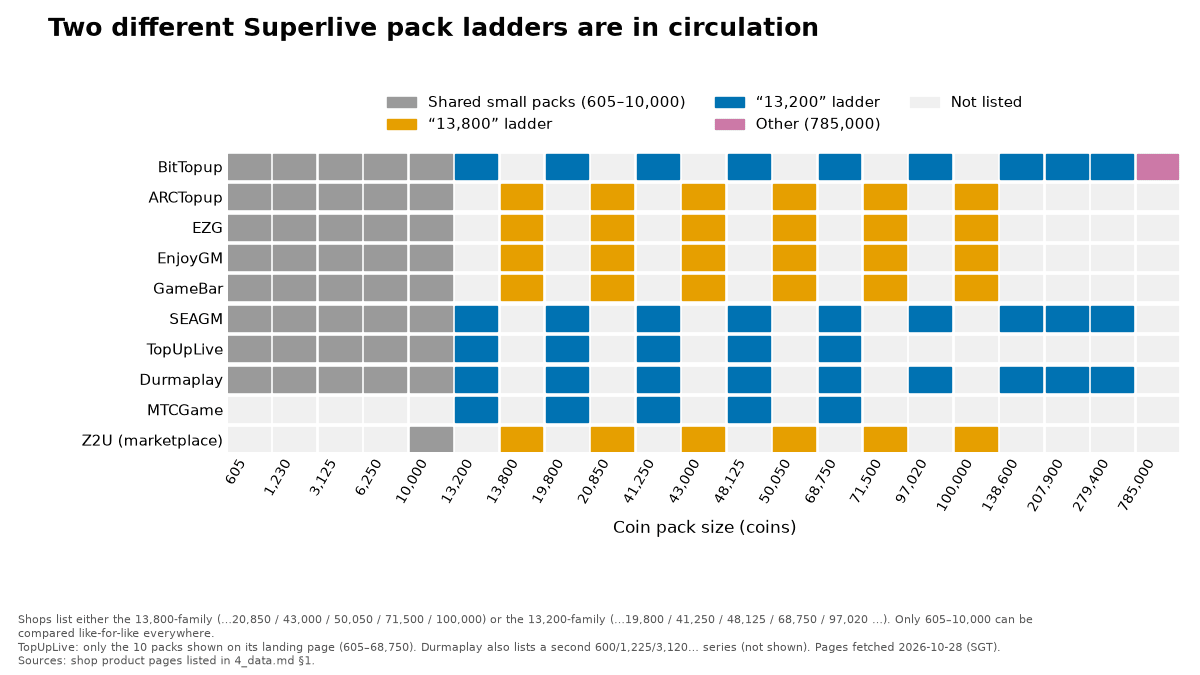
Original chart by BitTopup. Data: shop pages fetched Oct 28, 2026 (Singapore time). Seller claims. TopUpLive's landing page shows only 10 packs; Durmaplay also lists a second series not shown.
So I compared the nearest large pack by price per 1,000 coins (Computed price ÷ coins × 1,000):
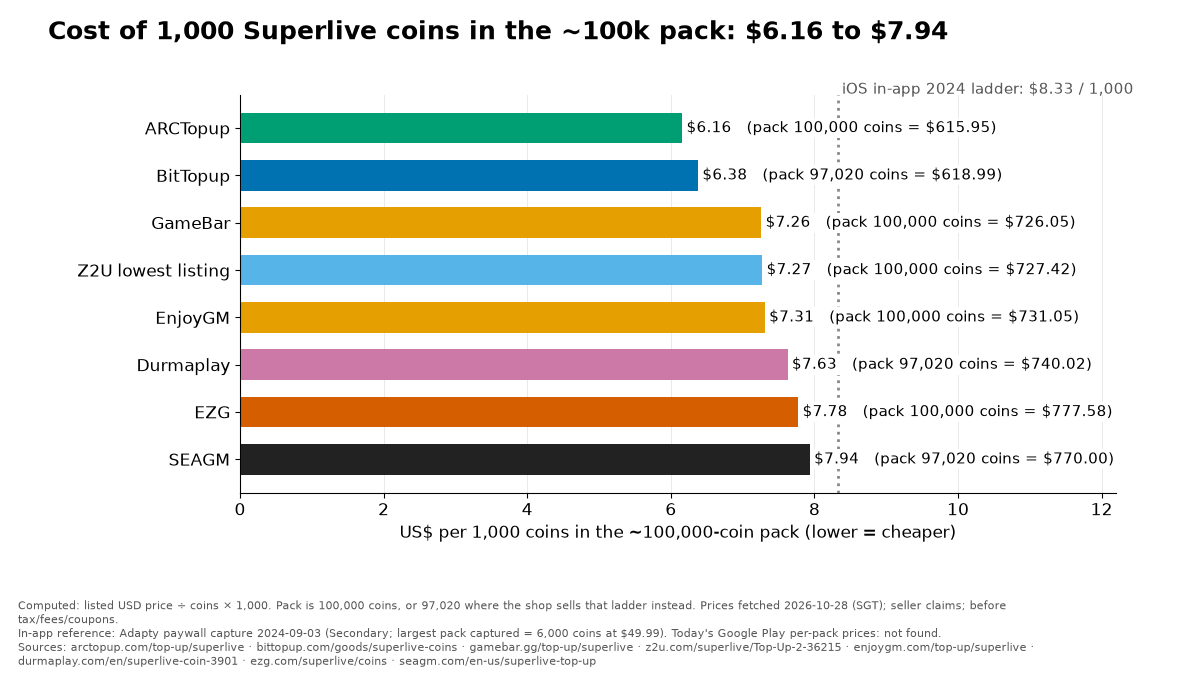
Original chart by BitTopup. Pack = 100,000 coins, or 97,020 where the shop sells that ladder instead. Data: shop pages fetched Oct 28, 2026 (Singapore time). Seller claims, before tax, fees and coupons.
In this size, ARCTopup was cheapest at $6.16 per 1,000 coins, ahead of BitTopup's 97,020 pack at $6.38. I'm telling you because a fair comparison should. The ranking at the small packs and the ranking at the top end aren't the same.
How to check any shop in 90 seconds
- Open Superlive's Purchase Coins screen. Note the coins and the price, and the currency.
- Divide coins by price. That's your coins-per-dollar number. Convert to USD first if the screen isn't in dollars.
- Do the same math on the shop page, for the same pack size.
- Add what checkout adds: tax, card fee, currency conversion. Compare the final line, not the headline.
- Check what the shop asks for. A UID top-up needs your Superlive ID, never your password.
If you want to buy Superlive Coins with a UID top-up, we list them there, and the price is whatever your checkout screen says. One open question: the Terms say Coins "cannot be combined" with promotions "except those designated by us", and they don't mention resellers at all. How that applies to shop coupons or third-party top-ups: not found. Ask Superlive support if you need certainty.
Who runs Superlive? The official pages don't match
Ask "which company is behind Superlive?" and you get four answers, all from official-looking pages. I'm not going to pick one for you. Here they are side by side.
| Where | What it names | Date |
|---|
| Google Play developer name | Official "Superlive Tech". Its contact block shows "Superlive LLC", an address in Delhi, CA, USA, and help/support emails on superlivellc.com. | Updated Oct 26, 2026 |
| Corporate site superlivellc.com | Official "Superlive LLC", described as "a passionate live streaming development company". The affiliate page says "A Trusted US-Based Company". | Fetched Oct 28, 2026 |
| Terms of Service | Official Contracting parties are "Mobitech Marketing Software Limited" (UK company no. 12411037, London) and "UNICODE GROUP LTD" (Nicosia, Cyprus). It also lists "Zaply Tech Limited" in Hong Kong. Law: United Kingdom and Cyprus. | No date on the page |
| Privacy Policy | Official Same two companies as data controllers. | "Last updated: June 2026" |
How these companies relate to each other: not published on any page I found. Ownership, founding year and company size: not found. Play shows the app was released on Dec 18, 2020. That's it.
More mismatches
Official The Safety Center says "We don't run ads", while the Google Play listing says "Contains ads". Official Terms §1 bars payments and business with Cuba, Iran, North Korea, Sudan, Syria and Crimea, yet Secondary AppBrain (Oct 27, 2026) shows a #6 Top Grossing (Social) rank in Iran. A chart rank doesn't prove Superlive takes payments there. An official list of available countries: not found.
Which Superlive sites are official?
Search "Superlive" and you'll see many domains. Only some tie back to the company. Here's what I could and couldn't confirm on Oct 28, 2026:
| Site | What it says | Official? |
|---|
| superlivellc.com | Corporate site: Terms, Privacy, safety pages, agency and affiliate pages | Official It's the home of the Terms and the support emails Play lists. |
| superlive.chat | Marketing site. Claims "9 million+" users and 700,000+ verified profiles. Footer email is on superlivellc.com. | Linked to the company by its email. User numbers unverified. |
| superlivechat.tv | Claims "900,000+ Active Users" and "3,500,000+ Registered Members" | Not confirmed. Its numbers conflict with superlive.chat. |
| superlive.cam | Says the app "lives in your browser" with no download or Play Store | Not confirmed. It contradicts the real Play app. |
| superlive.chat/recharge | Looks like a recharge page, but it's a user profile offering top-ups via local payment apps or USDT | Not an official recharge page. |
I found no page on Superlive's sites that links to any of its social accounts, and I couldn't confirm an official YouTube channel. So treat any "official agency" or "official recharge" claim as unproven until it's tied to superlivellc.com. Also, "SuperLive Plus" on the App Store is a camera-monitoring app by another developer. It has nothing to do with the live-stream app.
The iPhone question: Superlive has left the App Store
This is the most under-answered question. A YouTube viewer asked "Does it work on iPhone?" in July 2026 and got no reply. Here's what I could check on Oct 28, 2026:
- Official Apple's public iTunes lookup for the old app ID (1545607822) returned 0 results in all 16 storefronts I tried (US, UK, SG, ID, MX, EE, DE, BR, TR, PH, IN, AU, CA, FR, ES, IT). The developer page lists no apps.
- Secondary The tracker AppleCensorship says it's gone from 175 of 175 storefronts since Jul 16, 2025 (last test Sep 18, 2026). Adapty also marks it "Removed from App Store" (updated Oct 25, 2026).
- Community An Instagram reel caption says "SuperLive is officially BACK on the App Store". I couldn't read or date it, and the lookup says otherwise. Unverified. Old Apple pages still cached in search results can also make it look "available again". Don't trust the cache.
Why Apple removed it, and what happens to iOS coins and accounts: not found. No official statement turned up. If you're on iPhone, the safe move is to not spend until Superlive says something.
Is Superlive safe? What's solid and what's reported
| Check | What I found |
|---|
| Is the app real? | Official Yes. Google Play, 4.5 stars, about 254K reviews, updated Oct 26, 2026. |
| Age and child safety | Official 18+ only. Minors may not appear in any livestream, even with adults. Block and "Block & Report" tools exist. Superlive's Make a Report page says it responds within 5 business days. |
| Money complaints | Community At least 10 accidental-charge reports in 2026 (see the table above). At least 5 payout complaints in 2026, such as USDT withdrawals "pending since Feb 11" and a $100 request "under review" since Sep 12. |
| Ban complaints | Community At least 10 on one board in Sep and Oct 2026, many saying "underage". No formal appeal form found. |
| Scam DMs and trust score | Community A Play reviewer (Sep 12, 2026) warns of "lots of scammers" in the inbox. Trustpilot shows 2.5 out of 5, but from only 7 reviews (undated snapshot), too few to mean much. |
My verdict, plainly: the app is real, and the money handling is where people get hurt. The charge prompts are confusing, support is slow by users' accounts, and cash-out rules aren't public. Set a spending cap, turn Auto-Refill off, and skip any site selling "unlimited free coins". One YouTube "MOD / unlimited coins" video I saw had 133 comments, all asking you to post your username and device. That's a scam funnel. I won't link it.
Credit: HMD Tech on YouTube, "SuperLive App Review 2026– Is This Live Streaming App Safe to Use?" (uploaded Oct 28, 2025, despite "2026" in the title; 1:54). One creator's opinion, not official. From about 0:30 the narrator turns to user-reported problems, which are user claims, not verified facts.
How big is Superlive next to Bigo Live and Tango?
Superlive is much smaller than the big names. On Google Play on Oct 28, 2026, it had about 254K reviews against 6.51M for Bigo Live and 5.02M for Tango. That's about 3.9% of Bigo's count (Computed 254K ÷ 6.51M). Ratings are close: 4.46, 4.54 and 4.54. Review counts aren't user counts, so don't read it as "4% of the users".
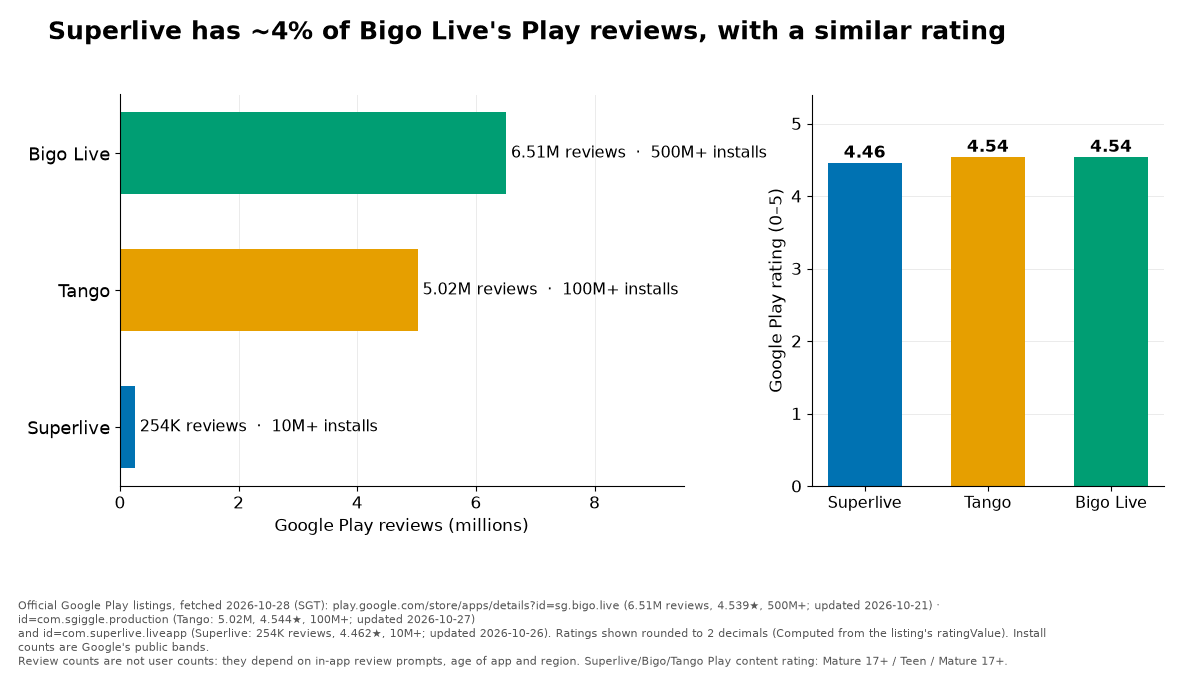
Original chart by BitTopup. Data: Google Play listings fetched Oct 28, 2026 (Singapore time): Superlive updated Oct 26, Bigo Live Oct 21, Tango Oct 27. Official page data; the percentage is Computed.
If you also top up Bigo, I priced Bigo Live diamond prices for October 2026 in a separate guide.
Hosts and payouts: what's not published
If you stream on Superlive, you earn Diamonds from gifts. The official pages say 18+ users can withdraw them, and that's nearly all they say. I compared what each company publishes about payouts:
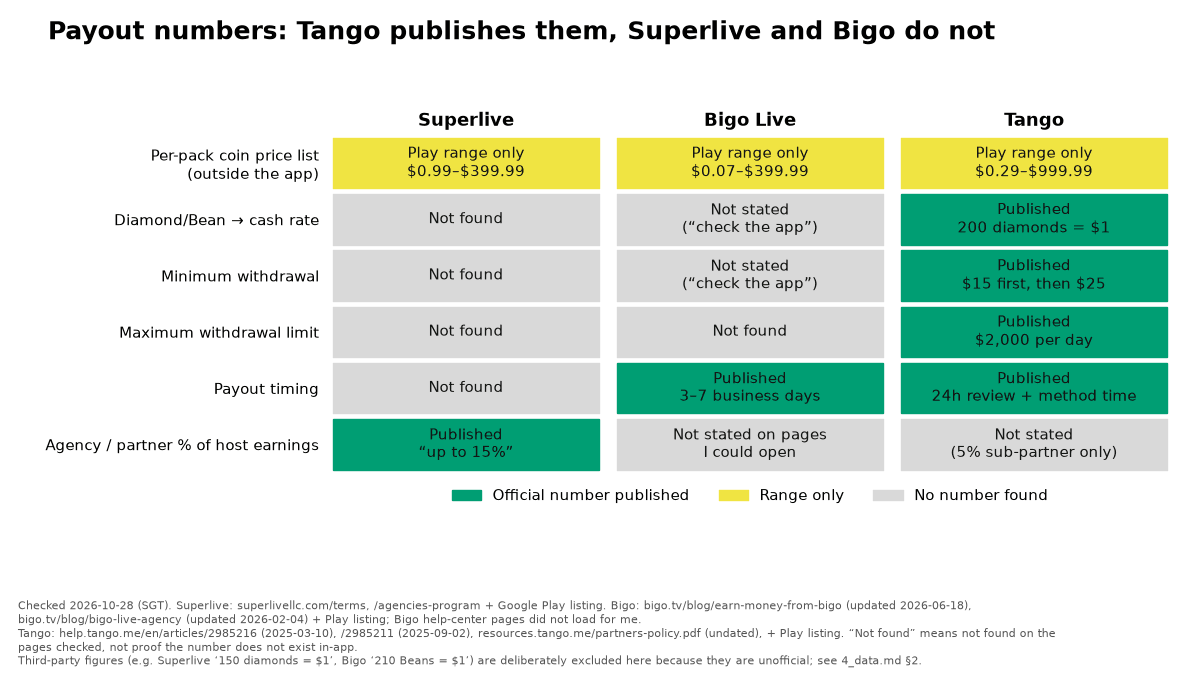
Original chart by BitTopup. Data: public pages checked Oct 28, 2026 (Singapore time): Superlive Terms and agencies page, Bigo's blog, Tango's help center (Mar 10 and Sep 2, 2025). "Not found" means not on pages I could open, not proof it doesn't exist in the app. Unofficial third-party figures are deliberately left out.
Tango, for comparison, publishes its rate (200 diamonds = $1) and minimum withdrawals. Superlive's only official payout number is for agencies: "up to 15%" revenue share, with commissions "for a lifetime" per its agencies page.
The numbers you'll see online, and where they come from
You'll read "150 Diamonds = $1" and "$25 minimum" everywhere. These are unofficial. None of them comes from Superlive.
| Claim | Who says it | Label and date |
|---|
| 150 Diamonds = $1; minimum 3,750 Diamonds = $25 | A vendor blog (buffget.com) | Secondary 2026, exact date not shown |
| Same 150 : 1 and 3,750; says it is "not a legal guarantee"; no public chart | topuplist.com | Secondary 2026 |
| "3750 diamonds, which is equal to $25" | Instagram post, @superlive_india (snippet only) | Secondary undated, couldn't be read |
| Minimum 3,000 Diamonds = $20; also 7,500 = $50 and 15,000 = $100 | An agency page (streameragent.com) | Secondary undated, fetched Oct 28, 2026 |
| Requests of $20 (Apr 20), $25 (Apr 22 and 23) and $35 (Apr 24); then deactivation for "multiple accounts" with $80 unpaid | One user complaint on Sikayetvar | Community Apr 24, 2026. A user claim. |
| A cash-out screen showing 568 Diamonds ≈ $3.79 | One creator's video (timestamp not verified) | Community 2025 upload; Computed 568 ÷ 3.79 = 149.9 |
Here's the interesting bit. At 150 Diamonds per dollar, 3,000 Diamonds is $20 and 3,750 is $25 (Computed 3,000 ÷ 150 and 3,750 ÷ 150). So the sources roughly agree on the rate and disagree on the minimum. A $20 request in a 2026 complaint hints the lower number may be real, but one complaint proves nothing. Official rate, minimum, schedule and fees: not published.
Other things people ask, with honest answers:
- Do I need an agency? Not published. Agency pages say yes, a Reddit user says you must "have other people join", and YouTube commenters keep asking. Officially, agencies get up to 15% revenue share, and the application form's smallest group size is "5-10" members. Whether independent hosts can withdraw directly: not found.
- Gender or country limits? Third-party pages disagree ("women only", "United States" lists, or men accepted). No official rule found.
- Which payout methods? Not published officially. Agencies mention bank transfer, PayPal and USDT.
Credit: VICTORIA VICK CHANNEL on YouTube, "How to WITHDRAW your EARNINGS on SUPERLIVE" (Apr 16, 2026, 7:38). This is one creator's own account, not an official guide. Uploader chapters: 1:48 initiating the withdrawal, 3:21 bank details, 5:02 receiving payment. Her payout details are hers; Superlive publishes no rate or minimum.
Watch it for the screens, not for the numbers. Viewers' comments in Oct 2026 show some people still can't withdraw.
Quick answers
Can I still get Superlive on iPhone?
Not from the App Store as far as I can check: Apple's lookup returned 0 results in 16 storefronts on Oct 28, 2026. No reason or return date published that I found.
Can I get a refund for an accidental purchase?
The Terms say purchases are final, with discretionary exceptions, but Superlive's Oct 14, 2026 Play reply called its prompt "genuinely misleading" and invited a user to contact support. Email help@superlivellc.com with your receipt. If Google billed you, ask Google within 48 hours. Chargebacks are a last resort: bad-faith ones risk your account.
What is the real Diamond-to-cash rate and minimum payout?
Not published officially. Third parties say 150 Diamonds = $1 and a $25 minimum, and one agency says $20. All unofficial.
I got banned as "underage". How do I appeal?
Superlive's safety FAQ only says users blocked by mistake should "get in touch". I found no appeal form or response time. Start with help@superlivellc.com. Also note the Terms say one account per device, and minors may not appear on a stream at all.
What does "user is inactive" or "Unexpected case occurred" mean?
Superlive doesn't document these messages. Users on complaint sites link them to bans or deactivation, but that's their guess, not an official meaning.
Is buying coins from a third-party shop allowed?
The Terms don't mention resellers either way, so I can't say. They do say Coins can only be used on Superlive, can't be turned into cash, and that chargebacks in bad faith can end your account.
Everything above is as of Oct 28, 2026 (Singapore time) unless a date is given. Shop prices change and BitTopup's own pages disagree with each other, so the number on your checkout screen is the one that counts. Official, seller, community, secondary and computed items are tagged as such. Nothing here is legal or financial advice.









![Best SuperLive Coins Bundles April 2026 Post-Carnival [Ranked]](https://pic.bittopup.com/apiUpload/82cd83e5143b169be9c758b1e7ce29ee.jpg?imageView2/0/w/80/h/80/format/webp/ignore-error/1 "Best SuperLive Coins Bundles April 2026 Post-Carnival [Ranked]")