

SuperLive Coins Top Up: What Are Coins and How They Work
SuperLive is a global live-streaming and social interaction platform where users connect with broadcasters, watch interactive talent shows, and participate in competitive stream events. Within the platform, SuperLive Coins operate as the primary virtual currency for viewers and community members.
SuperLive Coins allow you to interact directly with content creators across live video and audio broadcasts. By spending coins, you can send animated gifts, trigger visual entrance effects, boost a broadcaster during live PK battles, and raise your VIP supporter status. Coins are tied directly to your SuperLive profile and are accessible across supported mobile devices on both iOS and Android once credited.
BitTopup provides a direct top-up service that sends Coins straight to your account using only your numerical User ID. You do not need to share sensitive account passwords or link personal social media logins to complete your transaction.
How to Recharge SuperLive Coins on BitTopup
Recharging your SuperLive Coins balance through BitTopup takes only a few quick steps:
- Select Your Package: Choose the desired SuperLive Coins denomination from the catalog options displayed on the page.
- Enter Your User ID: Type your SuperLive User ID into the designated input box. Double-check your numbers to avoid sending balance to the wrong account.
- Proceed to Live Checkout: Click the purchase button to view available local payment methods, exchange rates, and final costs on the live checkout screen.
- Complete Payment: Follow the on-screen instructions for your selected payment method to finalize the order.
- Check Your Account: Open the SuperLive app and visit your profile or enter any live stream to confirm your updated coin balance.
How to Find Your SuperLive User ID (UID)
Locating your SuperLive User ID is straightforward and requires only a few taps inside the official mobile application:
- Launch the SuperLive app on your phone or tablet.
- Tap the Profile / Me icon located in the bottom-right corner of the main navigation bar.
- Look directly under your profile avatar and display name.
- You will see your numerical User ID (e.g.,
12345678). - Tap the copy icon next to the number or write down the exact digits for your top-up order.
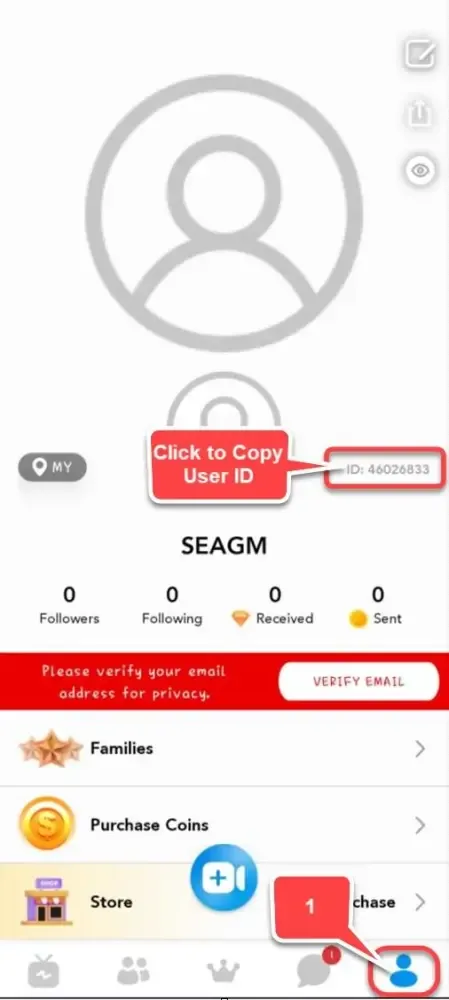
Make sure to enter only the numerical User ID and not your customized nickname or display name, as system fulfillment relies solely on the unique account number.
Popular Uses for SuperLive Coins: Virtual Gifts, VIP Perks, and PK Battles
SuperLive Coins give you full access to the interactive ecosystem of live broadcasting. Here are the primary ways viewers use their coin balance:
Interactive Virtual Gifts
Broadcasters depend on community appreciation to build their channels. SuperLive offers a broad catalog of virtual gifts, ranging from basic tokens like roses, thumbs-ups, and hearts to premium animated presents such as luxury sports cars, private yachts, rockets, and royal castles. When you send high-tier gifts, custom animations take over the stream screen, highlighting your support to the entire audience.
PK Battle Score Boosts
PK battles are head-to-head live competitions where two creators compete against each other in real-time. The winner is decided by the total value of gifts sent by viewers within a strict countdown timer. SuperLive Coins give you the power to drop point-boosting gifts during crucial moments, push your favorite host up the leaderboard, and secure match victories.
VIP Level Progression and Profile Badges
Every coin you spend on gifts and stream activities awards account experience toward your VIP tier. Advancing through VIP tiers unlocks exclusive perks, including:- Distinctive colored name tags and VIP chat badges.- Custom entrance animations when joining any public live room.- Unique chat text bubbles that stand out in fast-moving comment sections.- Higher placement on broadcaster top fan and contributor lists.
SuperLive Coins vs. Creator Beans: Understanding Platform Currencies
SuperLive uses a dual-currency system to manage community interactions and broadcaster rewards. Understanding the difference between Coins and Beans ensures you buy the correct currency for your intended use.
| Feature | SuperLive Coins | SuperLive Beans |
|---|---|---|
| Primary User | Viewers and Supporters | Streamers and Creators |
| How Obtained | Direct recharge / purchase | Received as gifts during broadcasts |
| Primary Purpose | Sending gifts, PK boosts, VIP perks | Creator revenue measurement |
| Cash Out Eligibility | Non-withdrawable | Withdrawable by hosts (per platform rules) |
| Account Transfer | Non-transferable between accounts | Converts to host earnings balance |
Viewers purchase Coins to support creators and unlock social features. Creators receive incoming gifts as platform Beans, which represent their channel performance and eligible earnings according to SuperLive host payout policies.
Safe Top-Up Best Practices: Why You Never Need to Share Account Passwords
Account safety is essential when purchasing digital currencies online. BitTopup uses a direct-to-UID credit system designed to keep your personal data secure.
- No Passwords Required: Legitimate third-party top-up processes only need your public numerical User ID. You never need to provide your SuperLive account password, Apple ID, Google credentials, or phone verification codes.
- Protection Against Account Takeovers: Sharing login details with unauthorized individuals exposes your private messages, connected payment cards, and profile settings to risk. By using direct UID fulfillment, your account credentials remain completely private.
- Secure Payment Channels: BitTopup processes transactions through encrypted payment gateways, ensuring your payment details are protected at every stage of the checkout process.
Troubleshooting Delivery and Payment Issues for SuperLive Coins
If you encounter an issue during or after your recharge, follow these troubleshooting recommendations to resolve the situation quickly:
What to Do If You Entered the Wrong User ID
Top-ups sent to an active, incorrect User ID are processed automatically by the system and generally cannot be reversed once delivered. If you notice a typo immediately after ordering and the order status is still pending, contact BitTopup customer support right away with your order number and the correct UID to request manual correction before fulfillment completes.
Coins Not Showing After Payment
If your payment succeeded but your balance has not updated:1. Force close the SuperLive application completely on your device.2. Reopen the app and visit your profile page to force a server balance refresh.3. Check your network connection or switch between Wi-Fi and mobile data.4. Allow a few moments for platform server synchronization during peak streaming hours.
Payment Verification and Delays
If your payment status is pending, your financial institution or local payment provider may be completing routine fraud prevention checks. Once your payment clears, the coin credit triggers automatically. If your order shows completed on BitTopup but your balance remains unchanged after 15 minutes, reach out to the 24/7 BitTopup support team with your transaction receipt and User ID for immediate investigation.
Frequently Asked Questions
How do I recharge SuperLive Coins using my User ID?
Select your preferred coin package on BitTopup, type your numerical SuperLive User ID into the input field, proceed to the checkout screen to choose your payment method, and complete the payment. Coins are deposited directly into your SuperLive account.
Where can I find my SuperLive User ID in the app?
Open the SuperLive app, tap the Profile / Me icon in the lower right corner, and locate the numerical ID displayed beneath your avatar and display name. Tap the copy icon to copy your UID accurately.
Do I need to share my SuperLive password to buy Coins?
No. You only need to provide your public numerical User ID. BitTopup never asks for your password, social login credentials, or SMS verification codes.
What can I do with SuperLive Coins during live streams?
SuperLive Coins allow you to send animated virtual gifts to broadcasters, support creators during live PK battles, gain exclusive entrance animations, unlock customized chat effects, and advance your profile VIP status.
How long does it take for SuperLive Coins to appear in my account?
Coin orders are processed directly through automated digital delivery. In most cases, your coins appear in your SuperLive balance shortly after your payment confirms.
Can SuperLive Coins be refunded or transferred to another account?
Once Coins have been credited to the specified User ID, they cannot be transferred to a different SuperLive account or refunded. Always verify your User ID before submitting payment.
What is the difference between SuperLive Coins and Beans?
Coins are the purchasing currency used by viewers to buy gifts and support streamers. Beans are reward units earned by streamers when they receive gifts from viewers during their live broadcasts.