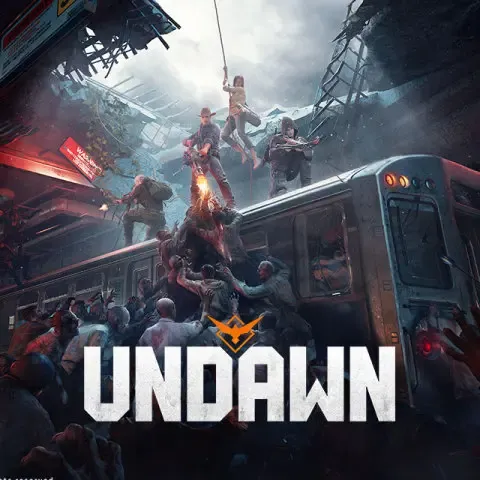


Garena Undawn RC SG Top Up: Instant Recharge for Singapore Server
Surviving the post-apocalyptic wilderness of Garena Undawn demands preparation, tactical gear, and reliable resources. Raven Credits (RC) serve as the premium in-game currency within the Garena-published edition of Undawn. Whether you are fortifying your homestead, unlocking high-tier survival equipment, or purchasing the latest cosmetic outfits, having an immediate supply of RC keeps your character ahead of environmental hazards and rival survivors.
BitTopup provides a direct Player ID recharge service for players on the Singapore (SG) server. By entering your numerical Undawn Player ID, your RC balance updates directly in your game account without requiring your account login credentials or complicated voucher redemptions.
What is Garena Undawn RC and What Can You Buy in 2026
Raven Credits (RC) are the primary premium currency used in Garena Undawn. RC can be used directly for store purchases or converted into in-game Gold and Silver to support your daily survival progression.
Key In-Game Purchases Powered by RC
- Glory Pass & Survival Pass: Activate elite tracks of the seasonal battle pass to earn exclusive survival tools, rare upgrade materials, and seasonal outfits.
- Growth Funds & Investment Plans: Gain high-multiplier returns on Silver and Gold as your character hits specific level milestones.
- Weekly & Monthly Privilege Cards: Receive immediate RC bundles along with daily automated deliveries of Gold, Silver, and supply crates.
- Homestead Blueprints & Decorative Packs: Expand your personal territory with advanced architectural structures, defensive facilities, and luxury furniture.
- Cosmetic Outfits & Weapon Finishes: Access limited-time store bundles, vehicle skins, and tactical weapon appearances.
- Material Crates & Talent Resets: Speed up your crafting progress by securing specialized alloy parts, armor plates, and skill points.
How to Recharge Garena Undawn RC (SG) Using Player ID
Recharging your Garena Undawn account takes only a few quick steps on BitTopup:
- Select your desired Garena Undawn RC denomination from the live product list.
- Enter your numerical Player ID in the field provided.
- Verify that your character ID belongs to an active account on the Garena Singapore server.
- Click Buy Now and select your preferred payment method at checkout.
- Complete the payment. Your RC will be credited directly to your in-game mailbox or account balance.
How to Find Your Garena Undawn Player ID
Your Player ID is a unique numerical identifier tied directly to your survival character. You do not need to share your Garena username or password.
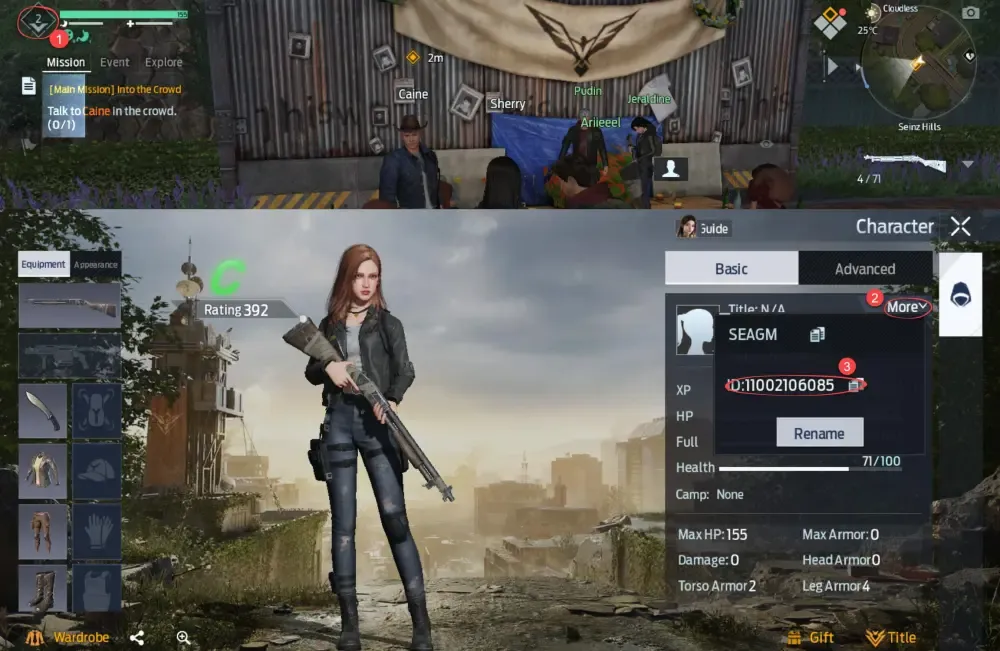
Follow these steps to locate your Player ID inside the game client:
- Launch Garena Undawn on your mobile device or PC client.
- Tap your Avatar icon in the top-left corner of the main HUD to open the Survivor Profile menu.
- Locate your profile summary screen. Your Player ID is displayed right next to your character name and current level.
- Tap the Copy icon next to the numbers to copy your ID directly to your clipboard, preventing manual typing mistakes.
Singapore Server Compatibility and Geo-Restriction Guidelines
This specific recharge page is configured exclusively for accounts registered on the Garena Undawn Singapore (SG) server.
Important Regional Guidelines
- Publisher Verification: Garena publishes Undawn across Southeast Asian regions. Ensure your game client displays the Garena logo on boot, not the Level Infinite global client.
- Server Mismatch Protection: Entering a Player ID from non-SG Garena servers (such as Thailand, Indonesia, or the Philippines) or global servers will result in an order failure or delivery to an unintended profile. Double-check your server region on the character select screen before placing your order.
- Account Binding: Guest accounts can top up, but binding your character to a Garena account or social login ensures permanent security for all purchased RC assets.
Comparing Direct Undawn RC Recharge vs Garena Shell Top-Up
Survivors often choose between direct UID top-ups and traditional Garena Shell card redemptions. Direct recharge eliminates extra conversion steps and avoids region-locking issues with generic voucher codes.
| Feature | Direct Player ID Top-Up (BitTopup) | Garena Shells Voucher | In-Game Direct Store |
|---|---|---|---|
| Account Password Required | No (Player ID only) | No (Voucher PIN) | Yes (App Store / Google Play login) |
| Redemption Process | Automatic in-game credit | Manual login on Garena Topup Center | In-app authorization |
| Risk of Typing Errors | Low (Copy/Paste UID) | High (Multi-digit PIN codes) | None |
| Cross-Platform Access | PC Client & Mobile | Web browser redemption | Device-specific store |
| Delivery Method | Direct to Account / Mail | Manual conversion to RC | Direct to Account |
Why Recharge Garena Undawn on BitTopup (No Account Password Required)
BitTopup focuses on fast, reliable, and secure game currency processing designed around player safety.
- Zero Account Risk: You never provide your Garena password, email access, or two-factor authentication codes. Your account stays entirely under your control.
- Direct Balance Updates: The system communicates directly with regional server endpoints to send your purchased RC immediately to your character.
- Clear Pricing: The exact cost for each RC package is displayed on the live checkout interface before you pay, with no surprise processing fees.
- 24/7 Dedicated Support: If you make a typo in your Player ID or have questions regarding your order status, customer assistance is available around the clock to assist you.
Troubleshooting Delivery Delays and Top-Up Issues
If your RC balance does not update immediately after your transaction completes, follow these troubleshooting checks:
- Restart the Game Client: Fully close Garena Undawn and reopen the game. A fresh server handshake is often required to update the on-screen currency counter.
- Check the In-Game Mailbox: Certain promotional bundles, first-recharge bonus packs, and card activations arrive via the internal mail system. Open your mailbox tab to claim pending attachments.
- Verify Player ID Accuracy: Compare the ID on your BitTopup order receipt with your in-game profile. If you submitted the wrong digits, reach out to BitTopup support immediately with your transaction ID.
- Check Regional Server Status: During major game patches, seasonal maintenance, or server upgrades, top-up delivery queues may experience brief processing holds until Garena server maintenance concludes.
Frequently Asked Questions
How do I find my Garena Undawn Player ID?
Open Garena Undawn, tap your character avatar in the upper-left corner of the screen, and locate the numerical ID next to your character name. Tap the copy button to copy the exact string of numbers.
Is this RC recharge service valid only for Garena Undawn Singapore players?
Yes. This product is dedicated to players operating on the Garena Singapore (SG) server. If you play on other regional servers, please select the corresponding regional product to ensure accurate crediting.
Do I need to provide my Garena password to top up RC?
No. BitTopup requires only your public Player ID. You will never be asked for your account password, email credentials, or verification codes.
How long does it take for Garena Undawn RC to reflect in my account?
RC is processed automatically once payment confirmation is received. In most instances, your balance updates within moments of completed payment.
What in-game items can I purchase with Garena Undawn RC in 2026?
You can use RC to purchase the Glory Pass, Weekly and Monthly Privilege Cards, Growth Fund investments, exclusive outfits, weapon camos, homestead building packs, and direct conversions to Gold or Silver.
What should I do if my Undawn RC has not arrived after payment?
First, restart your game client and check your in-game mailbox. If the balance remains uncredited, contact the 24/7 BitTopup customer support team with your order number and Player ID for rapid verification.