

JB Hi-Fi Gift Card (NZ) Top Up: Overview and Supported Products in 2026
A JB Hi-Fi Gift Card (NZ) provides instant spending credit for New Zealand's leading entertainment and electronics retailer. Denominated in New Zealand Dollars (NZD), these digital vouchers allow you to purchase thousands of products online at jbhifi.co.nz or across physical retail stores throughout New Zealand.
Whether you are shopping for gaming hardware, home electronics, or digital entertainment, this voucher covers the full retail catalog, including:
- Gaming Consoles and Accessories: PlayStation 5, Xbox Series X|S, Nintendo Switch OLED, controllers, headsets, and physical game releases.
- Computers and Peripherals: Laptops, desktop rigs, monitors, gaming mice, mechanical keyboards, and external storage drives.
- Smartphones and Wearables: Mobile devices, smartwatches, fitness trackers, and genuine manufacturer accessories.
- Audio and Visual Equipment: 4K OLED and QLED televisions, soundbars, noise-canceling headphones, Bluetooth speakers, and home theater setups.
- Home Appliances and Smart Tech: Smart lighting, robot vacuums, air fryers, kitchen appliances, and home security systems.
- Music and Movies: Vinyl records, CDs, 4K Ultra HD Blu-rays, and pop culture merchandise.
How to Recharge and Buy JB Hi-Fi NZ Gift Cards on BitTopup
Acquiring a digital voucher code through BitTopup is fast, secure, and straightforward. Follow these steps to complete your purchase:
- Select Denomination: Choose your desired NZD gift card value from the available options on this page.
- Enter Delivery Information: Provide a valid email address where your digital code and PIN will be sent immediately after payment.
- Choose Payment Method: Select your preferred local or international payment method from the options shown at checkout.
- Review Order Summary: Check the final price displayed on the live checkout screen.
- Complete Payment: Confirm the transaction. Your digital voucher code and PIN will appear on your order confirmation screen and arrive directly in your email inbox.
Locating Your Digital Card Number and PIN
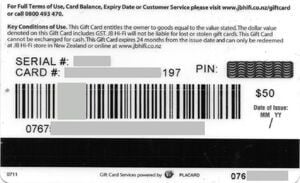
Your digital gift card consists of two essential pieces of information: the Gift Card Number (a 16 to 19-digit numerical string) and the Card PIN (a 4 to 6-digit security code). Both numbers are generated upon purchase and are required to redeem your balance online.
Account Safety and Security
- No Password Required: BitTopup will never ask for your JB Hi-Fi account password, personal email login, or private credentials.
- Zero Account Sharing: You receive an unredeemed, clean digital voucher code that you apply directly to your personal checkout.
- Private Delivery: Codes are delivered securely to your verified email address and order management dashboard.
Step-by-Step Guide to Redeeming Your JB Hi-Fi Digital Code Online and In-Store
JB Hi-Fi New Zealand vouchers can be used both online and at physical store registers.
Redeeming Online at jbhifi.co.nz
- Visit the official New Zealand store at jbhifi.co.nz and add your desired products to the shopping cart.
- Proceed to the Checkout page and sign in or continue as a guest.
- In the Payment Method section, select Gift Card as your payment option.
- Enter your Gift Card Number and Card PIN exactly as provided in your BitTopup order.
- Click Apply. The card balance will automatically deduct from your order total.
- If your cart total exceeds the gift card balance, you can pay the remaining amount using a credit card, debit card, or another accepted payment method.
Redeeming In-Store at New Zealand Retail Locations
- Open your BitTopup digital voucher email on your smartphone, or print out the voucher document containing the barcode, card number, and PIN.
- Present the barcode or code to the cashier at the retail checkout counter before finalizing payment.
- The staff member will scan the digital barcode or manually input the numbers to deduct the balance from your total purchase.
Important Exclusions: Education, BYOD, Solutions, and Airport Restrictions
Before redeeming your digital voucher, review the specific store limitations established by JB Hi-Fi New Zealand:
- JB Hi-Fi Solutions: Digital gift cards cannot be redeemed on the commercial B2B portal (JB Hi-Fi Solutions).
- Education and BYOD Sites: Codes are not valid on customized school purchasing portals, BYOD (Bring Your Own Device) educational platforms, or corporate discount portals.
- Family & Friends Portals: Vouchers cannot be applied to internal staff or special promotional affiliate micro-sites.
- Airport Concessions: Physical duty-free or airside airport stores may have separate point-of-sale systems that do not accept standard consumer gift vouchers.
- No Gift Card Purchases: You cannot use a JB Hi-Fi gift card to purchase other third-party gift cards (such as PlayStation Network, Steam, Xbox, or Apple vouchers).
Regional Limitations: Using NZD Gift Cards in New Zealand
All JB Hi-Fi gift cards purchased on this page are strictly locked to the New Zealand (NZD) region.
- Currency: Denominated exclusively in New Zealand Dollars (NZD).
- Domain Restriction: Valid exclusively on jbhifi.co.nz. They will not work on the Australian site (jbhifi.com.au).
- Store Locations: Usable exclusively at physical retail branches operating within New Zealand territory.
How to Check Your JB Hi-Fi NZ Gift Card Balance
You can verify your remaining credit balance anytime through two official channels:
- Online Balance Check: Go to the official JB Hi-Fi New Zealand Gift Card Balance portal. Enter your 16–19 digit Card Number and your security PIN, then submit the form to view your live balance and transaction history.
- In-Store Balance Inquiry: Visit any JB Hi-Fi customer service desk or checkout register in New Zealand and ask a team member to scan your digital voucher.
- Cart Preview: Applying your card code during online checkout displays the exact amount applied and any leftover balance on the card.
JB Hi-Fi NZ Gift Card Specification Summary
| Feature | Detail |
|---|---|
| Card Currency | New Zealand Dollar (NZD) |
| Region of Use | New Zealand (jbhifi.co.nz & Physical NZ Stores) |
| Delivery Method | Digital Code & Security PIN via Email / Screen |
| Account Sharing Required? | No (Code-only delivery) |
| Split Payment Supported? | Yes (Pay balance with secondary payment method) |
| Stackable Online? | Yes (Multiple gift cards allowed per transaction) |
Why Choose BitTopup for Your JB Hi-Fi Gift Card NZ Recharge
- Fast Digital Processing: Access your digital code and PIN immediately after completing checkout.
- 100% Secure Transactions: Protected checkout infrastructure with zero requirement for sensitive personal passwords or retail accounts.
- Transparent Pricing: Check final, exact amounts directly on the live checkout interface before making any payment.
- 24/7 Customer Support: Reach our dedicated support team around the clock for assistance with order lookups or redemption questions.
Frequently Asked Questions
How do I redeem my JB Hi-Fi Gift Card (NZ) online?
Add your chosen items to your shopping cart on jbhifi.co.nz and proceed to the payment stage. Select Gift Card as the payment method, enter your digital Card Number and PIN, and click Apply to deduct the balance from your total.
Does a JB Hi-Fi gift card expire in New Zealand?
Standard JB Hi-Fi New Zealand gift cards generally have no expiry date or carry extended multi-year validity according to current consumer policies. Check the official balance inquiry tool on jbhifi.co.nz to view specific status details for your individual code.
How can I check the remaining balance on my JB Hi-Fi gift card?
Visit the Gift Card Balance page on the official jbhifi.co.nz website, type in your Card Number and PIN, and click check balance. You can also ask an in-store cashier to scan your code at any New Zealand branch.
Can I use a JB Hi-Fi gift card to buy another gift card?
No. JB Hi-Fi store policies prohibit using a gift card balance to purchase third-party gaming, entertainment, or retail gift cards (such as Steam, Apple, PlayStation, or other brand vouchers).
Can I use my JB Hi-Fi gift card on JB Hi-Fi Solutions or BYOD websites?
No. Gift cards are strictly valid for standard retail purchases on jbhifi.co.nz and in consumer retail stores. They cannot be redeemed on JB Hi-Fi Solutions, Education BYOD sites, or corporate business portals.
Can I redeem a New Zealand JB Hi-Fi gift card in Australia?
No. Gift cards are region-locked and currency-specific. An NZD gift card bought for New Zealand can only be redeemed on jbhifi.co.nz or inside New Zealand physical stores; it cannot be used on jbhifi.com.au or in Australian retail locations.