

Dino Diamonds Top Up: Quick & Secure ID Recharge
Dino is a popular voice chat and interactive entertainment application where users connect, participate in dynamic voice party rooms, stream audio, and play casual social games. Dino Diamonds serve as the primary premium in-app currency, giving users the freedom to interact with hosts, send animated virtual gifts, activate premium profile flair, and join special room activities.
BitTopup provides a direct, secure Dino Diamonds top up experience designed specifically for the global voice chat community. By utilizing direct Dino ID routing, your diamond purchases are processed straight to your game account without requiring any login credentials, account passwords, or intrusive verification steps. Check live pricing directly on the checkout module above and complete your top up in seconds.
What Are Dino Diamonds and What Can You Use Them For?
Dino Diamonds unlock the complete social and interactive experience inside the Dino voice app. Whether you host your own voice rooms or support your favorite content creators, keeping a diamond balance gives you access to key platform benefits:
- Virtual Gifting: Send premium animated gifts to room hosts and speakers to show appreciation, gain recognition, and rise up the contributor leaderboards.
- VIP Privileges and Badges: Unlock exclusive profile frames, custom room entry announcements, special chat bubbles, and distinct VIP badges that stand out in active rooms.
- Interactive Games: Use diamonds to participate in built-in room mini-games and social events with other community members.
- Room Growth & Boosting: Help your favorite audio rooms trend on platform discovery pages, drawing larger crowds to live events and talent showcases.
How to Find Your Dino ID in the Dino App
To ensure your Dino Diamonds are credited to the correct account, you only need to provide your unique Dino ID. Follow these steps to find it inside the app:
- Launch the Dino app on your mobile device.
- Tap the Profile (or Me) tab situated in the bottom-right corner of your screen.
- Look directly beneath your avatar and display name on your main profile overview.
- You will see a numeric code labeled as ID.
- Tap the copy icon next to your ID to copy the numbers directly to your clipboard.
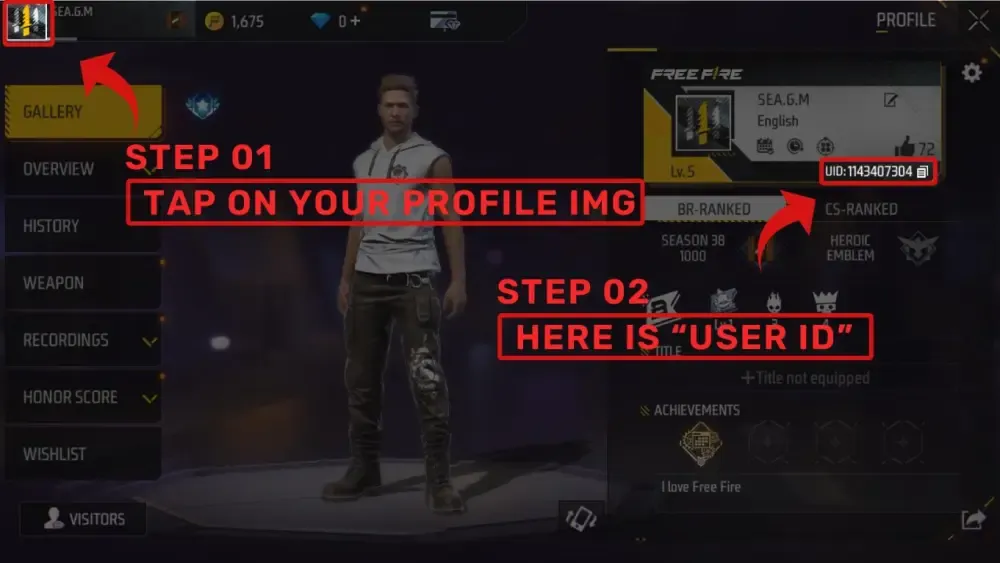
Always double-check the copied numbers before placing an order to avoid accidental delivery delays.
Step-by-Step Guide to Recharge Dino Diamonds on BitTopup
Recharging diamonds on BitTopup requires zero complicated setup. Follow this simple guide to finish your purchase:
- Select Denomination: Choose the exact amount of Dino Diamonds you want to purchase from the product catalog above.
- Enter Account Details: Paste your numeric Dino ID into the designated player ID field.
- Select Payment Option: Choose your preferred payment method from the available local and international options.
- Review & Confirm: Check the accuracy of your Dino ID and review the live checkout total.
- Complete Checkout: Finalize your payment through our secure payment gateway.
- Receive Diamonds: Once payment confirms, your diamonds are automatically dispatched directly to your Dino app balance.
| Order Step | Required Input | Purpose |
|---|---|---|
| 1. Selection | Diamond Pack | Chooses the volume of diamonds to buy |
| 2. User Detail | Dino User ID | Directs currency delivery to your specific profile |
| 3. Payment | Preferred Method | Completes the encrypted financial transaction |
| 4. Delivery | In-App Refresh | Diamonds update automatically in your Dino wallet |
Why Choose BitTopup for Dino Diamonds Top Up
BitTopup is built to deliver a reliable, direct top-up experience for digital entertainment and gaming users worldwide:
- Direct ID-Only Delivery: We never ask for your account password or social login details. Your account stays entirely under your control.
- Real-Time Live Pricing: Live exchange rates and transparent package costs are updated right on the store page, so you always know what you pay.
- High-Speed Automated Processing: Orders are handled automatically by our distribution system to minimize wait times after payment confirmation.
- Dedicated Customer Support: Our support team is standing by 24/7 to assist you with order status lookups, transaction verification, and user questions.
Supported Global and Local Payment Options in 2026
BitTopup accommodates users across Southeast Asia and global regions by offering a diverse array of secure payment channels. Depending on your region, you can complete your Dino Diamonds recharge using:
- Credit and Debit Cards: Major international bank cards with full 3D-Secure authentication.
- Localized E-Wallets: Popular digital wallets adapted for your country or regional currency.
- Online Bank Transfers: Instant direct bank payment systems.
- Alternative Digital Channels: Modern checkout options updated regularly on our live checkout screen.
Select your country on the checkout page to see the exact localized payment methods and fee-free transaction options available for your location in 2026.
Safe & Secure Dino Diamonds Recharge (No Password Needed)
Account safety is a top priority when topping up online. Traditional account-sharing methods pose serious risks to personal chat logs, friend lists, and stored information.
BitTopup uses direct-to-ID API transmission. This means you will never be asked to share:
- Your Dino login password
- Third-party linked account credentials (such as Google, Facebook, or Apple IDs)
- SMS verification codes or two-factor authentication tokens
All financial transactions are protected with end-to-end SSL encryption, ensuring your payment data remains private and your voice chat account stays completely secure.
Troubleshooting Common Dino Diamond Recharge Issues
If you experience any delay or issue during your recharge process, use the troubleshooting steps below:
- Diamonds Not Appearing Immediately: Fully close the Dino application from your device's multitasking menu, relaunch the app, and open your profile wallet to refresh the display balance.
- Incorrect Dino ID Entered: If you submitted a wrong Dino ID, contact BitTopup customer support immediately with your order number. If the order has not yet been routed through the automated fulfillment pipeline, our support team can help correct the destination ID.
- Payment Charged but Order Pending: Certain banking methods take a few extra moments to transmit confirmation. Check your transaction receipt in your email, and allow a brief window for the payment status to synchronize.
Frequently Asked Questions
Where can I find the Dino recharge center?
You can recharge your Dino Diamonds quickly and securely online right here on the BitTopup Dino Diamonds page. Simply enter your Dino ID, pick your diamond package, and complete checkout.
How do I find my Dino ID to recharge diamonds?
Open the Dino application, tap the Profile ("Me") tab in the lower-right corner, and locate the numeric ID displayed underneath your profile picture. Tap the copy icon next to it to use during checkout.
Do I need to share my password to top up Dino Diamonds?
No. BitTopup only requires your public numeric Dino ID. We will never ask for your account password, linked social logins, or verification codes.
How long does it take for Dino Diamonds to be credited to my account?
Diamonds are typically credited automatically within moments after your payment is successfully verified. After checkout, reopen your Dino app to see your updated diamond total.
What payment methods are supported for Dino Diamonds recharge?
BitTopup supports a broad selection of payment methods including major credit/debit cards, regional e-wallets, online banking, and local payment gateways. View the live checkout module to see options available in your region.
What should I do if I entered the wrong Dino ID during checkout?
Contact BitTopup 24/7 customer support immediately with your order reference number. If the order has not yet been processed by the automated delivery system, our team will assist you in updating the recipient ID.