




Football Master 2 FMP Top Up: Fast & Secure Direct Recharge
Football Master Points (FMP) serve as the premium currency in Football Master 2, driving club expansion, top-tier player acquisitions, and critical training upgrades. Securing sufficient FMP ensures your squad maintains a competitive edge across league matches, global championships, and tournament campaigns.
BitTopup provides a direct, secure Football Master 2 FMP recharge service for managers worldwide. All orders process directly through your unique User ID, removing the risk of account sharing or password disclosure. Browse live packages on the checkout menu to select your desired FMP bundle and fund your club operations instantly.
What is Football Master Points (FMP) and How to Spend It
FMP is essential for managers aiming to build a championship-grade football club. While standard Euro currency handles basic operational costs, FMP gives you direct access to high-impact resources that accelerate progression.
Strategic Uses for FMP in Football Master 2:
- Superstar Scouting & Agent Signings: Use FMP to execute elite scouting draws, unlocking world-class forwards, midfielders, defenders, and goalkeepers licensed by FIFPro and top global clubs.
- Master Player Awakening: Convert FMP into awakening materials and specialized evolution items to unlock advanced player skills and overall rating (OVR) boosts.
- Energy & Stamina Refills: Replenish your match stamina instantly to grind daily challenge stages, league fixtures, and limited-time events.
- Skill Training & Tactical Books: Purchase tactical training manuals to max out custom team formations, counter-strategies, and individual player traits.
- Club Facility Upgrades: Speed up construction and upgrade timers across your stadium, youth academy, and medical center to support your roster's growth.
How to Find Your Football Master 2 User ID
To ensure fast and accurate delivery of your FMP top up, you must provide your exact in-game User ID. Follow these steps to locate your information inside the game client:
- Launch Football Master 2 on your mobile device.
- Tap your Manager Profile Icon (Avatar) located in the upper-left corner of the main screen.
- The Profile overview window will open, displaying your manager details.
- Locate your User ID (a series of numeric digits) displayed clearly beneath your manager name.
- Tap the Copy icon next to your User ID to avoid manual typing errors.
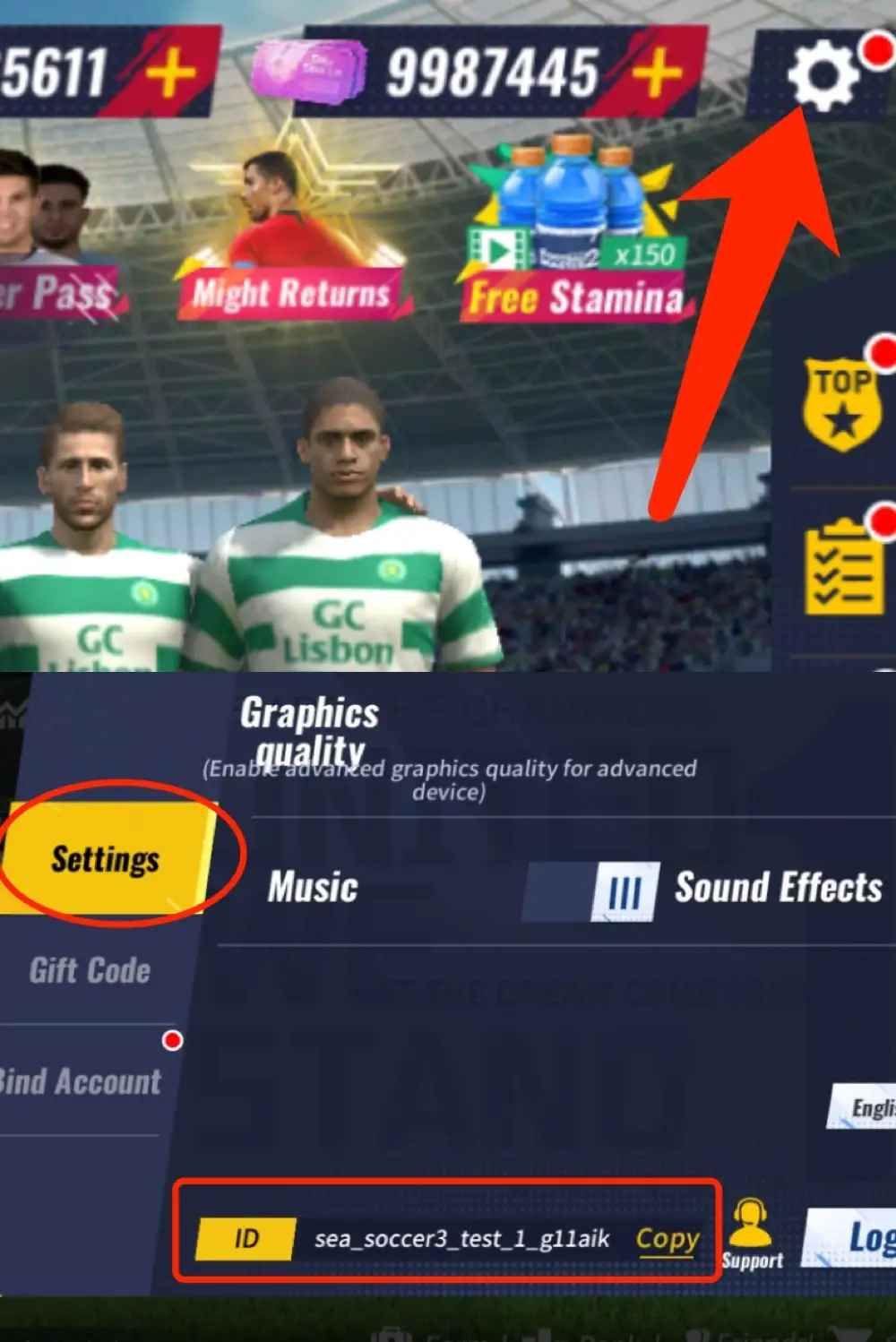
Double-check that the copied User ID matches your active game profile. Because delivery credits directly to the server ID provided, precision ensures your FMP appears in your balance without delay.
Step-by-Step Process to Buy Football Master 2 FMP on BitTopup
Recharging your account on BitTopup takes only a few simple steps:
- Select Denomination: Choose the Football Master 2 FMP package that matches your club's recruitment or training goals.
- Enter Account Details: Paste your in-game User ID into the designated player input field.
- Proceed to Checkout: Review your order details and select your preferred payment method from the available regional and global payment channels.
- Complete Payment: Finalize the secure transaction. Your order enters automated processing immediately.
- Check In-Game Balance: Open Football Master 2 and verify your updated FMP balance in the top currency bar.
FMP Utility & Management Priority Guide
Allocating your FMP strategically ensures you get the highest return on investment for your squad rating. Here is a breakdown of optimal spending priorities:
| Feature / Item | FMP Priority | Main Benefit |
|---|---|---|
| Superstar Agent Scouting | High | Secures high-OVR base cards to complete key team chemistry sets. |
| Awakening & Evolution Items | High | Unlocks extra skill slots and stat multipliers for core squad players. |
| Daily Energy / Stamina Restores | Medium | Allows extra event runs to collect enhancement cards and upgrade gear. |
| Tactical Formation Upgrades | Medium | Increases team tactical proficiency against specific opponent setups. |
| Facility Timer Skips | Situational | Accelerates stadium expansion to boost match-day ticket revenues. |
Account Security: Safe Direct Top-Up Without Passwords
Account safety is critical when purchasing game currencies online. BitTopup processes Football Master 2 FMP orders via direct server integration, which requires only your public User ID.
- Zero Password Sharing: You will never be asked for your login credentials, email password, social login tokens, or two-factor authentication codes.
- Global Server Compatibility: The direct top-up system fully supports Global accounts across all active regions.
- Official Delivery Pipeline: FMP credits straight to your official in-game balance without unauthorized modifications or third-party client tampering.
Keep your login credentials strictly private. Direct UID recharge protects your account from unauthorized access while delivering your purchased FMP smoothly.
Troubleshooting In-Game Delivery and Support
If you experience any delay in receiving your Football Master Points, follow these verification steps:
- Restart the Game App: Completely close the Football Master 2 client and reopen it to force a server synchronization of your wallet balance.
- Verify the User ID: Check your BitTopup order confirmation to confirm the User ID submitted was entered correctly without extra spaces or missing digits.
- Check In-Game Mailbox: Certain promo bundles or event-linked points may be delivered directly to your in-game mailbox rather than auto-added to the top bar.
- Contact Customer Support: If your balance does not update shortly after completing payment, contact the BitTopup 24/7 customer support team with your Order ID and transaction receipt for immediate assistance.
Football Master 2 FMP Top Up FAQ
What is FMP in Football Master 2 and what can I buy with it?
FMP (Football Master Points) is the primary premium currency in Football Master 2. You can use it to scout elite superstar players, purchase awakening materials, buy stamina refills, upgrade training facilities, and acquire exclusive event packages.
Where can I find my Football Master 2 User ID?
Open Football Master 2 and tap on your Manager Avatar in the top-left corner of the home screen. Your numeric User ID will appear directly below your manager name. Tap the copy button to save it directly to your clipboard.
Do I need to provide my account password to recharge Football Master 2 FMP?
No. Recharging through BitTopup requires only your in-game User ID. You should never share your game password, Google account, or social media login details with anyone.
How quickly will FMP be credited to my Football Master 2 account?
Orders process automatically once payment confirmation is received. In most cases, the FMP balance reflects on your account shortly after transaction completion. Relaunching the game helps refresh the balance instantly.
Can I recharge Football Master 2 FMP for friends using their User ID?
Yes. As long as you have your friend's correct User ID, you can enter their details during checkout to send the FMP package directly to their account balance.
What should I do if my Football Master 2 FMP does not arrive after payment?
First, restart your game client to refresh the server connection. If the balance remains unchanged, check your BitTopup order history to verify payment status and confirm that the User ID was entered correctly. You can reach out to BitTopup 24/7 customer support anytime with your Order ID for prompt resolution.