




Piggy GO Diamond Top Up with Instant UID Delivery
Piggy GO brings classic board game fun to mobile screens, combining board navigation, city construction, competitive raids, and card collecting. Diamonds serve as the most versatile premium currency in Piggy GO, giving you the power to buy extra dice rolls, purchase vital shields, unlock rare card packs, and acquire exclusive event boosters.
When your dice count hits zero or an opponent attacks your town structures, having Diamonds ready lets you rebuild instantly and stay ahead on the leaderboard. BitTopup provides a direct, secure Piggy GO Diamond top up service using only your in-game User ID (UID). With zero login requirements, rapid crediting, and multiple payment options, recharging your account is simple and safe.
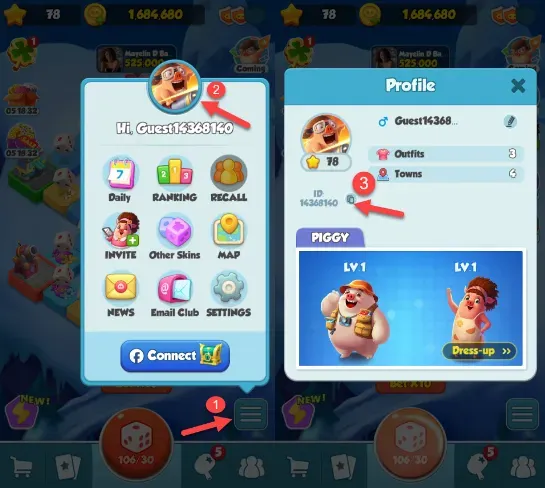
How to Find Your Piggy GO UID
To ensure your Diamond recharge delivers directly to your character, you need to provide your exact Piggy GO UID. Follow these steps to find it in the game:
- Launch Piggy GO on your mobile device.
- Tap your Avatar Profile Icon located in the upper-left corner of the main lobby screen.
- The Player Info window will appear on screen.
- Your numeric UID is displayed clearly below your player name and avatar.
- Tap the Copy icon next to your UID or write down the numbers carefully before entering them at checkout.
Step-by-Step Guide to Recharge Piggy GO Diamonds
Recharging your Piggy GO account on BitTopup takes only a few simple steps:
- Select Your Diamond Denomination: Browse the available Piggy GO Diamond packs and choose the quantity you need for your gameplay goals.
- Enter Your Piggy GO UID: Paste your copied User ID into the input field on the product page. Double-check the numbers to avoid delivery delays.
- Proceed to Checkout: Click the recharge button to view the available payment gateways and select your preferred method.
- Complete the Payment: Finalize the transaction through the secure checkout screen.
- Check Your In-Game Balance: Open Piggy GO. Your Diamonds will credit directly to your account balance.
| Step | Action Required | Expected Result |
|---|---|---|
| 1. Select Pack | Choose Diamond quantity on BitTopup | Item selected in checkout |
| 2. Enter UID | Paste your numeric player UID | System validates player target |
| 3. Pay | Select local or global payment option | Secure payment processed |
| 4. Receive | Launch or refresh Piggy GO app | Diamonds added to in-game counter |
What Can You Buy With Piggy GO Diamonds
Diamonds provide direct utility across every major game mode in Piggy GO. While gold coins build towns and dice move you around the board, Diamonds give you control over resource shortages and time-limited events.
1. Extra Dice Rolls
Dice are the core driver of Piggy GO progression. When you run out of standard rolls during high-stakes tournament hours, converting Diamonds into dice keeps your board laps active, allowing you to trigger cannon attacks, bank raids, and mini-game tiles.
2. Town Shields and Defense
Other players frequently target your completed buildings to steal your coins. Purchasing shields with Diamonds prevents destructive attacks from wiping out your town progress, saving millions of gold coins in repair costs.
3. Card Chests and Album Completion
Completing seasonal card albums grants massive rewards, including tens of thousands of dice rolls and exclusive avatar frames. Diamonds let you purchase card chests containing rare, high-star cards to finish difficult sets before seasonal deadlines.
4. Gold Bundles
Upgrading high-tier towns requires substantial gold balances. If you are short on coins to complete a board stage, Diamonds can be converted into instant gold reserves to finalize building construction.
| Game Item | Primary Function | Diamond Advantage |
|---|---|---|
| Dice Rolls | Movement across board spaces | Instant replenishment for tournaments |
| Shields | Defense against incoming attacks | Protects high-cost town buildings |
| Card Chests | Unlocking set collection stickers | Faster set completion for milestone payouts |
| Gold Coins | Constructing and upgrading towns | Instant bridge for construction shortages |
| Event Passes | Special event milestone tracks | Unlocks premium tiered seasonal items |
Safe and Secure Password-Free Top Up with UID
Account safety is a top priority when purchasing in-game resources. BitTopup uses a direct UID top-up system that never asks for your sensitive login credentials.
- No Passwords Required: You never need to share your game password, linked Facebook login, Google Play credentials, or Apple ID.
- No Account Sharing: Your profile remains in your hands at all times. There is no remote account takeover or third-party device login involved.
- Direct System Delivery: Orders are processed through standard server crediting routes directly linked to your UID.
- Clean Account Standing: Because our delivery uses official fulfillment channels, your game account stays secure and compliant with standard terms.
Supported Payment Methods for Piggy GO Recharge
BitTopup supports a broad selection of payment methods to accommodate players worldwide. Depending on your region, you can choose from credit cards, debit cards, popular digital wallets, and local online banking systems.
All pricing, currency options, and payment channels are displayed clearly on the live checkout screen. Select the payment method that fits your location best, complete your transaction securely, and enjoy fast order processing.
Delivery Troubleshooting: What to Do If Diamonds Do Not Appear
Orders placed on BitTopup process swiftly. If your Diamonds do not reflect in your account right away, follow these troubleshooting steps:
- Restart the Game Client: Completely close the Piggy GO application from your device's background task manager and relaunch it. This forces the game to pull updated balance data from the server.
- Check Your In-Game Mailbox: Some promotional items or bundle components may arrive as an in-game system message rather than an immediate top-bar balance increase.
- Verify Your UID: Check your BitTopup order history and verify that the UID submitted matches your current Piggy GO account profile.
- Contact Customer Support: If your order status shows completed but your balance has not updated after restarting, reach out to BitTopup customer support with your Order ID and UID for prompt assistance.
Piggy GO Diamond Top Up FAQ
How do I find my Piggy GO UID?
Open Piggy GO on your phone or tablet and tap your profile avatar in the upper-left corner of the screen. Your UID is the numeric sequence shown on your profile card. You can tap the copy icon next to the number to copy it to your clipboard.
Do I need to share my Piggy GO password to top up?
No. BitTopup only requires your Piggy GO UID to deliver Diamonds. You never have to share your password, email address, or third-party linked social accounts.
How long does it take to receive Piggy GO Diamonds after recharge?
Orders are sent to your account via automated server delivery shortly after your payment is confirmed. Most recharges reflect in your in-game balance within moments.
What should I do if my Piggy GO Diamonds do not arrive?
First, restart your Piggy GO application to refresh the connection to the game server. If the balance remains unchanged, verify your submitted UID in your BitTopup account dashboard and contact 24/7 customer support with your Order ID.
Can I top up Piggy GO Diamonds for a friend?
Yes. You can purchase Diamonds for friends or team members by entering their Piggy GO UID into the player ID field at checkout instead of your own.
What payment methods are supported for Piggy GO recharge?
BitTopup supports major international credit and debit cards, secure e-wallets, and regional payment solutions. Check the live payment selection page during checkout to see the available payment methods for your region.