



Revelation Mobile Jade Philippines Top Up on BitTopup
Power up your character in Revelation: Infinite Journey with instant Divine Jade top-ups. BitTopup provides Philippine players with a secure, password-free recharge service directly linked to your in-game Role ID. Whether you need Divine Jade for limited-time gacha banners, exclusive wings, mount summons, or premium character customization packs, our direct system credits your account automatically.
Select your desired Jade package, enter your Role ID, and complete your order through convenient local Philippine payment channels without sharing sensitive login credentials.
How to Recharge Revelation Mobile Jade on BitTopup
Recharging your account takes less than a minute. Follow these simple steps:
- Select the Divine Jade denomination you wish to purchase from the package list above.
- Enter your Revelation Mobile Role ID in the required field.
- Verify your character details to ensure the Role ID is typed correctly.
- Choose your preferred payment method on the live checkout screen.
- Complete the payment process.
- Open Revelation Mobile to confirm your updated Divine Jade balance in your character inventory.
How to Find Your Revelation Mobile Role ID
Your Role ID is a unique numerical identifier assigned to your specific character. You do not need to share your game account username, email, or password to purchase Jade. Follow these steps to locate your Role ID in-game:
- Open Revelation Mobile on your mobile device or official PC client.
- Tap your character avatar in the upper-left corner of the home interface.
- The character profile window will appear, displaying your character name, level, and server.
- Locate the numerical Role ID displayed directly beneath your character name.
- Tap the small copy icon next to the number to copy your Role ID accurately to your clipboard.
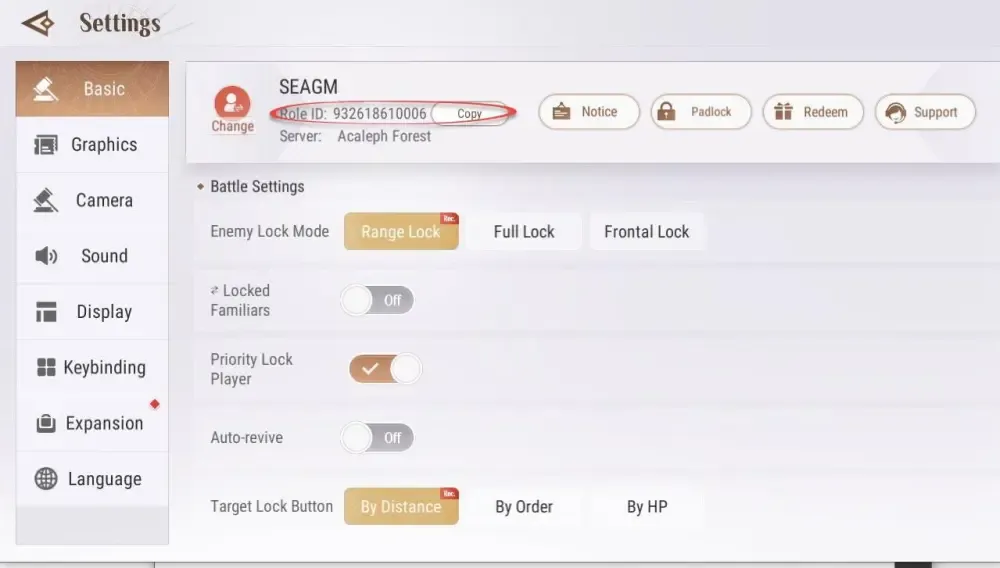
Always double-check your Role ID before finalizing your order. If you play multiple characters across different servers, make sure you copy the Role ID of the specific character you want the Divine Jade delivered to.
Divine Jade vs Bound Jade: Key Differences Explained
Revelation Mobile features multiple currencies with distinct functions. Knowing how each currency works helps you manage your spending effectively.
| Currency Type | Primary Source | Tradeable on Stall? | Usable for Gacha Banners? | Key In-Game Uses |
|---|---|---|---|---|
| Divine Jade | BitTopup direct recharge / Direct Purchase | Yes (Can convert to trade currency) | Yes (All premium banners & summons) | Premium summons, exclusive fashion, mount gacha, Battle Pass unlocks |
| Bound Jade | Quests, achievements, events, daily logins | No | Limited (Selected event banners only) | Daily stamina refills, basic enhancement items, NPC shop materials |
| Coins (Gold/Silver) | Monster drops, daily events, trade market | Silver is bound; Gold is tradeable | No | Equipment upgrades, skill leveling, guild donations, crafting |
Divine Jade
Divine Jade is the primary premium currency in Revelation Mobile. It can only be acquired via top-ups. You can spend Divine Jade directly in the cash shop on limited-time fashion sets, weapon skins, high-tier wings, rare Familiars, and VIP passes. Divine Jade can also be exchanged for Bound Jade or converted into trade currency to purchase items from other players in the Trade Stall.
Bound Jade
Bound Jade is earned through active gameplay, including main story quests, achievement milestones, and seasonal events. While valuable for upgrading gear and replenishing action points, Bound Jade cannot be used for premium gacha draws or player-to-player trading.
Revelation Mobile Divine Jade Uses and In-Game Value
Divine Jade gives you access to crucial progression items and aesthetic customizations:
- Familiar Summons & Gacha: Pull for top-tier SSR Familiars and Spirits to boost your combat rating in PvP and dungeon raids.
- Wardrobe & Cosmetics: Unlock rare outfits, weapon effects, hairstyles, and cosmetic accessories to customize your character appearance.
- Wings and Mounts: Obtain legendary flying wings and multi-passenger mounts to travel faster across the open world of Nuanor.
- Growth Packs & Battle Pass: Unlock premium tiers of the Revelation Pass for concentrated enhancement materials, skill books, and exclusive titles.
- Economy Conversion: Convert Divine Jade into trade currency when you need gold coins to purchase high-end crafted gear from other players on the Stall.
Supported Payment Options for Philippine Revelation Mobile Players
BitTopup supports popular local Philippine payment channels so you can complete your transaction quickly and securely:
- E-Wallets: Pay using GCash, Maya, and other top Philippine digital wallets.
- Debit & Credit Cards: Visa, Mastercard, and JCB cards with 3D Secure verification.
- Online Banking: Direct payment via major Philippine bank transfer gateways.
- Convenience Stores & Over-the-Counter: Local cash payment options at checkout.
Check the live checkout screen for real-time rates and currently available payment channels.
Why Choose BitTopup for Safe Role ID Direct Delivery
- Zero Password Risk: BitTopup only requires your character Role ID. We will never ask for your game password, Google account, Apple ID, or social login. Your account security remains 100% in your hands.
- Automated Processing: Orders are processed through automated direct-delivery systems to get your Divine Jade to your character as quickly as possible.
- Competitive Pricing: Transparent pricing with no hidden checkout fees.
- 24/7 Dedicated Support: If you ever need help with an order, our customer support team is available around the clock via live chat and email ticket.
Revelation Mobile Top-Up Troubleshooting
If you have completed your payment but your Divine Jade balance has not updated, follow these troubleshooting steps:
- Restart the Game Client: Fully close the Revelation Mobile app and relaunch it. Server balances frequently update upon a fresh login session.
- Check In-Game Mail: Certain bonus packs, milestone rewards, and first-recharge gifts are delivered via the in-game mailbox rather than directly to the currency counter.
- Verify Your Role ID: Log in to BitTopup, open your order history, and verify that the Role ID submitted matches your character profile.
- Confirm Payment Completion: Check your banking app or e-wallet transaction history to ensure the payment status shows successful.
- Contact Support: If your order status is completed but you have not received your Jade after restarting the game, reach out to BitTopup 24/7 customer support with your Order ID and character Role ID for fast resolution.
Frequently Asked Questions
How do I find my Revelation Mobile Role ID for top-up?
Tap your character avatar in the upper-left corner of the main screen. Your Role ID is the numerical code displayed below your character name. Tap the copy icon next to it to copy the exact number.
Do I need to provide my password or account login to recharge Jade?
No. BitTopup uses direct Role ID top-up. You never need to share your game password, verification codes, or login credentials. Your account remains completely secure.
How fast will the Divine Jade be credited to my Revelation Mobile account?
Divine Jade is credited automatically once payment confirmation is received. Most orders reflect in-game within minutes. Relaunch your game client to see the updated balance.
What payment methods can I use to top up Revelation Mobile in the Philippines?
You can pay using GCash, Maya, local bank transfers, debit/credit cards, and over-the-counter channels. All active payment options and real-time prices are displayed on the live checkout screen.
What is the difference between Divine Jade and Bound Jade?
Divine Jade is premium paid currency used for cash shop purchases, limited gacha banners, cosmetic outfits, and market trades. Bound Jade is earned through gameplay and quests, and can only be used for basic consumables, daily resets, and select in-game upgrades.
What should I do if my Revelation Mobile Jade is not reflected after payment?
First, restart Revelation Mobile to refresh the server connection. Next, check your in-game mailbox for any attached items. If the Jade still has not appeared, check your BitTopup order history to confirm the status and contact our 24/7 support team with your Order ID for immediate assistance.