



Twitch Gift Card CAD Top Up Overview and Denominations in 2026
Twitch Gift Cards denominated in Canadian Dollars (CAD) provide a direct, convenient way to fund your Twitch Wallet without linking a credit card or bank account directly to the streaming platform. When you purchase a digital Twitch card CAD instant code, you receive an alphanumeric digital voucher that immediately converts into Twitch Wallet credit upon redemption.
In 2026, Twitch CAD gift cards are available across standard fixed denominations as well as custom increments to fit your spending needs. Common denominations include CA$15, CA$25, CA$50, CA$100, and CA$200. Live pricing and available denomination options are displayed directly on the BitTopup checkout catalog.
Using a prepaid CAD gift card gives you complete control over your entertainment budget on Twitch. Whether you want to support your favorite Canadian creators, cheer in live chat with Bits, or watch broadcasts without advertisements using Twitch Turbo, these gift cards cover all digital goods supported by the Twitch Wallet.
How to Recharge and Redeem Twitch Gift Card CAD on Your Account
Redeeming your digital code is simple and takes only a few moments. Follow these straightforward steps to recharge Twitch Gift Card CAD balance onto your profile:
- Log in to your personal Twitch account on a desktop or mobile web browser.
- Go directly to the official redemption page at
twitch.tv/redeemor click on your profile icon in the top right corner and select Wallet. - Enter the digital gift card code received from BitTopup into the redemption box.
- Click Redeem.
- The balance is credited instantly to your Twitch Wallet in Canadian Dollars (CAD).
Verifying Your Account and Country Settings
Before redeeming, make sure your Twitch account is set to Canada to avoid regional processing errors.
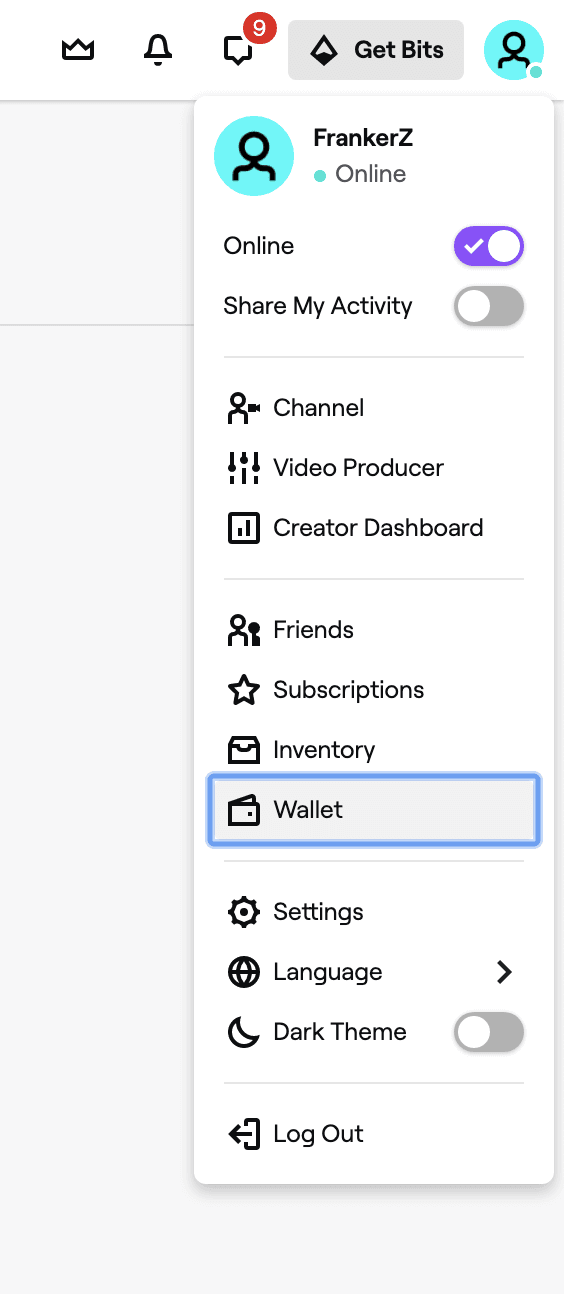
To check your account status, log into Twitch, click your profile avatar, and open Settings > Payment Methods / Wallet. Your registered country of residence must match Canada, as CAD gift cards will only activate on accounts configured to accept Canadian currency.
Eligible Purchases: Channel Subscriptions, Gifted Subs, Bits, and Twitch Turbo
Once your CAD balance is loaded into your Twitch Wallet, it automatically becomes your default payment method at checkout on Twitch.tv. You can spend your balance on several core features:
- Tier 1, Tier 2, and Tier 3 Subscriptions: Support partner and affiliate streamers on a recurring or single-month basis with custom emotes, badges, and subscriber perks.
- Gifted Subscriptions: Buy single or community gift sub packs (5, 10, 20, 50, or 100 subs) for active chat communities.
- Twitch Bits: Purchase Bits packages to send Cheermotes and trigger interactive alerts in live streams.
- Twitch Turbo: Pay for Twitch's platform-wide ad-free viewing subscription, custom chat badge colors, and extended VOD storage.
Non-Eligible Purchases (Important Exclusions)
Twitch Gift Card balances cannot be used for every product associated with the Twitch brand. Keep the following exclusions in mind:
- Prime Gaming: Prime Gaming memberships require an active Amazon Prime subscription and cannot be funded via Twitch Wallet credit.
- Physical Merchandise: Items sold through the Twitch Loot Cave merch store require standard external payment methods.
- TwitchCon Tickets: Event passes and in-person convention registrations cannot be purchased using Twitch Gift Card credit.
Current Twitch Subscriptions and Bits Pricing in CAD
Twitch uses localized pricing for viewers in Canada. When spending your CAD balance, the following table details the typical costs for subscriptions, Turbo, and Bits packages in 2026.
| Product / Tier | Estimated Price (CAD) | Duration / Quantity | Key Perks Included |
|---|---|---|---|
| Tier 1 Channel Sub | CA$7.99 – CA$8.49 | 1 Month | Custom emotes, sub badge, ad-free stream viewing (creator-enabled) |
| Tier 2 Channel Sub | CA$15.99 – CA$16.99 | 1 Month | Tier 1 perks + 1 additional Tier 2 emote, modified sub badge |
| Tier 3 Channel Sub | CA$31.99 – CA$33.99 | 1 Month | All lower perks + exclusive Tier 3 emote set, top supporter badge |
| Twitch Turbo | CA$15.99 – CA$17.49 | 1 Month | Ad-free viewing across all channels site-wide, custom chat colors |
| 100 Bits | ~CA$1.95 – CA$2.10 | Single Purchase | Basic chat cheering and interactive stream triggers |
| 500 Bits | ~CA$9.50 – CA$10.20 | Single Purchase | Medium chat cheering, badge progress milestones |
| 1,500 Bits | ~CA$27.50 – CA$29.50 | Single Purchase | Large support cheers, custom animated emote reactions |
| 5,000 Bits | ~CA$89.00 – CA$95.00 | Single Purchase | Heavy cheering power, high-tier channel leaderboard status |
Note: Exact checkout totals may vary depending on local Canadian provincial taxes (GST/PST/HST) applied during the final transaction step on Twitch.
Web vs Mobile App Spending Limitations for Twitch CAD Balance
A critical distinction when using Twitch Gift Cards involves the platform interface you use for checkout:
- Desktop and Mobile Web Browsers (twitch.tv): You can use your Twitch Wallet balance freely for all subs, gifted subs, Bits, and Turbo. The system automatically applies your CAD wallet funds before asking for any backup payment method.
- Twitch iOS and Android Native Apps: In-app purchases on mobile are processed through Apple App Store or Google Play billing systems. Because mobile app stores do not integrate with the internal Twitch Gift Card wallet, your balance will not appear as an available payment option inside the native smartphone apps.
Best Practice: Always log in to Twitch through a web browser (Safari, Chrome, Edge, Firefox) on your phone, tablet, or PC when buying subs or Bits so that your gift card credit is deducted correctly.
Region Restrictions and Country of Residence Requirements for CAD Cards
Twitch Gift Cards are strictly geo-locked by currency and country. A CAD Twitch Gift Card can only be redeemed on a Twitch account whose registered country of residence is set to Canada.
- You cannot redeem a CAD gift card on an account set to the United States (USD), the United Kingdom (GBP), Europe (EUR), or Australia (AUD).
- If you attempt to redeem a CAD card on a non-Canadian account, the Twitch system will return an error stating that the card currency does not match your account region.
- Twitch balances do not auto-convert across currencies. If you move or travel, your wallet retains its Canadian Dollar denomination and can only be spent under Canadian checkout conditions.
Troubleshooting Common Twitch Gift Card Redemption Errors
If you experience an issue while redeeming your code on Twitch, check these common fixes:
- Error: "Gift card code is invalid": Double-check the alphanumeric string for typos. Confusing characters like
0(zero) withO(letter), or1(one) withI(capital i) are frequent mistakes. Copy and paste the code directly from your BitTopup order page. - Error: "Country mismatch / Currency error": Verify your Twitch account region under Account Settings. Make sure your account is registered in Canada. Using active VPN connections can sometimes cause Twitch to detect an incorrect IP region during redemption.
- Error: "Code has already been redeemed": Refresh your Twitch Wallet page (
twitch.tv/wallet). In many instances, the code was successfully processed on the first click, and the CAD funds are already in your balance. - Balance not applying at checkout: Ensure you are checking out via a web browser rather than the mobile app. Check that your purchase item is eligible (not physical goods or Prime Gaming).
Why Choose BitTopup for Your Twitch CAD Digital Cards
When you buy Twitch Gift Card Canada codes on BitTopup, you benefit from a dependable, user-first digital marketplace:
- Account Security (No Passwords Required): BitTopup never asks for your Twitch login details, streaming credentials, or personal passwords. You receive a clean digital code that you redeem yourself on the official Twitch website.
- Fast Digital Code Delivery: Receive your code immediately after payment verification so you never miss a sub streak or a live hype train.
- Multiple Secure Payment Methods: Complete your transaction safely using a wide range of secure checkout options supporting Canadian payments.
- Dedicated 24/7 Support: Our customer support team is available around the clock to assist you with order verification, code retrieval, and general redemption guidance.
Frequently Asked Questions About Twitch Gift Card CAD
How to use Twitch gift card balance?
Once you redeem the code at twitch.tv/redeem, the CAD balance is added to your Twitch Wallet. When you purchase a channel subscription, gift sub, Bits, or Twitch Turbo on the desktop or mobile web browser, Twitch automatically applies your gift card balance first. If the purchase total exceeds your balance, you can pay the remainder using any secondary payment method.
How much does a Twitch sub cost in CAD?
In Canada, a standard Tier 1 channel subscription costs approximately CA$7.99 to CA$8.49 per month, depending on applicable provincial sales taxes. Tier 2 subscriptions cost around CA$15.99, and Tier 3 subscriptions cost around CA$31.99 per month.
Can I use a CAD Twitch gift card outside Canada?
No. Twitch gift cards are region-locked to the currency in which they are issued. A CAD gift card can only be redeemed on a Twitch account whose registered country of residence is Canada.
Can I use my Twitch Gift Card balance to purchase Prime Gaming or physical merchandise?
No. Twitch Gift Card funds cannot be used to pay for Prime Gaming subscriptions (which run through Amazon) or physical merchandise from the Twitch Loot Cave. They are also non-applicable for TwitchCon convention tickets.
Why can I not spend my gift card balance directly inside the Twitch mobile app?
The Twitch iOS and Android apps process transactions exclusively through Apple App Store and Google Play in-app payment systems. To spend your Twitch Wallet CAD balance, open a mobile or desktop web browser, visit twitch.tv, and complete your purchase there.
How to load a Twitch gift card to my account wallet?
Log into your account on twitch.tv, navigate to twitch.tv/redeem, type or paste the code received from BitTopup into the box, and click Redeem. The Canadian Dollar amount will immediately update in your Twitch Wallet.