



League of Pantheons Coupon Top Up: Fast, Safe, and Direct In-Game Currency
Coupons are the primary premium purchasing currency in League of Pantheons. Unlike standard in-game Diamonds that drop from daily quests and campaign progression, Coupons function as a direct universal credit balance. They allow you to purchase limited summoning packs, daily value bundles, premium battle passes, and VIP experience without triggering app-store transaction prompts every time you buy an item.
BitTopup provides a direct recharge service for League of Pantheons Coupons. You do not need to share login credentials or grant access to your social media accounts. By entering your Role ID, Character Name, and Server, your ordered Coupons are sent directly to your account balance, ready for immediate use across all event banners and in-game shops.
Free Redeem Codes vs. Direct Coupon Recharges
Many players confuse free promo redeem codes with direct Coupon top-ups. Understanding the distinction ensures you get the exact resources you need:
- Promo Gift Codes: These are temporary, promotional text strings distributed by the game developers during community milestones or holidays. They grant fixed rewards, such as basic Summon Scrolls, Gold, or small amounts of Diamonds. Gift codes cannot be purchased, cannot be converted into cash packs, and do not award VIP progression points.
- Coupon Recharges: Coupons are purchased cash-equivalent credits that sit in your in-game bag. When you open any paid bundle, monthly card, or summoning pack in the game shop, League of Pantheons asks if you want to pay using your Coupons instead of real-world money. Recharging Coupons grants full VIP experience and counts directly toward cumulative recharge events.
What Are League of Pantheons Coupons and In-Game Benefits
Using Coupons gives you total control over your spending strategy in League of Pantheons. Instead of binding payment cards to mobile app stores or making multiple microtransactions during high-tempo guild wars, keeping a balance of Coupons allows instant purchases at any moment.
+-------------------------------------------------------------------------+| COUPON UTILITY ECOSYSTEM |+-------------------------------------------------------------------------+| [BitTopup UID Top-Up] ---> [In-Game Coupon Balance Added] || | || +-----------------------------+-----------------------------+ || | | | || v v v || [Summon Packs] [VIP EXP Level] [Event Bundles] || Premium Hero Scrolls Permanent Account Buffs Limited Skins || Element Shards Daily Privilege Perks Growth Funds |+-------------------------------------------------------------------------+Key Benefits of In-Game Coupons:
- Universal Pack Purchases: Use Coupons to buy Hero Summon packs, 5-Star Hero Shards, Runes, and Revelation summon scrolls.
- VIP Progression: Every Coupon recharged contributes directly to your VIP Tier, unlocking permanent daily perks, auto-battle speedups, extra dungeon attempts, and exclusive VIP hero boxes.
- Event Readiness: Limited summon events (such as Light and Dark hero releases) often feature daily discount packs. Having Coupons ready lets you instantly claim time-limited flash sales before they reset.
- Flexible Resource Management: Coupons do not expire. You can recharge during promotions and hold them until your target hero banner arrives.
Step-by-Step Guide: How to Recharge League of Pantheons Coupons
Recharging on BitTopup is simple and requires only your public game identifiers. Follow these steps to complete your order:
- Select Your Coupon Amount: Review the available Coupon packages on the product page and choose the denomination that suits your current in-game goals.
- Enter Your Account Information: * Enter your numeric Role ID. * Enter your exact Character Name. * Enter your active Server (e.g., Server name or number).
- Verify Your Order Summary: Check the live price and review your input fields to ensure zero typing errors.
- Complete the Payment: Select your preferred payment method from the available local and international options and proceed through secure checkout.
- Check Your In-Game Balance: Open League of Pantheons, tap your Bag or open the in-game store, and verify your new Coupon total.
How to Find Your Role ID, Character Name, and Server
To ensure your Coupons are credited to the correct character, you must copy your Role ID and Server details directly from the game interface.
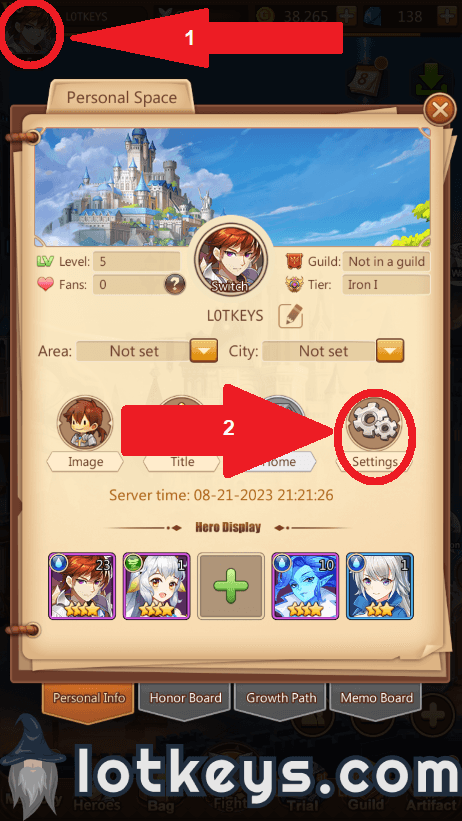
Step-by-Step Profile Lookup:
- Launch League of Pantheons on your mobile device or emulator.
- From the main city screen, look at the top-left corner and tap your Character Avatar.
- In the personal information pop-up window, locate the following data points: * Character Name: Displayed at the top next to your level badge. * Role ID: A dedicated numeric sequence listed in your profile data. Tap the small copy icon next to the number if available. * Server: Displayed near your profile details or visible at the bottom of the initial login title screen when launching the game.
- Paste these values directly into the BitTopup order fields without adding spaces or extra symbols.
Secure Recharge Guarantee: No Account Password Required
Account safety is critical when purchasing game currency online. BitTopup uses direct-to-UID processing protocols designed to keep your private credentials completely protected.
| Security Feature | Direct UID Recharge (BitTopup) | Account Sharing / Login Services |
|---|---|---|
| Password Required | No (Never requested) | Yes (High risk of unauthorized access) |
| Two-Factor Auth Bypass | No (Not needed) | Yes (Requires temporary security disabling) |
| Account Ban Risk | Zero (Compliant direct delivery) | High (Violates terms via IP sharing) |
| Personal Data Safety | Complete (Only public UID used) | Compromised (Payment info exposed) |
Because BitTopup only requires your public Role ID, Server, and Character Name, your login credentials (Google, Apple ID, Facebook, or email passwords) remain completely private on your personal device.
Comparing Direct Coupon Top-Up with In-App Purchases
Direct Coupon top-ups provide significant advantages over traditional mobile app store purchases, especially for players looking for transparent checkout and flexible global payment options.
| Feature / Metric | BitTopup Coupon Recharge | Standard In-App Purchase |
|---|---|---|
| Payment Flexibility | Global & regional payment channels | Tied strictly to Apple App Store or Google Play |
| Checkout Transparency | Live pricing shown prior to payment | Regional app store taxes added at final step |
| Account Security | UID-only; no stored credit cards on device | Requires active payment methods linked to device |
| VIP EXP Eligibility | 100% Eligible | 100% Eligible |
| Customer Assistance | 24/7 dedicated support team | Automated ticket queues via app stores |
Troubleshooting and Support for League of Pantheons Orders
If you run into any issues during or after your recharge, follow these standard troubleshooting steps:
- Coupons Not Showing Immediately: Completely close the League of Pantheons app from your device background task manager, wait 60 seconds, and reopen the game. This forces the client to sync with the server database.
- Incorrect Server or Role ID Entered: If you realize you entered an incorrect Server or Role ID, immediately check your order status on BitTopup. If the order is still pending, contact 24/7 Customer Support immediately with your order number, the wrong information submitted, and the correct account screenshot.
- Character Name Special Characters: If your Character Name uses special symbols, emojis, or non-standard fonts, focus on ensuring your Role ID and Server numbers are 100% accurate, as the delivery system matches the numeric UID first.
- Contacting Support: Keep your transaction receipt and in-game profile screenshot ready. BitTopup provides 24/7 customer service to help track, verify, and resolve any order questions.
Frequently Asked Questions
What details are required to recharge League of Pantheons Coupons?
You only need your numeric Role ID, your Character Name, and your active Server name/number. You never need to provide your account password or social login credentials.
How do I locate my League of Pantheons Role ID, Character Name, and Server?
Open League of Pantheons, tap your character avatar in the upper-left corner of the main screen, and view your profile info. Your Character Name, numeric Role ID, and Server details are all displayed on this screen.
Do I need to provide my game account password to recharge?
No. Recharging through BitTopup is 100% password-free. The system delivers Coupons directly to your account using your public Role ID and Server.
How long does it take to receive Coupons after completing payment?
Orders are processed through an automated direct-delivery system. In most cases, Coupons appear in your game account shortly after your payment is confirmed. If there is a minor delay due to server maintenance, restarting your game client will refresh your balance.
What items can I buy with Coupons in League of Pantheons?
Coupons act as universal cash credits in the in-game mall. You can use them to purchase limited summon packs, daily and weekly growth bundles, monthly cards, battle passes, and special holiday event offers, while also earning VIP points.
What should I do if my Coupons do not appear in my game account?
First, restart the game client to refresh your data connection with the server. If your balance does not update, check your BitTopup order history to verify delivery status. If the order is marked complete but items are missing, contact BitTopup 24/7 Customer Support with your order number and a screenshot of your in-game profile.