

Bol.com Gift Card EU Top Up: Fast, Secure Digital Codes
Bol.com stands as one of the largest online retail marketplaces across the Benelux region, offering millions of products across electronics, household appliances, books, baby gear, toys, and lifestyle items. A Bol.com Gift Card EU top up is the simplest way to add funds directly to your store balance or pay for shopping cart orders without linking personal banking cards or credit lines.
When you buy Bol.com Gift Card EU vouchers on BitTopup, you receive an authentic, unused digital code ready for immediate use. Digital codes provide total financial control, flexibility for gifting, and an extra layer of privacy for your everyday shopping online.
How to Recharge and Redeem Your Bol.com Gift Card EU Code
You can use your Bol.com digital voucher code in two ways: by crediting it directly to your personal Bol.com user balance before shopping, or by entering the code during the final payment screen at checkout.
Method 1: Pre-Funding Your Bol.com Account Balance
- Go to the official Bol.com website and log in to your personal user account.
- Click on your profile name at the top right to open the Mijn account (My Account) dashboard.
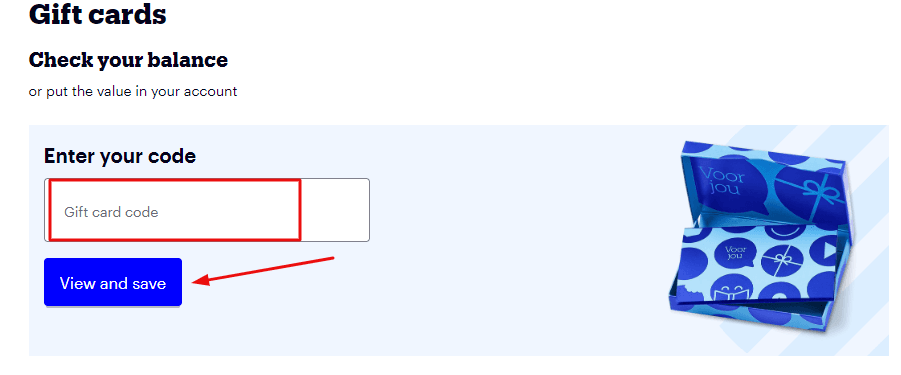
- Locate and select the Cadeauboncode invoeren (Enter gift card code) or Cadeaubonnen section.
- Type or paste your 19-digit gift card code along with the PIN code received from BitTopup.
- Click Toevoegen (Add). The euro value instantly reflects in your account wallet balance and will automatically apply as your default payment method on future orders.
Method 2: Applying the Code Directly at Checkout
- Browse Bol.com, add your chosen items to your shopping cart, and proceed to the checkout screen.
- Progress through the delivery details step until you reach the Betalen (Payment) section.
- Under the list of payment options, check the box labeled Cadeaubon of kortingscode (Gift card or discount code).
- Enter the unique digital code and the security PIN in the input boxes provided.
- Click Toepassen (Apply). The total order amount recalculates instantly. If your voucher balance exceeds the order total, the remainder stays securely stored on the code or credits to your account for subsequent purchases.
Finding Your Account Details and Voucher Redemption Area
Bol.com uses standard email-based account credentials rather than numerical gaming user IDs. To check your balance or verify that your gift card is applied, access your personal account menu.
- Sign in to your web browser or open the official Bol.com mobile app.
- Navigate to your account overview menu to view registered delivery addresses, active orders, and current gift card wallet balances.
- Make sure your account region matches your shipping destination (Netherlands or Belgium) to guarantee a smooth checkout process.
Bol.com Balance Top-Up vs Applying at Checkout
Understanding the difference between depositing credit onto your account profile versus entering codes at checkout helps you manage multi-item orders and recurring purchases efficiently.
| Feature | Account Wallet Pre-Funding | Direct Checkout Application |
|---|---|---|
| Storage Location | Tied directly to your Bol.com login profile | Kept on the digital code until used |
| Application | Auto-deducts on any future order | Requires manual entry at the payment screen |
| Multiple Vouchers | Stacks seamlessly into one unified euro total | Stacks multiple codes per transaction |
| Best For | Regular shoppers, budgeting, mobile app use | One-time purchases, split gifts, flexible gifting |
| Leftover Balance | Remains stored in your user balance | Remains linked to code or moves to account |
Regional Eligibility: Using Bol.com Gift Cards in the Netherlands and Belgium
Bol.com Gift Card EU vouchers operate in Euros (EUR) and are valid across both primary storefronts: Bol.com Netherlands (NL) and Bol.com Belgium (BE).
- Store Currency: Transactions must settle in Euros (€).
- Delivery Scope: Bol.com delivers physical goods throughout the Netherlands and Belgium. You can use your voucher across either regional portal as long as the delivery address lies within their supported shipping territories.
- Digital Goods & Subscriptions: Certain partner services, select third-party subscriptions, or select digital download items on the platform may have specific localized restrictions. Physical merchandise from both Bol.com and authorized marketplace partners can be paid for with gift voucher balances without restriction.
Validity Rules and Expiration Terms for Bol.com Vouchers
Bol.com digital gift cards come with flexible usage rules designed to protect consumer value:
- 3-Year Expiration Window: Standard Bol.com gift cards remain valid for 3 years from the date of issue. Make sure to redeem or attach your code to your user account within this window.
- Partial Spending: You do not have to spend the full value in a single transaction. If your shopping cart total is less than your voucher amount, the remaining funds stay active for future purchases.
- Order Top-Ups: If your purchase total exceeds your gift voucher value, you can pay the remaining balance using standard payment methods such as iDEAL, Bancontact, or supported credit cards.
- Non-Refundable: Once issued and delivered, digital codes cannot be exchanged for cash or transferred back to personal bank accounts.
Supported Denominations and Instant Digital Delivery in 2026
BitTopup provides a range of European denominations to match your shopping needs, whether you are ordering books, upgrading PC hardware, or picking up household supplies. Available denominations and active prices can be reviewed directly on the live checkout selector above.
Every order placed through BitTopup processes through an automated digital delivery system, generating your alphanumeric voucher code and security PIN code on your screen and sending a copy to your email immediately upon transaction approval.
Troubleshooting Common Bol.com Gift Card Redemption Errors
If you run into issues while redeeming your voucher, use these steps to resolve the problem quickly:
- Error: "Code is onjuist of ongeldig" (Code is incorrect or invalid)
Check for common typographical mistakes. Avoid accidental leading or trailing spaces when copying and pasting. Ensure you are not confusing the letter "O" with the number "0", or the letter "I" with the number "1". Confirm that you typed the separate security PIN in the correct field. - Error: "Code is al gebruikt" (Code has already been used)
Check your Mijn account wallet balance. If you entered the code on a previous session or an abandoned cart, the funds may already be credited to your account profile. - Split Payment Not Triggering
If your order exceeds your voucher amount, confirm that you have chosen a secondary payment method (such as iDEAL or Bancontact) to cover the remainder before clicking the final submit button. - Customer Assistance
If an error persists, reach out to BitTopup customer support with your order reference number for rapid verification.
Safe Digital Voucher Management on BitTopup
Maintaining account security is essential when shopping online. BitTopup guarantees a safe voucher purchase experience:
- Zero Account Sharing: BitTopup will never ask for your Bol.com account password, personal email access, or private login details. You receive an independent digital voucher code that you redeem yourself.
- Keep Your Codes Private: Do not share your 19-digit voucher number or PIN with unverified third parties. Once redeemed, the funds attach directly to the recipient's Bol.com profile.
- Secure Payment Processing: All purchases on BitTopup utilize encrypted checkout protocols to safeguard your payment information.
Why Buy Bol.com Gift Cards on BitTopup
- Reliable Code Delivery: Automated order processing ensures you receive your voucher without delays.
- Clear Pricing & Transparent Checkout: View exact rates directly on the live checkout page with zero hidden fees.
- Multiple Payment Channels: Pay conveniently using preferred European and international payment methods.
- Dedicated Support: BitTopup customer service is available around the clock to assist you with order inquiries and redemption guidance.
Frequently Asked Questions
How do I redeem my Bol.com Gift Card EU code?
Log in to your Bol.com profile, navigate to the Cadeaubonnen (Gift Cards) section in your account settings, and enter the code along with the PIN to add the funds to your wallet. Alternatively, you can enter the code under the Cadeaubon of kortingscode field during checkout.
Can I use my Bol.com Gift Card for both the Netherlands and Belgium stores?
Yes. Bol.com EU gift cards are denominated in Euros and can be redeemed on both Bol.com Netherlands (NL) and Bol.com Belgium (BE), provided your order shipping address is located within supported delivery regions.
How long is a Bol.com digital gift card valid for?
Bol.com digital gift cards are valid for 3 years from the original date of issuance. Any unspent balance remains available on your account or code until the expiration date.
Can I combine multiple Bol.com gift cards on a single purchase?
Yes. You can redeem multiple gift card codes to your user balance or enter multiple codes at checkout to cover larger transactions.
Do I have to spend the full Bol.com gift card balance in one order?
No. If your order total is less than the voucher amount, the remaining credit stays in your Bol.com account or remains attached to your code for future orders.
What should I do if my Bol.com voucher code fails to apply?
Verify that the 19-digit code and PIN are typed correctly without extra spaces. Check your account wallet balance to ensure the card was not already credited during a previous visit. If the issue remains unresolved, contact BitTopup support for assistance.