


How to Complete a Free Fire Diamonds Top Up Using Player ID
Topping up your Free Fire account on BitTopup is direct, fast, and secure. You do not need to share your game password or link third-party social media accounts. Every order is processed directly through your numeric Free Fire Player ID (UID).
Follow these steps to recharge your account:
- Select Your Diamond Package: Choose the diamond denomination you want from the package list above.
- Enter Your Free Fire Player ID: Type your numeric Player ID into the required input field. Double-check the numbers to ensure accurate delivery.
- Proceed to Checkout: Select your preferred payment method from the available local and global options.
- Complete Payment: Confirm your transaction. Once approved, the diamonds are sent directly to your Free Fire account balance.
- Check Your In-Game Balance: Open Free Fire on your device to confirm your updated diamond total.
Where to Find Your Free Fire Player ID in the Game
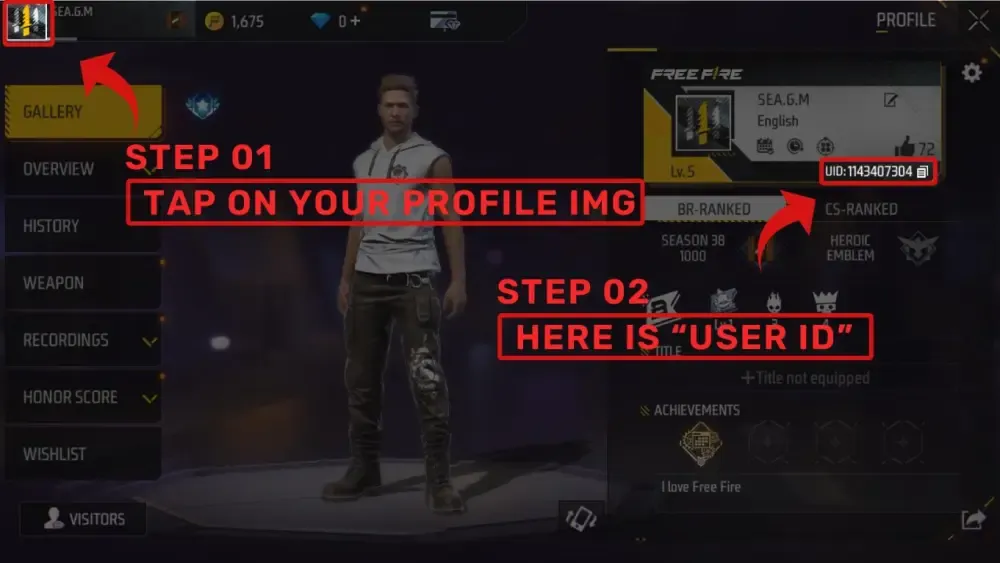
Your Free Fire Player ID is a unique numeric identifier linked to your profile. Finding and copying it takes only a few seconds.
- Open the Free Fire application on your mobile device.
- Tap on your Profile Banner or avatar located in the top-left corner of the main game lobby.
- Stay on the Basic tab in your profile menu.
- Look directly below your in-game nickname to find your UID (a sequence of 8 to 11 digits).
- Tap the small Copy icon next to your Player ID to copy it to your clipboard.
- Paste this number into the Player ID box on the BitTopup product page.
Free Fire Diamond Packages, Costs, and In-Game Rewards
Free Fire Diamonds are the primary premium currency in the game. They allow you to purchase exclusive character sets, gun skins with enhanced attributes, seasonal battle passes, and special event items. Diamond packs range from small bundles for quick spins to large packs for high-tier unlocks.
| Diamond Package Tier | Typical In-Game Utility | Recommended For |
|---|---|---|
| 100 – 310 Diamonds | Daily spins, minor crate openings, cosmetic items | Quick top-ups, daily discount events |
| 520 – 1,060 Diamonds | Booyah Pass unlock, elite character bundles | Seasonal pass buyers, active battlers |
| 2,180 – 5,600 Diamonds | High-tier weapon upgrades, Incubator spins, Royale events | Collectors, competitive loadout builders |
Note: Exact pricing, localized currencies, and active promotional values are calculated and displayed in real time on the BitTopup checkout screen based on your region.
Regional Compatibility and Global Server Support
BitTopup supports Free Fire accounts across major global servers. Because delivery relies strictly on your unique Player ID, your server region is automatically recognized during processing. Ensure that your account is registered on an active regional server before submitting your order.
What You Can Buy with Free Fire Diamonds in 2026
Free Fire continues to introduce fresh cosmetics, competitive enhancements, and interactive events throughout 2026. Having a ready balance of diamonds allows you to take advantage of limited-time items as soon as they launch.
- The 2026 Booyah Pass: Unlock both the Premium and Premium Plus reward tracks each season to earn exclusive themed costumes, vehicle skins, weapon crates, and custom kill effects.
- Character Unlocks and Awakened Forms: Secure new characters and upgrade their unique skill slots to optimize your battle royale and Clash Squad strategies.
- Weapon Royale and Evo Guns: Acquire high-tier Evo weapon skins that gain custom hit effects, kill animations, and upgraded combat statistics as you level them up.
- Luck Royale and Incubator Spins: Spin for rare, limited-edition bundles, Gloo Wall skins, and parachute designs that are not available in the standard store.
- Custom Room Cards and Name Change Cards: Host private tournaments with friends or change your in-game identity.
Why Choose BitTopup for Safe and Password-Free Top-Ups
Account safety is the top priority when purchasing digital currencies online. BitTopup ensures a reliable and frictionless experience every time you recharge.
- 100% Password-Free Security: We never ask for your password, email login, Facebook credentials, or Google account information. You only provide your public Player ID.
- Fast Order Delivery: Orders are processed automatically as soon as payment is verified, crediting diamonds straight to your game balance.
- Direct UID Verification: The system verifies your numeric ID to minimize errors before final delivery.
- Diverse Payment Options: Choose from a broad range of trusted international and regional payment methods on the checkout page.
- Dedicated Support: If you ever have a question about your order status, our customer support team is available to assist you.
Order Status Tracking and Troubleshooting Diamond Delivery
Most Free Fire Diamond top-ups arrive within moments of payment confirmation. If you do not see the diamonds on your balance right away, follow these troubleshooting steps:
- Restart Your Game Client: Fully close the Free Fire app from your device background processes and relaunch it. This forces the client to fetch updated balance data from the game servers.
- Verify Your Order on BitTopup: Check your order status page on BitTopup to confirm that your payment has completed successfully.
- Check In-Game Mail: Certain event bonuses or top-up milestone rewards are delivered directly to your in-game mailbox rather than the raw diamond counter.
- Review the Submitted Player ID: Check your order receipt to make sure the Player ID you entered matches your profile UID exactly.
If your order shows as completed on BitTopup but your balance has not updated after restarting your game, contact BitTopup customer support with your Order ID for rapid verification.
Frequently Asked Questions
How to recharge diamonds in Free Fire using Player ID?
Select your preferred diamond package on BitTopup, type your numeric Free Fire Player ID into the player field, and proceed to checkout. Once your payment clears, the diamonds are credited directly to your in-game balance without logging into your account.
Do I need to give my Free Fire password to top up diamonds?
No. BitTopup operates on a strict password-free system. You never need to share your game password, Google account, Apple ID, Facebook, or VK credentials. Only your public Player ID is required.
Where do I find my Free Fire Player ID?
Open Free Fire, tap your avatar banner in the top-left corner of the main lobby, and look at the Basic profile tab. Your numeric Player ID is displayed directly below your nickname. Tap the copy icon next to the number to copy it instantly.
How long does it take for Free Fire Diamonds to arrive after checkout?
Diamond delivery begins immediately after your payment is successfully confirmed. In most cases, diamonds reflect in your game account within a few minutes. You can monitor your purchase on the BitTopup order status page.
What can I buy with Free Fire Diamonds in 2026?
You can use diamonds to purchase the 2026 Booyah Pass, unlock character skills, spin the Luck Royale and Weapon Royale, upgrade Evo gun skins, obtain Gloo Wall cosmetics, and participate in special limited-time discount stores.
What should I do if I entered the wrong Player ID?
Because diamond top-ups are processed automatically based on the ID provided, orders sent to an existing, valid Player ID cannot be reversed. Always double-check your UID before confirming your purchase. If you notice a typo before payment is processed, contact BitTopup support immediately with your order details.