Stuck on a Viu device limit error? Learn how to purge ghost logins, clear your 5-device quota, and bypass authentication errors on Smart TVs and phones.
You turn on your living room Smart TV, launch Viu, and hit a prompt: "Maximum devices reached." Your phone and tablet stream without issue, but your television refuses to let you past registration. It looks like a software bug, but the issue is an entitlement counter enforced on your backend account.
Here is how to clear dormant hardware and reclaim your screens.
The Immediate Fix for the Viu Device Limit Lockout
To bypass the limit right now, manually revoke an active token from an authorized screen. Viu Premium caps accounts at 5 registered logins. The service does not boot your oldest hardware when you buy a new screen; it blocks device number six at the gate.
Follow these steps to clear the error:
- Open a desktop or mobile browser and go to the Viu portal.
- Select the user profile icon in the top-right corner and click Login.
- Enter your registered mobile phone number and submit the 4-digit SMS OTP.
- Click your profile avatar and select My Profile or Account Settings.
- Open Device Management. This screen lists hardware currently holding authentication tokens tied to your phone number.
- Select dormant hardware—such as an old phone, tablet, or secondary desktop browser—and choose Delete or Logout.
- Return to your Smart TV, restart the Viu app, enter your phone number, and verify with the new 4-digit OTP. The TV claims the vacant slot immediately.
If you lack a computer nearby, launch the Viu app on your phone, open the Account tab, select Settings, and manage your sessions from the device list. If you are starting fresh or bypassing billing hurdles on an expired setup, you can purchase a Viu Premium Subscription Code (MY) to establish an unencumbered subscription.

Viu Registered Devices vs Concurrent Streams: The Hidden Difference
Subscribers routinely confuse registered hardware quotas with concurrent stream limits. When Viu throws an error code, identifying the barrier determines your fix.
A registered device slot represents an authorized hardware instance storing an encrypted authentication token. Even if your bedroom TV stays unplugged for weeks, its token occupies one of your 5 slots. A formatted laptop will consume a slot indefinitely unless you hit "Sign Out" before wiping the drive.
A concurrent stream is an active playback session requesting live video decoding. Platforms rely on short-lived DRM licenses—renewing on 2- to 15-minute intervals—to verify that your account stays within simultaneous playback caps.
| Technical Layer | Viu Premium Specification | Trigger for Error Message | Immediate Resolution |
|---|
| Hardware Slot Cap | 5 Authorized Logins Max | Attempting a 6th login on any TV, PC, tablet, or mobile phone | Sign out of a dormant hardware session via profile settings |
| DRM Stream Heartbeat | Up to Full HD (1080p) streams | Exceeding simultaneous playback requests across authorized screens | Stop playback on one screen and wait 2 to 15 minutes for DRM release |
| Offline Storage Token | 7-Day Download Expiry | Trying to play expired downloaded files without re-authenticating | Reconnect the device to the internet to validate local storage files |
The baseline operational thresholds for hardware registration and video decode concurrency on Viu Premium accounts.
If a family member streams an episode while other screens run playback, Viu halts the stream. That is a concurrent stream collision, not a registration lockout. If you cannot even log in on a new TV, you are hitting the 5-device hardware limit.
Viu Device Management Menu Location and Layout
Tracking down Viu's device management menu depends on your operating system.
On the Viu Mobile App (Android/iOS):
* Tap the Account tab at the bottom-right corner of the interface.
* Scroll past offline downloads and history.
* Select Settings, then tap Connected Devices (labeled Device Management in select regional builds).
* Your active phone appears as "Current Device," alongside other hardware grouped by OS.
On the Desktop Web Portal:
* Sign in with your mobile number.
* Select the circular profile icon near the search bar.
* The dropdown reveals your subscription tier, auto-renewal status, and connected hardware.
On Smart TV Platforms (Samsung Tizen, LG webOS, Sony Android TV, Apple TV, Philips Smart TV):
* The TV client contains zero device-pruning tools. You cannot revoke other screens from a TV.
* If you see the viu tv maximum devices reached error on a television, you must switch to a phone or PC browser to manage the list.
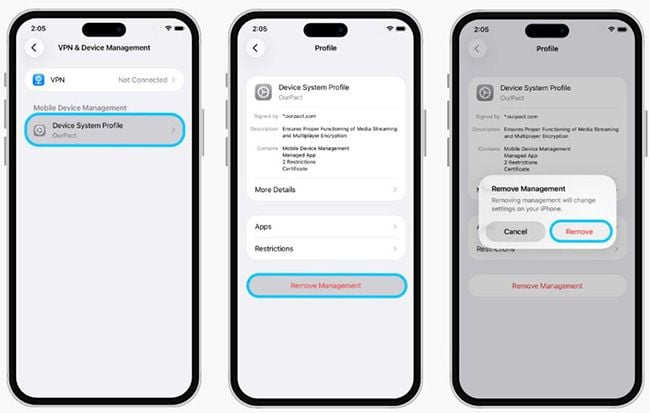
How to Delete Device from Viu Account Safely
Pruning hardware requires care. Tap the wrong entry, and you unlink your primary phone, forcing an extra SMS OTP cycle while standing at your TV.
Prioritize entries in this order:
- Ghost Browser Instances: Web sessions accumulate rapidly. Signing in via Chrome, and later via Firefox or private browsing on the same PC, registers as multiple independent hardware slots. Delete browser logins first.
- Decommissioned Phones: Trade-ins and factory resets leave orphan tokens behind. Remove any phone model you no longer own.
- Guest Screens: Vacation rentals, hotel TVs, or guest room setups should be deleted immediately after use.
Tapping Delete invalidates the device token across Viu's servers. There is no database propagation delay; the slot opens up instantly.
To keep your account active across your screens without renewal issues, top up your access through a Viu Premium Subscription Code (MY) for continuous Full HD streaming.
The Truth About the Viu Remove Connected Device Cooldown
Users worry about unlinking hardware because competing services enforce strict rotation rules. Amazon Prime Video limits users in certain regions to unlinking 2 devices per rolling 30 days. YouTube TV restricts designated home Wi-Fi changes to 3 times in 30 days. Astro GO limits accounts strictly to a single Smart TV.
Does Viu enforce a cooldown on removing devices?
No. Viu does not impose a 30-day penalty when you revoke a screen. You can delete an unused tablet and register a new Smart TV within seconds. Anti-abuse systems step in only if you repeatedly churn devices. Adding, deleting, and re-adding multiple units within an hour triggers API throttling, blocking SMS OTP delivery to your phone for 12 to 24 hours.
| Platform Ecosystem | Device Slot Registration Cap | Unlink/Cooldown Restrictions | Home Network Reposition Limits |
|---|
| Viu Premium | 5 Devices (All Form Factors) | Instant release; temporary SMS throttle if abused | Restricted strictly to country of original subscription |
| Amazon Prime Video | Hardware limits vary by tier | Max 2 devices unlinked per 30-day rolling window | Region-dependent access checks |
| YouTube TV | 3 Concurrent streams / 6 Profiles | None on individual hardware | Max 3 home Wi-Fi changes per 30-day window |
| Astro GO | Multi-mobile, strictly 1 Smart TV | Manual device clearing required | Domestic territorial enforcement |
Comparative restrictions on hardware manipulation and unlinking policies across streaming services.
Treat the 5-device quota like parking spots: pull one car out, and another parks immediately. Avoid rapid churn so the SMS gateway stays clear.
Smart TV Authentication Traps: 4-Digit OTPs and Single-Screen Quirks
Viu supports living room ecosystems like Samsung Tizen, LG webOS, Android TV, and Apple TV, but authenticating them is rigid.
You cannot use an email and password on the television app. Viu requires phone-based verification:
- Launch the Viu TV app.
- Agree to the Terms of Service.
- Type your registered telephone number.
- Wait for the 4-digit SMS OTP on your phone.
- Type the 4-digit code using your TV remote on the visual keypad.
One obscure rule catches living room viewers off guard: Smart TV free trials can only be claimed once per physical television. If a secondhand television's previous owner activated a trial, that unit is permanently barred from trial promotions, even under a brand-new phone number.

Regional account boundaries also apply. A plan purchased in Malaysia or Hong Kong works only within that market. Bringing an Apple TV or streaming stick abroad triggers generic network errors during the login handshake.
Resolving Contradictions: 3-Device vs 5-Device Allowances
Outdated tech blogs and forums often disagree on whether Viu allows 3 or 5 devices. The discrepancy comes from old carrier packages versus contemporary direct tiers.
Older partner bundles once restricted active accounts to 3 devices. Current agreements—such as CelcomDigi postpaid and prepaid integrations in Malaysia—and direct Viu Premium tiers standardly permit 5 registered devices with Full HD (1080p) playback.
| Subscription Variant / Bundle | Hardware Quota Cap | Resolution Limit | Quota / Billing Details |
|---|
| Viu Direct Premium (Malaysia) | 5 Registered Devices | Up to Full HD (1080p) | Ad-free, unlimited download access with 7-day file expiry |
| CelcomDigi Mega Add-Ons Viu Premium | 5 Registered Devices | Up to Full HD (1080p) | 12-month postpaid contract add-on with 5GB monthly data |
| CelcomDigi StreamMORE Viu Premium | 5 Registered Devices | Up to Full HD (1080p) | 30-day recurring prepaid/postpaid pass with 5GB data |
Current official hardware caps across direct and carrier-integrated Viu Premium tiers in Malaysia.
If your account stops accepting logins at device 4, check for an unrevoked browser session or an old legacy plan. To guarantee a standard 5-device allocation, apply a fresh Viu Premium Subscription Code (MY) voucher.
When the App Refuses to Budge: Cache Nukes and Support Escalation
If your management screen lists 3 devices but your Smart TV still shows a maximum limit error, client-side authentication cache is corrupted.
To clear the loop:
- Purge TV App Data: On Android TV, navigate to Settings > Apps > See All Apps > Viu, then run Clear Cache and Clear Data. On Samsung or LG, uninstall Viu, pull the TV power plug for 60 seconds to dump RAM, power on, and reinstall.
- Remember the Phone Number Lock: Viu does not support shifting an active subscription to a new telephone line. Your registered phone number remains tied to your profile.
- App Deletion Does Not Cancel Billing: Uninstalling the app does not stop recurring charges. You must cancel renewals inside the web portal or through your carrier's billing dashboard.
If local resets fail, escalate the problem to Viu support:
- Live Chat: Open
viu.com/help or tap Account > Help in the mobile app. - Support Email: Email
support@viu.com with your registered phone number, account ID string, and TV model number. Viu email tickets typically take 2 to 5 business days for review.
FAQ
What does the Viu maximum device limit reached error mean?
It indicates that your Viu Premium account currently holds 5 authorized hardware sessions across phones, tablets, PCs, or Smart TVs. You must sign out of an existing hardware slot before the server authorizes a new screen.
How many devices can be logged into a Viu Premium account?
Viu Premium permits a maximum quota of 5 registered device logins per account. This includes personal computers, mobile phones, tablets, and supported Smart TV platforms.
How do I log into the Viu app on my Smart TV?
Open the Viu app on your Smart TV, agree to the terms, and type your registered mobile phone number on the screen. Enter the 4-digit SMS OTP transmitted to your smartphone to validate the living room device.
Does logging out of an old phone immediately free up a Viu device slot?
Yes. When you hit Sign Out or remove a hardware token through the mobile app settings, the slot frees up instantly on the backend. You can immediately authenticate your new television or phone.
Can I transfer my Viu subscription to a different phone number to fix device issues?
No. Viu accounts and paid entitlements are bound strictly to the specific mobile phone number utilized during initial registration. Benefits cannot be transferred or ported across different telephone numbers.
Who do I contact if I cannot clear the device limit error on Viu?
You can speak with live chat agents at viu.com/help or submit a direct ticket to support@viu.com. Email tickets generally require 2 to 5 business days for support staff resolution.
The Final Hardware Cleanout Verdict
Viu's 5-device quota works for daily needs, but its interface does not clearly show which hardware occupies those slots. Smart TVs bear the brunt of the issue because their native apps omit device-pruning tools entirely.
Resetting your home router will not fix backend token rejections. Instead, open a browser or your mobile app, log in, and delete dormant browser and phone sessions. Keeping your active list trimmed to your primary screens prevents lockouts when you sit down to watch.