


MIYA - Meet you. Meet good voice Coins Top Up: Essential Guide
MIYA - Meet you. Meet good voice is a premier social audio platform designed for real-time voice streaming, group chat parties, interactive karaoke, and community casual gaming. Whether you join multi-seat audio rooms to chat with talented hosts or sing along with friends, MIYA Coins serve as the primary in-app currency that drives engagement.
Recharging MIYA Coins gives you the freedom to send high-impact animated gifts, support your favorite voice hosts, stand out in crowded broadcast rooms with special entry effects, and activate exclusive Noble privilege tiers. BitTopup provides a direct top-up service that delivers your coins straight to your Miya ID without requiring your account password or third-party login credentials.
How to Locate Your Miya ID in the App
To ensure your MIYA Coins are credited to the correct account, you only need to provide your unique numerical Miya ID during checkout. Follow these simple steps to find your ID:
- Launch the MIYA - Meet you. Meet good voice app on your mobile device.
- Tap the Profile (Mine / 我) tab located in the bottom-right corner of the main screen.
- Locate your profile avatar at the top of the screen.
- Find your Miya ID displayed as a sequence of numbers directly underneath your nickname.
- Tap the Copy icon next to your ID number to copy it to your clipboard.
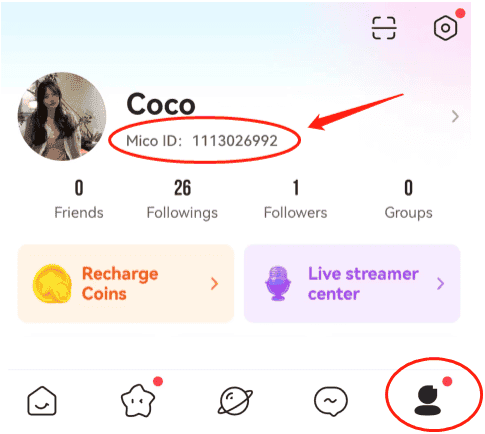
Tip: Always use the copy button rather than typing the ID manually to prevent typos and delivery delays.
Features and Perks Unlocked with MIYA Coins (Gifts, VIP, and Voice Rooms)
MIYA Coins give you full access to the interactive ecosystem across all live audio broadcasts and group lounges. Here is what you can unlock once your account is topped up:
1. Animated and Full-Screen Virtual Gifts
Sending gifts is the best way to interact with room hosts, show appreciation for musical performances, and build social affinity. With coins, you can send everything from quick micro-gifts (like roses and hearts) to premium luxury gifts featuring dynamic 3D animations, sports cars, castles, and room-wide fireworks displays.
2. Noble Titles and Exclusive VIP Status
Ascending the MIYA Noble tier system unlocks visible perks throughout the platform. Depending on your level (such as Knight, Duke, or Emperor), you receive:* Distinctive entrance banners and audio alerts when entering voice rooms.* Custom chat bubble frames and exclusive nickname color treatments.* Dedicated badge icons next to your profile in user lists.* Privilege rankings that place your avatar at the top of guest lists.
3. Voice Room Minigames and Interactive Features
Many voice rooms feature built-in party games, CP (Couple) pairing activities, and lucky prize wheels. Coins allow you to participate in these mini-games, compete against other listeners, and share rewards with the entire room.
MIYA Coin Utility Breakdown
| Feature Category | In-App Utility | Account Benefit |
|---|---|---|
| Live Gifting | Dynamic room animations & effects | Increases streamer intimacy points and global ranking |
| Noble & VIP Ranks | Emperor, Duke, and Knight memberships | Unlocks custom entry banners, chat frames, and room priority |
| Room Minigames | Party game entry and lucky spins | Enables interactive multiplayer gameplay in active rooms |
| Profile Styling | Avatar frames and room nameplates | Provides distinctive visual presence in chat feeds |
How to Recharge MIYA - Meet you. Meet good voice Coins on BitTopup
Recharging on BitTopup takes only a few steps and requires no account login credentials:
- Select Your Package: Browse the available MIYA Coin denominations and select the package that fits your needs.
- Enter Your Account Details: Input your numeric Miya ID in the designated field. Double-check the number to confirm accuracy.
- Select a Payment Method: Choose your preferred payment channel from the available list at checkout.
- Confirm and Pay: Complete the payment process through the secure gateway.
- Check In-App Balance: Open your MIYA app, refresh your wallet or profile page, and verify your updated coin balance.
Safe & Password-Free Recharge Process on BitTopup
Security is paramount when purchasing virtual currencies online. BitTopup processes your top-up using direct ID delivery protocols:
- No Password Required: You never have to provide your MIYA password, verification codes, or linked social account details. Your login credentials stay completely private.
- No Account Sharing: The recharge is sent directly to your publicly visible Miya ID, eliminating the risks associated with account sharing or manual logins.
- Encrypted Transactions: All transactions on BitTopup are processed through modern encrypted channels to safeguard your payment information.
Supported Payment Methods for MIYA Coin Top Up
BitTopup supports a wide selection of international and localized payment solutions to make your purchase smooth and accessible regardless of your location. Available options include major credit and debit cards, secure e-wallets, online banking transfers, and popular regional payment gateways.
Real-time exchange rates and localized pricing are calculated directly on the live checkout screen, allowing you to select your preferred currency and payment provider with total clarity.
Troubleshooting and Frequently Asked Questions
What is a Miya ID and where can I find it?
A Miya ID is a unique numerical identifier assigned to your account upon registration. You can find it by opening the MIYA app, navigating to the Profile (Mine) section in the bottom-right corner, and checking the number displayed right below your avatar and nickname.
Do I need to share my MIYA password to recharge Coins?
No. Recharges on BitTopup require only your numeric Miya ID. We will never ask for your account password, SMS verification codes, or social media login details.
How fast will the MIYA Coins be credited to my account?
Direct ID top-ups are processed automatically. In most cases, coins reflect in your in-app wallet within moments of payment confirmation. If you are currently in a voice room, you may need to close and reopen the app to refresh your balance display.
What can I purchase with MIYA Coins in the app?
MIYA Coins can be used to send dynamic virtual gifts to room hosts, unlock Noble status privileges, purchase exclusive profile decorations and entry effects, and participate in interactive voice room mini-games.
What should I do if I entered an incorrect Miya ID during checkout?
Because direct ID recharges are automated, orders delivered to a valid ID cannot be reversed once processed. If you notice an error immediately before payment completion, please correct the ID field right away. If an order has already gone through with an incorrect ID, contact BitTopup 24/7 customer support with your order number and transaction receipt for assistance.
Which payment options are available for purchasing MIYA Coins?
BitTopup accepts a wide range of payment methods, including credit/debit cards, regional e-wallets, and online banking options. The full list of available payment methods and live prices is displayed directly on the checkout page based on your region.