



What Is a MiFinity eVoucher CAD Top Up and How It Works
A MiFinity eVoucher (CAD) is a prepaid digital payment card issued in Canadian Dollars. It provides a secure, private way to fund your MiFinity eWallet or make direct payments on merchant websites without sharing bank account numbers, credit card data, or personal financial details online.
When you purchase a MiFinity eVoucher on BitTopup, you receive a unique 16-digit PIN code. You enter this code directly into your MiFinity account or at supported merchant checkouts to credit the exact prepaid value instantly. Because the voucher is prepaid, you can only spend the amount loaded on the card, making it an effective tool for budget management and fraud prevention.
MiFinity CAD Denominations Available on BitTopup
BitTopup offers a wide selection of Canadian Dollar denominations to suit casual gaming, digital entertainment subscriptions, or larger wallet reloads. Current pricing and exchange rates reflect directly on the live checkout screen.
| Denomination (CAD) | Best Used For | Code Format |
|---|---|---|
| 10 CAD - 25 CAD | Quick wallet reloads, microtransactions, casual gaming | 16-digit digital PIN |
| 50 CAD - 100 CAD | Entertainment subscriptions, monthly digital services | 16-digit digital PIN |
| 250 CAD - 500 CAD | High-volume merchant deposits, main eWallet funding | 16-digit digital PIN |
Note: Denomination availability depends on current inventory. Check the live BitTopup checkout for active stock and real-time CAD pricing.
How to Recharge Your MiFinity eWallet Using a CAD eVoucher
Loading your digital code into your account takes less than two minutes. Follow these direct steps:
- Log in to MiFinity: Open the official MiFinity mobile app or go to the web portal and sign in to your personal eWallet account.
- Go to Deposit: Select the Deposit option from the main dashboard navigation menu.
- Choose Payment Method: Click on the MiFinity eVoucher icon from the list of available deposit options.
- Select Currency and Wallet: Choose your CAD eWallet sub-account as the receiving wallet to prevent conversion charges.
- Enter Code Details: Type your 16-digit eVoucher PIN, the voucher expiry date, and the CVV/PIN if prompted.
- Confirm Transaction: Review the deposit summary and confirm. Your funds are credited to your eWallet balance instantly.
How to Find Your MiFinity Account Details
To ensure smooth reloads, verify that your account details match the voucher currency before redeeming.
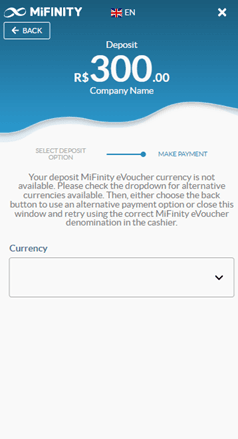
- Open your MiFinity app or sign in through your browser.
- View your eWallet overview on the home screen.
- Identify your account currency code (CAD) and account ID located directly below your balance.
- If you hold multi-currency sub-wallets, switch to or create a CAD sub-wallet before entering your voucher code.
Important Currency Lock and FX Terms for Canadian Users
To maximize the value of your MiFinity eVoucher, keep the following currency and validity policies in mind:
- Currency Matching: A CAD eVoucher is designed specifically for CAD eWallet accounts. If you redeem a CAD voucher into an eWallet designated in EUR, USD, or GBP, MiFinity automatically applies a foreign exchange (FX) conversion fee according to their current daily rates.
- Voucher Validity: MiFinity eVouchers remain valid for 12 months from the date of issue. After 12 months, unredeemed codes may incur monthly maintenance fees deducted directly from the remaining balance as per MiFinity user terms.
- Single-Use Redemption: Each voucher code must be redeemed in full. Partial redemptions are not retained on the voucher PIN once activated into an eWallet.
- Region Lock: CAD vouchers are meant for accounts and merchants supporting Canadian Dollar transactions. Confirm your account region is set to Canada or supports CAD balance holdings.
Where and How You Can Spend Your MiFinity Balance in 2026
Once your CAD funds are deposited into your MiFinity eWallet, you can spend your balance across various digital platforms in 2026:
- Online Gaming & Esports: Top up gaming credits, virtual currencies, and in-game passes across global digital entertainment hubs.
- International Digital Merchants: Pay for software licenses, digital downloads, cloud storage, and web hosting providers that accept MiFinity payments.
- Peer-to-Peer Transfers: Send CAD directly to other MiFinity account holders worldwide using their registered email address or phone number.
- Virtual Card Funding: Link your eWallet balance to virtual payment tools offered directly within the MiFinity ecosystem for broader online checkout compatibility.
Troubleshooting MiFinity eVoucher PIN and Account Errors
If you experience an issue when loading your code, review these common fixes:
- "Invalid PIN" or Formatting Errors: Ensure you enter the 16 digits without spaces or dashes. Check for character misreads (such as confusing the number
0with the letterO, or1withI). - "Currency Mismatch" Warning: You may be attempting to load a CAD voucher into a USD or EUR wallet. Go to your wallet dashboard, create or select a CAD wallet, and try the deposit again.
- Code Shows "Already Redeemed": Check your MiFinity transaction history. In rare cases, a connection timeout occurs while the balance was already successfully processed. If the transaction does not appear, contact BitTopup support with your order number.
- Account Deposit Limits Exceeded: MiFinity accounts have regulatory verification tiers. If your deposit fails, check your account verification status in the MiFinity profile settings to ensure you have not hit your monthly deposit cap.
Why Buy MiFinity eVouchers on BitTopup?
- Complete Privacy: Keep your credit cards and personal bank details private. BitTopup processes your voucher purchase securely without requiring your MiFinity login credentials.
- Instant Digital Delivery: Your 16-digit voucher code displays immediately on your screen after checkout and is sent to your registered email for safe backup.
- No Password Sharing: We never ask for your eWallet password or account access. You redeem the code yourself directly within the official MiFinity portal.
- Clear Checkout: Review final CAD payment options and order details clearly on the live checkout screen before confirming.
Frequently Asked Questions
How do I redeem my CAD MiFinity eVoucher?
Log in to your MiFinity account, navigate to the Deposit section, select MiFinity eVoucher, pick your CAD eWallet, and type your 16-digit PIN to load the funds instantly.
Can I use a CAD MiFinity eVoucher with an account set to USD or EUR?
Yes, but MiFinity will convert the CAD value to your account base currency at their current foreign exchange rate, which includes an FX conversion fee. To avoid exchange fees, redeem the code into a CAD-denominated sub-wallet.
Do MiFinity eVouchers expire?
MiFinity eVouchers are valid for 12 months from the date of purchase. We recommend loading your voucher code into your MiFinity eWallet promptly after receiving it.
Do I need to provide bank details to buy a MiFinity eVoucher on BitTopup?
No. You do not need to link your bank account to MiFinity when buying on BitTopup. You simply select your preferred payment method at checkout to receive your digital voucher.
What should I do if my MiFinity eVoucher code is invalid or rejected?
Double-check that all 16 digits were entered correctly without extra spaces. Confirm your receiving wallet accepts CAD deposits. If the issue persists, reach out to BitTopup 24/7 customer support with your order number for swift verification.
Are there any extra fees when loading a MiFinity eVoucher into my eWallet?
MiFinity may apply standard merchant or deposit processing fees depending on your account tier and wallet settings. Depositing into a matching CAD wallet avoids unnecessary foreign exchange charges.