

MiFinity eVoucher NOK Top Up: What It Is and How It Works
A MiFinity eVoucher (NOK) is a secure prepaid digital payment method that allows users in Norway to fund their MiFinity eWallet accounts or complete transactions at supported online merchants without sharing personal banking credentials or credit card details. When you purchase an eVoucher, you receive a unique 20-digit PIN code denominated in Norwegian Krone (NOK).
This electronic voucher functions as cash online. It offers complete privacy, immediate account funding, and strict control over your spending. Whether you want to reload your main eWallet balance or pay an online vendor directly at checkout, the MiFinity eVoucher eliminates the need for direct bank transfers or card authorizations.
How to Recharge Your MiFinity eWallet Using a NOK eVoucher
Redeeming your 20-digit PIN into your balance is straightforward. Follow these steps to complete your deposit:
- Log in to MiFinity: Open the official MiFinity app or visit the desktop portal and sign in to your eWallet account.
- Open the Deposit Section: Select the Deposit tab from the main navigation dashboard.
- Select MiFinity eVoucher: From the list of available deposit methods, choose MiFinity eVoucher as your payment source.
- Choose Wallet and Currency: Select the sub-wallet you wish to fund. If your account holds multiple currencies, choose your NOK balance to avoid conversion charges.
- Enter Voucher Details: Type the exact face value of your voucher in NOK and input the 20-digit PIN code received from BitTopup.
- Confirm Transaction: Review the deposit details and click confirm. The funds will reflect immediately in your account balance.
Locating Your Account Details and Voucher Credentials
To redeem your voucher, you do not need to disclose your eWallet login credentials to anyone. You only need your personal account access to enter the code yourself.
Your 20-digit PIN code is delivered directly to your BitTopup order history screen and sent to your registered email address right after checkout. Keep this PIN confidential until you are ready to redeem it in the official MiFinity portal.
Available Denominations and Spending Limits for MiFinity NOK Codes
BitTopup provides multiple denominations to suit your budget and transaction requirements. Real-time prices and availability are displayed on the live checkout screen.
| Denomination (NOK) | Voucher Format | Recommended Use Case |
|---|---|---|
| 100 NOK | 20-Digit Digital PIN | Quick small balance reloads and basic service checkouts |
| 250 NOK | 20-Digit Digital PIN | Casual online entertainment and gaming subscriptions |
| 500 NOK | 20-Digit Digital PIN | Standard wallet funding for regular digital purchases |
| 1,000 NOK | 20-Digit Digital PIN | Substantial deposits and higher-tier merchant payments |
| 2,500 NOK | 20-Digit Digital PIN | Large wallet top-ups without using debit cards |
Supported Merchants, Gaming Platforms, and Entertainment Services
The MiFinity eWallet ecosystem connects thousands of online platforms worldwide. By loading your wallet with a NOK voucher, you gain access to an expansive network of digital services, including:
- Online Gaming and Esports: Fund gaming balances, buy in-game currencies, and pay on international entertainment platforms.
- Digital Retailers and Subscriptions: Check out on global shopping sites and digital subscription services that accept MiFinity payments.
- Peer-to-Peer Transfers: Transfer funds to other verified MiFinity account holders globally once your balance is loaded.
- Virtual Card Funding: Move funds from your voucher deposit into virtual card options linked to your eWallet.
Fees, Currency Conversion, and Expiry Rules for MiFinity Norway
Before redeeming your code, review the following operational rules regarding validity, conversions, and maintenance fees:
- Voucher Validity Period: MiFinity eVouchers remain valid for 12 months from the date of generation. You should redeem your voucher within this window to avoid potential expiration.
- Currency Conversion Rates: If you redeem a NOK-denominated voucher into a sub-wallet registered in another currency (such as EUR, USD, or GBP), MiFinity will apply an automatic foreign exchange conversion fee based on daily exchange rates. To retain the full face value, redeem the code into a NOK sub-wallet.
- Regional Compatibility: These vouchers are issued in Norwegian Krone (NOK) and are designed specifically for Norwegian accounts or international accounts supporting NOK currency balances.
Troubleshooting MiFinity 20-Digit PIN Redemption Errors
If you encounter an issue when attempting to redeem your code, use these solutions for the most common errors:
- Invalid PIN Error: Check for extra spaces before or after the 20-digit sequence. Enter only the numeric digits without hyphens, dashes, or spaces.
- Full Redemption Requirement: MiFinity eVouchers do not support partial balance redemption. You must enter the exact nominal face value of the voucher on the deposit screen (e.g., enter exactly 500 when redeeming a 500 NOK voucher).
- Voucher Already Redeemed: Each voucher code is single-use. Once redeemed, the PIN becomes permanently inactive. Check your deposit history in your MiFinity dashboard to verify if the balance was already credited.
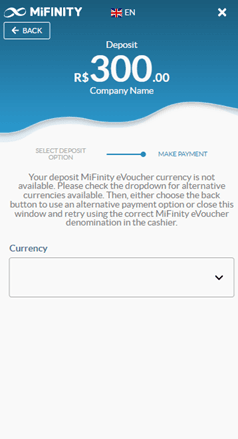
- Currency Mismatch on Deposit: If the deposit screen rejects your input, ensure you have set the currency selector to NOK rather than default currencies like EUR or USD.
Safe and Secure Payments: Why Buy MiFinity eVoucher (NOK) on BitTopup
BitTopup provides a direct, secure, and reliable platform to buy digital prepaid cards and gaming vouchers. Purchasing on BitTopup offers clear advantages:
- Zero Account Sharing: We never ask for your eWallet password, banking logins, or private account credentials. You receive a digital code that you redeem yourself.
- Fast Digital Delivery: Your 20-digit PIN code is generated immediately upon completed payment and accessible in your order overview.
- Protected Payment Methods: Complete your purchase using secure local and global checkout options without exposing your primary bank cards to third parties.
- Dedicated Customer Support: If you ever experience issues retrieving your digital code, BitTopup customer support is available to assist you quickly.
Frequently Asked Questions
How do I redeem my MiFinity eVoucher NOK code?
Log in to your MiFinity eWallet, click Deposit, select MiFinity eVoucher, choose your NOK sub-wallet, enter the exact face value of your voucher, type the 20-digit PIN, and click confirm.
Do MiFinity eVouchers have an expiration date?
Yes, MiFinity eVouchers are valid for 12 months from the date of issue. Make sure to redeem the PIN into your eWallet balance before the 12-month period expires.
Can I use a NOK MiFinity eVoucher on a wallet registered in another currency?
Yes, but MiFinity will apply a currency conversion fee at their standard daily foreign exchange rate when converting your NOK voucher into another currency balance like EUR or USD. Using a NOK sub-wallet avoids this fee.
Is the MiFinity eVoucher single-use or can I split the balance across multiple deposits?
MiFinity eVouchers are single-use only. You cannot split a voucher across multiple partial deposits. The entire face value must be deposited in a single transaction.
Do I need to link a bank account or credit card to use a MiFinity eVoucher?
No, you do not need to link any bank account or credit card. The eVoucher acts as a standalone prepaid balance, keeping your financial information private.
What should I do if my 20-digit MiFinity eVoucher PIN is rejected?
Verify that you typed all 20 digits correctly without spaces or dashes. Confirm that you selected NOK as the currency and entered the exact total voucher value on the deposit screen. If errors persist, verify your order status on BitTopup or contact customer service.