

Netflix Gift Card (CO) Recharge Guide (2026)
A Netflix Gift Card (CO) allows you to add funds directly to any Netflix account configured for Colombia. Once redeemed, the credit is converted into Colombian Pesos (COP) and applied to your account balance. This digital voucher provides complete control over your subscription costs without requiring a recurring credit card or bank account linked to your profile.
Digital gift cards purchased for Colombia are dedicated exclusively to Netflix streaming subscriptions. They cannot be used on third-party platforms or the physical Netflix Shop merchandise portal. Whether you are funding a brand-new profile or topping up an existing membership, a gift card lets you manage entertainment spending with fixed prepaid amounts.
Colombia Account Currency and Region Compatibility Rules
Netflix maintains strict regional restrictions on all digital gift cards. To successfully redeem and use a Netflix Gift Card (CO), your account must meet specific regional criteria:
- Account Country: Your Netflix account must be registered in Colombia.
- Billing Currency: The account balance and subscription billing must be denominated in Colombian Pesos (COP).
- IP & Geo-Locking: The redemption interface validates regional settings. Attempting to apply a Colombian voucher to an account based in the United States, Europe, or another Latin American country will trigger a currency mismatch or regional restriction error.
If you created your Netflix account outside Colombia, you must let your current billing cycle finish, cancel that subscription, and re-subscribe while located in Colombia or using Colombian account settings to apply COP credit.
How to Verify Your Netflix Colombia Account Before Redemption
Before applying your digital code, verify that you are logged into the correct Colombian profile. Netflix accounts identify users primarily through an email address and billing region rather than a public gaming User ID (UID).
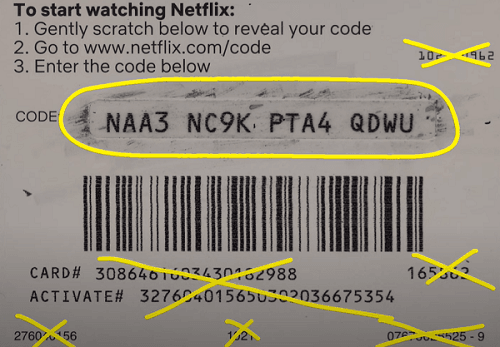
Follow these steps to confirm your account status:
- Visit the official Netflix website on your web browser or open the mobile app.
- Log in using your registered email address and password.
- Click on your profile icon in the upper-right corner and select Account.
- Review the Membership & Billing section. Confirm that the currency displayed is Colombian Pesos (COP).
- Keep this browser tab open to proceed directly to the redemption page once you receive your digital code from BitTopup.
Step-by-Step Guide: How to Redeem Netflix Gift Card Colombia Codes
Applying your prepaid digital code to your streaming account takes only a few moments. Follow this official redemption walkthrough:
- Go directly to
netflix.com/redeemon your desktop or mobile browser. - Log in to the Netflix account you wish to credit.
- Locate the 11-digit or alphanumeric PIN code delivered to your BitTopup order confirmation screen or registered email.
- Enter the digital code carefully into the text field labeled Code or PIN.
- Click the red Redeem button.
- Confirm the prompt displaying the COP balance being added to your account.
Once confirmed, the credit becomes active immediately. If you are starting a new subscription, you will be prompted to select a plan (Standard with ads, Standard, or Premium). If you have an active account, the balance will cover upcoming billing cycles.
Netflix Colombia Subscription Plans and Balance Duration
When you apply a COP gift card balance, Netflix deducts the cost of your selected plan on each monthly renewal date. The duration your voucher lasts depends on the total credit loaded and your active tier.
| Subscription Plan | Standard Features | Typical Monthly Cost (COP) | Balance Coverage with 50,000 COP Card |
|---|---|---|---|
| Basic / Standard Entry | 1-2 Screens, HD streaming | ~16,900 - 26,900 COP | Approx. 2 to 3 Months |
| Standard Plan | 2 Screens, Full HD 1080p, 1 extra member slot | ~32,900 COP | Approx. 1.5 Months |
| Premium Plan | 4 Screens, 4K Ultra HD + HDR, Spatial Audio | ~44,900 COP | Approx. 1 Month + Partial Roll-over |
Note: Exact plan pricing is set by Netflix Colombia and may vary over time. The table above reflects representative estimates. BitTopup displays live pricing for gift card denominations during checkout.
How Gift Card Balance Interacts with Existing Payment Methods
If you already have a credit card, debit card, or local payment method linked to your Colombia Netflix account, the system prioritizes your gift card balance first. Netflix will not charge your secondary payment method until your gift card funds are completely exhausted. If your remaining balance only covers part of a month, Netflix will prorate the days or charge the remaining difference to your backup payment card.
Safe Digital Top Ups: Zero Password Sharing Policy
Security is essential when managing digital entertainment subscriptions. BitTopup processes your Netflix Gift Card (CO) order without ever requesting sensitive personal account data:
- No Password Sharing: You never need to provide your Netflix password, login email, or account credentials.
- Direct Digital Code Delivery: You receive the official digital redemption PIN directly after payment confirmation.
- User-Controlled Redemption: You input the code yourself on the official
netflix.com/redeemportal, ensuring complete privacy. - Secure Payment Processing: All transactions are encrypted through protected checkout protocols.
Why Buy Your Colombia Netflix Voucher on BitTopup
Acquiring a digital Netflix Gift Card (CO) on BitTopup ensures a straightforward and dependable purchase process:
- Instant Digital Code Fulfillment: Get your voucher code delivered to your screen immediately after payment confirmation.
- Competitive Pricing: Transparent, real-time rates displayed at checkout without hidden processing fees.
- Multiple Payment Options: Choose from trusted international and local payment channels to complete your order.
- 24/7 Customer Support: Dedicated helpdesk assistance available around the clock if you encounter questions regarding order delivery.
Troubleshooting Common Netflix Colombia Code Errors
If you experience an issue during redemption, check the following common solutions:
- Invalid Code Error: Re-check the characters entered. Avoid mixing up letters and numbers (such as zero '0' and the letter 'O', or one '1' and the letter 'I'). Copy and paste the code directly from your BitTopup receipt.
- Currency / Region Mismatch: If the site displays an error stating the code is not valid in your country, verify that your account was created in Colombia and bills in COP. Turn off any active VPNs that might misidentify your browsing location.
- Already Redeemed: Refresh your Netflix account page. Check your Billing Details section to see if the balance was already credited on a previous click.
Frequently Asked Questions
Can I use a Netflix Gift Card (CO) on an account registered outside Colombia?
No. Netflix gift cards are strictly region-locked. A Colombian (CO) gift card can only be redeemed on a Netflix account that is registered in Colombia and bills in Colombian Pesos (COP).
How to recharge Netflix with a gift card?
To recharge your account, buy a Netflix Gift Card (CO) code on BitTopup, visit netflix.com/redeem, enter the voucher PIN into the input box, and click Redeem. The funds will apply to your account balance immediately.
How do I redeem a Netflix gift card code?
Log in to your Colombian Netflix account, navigate to netflix.com/redeem, paste your digital PIN code, and submit. The credit will appear under your account's Billing Details.
Can I pay my existing Netflix bill with a Netflix gift card?
Yes. When you apply a gift card to an existing membership, Netflix automatically draws from your gift card balance for upcoming billing cycles before charging any linked credit card or bank method.
How long will my Netflix gift card balance last?
Your balance lasts until it is fully consumed by your monthly subscription tier. For example, a 50,000 COP gift card applied to a 26,900 COP plan will cover nearly two full months of streaming.
Do Netflix Colombia gift cards expire?
No. Netflix gift card funds do not expire. Once added to your account, the balance remains available until your monthly subscription fees use it up completely.