



Racing Master SEA Top Up: Fast and Direct Gems Recharge
Racing Master is a real-time racing simulation developed by NetEase Games in collaboration with Codasters. Built on an advanced physics engine, the game delivers authentic handling, customizable supercars, and competitive multiplayer circuits. To collect top-tier supercars, install high-grade ECU tuning parts, and stand out on the track with custom body kits, players rely on premium in-game Gems.
Topping up your account provides direct access to gacha pulls on limited-time manufacturer banners, exclusive monthly privilege cards, and seasonal battle passes. BitTopup provides an efficient, password-free top-up solution designed specifically for racers on the Racing Master SEA server. Enter your User ID, choose your pack, and receive your Gems directly in your game account.
How to Recharge Racing Master SEA Gems on BitTopup (Step-by-Step)
Recharging your Racing Master SEA account takes only a few minutes. Follow these simple steps to complete your order:
- Select Your Package: Review the available Gem bundles, Monthly Cards, or battle pass packs listed above and select your required amount.
- Enter Your User ID: Type or paste your numeric Racing Master User ID into the input field.
- Confirm Your Server: Select the default SEA server (
Racing Master/ Server ID 4000). - Check the Live Price: Verify your order details and final total on the live checkout screen.
- Complete Payment: Select your preferred payment method and finalize the transaction.
- Receive Your Gems: Launch Racing Master on your device. Your recharged Gems or package perks will credit to your account balance automatically.
How to Find Your Racing Master User ID and Server
To ensure your Gems reach the correct account, you must provide your exact in-game User ID. You do not need to share passwords or login credentials.
- Open the Racing Master game client on your mobile device or official PC launcher.
- Tap your Profile Avatar in the top-left corner of the main lobby.
- Stay on the Personal Info tab.
- Locate your User ID displayed below your player name.
- Tap the Copy icon next to your ID number to copy it to your clipboard.
- Confirm your server name (the standard Southeast Asia server is labeled
Racing Master).
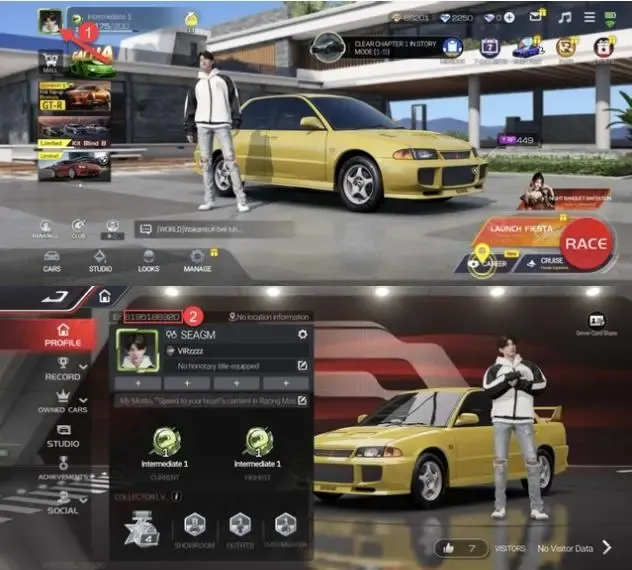
Double-check the copied numbers before submitting your order to prevent delivery delays.
Available In-Game Packages: Gems, Monthly Pass, and Battle Pass
Racing Master offers multiple top-up options tailored to different progression goals:
- Direct Gems: The core premium currency used for standard vehicle draws, limited-time banner pulls, performance part crates, and direct paint customizations.
- Monthly Card (Privilege Pass): Provides an immediate Gem payout upon activation, followed by a daily Gem stipend sent to your in-game mailbox every day for 30 days.
- Weekly Supply Packs: Bundles containing stamina batteries, gold coins, and specific vehicle tuning blueprints to accelerate engine upgrades.
- Racing Pass (Battle Pass): Unlocks the premium reward track for the active racing season, granting exclusive licensed cars, custom liveries, driving suits, and bonus summon tickets as you complete season missions.
Package Comparison
| Package Type | In-Game Utility | Best Used For |
|---|---|---|
| Direct Gem Packs | Instant premium balance | Limited-time gacha banners, ECU upgrades, urgent summons |
| Monthly Card | Daily Gem delivery over 30 days | Long-term progression and cost-effective currency growth |
| Weekly Supply Pack | Upgrade materials and stamina | Fast-tracking car parts, suspension tuning, and tuning events |
| Premium Racing Pass | Seasonal reward track unlock | Exclusive seasonal car models, driver gear, and rare liveries |
Benefits of Topping Up Racing Master (SEA) on BitTopup
Choosing BitTopup for your Racing Master top-up gives you a secure, streamlined purchasing experience:
- Password-Free Security: You only submit your public User ID and Server. Your NetEase account login, social media links, and passwords remain completely private.
- Direct Account Delivery: Orders are processed through automated fulfillment queues, sending purchased Gems straight to your in-game wallet.
- Transparent Pricing: Check out with clear pricing directly on the store interface with no hidden handling surprises.
- Regional Optimization: Configured specifically for Southeast Asian players across Thailand, Indonesia, the Philippines, Malaysia, Singapore, and regional servers.
- 24/7 Customer Support: Our dedicated help team is available around the clock to assist with order tracking, ID confirmation, or payment inquiries.
First-Time Top-Up Bonus Guide for Racing Master SEA
If you are recharging your Racing Master SEA account for the first time, NetEase frequently provides initial top-up incentives:
- First-Recharge Tier Bonuses: Many base Gem bundles award extra bonus Gems on your very first purchase of that specific tier.
- Welcome Top-Up Gifts: Making any top-up often unlocks a beginner reward bundle, which can include a free sports car, rare upgrade materials, and specialized livery sets.
- Seasonal Top-Up Milestones: Throughout 2026, special seasonal events grant cumulative milestone rewards when reaching specific recharge thresholds.
Note: First-time purchase bonuses are managed directly by the game server and are applied automatically upon delivery if your account is eligible.
Safety and Account Security: Direct UID Recharge Explained
Account safety is essential when purchasing digital game currency. BitTopup uses direct UID processing, which eliminates the risks associated with manual account sharing.
- Zero Password Sharing: We will never ask for your NetEase credentials, Google login, Apple ID, or two-factor verification codes.
- Direct Game Crediting: Because the recharge routes directly through official server protocols using your User ID, your account remains fully protected from unauthorized access.
- Safe Transactions: Avoid untrusted third-party sellers who demand login credentials or use unverified payment techniques that could put your account at risk of suspension.
Keep your account secure by keeping your credentials private and relying exclusively on UID-based recharges.
Frequently Asked Questions About Racing Master SEA Recharge
Where can I find my Racing Master User ID?
Open Racing Master and tap your avatar icon in the upper-left corner of the main lobby screen. Your numeric User ID is listed on the Personal Info tab right below your character name. Tap the copy icon next to it to copy your ID directly.
Do I need to provide my NetEase account password to recharge Racing Master Gems?
No. Recharging on BitTopup requires only your User ID and Server selection. Never share your password or verification codes with anyone.
Where is Racing Master SEA available and which server should I choose?
The Racing Master SEA edition serves players across Southeast Asia, including Indonesia, Malaysia, the Philippines, Thailand, and Singapore. When topping up on BitTopup, choose the Racing Master server (Server ID 4000).
What items can I buy using Racing Master Gems?
You can spend Racing Master Gems on vehicle summon gacha banners, performance upgrade crates, ECU modification kits, external body kits, custom wheel sets, and premium season battle passes.
How long does it take for recharged Gems to be credited to my Racing Master account?
Recharges are processed promptly once your payment is confirmed. In most cases, your Gems appear in your balance almost immediately. If you are logged in during the recharge, restart your game client to refresh your balance.
Is Racing Master available to play on PC and iOS?
Yes. Racing Master is available on iOS, Android, and official PC client versions. Because your game data is synced to your NetEase account, Gems recharged via your User ID will be accessible across any compatible platform you use to play.
What should I do if my Racing Master Gems do not arrive after payment?
First, restart the Racing Master game client and check your in-game mailbox to verify if items were sent as a mail claim. If your balance still does not update after a few minutes, copy your BitTopup order number and contact our 24/7 customer support team for quick assistance.