

StarzPlay Subscription (DZ) Top Up: Overview & Content Highlights
StarzPlay is one of the leading premium streaming platforms across the Middle East and North Africa. A StarzPlay Subscription (DZ) provides viewers in Algeria with on-demand access to thousands of hours of high-definition entertainment, ranging from Hollywood blockbusters and original series to classic Arabic cinema, Turkish dramas, anime, and live sporting events.
Algerian subscribers can watch content with dual-language audio tracks and multiple subtitle options, including Arabic, French, and English. By acquiring a digital prepaid voucher code, users can activate their subscription instantly without needing an international credit card or linking personal banking details to the streaming platform.
Core Content Available on StarzPlay Algeria
- Hollywood Hits & TV Premieres: Access major studio movies, popular US series, and day-and-date broadcast releases.
- Arabic & Regional Exclusives: Watch newly released Arabic films, classic Egyptian titles, North African drama, and exclusive Ramadan programming.
- Live Sports & Combat Coverage: Enjoy live broadcasts of international football leagues, combat sports, cricket tournaments, and wrestling events.
- Anime & Kids Entertainment: Family-friendly channels, dedicated children's profiles, and full anime series dubbed and subtitled in Arabic.
How to Recharge StarzPlay Subscription (DZ) on BitTopup
To top up your StarzPlay Algeria account using a prepaid digital voucher on BitTopup, follow these direct purchasing steps:
- Select Voucher Duration: Choose your preferred StarzPlay DZ subscription period (such as 1-month, 3-month, 6-month, or 12-month access).
- Review Checkout Information: Verify your order details on the live checkout screen. BitTopup displays current rates and supported checkout options in real time.
- Provide Contact Details: Enter a valid email address where your order confirmation and digital voucher code will be sent.
- Complete the Payment: Choose your preferred payment option and finalize the transaction.
- Retrieve Your Digital Code: Your StarzPlay voucher code will be instantly generated on your screen and delivered directly to your BitTopup dashboard and email inbox.
Step-by-Step Guide to Redeem StarzPlay Algeria Voucher Codes
Once you receive your digital code from BitTopup, apply it directly to your StarzPlay profile to start streaming immediately.
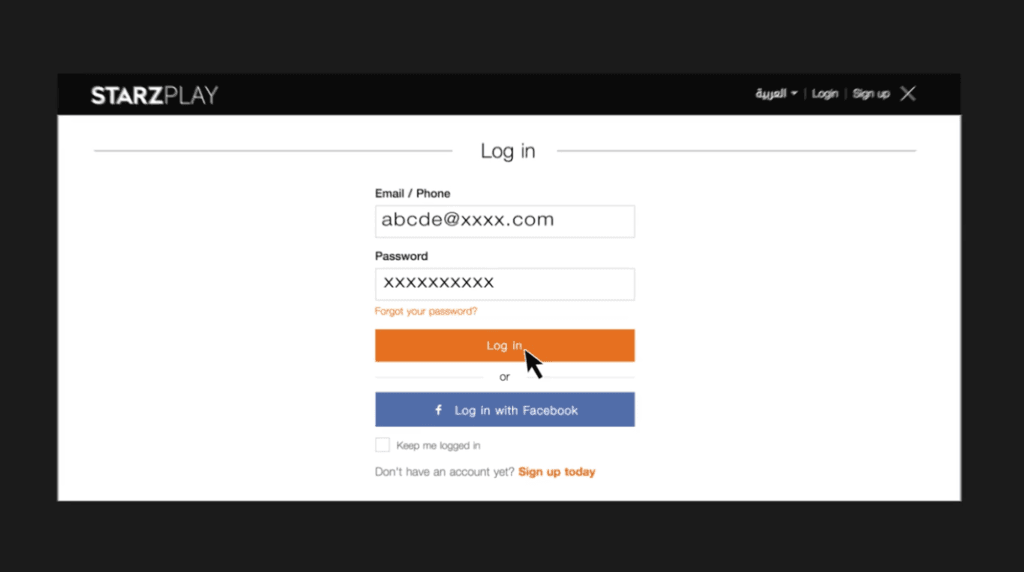
Redeeming on a Web Browser
- Go to the official StarzPlay website (
starzplay.com) on your computer or mobile browser. - Log in to your existing account or select Sign Up using your Algerian mobile phone number or email address.
- Click on your profile icon in the top right corner and open Account Settings.
- Select the Payments & Subscriptions or Voucher / Promo Code section.
- Enter the exact digital voucher code you received from BitTopup.
- Click Apply or Redeem. Your account will update immediately with active streaming access.
Redeeming via Mobile or Smart TV Apps
- Launch the StarzPlay app on your iOS, Android, or Smart TV device.
- If you are a new user, register an account linked to an Algerian IP address.
- Existing users can go to Settings > Subscription > Voucher Code.
- Type in your voucher code and confirm the activation.
StarzPlay DZ Plan Comparison and Specifications
| Plan Option | Streaming Quality | Screen Limits | Supported Subtitles | Regional Lock |
|---|---|---|---|---|
| 1-Month DZ Voucher | Full HD / 4K Ultra HD | Up to 5 Registered Devices / 2 Simultaneous | Arabic, French, English | Algeria Only (DZ IP) |
| 3-Month DZ Voucher | Full HD / 4K Ultra HD | Up to 5 Registered Devices / 2 Simultaneous | Arabic, French, English | Algeria Only (DZ IP) |
| 6-Month DZ Voucher | Full HD / 4K Ultra HD | Up to 5 Registered Devices / 2 Simultaneous | Arabic, French, English | Algeria Only (DZ IP) |
| 12-Month DZ Voucher | Full HD / 4K Ultra HD | Up to 5 Registered Devices / 2 Simultaneous | Arabic, French, English | Algeria Only (DZ IP) |
Note: Exact plan durations and availability are updated regularly on BitTopup's live product catalog.
StarzPlay DZ Regional Eligibility and Account Requirements
StarzPlay digital vouchers are geo-restricted. To ensure a smooth activation without regional lock errors, keep the following guidelines in mind:
- Algerian IP Requirement: The voucher code must be redeemed on a connection based in Algeria. If you are using a VPN or proxy service, disable it before opening the redemption page.
- Account Country Setting: Your StarzPlay account profile country must be set to Algeria (DZ). Codes designed for the Algeria region cannot be redeemed on accounts registered in other MENA territories (such as UAE, KSA, or Egypt).
- Voucher Validity: Digital codes are single-use tokens. Once applied, the balance is added directly to your profile and cannot be transferred to another user.
- Troubleshooting 'Invalid Voucher' Errors: If the system returns an error during redemption, confirm that the code was typed without extra spaces, check your internet connection region, and ensure that your profile does not currently have a conflicting active recurring credit card billing cycle.
Supported Streaming Devices, 4K Playback, and Multi-Screen Access
StarzPlay supports a wide range of consumer electronics, allowing you to stream at home or on the move.
- Smart TVs: Compatible with Samsung TV (Tizen OS), LG Smart TVs (webOS), Sony Bravia, TCL, and any television running Android TV or Google TV.
- Streaming Sticks & Boxes: Works with Apple TV 4K, Amazon Fire TV Stick, Xiaomi Mi Box, and Google Chromecast.
- Mobile Devices & Tablets: Dedicated native applications available for iPhone, iPad (iOS 12.0+), and Android smartphones/tablets (Android 5.0+).
- Web Browsers: Compatible with Google Chrome, Mozilla Firefox, Microsoft Edge, and Apple Safari on Windows and macOS.
- Video & Audio Quality: Stream in 1080p Full HD and selected titles in 4K Ultra HD with Dolby Digital 5.1 surround sound audio.
- Parental Controls & Profiles: Set up individualized profiles for family members, complete with PIN-protected parental filters for age-appropriate viewing.
Why Choose BitTopup for StarzPlay Algeria Digital Top Ups
BitTopup provides a secure, streamlined way to manage your digital subscriptions and digital entertainment purchases:
- Instant Digital Delivery: Voucher codes are issued immediately after payment processing, allowing you to start streaming right away.
- Zero Password Sharing: We never ask for your StarzPlay account login credentials or passwords. You receive a direct voucher code and redeem it yourself on the official platform.
- Transparent Live Checkout: Check exact prices on our live checkout page with zero hidden processing fees.
- Dedicated 24/7 Customer Support: If you ever experience issues with your order or have questions regarding code redemption, our customer service team is available around the clock to assist you.
Frequently Asked Questions About StarzPlay Algeria
How to activate STARZPLAY subscription in Algeria?
To activate your subscription, purchase a StarzPlay DZ voucher from BitTopup. Log in to your StarzPlay account on the official website or mobile app, open the Account Settings or Voucher Redemption section, enter the digital code, and confirm to activate your plan.
Can I use a StarzPlay DZ voucher outside of Algeria?
No. StarzPlay DZ vouchers are geographically restricted to the Algerian market. You must have an account configured for Algeria and redeem the code using an Algerian IP address without an active VPN.
How much does a STARZPLAY subscription cost in 2026?
Subscription prices depend on the chosen plan duration (such as monthly or multi-month packages). Check the BitTopup live checkout screen for real-time pricing and current voucher packages.
Do I need to share my StarzPlay password to recharge on BitTopup?
No. BitTopup does not require your account password. You simply purchase a digital code and redeem it directly inside your own StarzPlay account settings.
What devices are compatible with StarzPlay Algeria?
StarzPlay works across Smart TVs (Samsung, LG, Android TV, Apple TV), streaming devices (Fire TV, Chromecast), mobile phones and tablets (iOS and Android), and standard desktop web browsers.
How do I cancel my subscription to STARZPLAY?
Because BitTopup provides prepaid digital voucher codes, your subscription does not auto-renew on a credit card. Once the prepaid voucher period expires, your access stops automatically unless you choose to redeem a new voucher code. If you have an existing card-based recurring billing cycle, you can disable it under your StarzPlay Account Settings > Subscriptions.