



Fast Steam Wallet Code (KWD) Top Up for Kuwait Accounts
A Steam Wallet Code (KWD) is a prepaid digital voucher used to add Kuwaiti Dinar directly to your Steam balance. Redeeming a digital voucher provides immediate store funds to purchase games, downloadable content (DLC), in-game items, community market assets, and software directly on the Steam platform.
BitTopup delivers authentic digital codes directly to your screen and email. Because you receive an alphanumeric code, you never need to share your Steam username, password, or account credentials. You keep full control over your account security while topping up your wallet quickly.
What is a Steam Wallet Code (KWD) and What Can You Buy With It
When you buy Steam Wallet Code KWD denominations, the face value is credited to your balance in Kuwaiti Dinars. Unlike physical retail scratch cards, a digital voucher consists of a 15-character code sent instantly after purchase.
Your redeemed KWD balance gives you direct access to the entire Steam catalog without needing an international credit card tied to your profile. You can spend your balance on:
- Full Games & Early Access Titles: Purchase AAA releases, indie games, and pre-orders directly through the Steam Store.
- In-Game Currency & Microtransactions: Buy Battle Passes, skins, crates, and virtual currency inside supported titles like Counter-Strike 2, Dota 2, Apex Legends, and PUBG.
- Steam Community Market Transactions: Purchase weapon finishes, trading cards, profile backgrounds, and community stickers from other users.
- Downloadable Content (DLC) & Expansions: Add expansions, soundtrack bundles, and season passes to the games already in your library.
- Hardware & Software: Pay for non-gaming production software, benchmarks, and hardware accessories where shipping to Kuwait is supported.
Steam Currency Restrictions: Kuwait Account Requirements and Region Checks
Valve enforces strict regional currency restrictions on Steam Wallet codes. A code denominated in Kuwaiti Dinar (KWD) will only redeem on an account set to the Kuwait region with KWD as its base store currency.
Steam does not convert KWD codes to USD, EUR, SAR, or any other regional currency upon entry. Attempting to redeem a Kuwait voucher on an account registered to a different country will trigger a regional mismatch error (An unexpected error has occurred. Your code could not be redeemed at this time).
How to Verify Your Steam Account Country
Before ordering your code, check that your account store region matches Kuwait:
- Open your Steam client or log in at the official Steam website.
- Click on your profile name in the upper-right corner and select Account details.
- Under Store & Purchase History, look at the Country field.
- Ensure the country is listed as Kuwait and your wallet display shows KD / KWD.
If your account is currently set to another region, you cannot change your country simply by using a VPN. Valve requires a local payment method registered in Kuwait to update the store region. Verify your account country first to guarantee a smooth top up.
How to Recharge Steam Wallet Using a KWD Digital Code
Redeeming your code takes less than a minute across desktop, browser, and mobile apps.
Method 1: Redeeming on the Steam Desktop Client
- Launch the Steam application on your PC or Mac and log in.
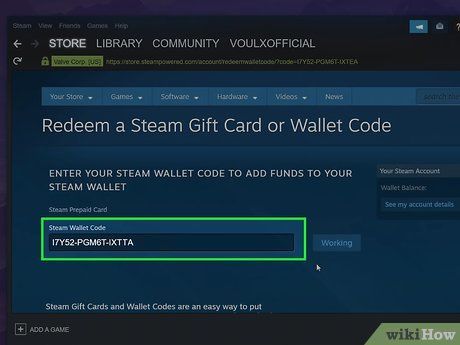
- In the top navigation menu, click Games and select Redeem a Steam Wallet Code (or click your balance in the upper-right corner and choose Redeem a Steam Gift Card or Wallet Code).
- Enter your 15-character digital code into the text field.
- Click Continue.
- The balance will update instantly in your upper-right account display.
Method 2: Redeeming via Web Browser or Mobile App
- Go to
store.steampowered.com/account/redeemwalletcodein your web browser, or open the Steam Mobile app. - Sign in with your Steam credentials.
- Type or paste the KWD digital code into the box.
- Press Continue to confirm the credit.
Steam Wallet Codes vs. Game Keys vs. Account Limitations
Understanding the differences between digital Steam products helps prevent purchase confusion:
| Product Type | What It Does | Region Locking | Affects Steam 5 Dollar Rule? |
|---|---|---|---|
| Steam Wallet Code (KWD) | Adds Kuwaiti Dinar to account balance | Strict (Kuwait / KWD accounts only) | Yes (counts toward the 5 USD threshold) |
| Game Product Key (CD Key) | Unlocks a specific single game directly | Publisher-dependent (Global or Regional) | No (does not count toward the 5 USD threshold) |
| Steam Community Market Funds | Balance earned from selling items | Stays in current account currency | No (user-to-user marketplace sales do not unlock limits) |
Redeemed wallet balances cannot be transferred between accounts, refunded back to payment cards, or withdrawn as cash. Once the balance is tied to your Steam ID, it remains permanently accessible until spent on the platform.
Unlocking Steam Community Features and the 5 Dollar Rule in 2026
To protect the platform against spam bots, phishing accounts, and market manipulation, Valve places "Limited User Account" restrictions on newly registered profiles. Limited accounts cannot:
- Send friend invites.
- Open group chats or create community groups.
- Access the Steam Community Market.
- Post reviews or participate in Steam Discussions.
- Gain Steam Profile levels or earn trading card drops.
To remove these restrictions, you must spend or add the equivalent of $5.00 USD to your account. Redeeming a Kuwait Steam Wallet code meeting or exceeding the current 5 USD equivalent in KWD permanently lifts all limited account restrictions, granting full access to Steam community and social features.
Troubleshooting Common Steam Wallet Code Redemption Errors
If you encounter an issue when entering your voucher, check these common causes and resolutions:
- "The code you entered is invalid": Check for visual typos. Steam codes use alphanumeric strings. Verify characters like
0(zero) vs.O(letter),1(one) vs.I(capital i), and8vs.B. Avoid extra spaces before or after the code when copy-pasting. - "The code has already been redeemed": Refresh your client or web page. Sometimes the balance updates immediately while the interface lags. Check your Account Details > View purchase history to confirm whether the funds were credited. If not, verify you did not enter the code into a secondary profile by mistake.
- "An unexpected error has occurred / Currency mismatch": This happens when attempting to redeem a KWD code on a non-Kuwait account. Check your account region settings under Account Details.
Why Buy Steam Wallet Codes Online at BitTopup
Choosing BitTopup for your Steam Wallet Code (KWD) recharge provides a safe and reliable buying experience:
- Instant Digital Code Delivery: Receive your digital voucher immediately on the confirmation screen and straight to your inbox without waiting.
- Guaranteed Account Safety: You never share your Steam password, login tokens, or Steam Guard codes. You purchase the raw alphanumeric voucher and redeem it yourself inside your own client.
- Competitive Pricing: Transparent rates displayed live at checkout without hidden processing fees.
- Reliable Payment Processing: Pay using major debit/credit cards and popular regional payment options.
- 24/7 Support: Responsive customer service standing by to assist with payment validation and redemption inquiries.
Select your required KWD denomination on the live checkout menu above, complete your secure order, and top up your Steam balance immediately.
Frequently Asked Questions
Can I redeem a Kuwait (KWD) Steam Wallet code on an account set to another currency?
No. Steam enforces strict regional restrictions. A KWD Steam Wallet code will only redeem on an account with its store country set to Kuwait and its wallet currency configured in KWD. It will not convert automatically to USD, EUR, or other regional currencies.
How do I recharge my Steam Wallet using a digital code?
Log into your Steam account via the desktop application, mobile app, or browser. Go to your Account Details page or click Games > Redeem a Steam Wallet Code, type your 15-digit alphanumeric code into the box, and click Continue. The KWD funds credit to your account balance instantly.
Do Steam Wallet codes or redeemed KWD balances expire?
No. Steam Wallet digital codes do not expire before redemption, and your redeemed KWD wallet balance remains in your Steam account indefinitely until you choose to spend it.
What is the Steam 5 dollar rule and does a KWD wallet code remove account limits?
Valve limits new accounts until they spend or add the equivalent of $5.00 USD. Redeeming a Kuwait Steam Wallet code with a value equal to or greater than 5 USD in KWD permanently unlocks all limited account features, enabling friend requests, community market trading, and profile leveling.
Can I transfer my Steam Wallet KWD balance to another user?
No. Once a Steam Wallet code is redeemed, the KWD funds are permanently locked to that specific Steam ID. Steam does not permit direct wallet balance transfers between accounts. If you wish to give funds to a friend, you must send them the unredeemed digital voucher code or purchase a digital gift card directly through Steam's gifting system.
Where can I buy a Steam Wallet Card in Kuwait safely?
You can purchase authentic Steam Wallet Code (KWD) vouchers online directly through BitTopup. You get instant digital delivery, secure checkout with no password requirements, and 24/7 customer service support.