




Steam Wallet Code PLN Top Up: Overview and Mechanics
A Steam Wallet Code (PLN) is a digital prepaid card denominated in Polish Złoty (PLN) that allows gamers to add funds directly to their Steam balance. Once redeemed, the full value of the voucher transfers to your account, giving you instant spending credit for thousands of video games, downloadable content (DLC), in-game purchases, software, and items on the Steam Community Market.
Using a digital wallet code avoids the need to link a personal credit card or bank account directly to the gaming platform. The redemption process is fully automated on Steam's backend, making it a fast and secure way to manage your gaming budget or purchase titles during platform-wide seasonal sales.
Steam Poland Region and PLN Currency Compatibility Requirements
Steam enforces strict regional currency restrictions on wallet codes. A code denominated in Polish Złoty (PLN) can only be redeemed on an account that has Poland configured as its official store country and PLN set as its primary wallet currency.
If your Steam account uses a different primary currency (such as EUR, USD, or GBP), the platform will reject the PLN code with a currency mismatch warning. Always confirm your account region settings before redeeming.
| Account Parameter | Requirement for PLN Code | Details |
|---|---|---|
| Store Country | Poland (PL) | Must match the code's currency region |
| Wallet Currency | Polish Złoty (PLN / zł) | Primary display currency must be PLN |
| Account Type | Standard or Limited | Works on all registered Steam profiles |
| Login Required on BitTopup | None | Digital codes are redeemed directly by you |
How to Check Your Steam Account Country and Currency
Before completing a top-up, verify that your profile is set to the Polish region. Checking your regional settings takes less than a minute:
- Open the Steam Desktop Client or visit the Steam website and sign in.
- Click on your profile username in the top-right corner of the interface.
- Select Account details from the dropdown menu.
- Look at the Store & Purchase History section to view your current Country and primary Wallet Balance.
Ensure that the listed country is Poland and the displayed currency symbol is zł / PLN before applying your code.
Step-by-Step Guide: How to Recharge Your Steam Wallet with a PLN Code
You can redeem your digital voucher code using either the Steam Desktop Client or the Steam Mobile App.
Redeeming via the Steam Desktop Client
- Launch the Steam Desktop Client and log in to your account.
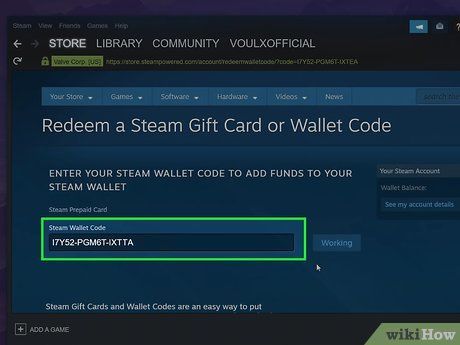
- In the top navigation bar, click on Games, then select Redeem a Steam Wallet Code (or click your account name in the top right and select View my wallet > Redeem a Steam Gift Card or Wallet Code).
- Enter the alphanumeric code received from BitTopup into the Steam Wallet Code input box.
- Click Continue.
- If prompted, enter a valid local billing address for tax verification.
- The PLN amount will be credited to your Steam balance instantly.
Redeeming via the Steam Mobile App
- Open the official Steam Mobile App on your Android or iOS device.
- Tap your profile avatar or the menu icon to open navigation options.
- Tap Store, then select Account Details.
- Select + Add funds to your Steam Wallet.
- Tap Redeem a Steam Gift Card or Wallet Code.
- Enter your digital code and tap Continue to finalize the balance update.
Unlocking Steam Features: The 5 USD Equivalent Rule and Store Purchases
Brand new Steam accounts start with a "Limited User Account" status. Valve applies this restriction to prevent spamming, bot accounts, and fraudulent activity. Limited accounts face specific restrictions:
- Cannot send friend invites to other players.
- Cannot access the Steam Community Market to buy or sell item skins and trading cards.
- Cannot create group chats or public Steam groups.
- Cannot submit reviews or vote on Steam Workshop items.
- Profile level remains capped at 0 with no trading card drops.
To remove these restrictions, Steam requires users to spend or add funds equivalent to at least $5.00 USD. Redeeming a PLN Steam Wallet Code that meets or exceeds this $5.00 threshold in Polish Złoty automatically lifts the limited status, giving you full access to community features, trading, and friend requests.
Troubleshooting Common Steam Redemption Errors
If you run into an issue while applying your code, consult the solutions below:
- Currency Mismatch Error: Steam displays a message stating the currency of the code does not match your account. This occurs if your Steam store region is set outside Poland. You must use an account set to Poland with PLN as its primary currency.
- Invalid Code Error: Ensure there are no accidental spaces before or after the code. Check for easily confused characters, such as the letter O and the number 0, the letter I and the number 1, or the letter S and the number 5.
- An unexpected error has occurred: This temporary warning appears if Steam's redemption servers are undergoing maintenance or if too many failed attempts occurred in a short timeframe. Wait 30 minutes before trying again.
- Code Already Redeemed: Check your Store & Purchase History under Account Details. If the credit already processed, the balance will appear in your transaction log.
Why Buy Steam Wallet Code PLN on BitTopup
BitTopup provides a secure, efficient platform for purchasing digital gaming codes:
- 100% Digital Code Delivery: Receive clean alphanumeric codes ready for self-redemption without delays.
- Zero Password Sharing: BitTopup never asks for your Steam login credentials, account passwords, or Steam Guard codes. Your account security remains in your hands.
- Live Checkout Processing: Clear pricing and current exchange terms are displayed directly on the live checkout page with real-time order tracking.
- Dedicated Customer Support: Access support resources to resolve transaction inquiries quickly.
Steam Wallet Code Safety and Account Protection
Protect your gaming account by following core digital safety practices:
- Never share credentials: No legitimate digital store or customer service agent will ever ask for your Steam password or two-factor authentication codes.
- Beware of third-party scams: Valve never demands wallet codes to resolve account disputes, verify identity, or prevent account bans. Never send digital codes to unverified individuals.
- Redeem only on official channels: Only enter your digital voucher codes inside the official Steam client or on the verified
steampowered.comwebsite.
Frequently Asked Questions
Can I redeem a Steam Wallet Code (PLN) on an account registered outside Poland?
No. Due to Steam's regional currency policies, Steam Wallet Codes denominated in PLN can only be redeemed on accounts where Poland is selected as the primary country and PLN is the active wallet currency.
How to recharge a Steam wallet with a digital code?
Log in to your Steam account on desktop or mobile, navigate to the Redeem a Steam Wallet Code page under the store or account menu, paste your alphanumeric voucher code into the input field, and click Continue.
What is the Steam $5 rule and does a PLN wallet recharge count towards it?
Steam restricts new accounts until they add or spend the equivalent of $5.00 USD. Redeeming a PLN wallet code whose value meets or exceeds the 5 USD equivalent in Polish Złoty fulfills this requirement and removes all limited account restrictions.
Do Steam Wallet Codes (PLN) have an expiration date?
No. Digital Steam Wallet Codes do not have an expiration date. Once purchased, you can redeem them immediately or hold them for upcoming sales.
Where do I find my purchased Steam Wallet Code after checkout?
After completing your purchase on BitTopup, your digital code is displayed directly on your order confirmation page and stored in your BitTopup order history for immediate access.
What should I do if my Steam Wallet Code shows an 'invalid code' error?
Carefully verify each character to eliminate typographical mistakes, ensure there are no leading or trailing spaces, and confirm that your account region matches the PLN currency. If the issue persists, contact BitTopup support with your order reference.