

TNG Reload Pin (MY) Top Up: Overview and Supported Uses
A Touch 'n Go (TNG) Reload PIN is a 10-digit digital voucher code used to add funds directly into a Malaysian Touch 'n Go eWallet account. It serves as an alternative top-up method to direct bank transfers (FPX) or debit and credit cards, allowing users to top up their digital wallet balance securely without linking banking credentials directly to the app.
Once redeemed into your Touch 'n Go eWallet, the funds become instantly usable across Malaysia's extensive payment ecosystem. Key supported uses include:
- Retail and In-Store Purchases: Pay at retail stores, supermarkets, restaurants, and local merchants across Malaysia using the integrated DuitNow QR scanner.
- Highway Tolls and Transport: Link your eWallet balance to Touch 'n Go RFID or physical TNG cards via PayDirect to pay toll charges on Malaysian highways without physical reload lanes.
- Street Parking and Utilities: Pay for roadside parking across municipal councils (such as DBKL, MBPJ, and MBSA) and settle utility bills, internet subscriptions, and local council assessments.
- Online Services and Food Delivery: Settle payments on Malaysian e-commerce platforms, food delivery apps, gaming portals, and digital subscription services.
- Mobile Prepaid Reloads: Top up prepaid airtime and data packages across all major Malaysian telecommunication telcos directly within the eWallet interface.
Available TNG Reload PIN Denominations and Balance Limits
TNG Reload PINs come in fixed Malaysian Ringgit (MYR) values, allowing you to choose the exact amount you wish to credit to your account. Common denominations include MYR 10, MYR 20, MYR 30, MYR 50, MYR 100, and MYR 200. Live pricing and denomination stock availability are displayed directly on the BitTopup checkout screen.
Transferable vs. Non-Transferable Balance Rules
Under regulatory guidelines set by Bank Negara Malaysia, funds loaded into a Touch 'n Go eWallet are categorized into two balance types: Transferable and Non-Transferable.
| Feature & Usage Criteria | Transferable Balance | Non-Transferable Balance (Reload PIN) |
|---|---|---|
| Funding Source | Direct DuitNow / FPX Bank Transfer | TNG Reload PINs / Credit Card Cash-in |
| Retail DuitNow QR Payments | Supported | Supported |
| In-App Bill Payments & Telco Top-up | Supported | Supported |
| RFID & PayDirect Highway Tolls | Supported | Supported |
| Peer-to-Peer (P2P) User Transfers | Supported | Restricted / Quota-Limited |
| DuitNow Bank Account Cash-Out | Supported | Not Supported |
Funds redeemed using a TNG Reload PIN are classified as Non-Transferable. This means the funds are designated for merchant payments, bills, transit, and retail transactions. They cannot be withdrawn or transferred out to an external commercial bank account via DuitNow Transfer.
Touch 'n Go eWallet Account Tier Limits
Before redeeming a PIN, ensure your account's maximum wallet limit can accommodate the reload value:
- Lite Tier (Unverified): Maximum wallet balance of MYR 200. Monthly transaction limit of MYR 200.
- Pro Tier (eKYC Verified): Maximum wallet balance of MYR 5,000. Monthly transaction limit of MYR 5,000.
- Premium Tier (Advanced Verification): Maximum wallet balance of MYR 20,000. Monthly transaction limit of MYR 25,000.
Step-by-Step Guide: How to Redeem TNG Reload Pin in Touch 'n Go eWallet
Redeeming your 10-digit digital code is fast and updates your balance immediately in the mobile application.
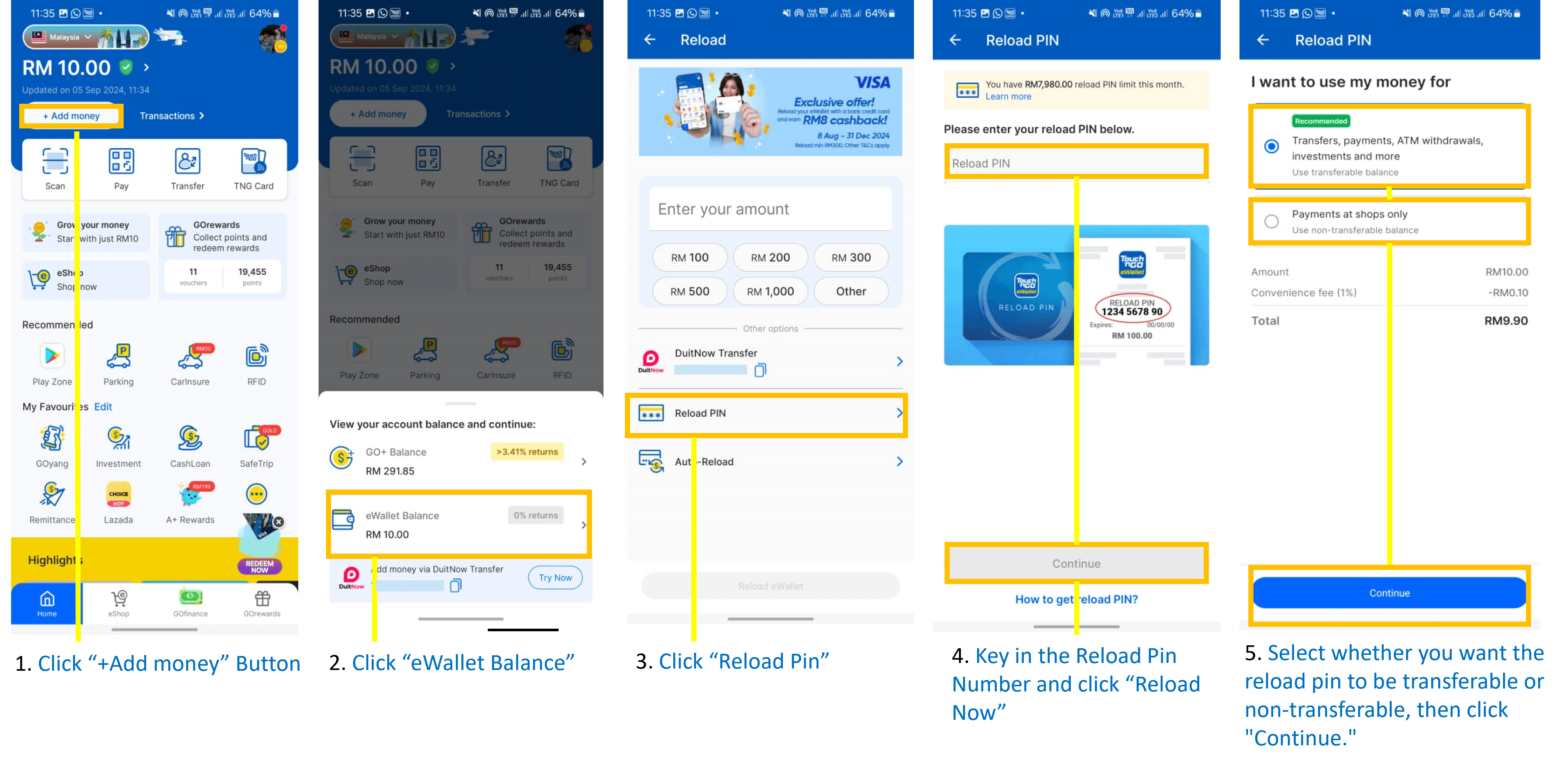
- Launch the Touch 'n Go eWallet app on your mobile phone.
- On the main home screen, tap the + Add Money (or Reload) button located next to your current balance display.
- Scroll down past the online banking options and select TNG Reload PIN.
- Type the 10-digit Reload PIN provided in your BitTopup order confirmation.
- Tap the Submit or Reload Now button.
- A confirmation prompt will appear on your screen showing your updated wallet balance.
Unlike direct top-up services that require finding and submitting a User ID (UID) at checkout, a TNG Reload PIN is a standalone digital prepaid voucher. BitTopup delivers the 10-digit code directly to you, so you never need to input your Touch 'n Go account ID or login credentials on external websites.
How to Buy TNG Reload Pin (MY) on BitTopup
Ordering your TNG Reload PIN through BitTopup takes only a few quick steps:
- Select your desired TNG Reload PIN denomination from the product catalog.
- Enter the email address where you want the order receipt and digital code sent.
- Review your order details and choose your preferred payment method on the live checkout page.
- Complete the transaction securely.
- Once payment is confirmed, your 10-digit TNG Reload PIN will display immediately on the confirmation page and arrive in your email inbox.
Account Eligibility and Regional Restrictions for Malaysia
Before purchasing a TNG Reload PIN (MY), verify that your account meets Malaysian regional compliance rules:
- Malaysia Region Lock: TNG Reload PINs denominated in MYR can only be redeemed on Touch 'n Go eWallet accounts registered under Malaysia region settings with a valid Malaysian mobile number (+60).
- Identity Verification (eKYC): While Lite accounts can redeem PINs up to the MYR 200 threshold, completing eKYC identity verification with a Malaysian MyKad or valid passport is recommended to unlock the Pro (MYR 5,000) or Premium (MYR 20,000) wallet limits.
- Cross-Border Accounts: Non-Malaysian regional e-wallets or foreign accounts not configured for Malaysian Ringgit transactions are incompatible with MY Reload PIN vouchers.
Common Redemption Errors and Troubleshooting Solutions
If you experience an issue when entering your PIN into the eWallet app, use the following troubleshooting solutions:
- Error: Invalid PIN Code: Ensure you have entered all 10 digits correctly without spaces, hyphens, or trailing symbols. Check for commonly misread digits (such as the number 0 vs. the letter O, or 1 vs. the letter I).
- Error: PIN Already Used / Redeemed: Check your eWallet transaction history under the 'Inbox' or 'Transactions' tab. If the reload amount already displays in your ledger, the code was processed. If the code was not used by you and shows as redeemed upon receipt, contact BitTopup support with your order number.
- Error: Exceeded Wallet Limit: If the reload value pushes your current balance over your tier cap (e.g., holding MYR 180 on a Lite tier and trying to redeem a MYR 50 PIN), the app will reject the redemption. Spend down your existing balance or complete eKYC to upgrade your tier limit before retrying.
- Error: Daily Reload Limit Exceeded: Touch 'n Go enforces security caps on daily reload attempts. If you have redeemed multiple PINs in a short window, wait 24 hours for the daily security limit to reset.
- App Connection Timeout: Clear your Touch 'n Go eWallet app cache, ensure a stable internet connection, or restart the app before attempting code entry again.
Why Choose BitTopup for TNG Reload Pin Recharge
- Instant Digital Delivery: Your 10-digit voucher code is delivered instantly upon payment verification, allowing you to top up your balance without delays.
- Maximum Account Security: BitTopup does not ask for your Touch 'n Go password, phone login, or OTP verification codes. You receive the raw PIN and redeem it yourself inside the official app.
- Transparent Live Checkout: The exact payable total is presented clearly on the checkout screen with no unexpected handling charges.
- Dedicated 24/7 Customer Support: If you ever encounter an issue with your voucher code delivery or order status, BitTopup customer service is available around the clock to assist you.
Frequently Asked Questions
How to topup tng with pin?
Open your Touch 'n Go eWallet app, tap + Add Money on the home screen, select the TNG Reload PIN option, enter the 10-digit code you received from BitTopup, and tap Submit to credit the funds to your balance.
How long does a TNG reload pin last before expiring?
TNG Reload PINs carry an expiration date assigned at the time of code generation, typically valid for several months up to one year. It is best practice to redeem your digital voucher code into your Touch 'n Go eWallet immediately upon purchase.
Can I use a TNG Reload Pin (MY) on a non-Malaysian eWallet account?
No. TNG Reload PIN (MY) vouchers are region-locked for Malaysian Touch 'n Go eWallet accounts configured for MYR currency. They cannot be redeemed on foreign or non-Malaysian digital wallet platforms.
Why is my TNG reload pin showing invalid or already redeemed?
An invalid error typically results from a mistyped digit or added whitespace. If the app states the PIN has already been redeemed, verify your in-app transaction history to confirm whether the funds were already credited. If the issue persists with a newly issued code, contact BitTopup 24/7 customer support with your order details.
Can money reloaded using a TNG PIN be transferred to a bank account?
No. In accordance with Malaysian eWallet regulations, balances loaded via Reload PINs are categorized as Non-Transferable balance. These funds can be used for merchant purchases, utility bills, DuitNow QR payments, and toll transit, but cannot be cashed out to external bank accounts.
What denominations are available for TNG Reload Pins?
Common denominations include MYR 10, MYR 20, MYR 30, MYR 50, MYR 100, and MYR 200. Check the BitTopup product catalog for current live stock availability and denomination options.