



TrueMoney e-Pins (TH) Top Up: Digital Cash Card Overview
TrueMoney e-Pins (TH), widely recognized across Thailand as TrueMoney Cash Cards, provide a flexible and secure method to reload your digital balance or pay for online services without linking a physical bank card. Each e-Pin consists of a 14-digit digital code denominated in Thai Baht (THB).
Whether you need to top up your official TrueMoney Wallet app, recharge gaming accounts on Thai servers, or purchase digital content, purchasing TrueMoney e-Pins on BitTopup gives you immediate access to valid, ready-to-redeem digital vouchers.
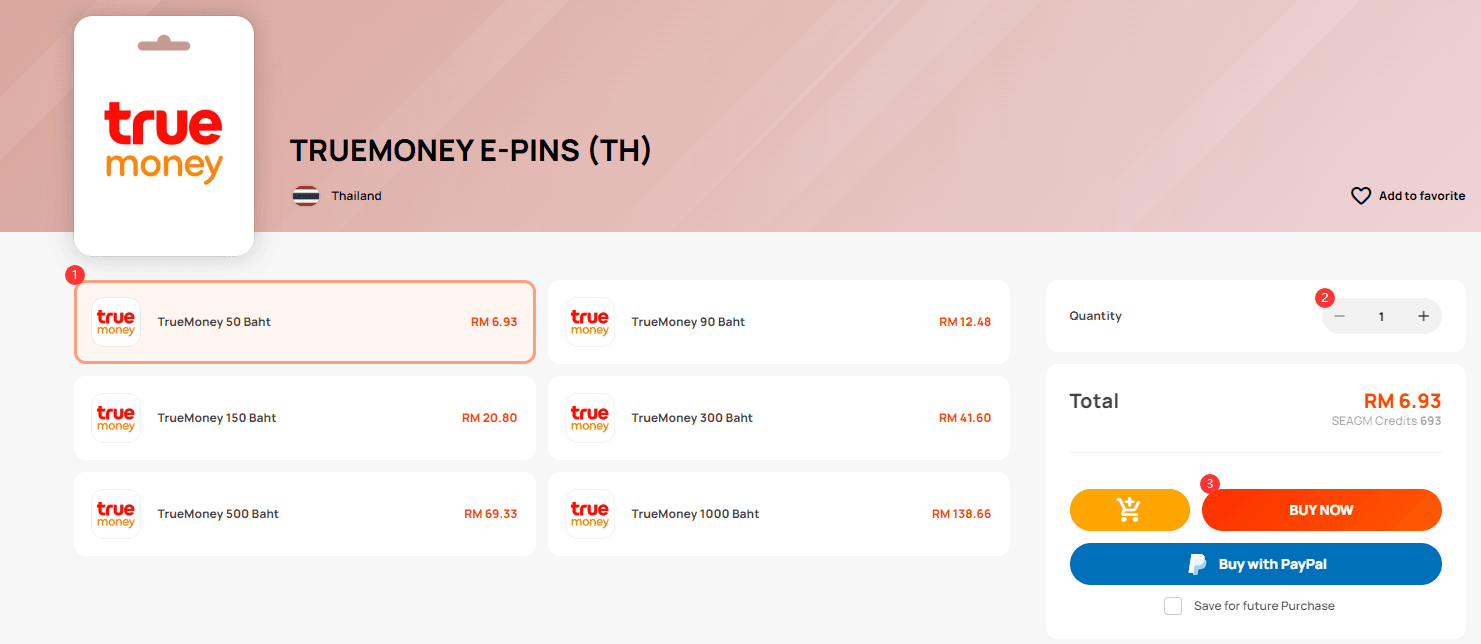
Available THB Denominations
TrueMoney e-Pins are distributed in standard fixed values designed to match various online gaming packages and wallet top-up requirements:
| Denomination (THB) | Code Format | Primary Use Cases |
|---|---|---|
| 50 THB | 14-Digit PIN | Mobile microtransactions, small game items |
| 90 THB | 14-Digit PIN | In-game currency packs, battle passes |
| 150 THB | 14-Digit PIN | Standard monthly passes, gaming reloads |
| 300 THB | 14-Digit PIN | Mid-tier gaming bundles, digital subscriptions |
| 500 THB | 14-Digit PIN | Premium game currencies, direct wallet reloads |
| 1,000 THB | 14-Digit PIN | High-value recharges, multi-game spending |
Live pricing and current stock for each card tier are displayed transparently on the BitTopup checkout screen.
Step-by-Step Guide: How to Redeem a 14-Digit TrueMoney e-Pin in TrueMoney Wallet
Redeeming your e-Pin directly into your Thai TrueMoney Wallet app takes less than a minute. Follow these steps to load your funds without errors:
- Open the TrueMoney App: Launch the official TrueMoney Wallet application on your mobile device and log in to your registered Thai account.
- Select the Top-Up Menu: On the main dashboard, tap the Top Up (เติมเงินเข้าบัญชี) icon.
- Choose Cash Card: Scroll through the list of top-up channels and select TrueMoney Cash Card (บัตรเติมเงินทรูมันนี่).
- Enter Your 14-Digit PIN: Copy the 14-digit numeric code received from BitTopup and paste or type it into the PIN input field. Ensure there are no accidental spaces before or after the numbers.
- Confirm Transaction: Tap Confirm (ถัดไป / ยืนยัน). Your balance will update instantly upon processing.
Fee Notice for Wallet Top-Ups: Loading the TrueMoney Wallet app via cash card e-Pins incurs a platform service fee deducted by TrueMoney Thailand at the point of redemption. If you use the e-Pin directly on participating game publisher top-up portals, the full face value is usually applied without that wallet deduction.
How to Verify Your Account Details and Find Your TrueMoney Account ID
Before loading e-Pins or submitting transactions, ensure you are logged into the correct account profile. TrueMoney identifies users via their registered Thai telephone number.
To locate and verify your TrueMoney account details:
- Open the TrueMoney app on your smartphone.
- Tap the Me or Profile icon located in the bottom navigation bar.
- Your registered Thai mobile number (formatted as +66 XX-XXX-XXXX) represents your TrueMoney Account ID.
- Check your account verification badge (Basic or Full KYC) to confirm your account tier and current holding limits before loading high-value pins.
Regional Restrictions and Thai TrueMoney Account Compatibility
TrueMoney e-Pins (TH) operate strictly within the Thailand regional ecosystem. Review these compatibility rules before ordering:
- Country Locking: These codes are valid only for TrueMoney Thailand accounts or third-party online platforms configured for the Thai region. They cannot be redeemed into TrueMoney Wallet accounts registered in other countries such as Cambodia, Myanmar, or the Philippines.
- Foreign User Compatibility: Foreign nationals living in or visiting Thailand can redeem these e-Pins provided their TrueMoney Wallet app was registered using a valid Thai SIM card and completed identity verification (Passport KYC) in accordance with Thai financial regulations.
- Direct Game Recharges: If you do not maintain an active TrueMoney Wallet app, you can still use the 14-digit e-Pin code directly on many regional gaming web shops that accept TrueMoney Cash Card as a direct checkout method.
Supported Uses: Gaming Recharges, App Store, and Online Payments
TrueMoney e-Pins remain one of the most widely accepted alternative digital payment methods across Southeast Asia for Thai servers:
- Direct Publisher Top-Ups: Enter your 14-digit PIN directly on top-up centers for major PC and mobile titles operating in Thailand to credit diamonds, coins, or premium passes instantly.
- Digital Entertainment: Load your TrueMoney balance to purchase streaming subscriptions, digital comic passes, and web novel points.
- In-App Wallet Payments: Use your topped-up TrueMoney Wallet to scan Thai PromptPay QR codes, settle digital utility bills, or pay for food delivery and transport within Thailand.
Troubleshooting Common e-Pin Redemption Errors and Invalid Codes
If you encounter an issue when submitting your 14-digit code, refer to these resolutions:
- "Invalid PIN Code / Code Does Not Exist": Double-check that all 14 digits are entered correctly. Ensure no letters, spaces, or hyphens were pasted into the field. Verify that you did not confuse similar numbers (such as 0 and 8, or 1 and 7).
- "PIN Already Used": Refresh your wallet transaction history. If the balance did not increase, check if the pin was entered into a web portal or game top-up page earlier. Each code is single-use and deactivates immediately upon successful processing.
- "Transaction Limit Exceeded": Thai TrueMoney accounts have tier-based daily and monthly balance caps. If your wallet is at its maximum allowable limit, complete advanced identity verification in the app or wait until the next billing cycle before redeeming additional pins.
- "System Timeout / Network Error": Poor network connectivity can interrupt code verification. Avoid repeatedly tapping the confirm button. Wait 3 to 5 minutes, check your transaction history to see if the credit registered, and attempt entry again only if the balance remains unchanged.
Safe and Fast Digital Code Delivery with BitTopup in 2026
BitTopup delivers reliable, rapid digital code fulfillment for TrueMoney e-Pins (TH) in 2026:
- No Password Required: You never need to provide your TrueMoney password, OTPs, or private login credentials. We deliver clean 14-digit digital codes directly to your order screen for self-redemption.
- Instant Digital Fulfillment: Once your transaction clears, your e-Pin serial and code are generated immediately without unnecessary delays.
- Live Checkout Transparency: Choose your desired THB denomination and complete your purchase using secure, globally recognized payment methods.
- 24/7 Customer Assistance: Our dedicated support team is available around the clock to assist you with order status, code verification, and redemption guidance.
Frequently Asked Questions
How do I redeem a TrueMoney 14-digit e-Pin in my TrueMoney Wallet?
Open the TrueMoney app, tap Top Up on the home screen, select TrueMoney Cash Card, enter your 14-digit e-Pin code, and tap confirm. The funds will be credited to your wallet balance immediately.
Can foreigners use and top up TrueMoney Wallet with e-Pins?
Yes. Foreign nationals with an active Thai TrueMoney Wallet registered with a Thai phone number and verified via passport can redeem e-Pins. Foreigners can also use the e-Pin directly on supported gaming sites without needing the wallet app.
What denominations are available for TrueMoney e-Pins (TH)?
TrueMoney e-Pins are available in denominations of 50 THB, 90 THB, 150 THB, 300 THB, 500 THB, and 1,000 THB. Availability and real-time pricing are shown on the BitTopup product page.
Why does my TrueMoney cash card code show as invalid or already used?
An invalid code error usually indicates a typographical mistake in the 14-digit sequence. An already-used error indicates the code was previously redeemed. Confirm your entry and check your wallet or game transaction log.
Do TrueMoney e-Pins have an expiration date?
Yes, TrueMoney e-Pins carry a validity window determined upon issuance. It is recommended to redeem your code into your wallet or game account promptly after receiving it from BitTopup.
Can I use TrueMoney e-Pins directly on gaming sites without the app?
Yes. Many Thai gaming portals and web top-up shops accept 14-digit TrueMoney Cash Card PINs directly as a standalone payment option at checkout, bypassing the need to maintain the TrueMoney Wallet mobile application.