







Pixel Gun 3D Top Up: Direct Account Delivery
Powering up your armory in Pixel Gun 3D requires a steady supply of resources. Whether you need Gems for the latest Mythical weapon in the Trader's Van, Coins to upgrade your armor modules, Keys to open event lottery chests, or Pixel Pass Tickets for season tiers, direct account top-ups provide the quickest way to stock your inventory.
BitTopup provides a direct-to-account recharge system that credits your balance straight to your public Player ID. You do not need to share account passwords, link external social accounts, or risk account integrity. Select your preferred currency package from the live catalog above, enter your ID, and your resources will arrive directly in your profile.
How to Recharge Pixel Gun 3D with Player ID
Completing a Pixel Gun 3D recharge on BitTopup takes only a few moments. Follow these straightforward steps to place your order:
- Select Your Package: Browse the currency options above and choose the amount of Gems, Coins, Keys, or Pixel Pass Tickets you wish to purchase.
- Enter Your Player ID: Input your unique numeric Pixel Gun 3D Player ID into the required input field. Double-check the number to ensure accurate routing.
- Review Order & Checkout: Select your payment method and confirm the order details. All active prices and available denominations are displayed directly on the live checkout screen.
- Receive Your Currencies: Once the transaction completes, open Pixel Gun 3D on your device to verify your updated balance.
Where to Find Your Pixel Gun 3D Player ID
Your Player ID is a distinct numeric identifier assigned to your game account. You can locate it directly inside the game client on both mobile and PC versions:
- Launch Pixel Gun 3D on your Android device, iOS device, or PC.
- In the main lobby screen, look at the top-left corner and tap or click on your Profile Avatar / Level Icon.
- Your profile window will open. Your Player ID (a string of numbers, often prefixed by "ID:") is clearly displayed beneath your username or inside your player statistics box.
- Click the small Copy icon next to the number to copy your ID directly to your clipboard, eliminating manual typing errors.
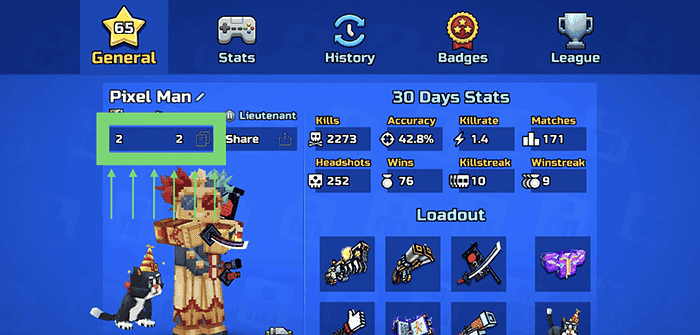
Paste this copied ID into the Player ID field on BitTopup when submitting your order.
Pixel Gun 3D In-Game Currencies: Gems, Coins, Keys, and Pixel Pass Tickets
Pixel Gun 3D features multiple distinct currencies, each serving a specific progression role. Understanding how each currency functions helps you choose the exact top-up package for your gameplay goals.
Gems (Premium Currency)
Gems are the most valuable resource in Pixel Gun 3D. They are required to purchase top-tier Mythical weapons, buy weapons and vanity items from the rotating Trader's Van, purchase Module Chests, upgrade weapon rarity tiers, and reset event timers.
Coins (Core Progression Currency)
Coins represent the foundational economy of your armory. You spend Coins to purchase standard weapons from the Armory, upgrade your Armor and Hats, enhance weapon craft components, upgrade Wear items, and construct structures inside your Clan Fort.
Keys (Lottery Currency)
Keys are used exclusively to open event lottery chests, including Novice, Fighter, Winner, and Super Chests. Spinning these lotteries awards exclusive weapon parts, avatars, modules, and vanity cosmetics during active game events.
Pixel Pass Tickets
Pixel Pass Tickets allow you to unlock the premium track of the seasonal battle pass. Activating the premium Pixel Pass unlocks exclusive seasonal weapons, skins, avatars, and bonus currency drops as you level up your battle pass tiers.
| Currency / Item | Primary Use Case | Recommended For |
|---|---|---|
| Gems | Trader's Van, Mythical weapons, module chests, rarity upgrades | High-tier loadout building and meta weapon acquisition |
| Coins | Armory purchases, armor upgrades, wearable gear, clan base | Daily core progression and defense gear leveling |
| Keys | Event lottery chest spins (Novice, Fighter, Winner, Super) | Collecting exclusive event weapon parts and cosmetics |
| Pixel Pass Tickets | Premium season pass activation and tier unlocks | Seasonal progression rewards and unique thematic gear |
Cross-Platform Recharge Support for Mobile and Steam PC Edition
What is Pixel Gun 3D available on? The game is available on Android (Google Play), iOS (Apple App Store), and PC via the official Steam edition.
Because Pixel Gun 3D supports cross-platform account linking, resources purchased via your Player ID credit to your unified profile. If your mobile account is properly linked to your PC account, any Gems, Coins, Keys, or Pixel Pass Tickets added to your Player ID will reflect across both your mobile device and your PC Steam client. You do not need separate top-up services for mobile and PC—your Player ID is universal across platforms.
Why UID Direct Top-Up is the Safest Purchase Method
Account security is essential when purchasing in-game resources. Direct UID (Player ID) recharge is the industry standard for safe digital transactions:
- Zero Password Sharing: You only provide your public Player ID. You never reveal your Google Play, Apple ID, Steam login, or game password.
- No Account Takeover Risk: Because no login credentials change hands, third parties cannot modify your account settings, delete items, or access private personal information.
- Official Server Crediting: Resources are delivered straight to your account balance via standard server routing, keeping your account fully compliant and secure.
How to Send Pixel Gun 3D Gems and Currencies as Gifts to Friends
Surprising a friend or clanmate with in-game resources on BitTopup is simple:
- Ask your friend for their numeric Pixel Gun 3D Player ID (found in their profile screen).
- Select the currency package you wish to send them from the catalog above.
- Enter your friend's Player ID into the recipient field.
- Complete the checkout. The Gems or Coins will deliver directly to your friend's account, ready for them to use next time they launch the game.
Troubleshooting Delivery Delays and Checking In-Game Balance
In rare situations where a purchased balance does not display immediately upon transaction completion, use the following troubleshooting steps:
- Restart the Game Client: Completely close Pixel Gun 3D from your active background applications (or close the Steam process on PC) and relaunch it. This forces the client to sync with the central game servers.
- Check Your Player ID: Review your order confirmation receipt to ensure the Player ID submitted matched your in-game profile without missing or transposed digits.
- Switch Network Connection: Disconnect and reconnect your Wi-Fi, or switch between mobile data and home broadband to resolve local caching issues.
- Contact Customer Support: If your resources have not appeared after completing these steps, contact BitTopup 24/7 customer support with your Order Number and Player ID for rapid verification and resolution.
Frequently Asked Questions
How do I find my Pixel Gun 3D Player ID?
Open Pixel Gun 3D and tap your profile avatar icon in the upper-left corner of the main lobby screen. Your numeric Player ID appears directly beneath your username. Tap the copy icon next to the number to copy it to your clipboard.
Do I need to provide my Pixel Gun 3D login password to recharge?
No. BitTopup requires only your public numeric Player ID. You should never share your account passwords, Steam credentials, or personal verification codes with anyone.
Can I top up my Pixel Gun 3D account if I play on PC Steam or iOS?
Yes. Direct top-ups work across all supported platforms, including Android, iOS, and PC (Steam). Enter your in-game Player ID, and the currencies will credit to your account regardless of the device you play on.
What is the difference between Pixel Gun 3D Gems, Coins, and Keys?
Gems are used for high-tier Mythical weapons, Trader's Van offers, and module upgrades. Coins are used for standard Armory gear, armor upgrades, and clan building. Keys are spent on event lottery chests to unlock weapon parts and seasonal items.
Can I buy Pixel Gun 3D Gems for a friend?
Yes. You can purchase resources for any player by entering their numeric Player ID into the checkout field instead of your own. The items will be credited directly to their game profile.
What should I do if my purchased Gems or Coins do not appear in-game?
Close and restart your Pixel Gun 3D application to force a server balance refresh. If the balance remains unchanged after restarting, verify the Player ID on your order receipt and reach out to BitTopup support with your transaction details.














































































































