



Pure Sniper SG Top Up: Fast & Secure Gold Recharge
Pure Sniper delivers intense sniper combat across solo campaign modes, hostage rescues, helicopter assaults, and live multiplayer PvP arenas. Gold serves as the premier currency required to acquire top-tier sniper rifles, accelerate weapon part upgrades, refill energy meters, and maintain an edge in competitive leaderboards.
BitTopup provides a direct channel to buy Pure Sniper gold for accounts registered in Singapore (SG). Using only your in-game Player ID, orders process directly to your game profile without requiring login credentials or account transfers. Check the live checkout on BitTopup for current package availability and real-time pricing.
How to Recharge Pure Sniper Gold Using Player ID
Recharging your Pure Sniper balance takes only a few moments. Follow this simple process to complete your order on BitTopup:
- Select Your Gold Pack: Browse the available gold denominations on the BitTopup Pure Sniper (SG) page and select the amount you want to purchase.
- Enter Your Player ID: Input your exact Pure Sniper Player ID in the designated account field. Double-check your numbers to avoid delays.
- Proceed to Checkout: Select your preferred payment method and confirm the transaction details.
- Receive Gold Instantly: Once payment is processed, the system delivers the gold directly to your Pure Sniper account in-game. Launch or restart your game to verify your updated balance.
| Order Step | Action Required | Verification Details |
|---|---|---|
| 1. Selection | Choose gold denomination | Review active live rates on BitTopup |
| 2. Account Input | Enter Pure Sniper Player ID | Found inside in-game profile settings |
| 3. Checkout | Complete secure payment | SSL-encrypted direct transaction |
| 4. Confirmation | Restart Pure Sniper app | Gold appears directly in your balance |
Where to Find Your Pure Sniper Player ID
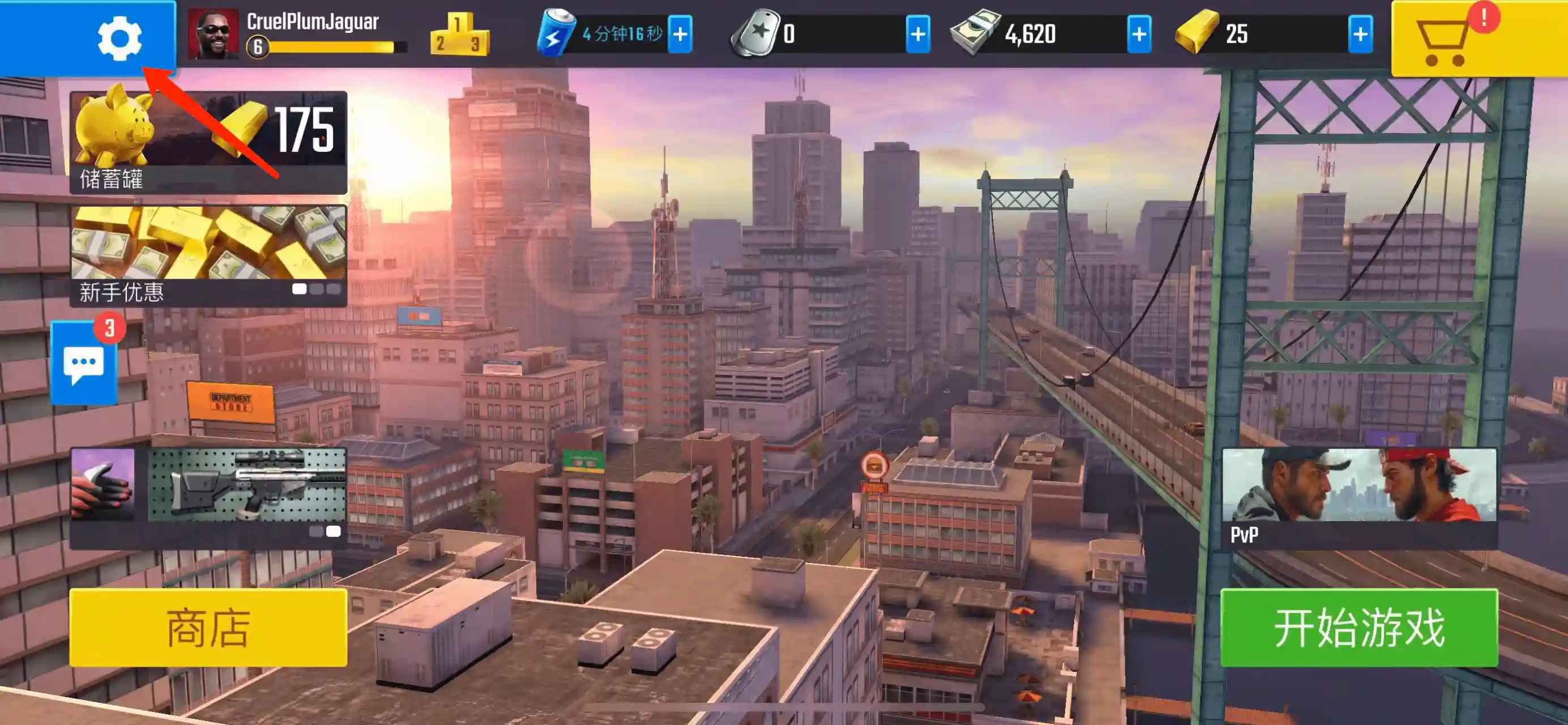
To ensure your recharge reaches your profile without errors, you must submit your exact Player ID. Follow these steps to locate your credentials inside the game:
- Launch Pure Sniper on your mobile device.
- Tap your Profile Avatar located in the top-left corner of the main lobby screen.
- Open the Settings or Profile Details tab.
- Locate your Player ID (a unique string of numbers/letters displayed below your username).
- Tap the copy icon next to your ID to copy it to your clipboard, then paste it directly into the BitTopup order form.
Singapore Region Account Verification & Server Requirements
This product catalog is tailored specifically for Pure Sniper (SG) accounts. Mobile titles frequently segregate server regions and in-game shop catalogs based on the geographical registration of your account.
- Region Compatibility: Ensure your Pure Sniper game profile was registered in Singapore or operates on the Southeast Asia / Singapore server region.
- Currency & Catalog Alignment: Purchasing an SG recharge for an account tied to a different geographic store region can lead to delivery failures or processing delays.
- Guest vs. Linked Accounts: While top-ups function for both guest profiles and linked accounts (via Google Play, Apple ID, or Facebook), linking your account prior to recharging is recommended to safeguard your progress.
Pure Sniper Gold Benefits: Weapons, Upgrades, and Energy
Gold is the primary resource for progression in Pure Sniper. Investing in gold grants immediate utility across several core game mechanics:
1. High-Performance Weapon Purchases
Advanced sniper rifles, high-caliber shotguns, assault rifles, and submachine guns often require gold or substantial blueprint investments. Acquiring gold allows you to unlock high-tier firepower early, helping you clear demanding campaign districts and event missions.
2. Instant Weapon Upgrades
Upgrading weapon components—such as scopes, barrels, magazines, bodies, and muzzles—improves damage output, zoom stability, reload speed, and clip capacity. Gold lets you bypass upgrade timers and bridge material shortages, keeping your arsenal combat-ready.
3. Energy Refills for Uninterrupted Play
Campaign missions and special operations consume energy. When your energy depletes, you must wait for it to regenerate naturally or spend gold for instant refills, allowing extended gameplay sessions.
4. Special Operations & PvP Gear
Competitive PvP sniper duels require precision and competitive gear. Gold provides access to specialty gear, thermal sights, armor boosts, and combat consumables that give you a tactical edge against rival snipers.
Fast Delivery and Secure Password-Free Top Up on BitTopup
BitTopup focuses on safety, efficiency, and customer satisfaction for mobile gamers:
- Password-Free Security: We never ask for your account password, email access, or security questions. All transactions use your public Player ID.
- Instant Order Fulfillment: Automated backend systems route gold directly to your account immediately after payment confirmation.
- Transparent Live Pricing: Exact package costs and payment options are clearly shown on the live checkout screen without hidden platform fees.
- Responsive Support: Our dedicated customer support team is available 24/7 to answer questions, verify transaction statuses, and resolve any order concerns.
Troubleshooting Pure Sniper Top-Up Orders in 2026
If your gold does not appear immediately after completing a purchase, use the following troubleshooting checklist:
- Restart the Game Client: Force close the Pure Sniper application completely on your iOS or Android device and reopen it. This forces the client to sync with the game servers.
- Verify Network Connectivity: Ensure your mobile data or Wi-Fi connection is stable. A weak connection can delay server-side balance updates.
- Check Order Confirmation: Review your BitTopup receipt to confirm that payment went through and that your submitted Player ID was accurate.
- Wait a Few Minutes: During peak traffic windows or maintenance periods, server delivery may take a brief moment.
- Contact BitTopup Support: If your balance has not updated after restarting your game, provide your BitTopup Order Number and your Pure Sniper Player ID to our live support team for immediate investigation.
Frequently Asked Questions
How do I find my Pure Sniper Player ID for recharge?
Open Pure Sniper, tap your profile avatar in the upper-left corner of the home screen, and check the profile menu. Your Player ID is displayed beneath your in-game name. Tap the copy button to copy the ID accurately.
Is this Pure Sniper top up valid for accounts outside Singapore?
This specific product page is configured for Pure Sniper Singapore (SG) region accounts. If your account is registered in a different region, choose the matching regional product on BitTopup to prevent delivery issues.
Do I need to share my game account password to recharge Pure Sniper gold?
No. BitTopup requires only your Pure Sniper Player ID. Never share your password, login credentials, or verification codes with anyone.
What can I purchase in Pure Sniper with gold?
Gold can be spent on high-tier sniper rifles, weapon part upgrades, instant timer completions, energy refills for continuous mission play, and tactical combat equipment for PvP modes.
How long does it take for Pure Sniper gold to appear in my account?
Deliveries are processed directly via automated systems. Most top-ups appear in your account balance within moments of completed payment. If it does not appear right away, restart your game app.
What should I do if I entered the wrong Player ID during checkout?
Contact BitTopup customer support immediately with your order number and the correct Player ID. If the order has not yet been processed by the automated system, our team will assist in updating your details.