
Pure Sniper Top Up for Turkey (TR) Accounts
Pure Sniper is an intense first-person sniper action shooter featuring sniper campaigns, fast gun-range target shooting, hostage rescue missions, helicopter assaults, and competitive multiplayer PvP matches. To advance through demanding city districts and eliminate tough targets, having upgraded firearms and ample resources is essential.
Performing a Pure Sniper top up on BitTopup allows you to reload your in-game Gold and Diamonds instantly. These currencies let you upgrade rifle stats, unlock high-caliber sniper rifles, acquire assault weapons, and stock up on tactical equipment. Our recharge service operates via direct Player ID top up, meaning you do not need to share passwords or login credentials. With dedicated support for Turkey (TR) accounts, BitTopup provides a direct, secure, and quick way to get the supplies you need to dominate the leaderboard in 2026.
Why Recharge Pure Sniper (TR) on BitTopup
Choosing BitTopup for your Pure Sniper TR recharge gives you several distinct advantages designed around security and speed:
- Password-Free Security: All orders are fulfilled using only your Pure Sniper Player ID. Your game login, social media accounts, and device credentials stay completely secure.
- Turkey (TR) Region Compatibility: Packages are configured specifically for Turkey region accounts to ensure prompt crediting without regional mismatch errors.
- Live Price Transparency: Current package pricing, currency amounts, and available offers are displayed directly on the live checkout page without hidden service fees.
- Reliable Order Processing: Automated systems process your order swiftly so your Gold and Diamonds arrive in your game inventory shortly after payment approval.
- Dedicated Support: The BitTopup customer support team is on standby to assist you with order verification, status tracking, and delivery queries.
How to Find Your Pure Sniper Player ID
To ensure your currency reaches your account without delay, you must provide your exact Pure Sniper Player ID. Follow these steps to locate your ID inside the game:
- Open the Pure Sniper app on your Android or iOS device.
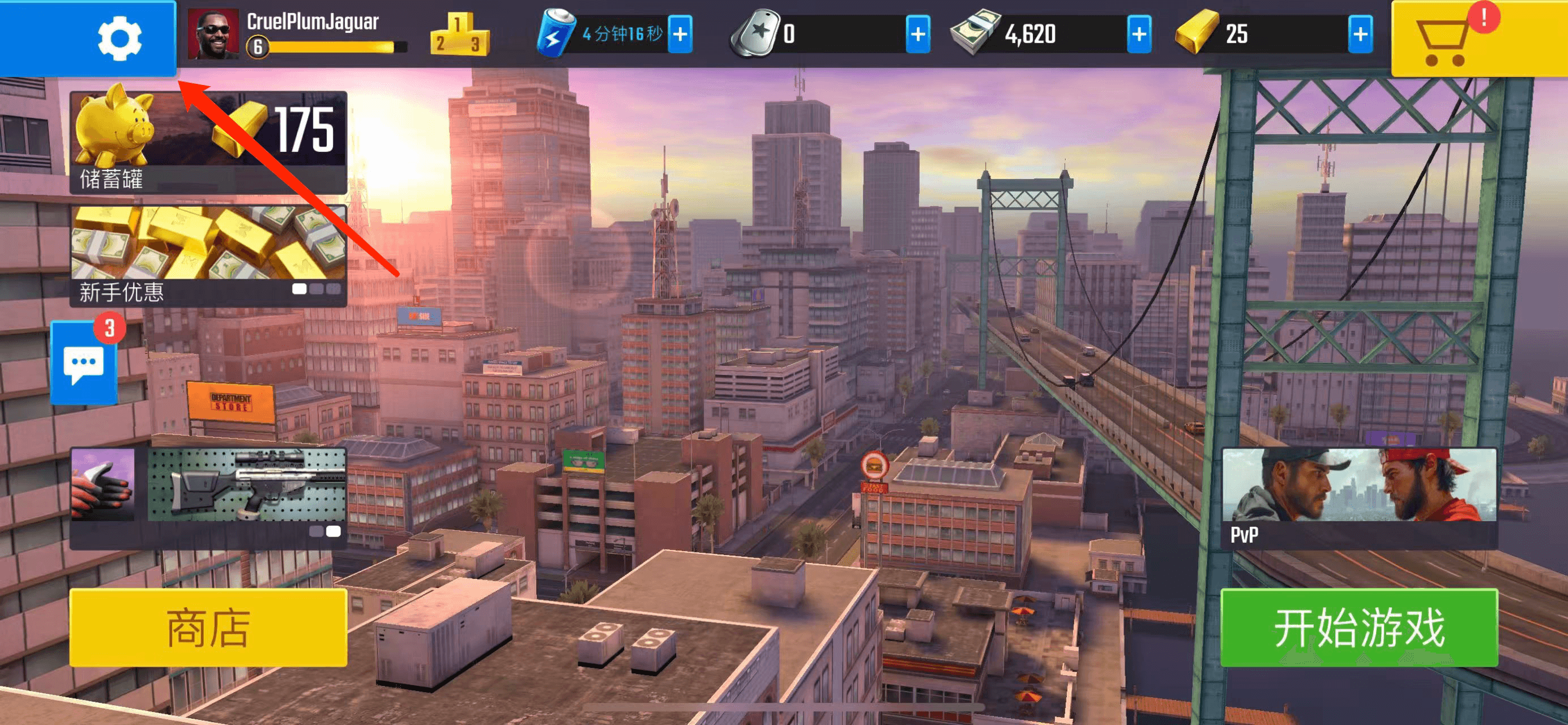
- From the main game lobby screen, tap on your Profile Avatar / Username in the top-left corner.
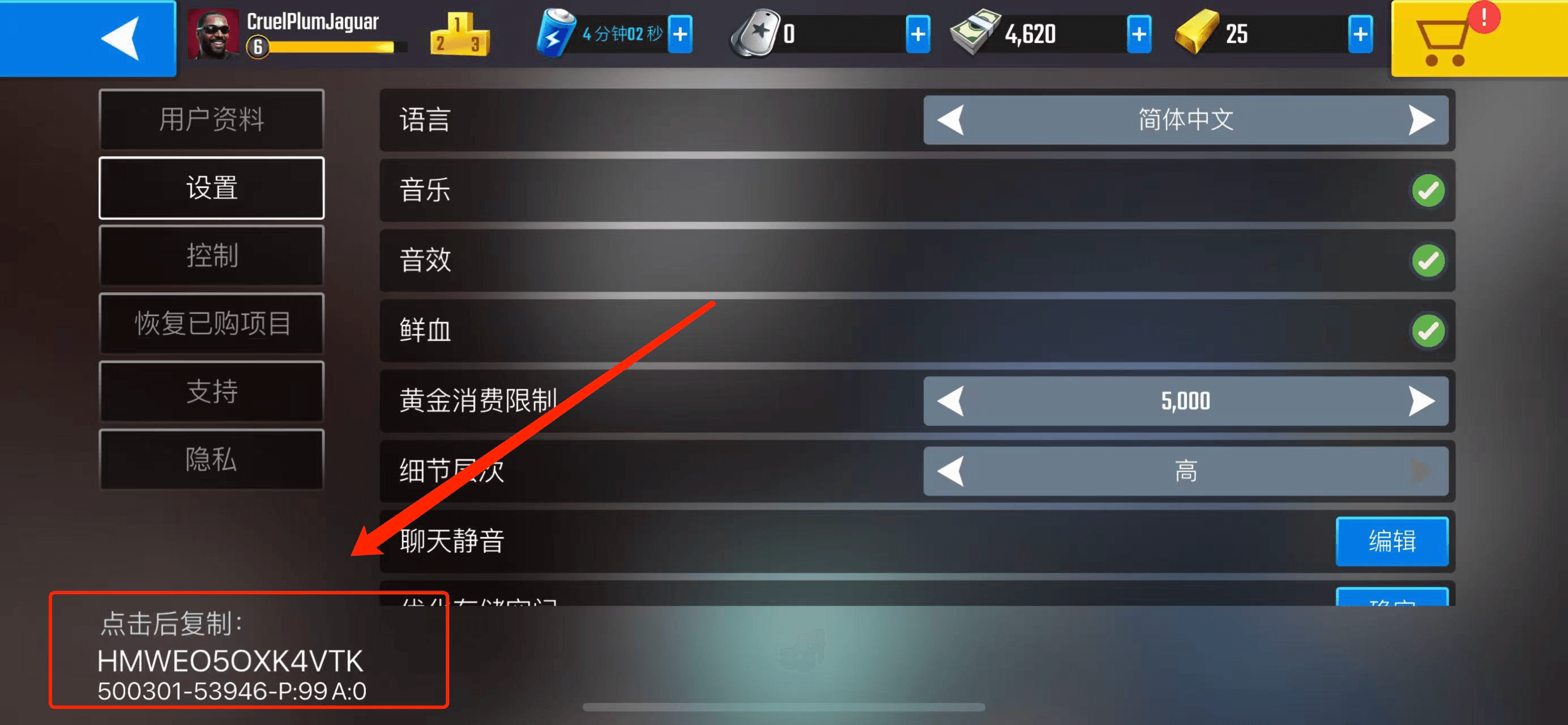
- In the profile overview window, locate the field marked Player ID (an alphanumeric sequence).
- Tap the Copy icon next to the ID string to copy it directly to your clipboard, or write it down carefully.

Double-check that you have copied the complete string. Pasting an accurate Player ID ensures that your BitTopup order routes directly to your profile.
Step-by-Step Guide to Pure Sniper TR Recharge
Completing your Pure Sniper TR top-up on BitTopup takes only a few simple steps:
- Select Your Currency Package: Choose the amount of Gold, Diamonds, or specific bundle you want to purchase from the product catalog above.
- Enter Your Player ID: Paste your alphanumeric Player ID into the required input field. Confirm that your account is registered in the Turkey (TR) region.
- Proceed to Checkout: Click the purchase button to move to the secure payment screen.

- Complete Payment: Select your preferred payment option from the available methods and confirm the transaction.

- Check In-Game Balance: Once your payment is confirmed, reopen Pure Sniper to see your updated Gold and Diamond balances.

| Step | Action | Checkpoint |
|---|---|---|
| 1. Package Selection | Pick Gold or Diamond quantity | Verify pack details on the product page |
| 2. ID Submission | Paste your Player ID | Ensure alphanumeric characters are exact |
| 3. Payment | Select payment channel | Review live price total on checkout |
| 4. Delivery | Reopen Pure Sniper | Verify currency balance in your profile |
Turkey (TR) Account Compatibility and Server Guidelines
This specific product catalog is configured for Pure Sniper accounts registered under the Turkey (TR) region. In-game payment systems link region-specific pricing and store catalogs to your account's registered country.


- Confirm Your Account Region: Make sure your Pure Sniper profile was created or is currently set to the Turkey region. Submitting a Player ID from another region may result in delayed delivery or processing failures.
- No VPN Required During Delivery: You do not need to connect through a VPN when ordering on BitTopup. Once your payment clears, the recharge processes server-side directly to your account.
- App Updates: Keep your Pure Sniper application updated to the latest version available in your app store to avoid local cache display bugs after a top-up.
Pure Sniper In-Game Items: Gold, Gems, and Weapon Upgrades 2026
Managing your in-game resources effectively helps you progress through the campaign and maintain a high win rate in PvP sniper duels. Here is how you can use your currencies in Pure Sniper:
- Gold: The foundational currency in Pure Sniper. You need Gold to upgrade weapon components such as muzzle velocity, clip size, body stability, scope zoom, and reload speed. Gold is also required to buy new base weapons across various categories, including sniper rifles, shotguns, and submachine guns.
- Diamonds (Gems): The premium currency used to purchase elite weapon blueprints, open high-tier weapon crates, instantly bypass weapon upgrade timers, and buy exclusive sniper customizations. Diamonds also let you refill energy when competing in extended multiplayer tournaments.
- Weapon Blueprints & Upgrades: As you advance through campaign sectors, enemies gain higher health and armor. Equipping weapons with advanced tier upgrades is necessary to achieve one-shot kills and beat mission timers.
Safe Payment Options and Fast Order Processing
BitTopup utilizes secure checkout protocols to safeguard your transactions. Every purchase is protected by industry-standard encryption, ensuring that your billing information remains private.
Because BitTopup processes Pure Sniper recharges directly via your Player ID, your account security is never compromised. You never have to hand over your social logins, Google Play credentials, or Apple ID details. Once your payment is approved, your order is queued automatically for fast dispatch straight to your Pure Sniper account.
Frequently Asked Questions
How do I find my Pure Sniper Player ID?
Open Pure Sniper and tap on your profile icon in the upper-left corner of the main menu. Your alphanumeric Player ID is displayed on the profile card. Tap the copy icon next to the ID to paste it directly into the order field on BitTopup.
Is this recharge service only valid for Turkey (TR) Pure Sniper accounts?
Yes, this product listing is specifically configured for Pure Sniper accounts registered in the Turkey (TR) region. To ensure smooth fulfillment, verify that your account belongs to the TR region before purchasing.
Do I need to provide my game password to recharge Pure Sniper?
No. BitTopup uses direct ID recharge. You only need to provide your Pure Sniper Player ID. Never share your game password or third-party login credentials with anyone.
How long does it take for Pure Sniper gold to reflect in my account?
Orders are processed through an automated system immediately following payment confirmation. In most cases, your Gold or Diamonds will appear in your game profile shortly after checkout. During peak server activity, slight processing queues may occur.
What should I do if my Pure Sniper recharge does not appear immediately?
First, restart the Pure Sniper app to refresh your connection with the game servers. If your updated currency balance still does not show after restarting, check your BitTopup order history to verify the order status and confirm that your submitted Player ID was correct. You can contact BitTopup customer support with your Order ID for prompt assistance.
Is Pure Sniper free to play with in-app purchases?
Yes, Pure Sniper is free to download and play on mobile platforms. Players can earn basic rewards through gameplay or purchase Gold and Diamonds via BitTopup to accelerate weapon upgrades and unlock premium gear faster.