




Voicemod Top Up: Instant Digital License Activation
A Voicemod top up gives you instant access to advanced real-time voice processing, sound effect management, and vocal customization software. Whether you stream content, play multiplayer titles, or host meetings, upgrading your software to PRO unlocks full soundboards, unlimited voice filters, and custom voice design tools.
BitTopup delivers your digital license directly after purchase so you can activate your license without delay. You never have to share account passwords or sensitive personal credentials to receive your code.
Voicemod PRO Key Features: AI Voice Changer, Voicelab, and Custom Soundboards
The free version of Voicemod includes a rotating selection of standard voice presets and limited sound slots. Upgrading to a Voicemod PRO license unlocks the full software suite:
- Real-Time AI Voice Changing: Apply advanced artificial intelligence filters that reshape pitch, tone, and formant in real time with low latency.
- Voicelab Custom Sound Creator: Build custom voice profiles from scratch. Combine pitch shifters, reverbs, delays, vocoders, and equalizers to design your own unique vocal identities.
- Unlimited Soundboard Profiles: Upload, organize, and trigger thousands of custom audio clips, meme tracks, and sound effects with hotkey bindings.
- Community Sound Hub: Download thousands of free community-shared sound clips directly through the built-in Tuna sound platform.
- No Ad Interruptions & Unlimited Daily Voice Access: Access every voice profile at any time without waiting for daily free rotations.
Voicemod Pricing in 2026: Lifetime License vs Recurring Subscriptions
Voicemod offers flexible license options depending on your budget and usage needs. The software is available through recurring subscription plans as well as a permanent one-time purchase.
| License Type | Duration | Best For | Key Benefits |
|---|---|---|---|
| Quarterly Subscription | 3 Months | Short-term projects / Trial | Low upfront cost, flexible renewal |
| Annual Subscription | 12 Months | Active streamers & gamers | Reduced monthly average rate |
| Lifetime PRO License | Permanent | Long-term power users | Single one-time payment, all future updates included |
Note: Exact pricing varies by region, currency, and ongoing promotional periods. Current real-time rates are displayed on the live BitTopup checkout page before you place your order.
How to Find Your Account Info and Redeem Your Code
Activating your license key does not require complex account syncing. You only need your installed desktop application to apply the digital code.
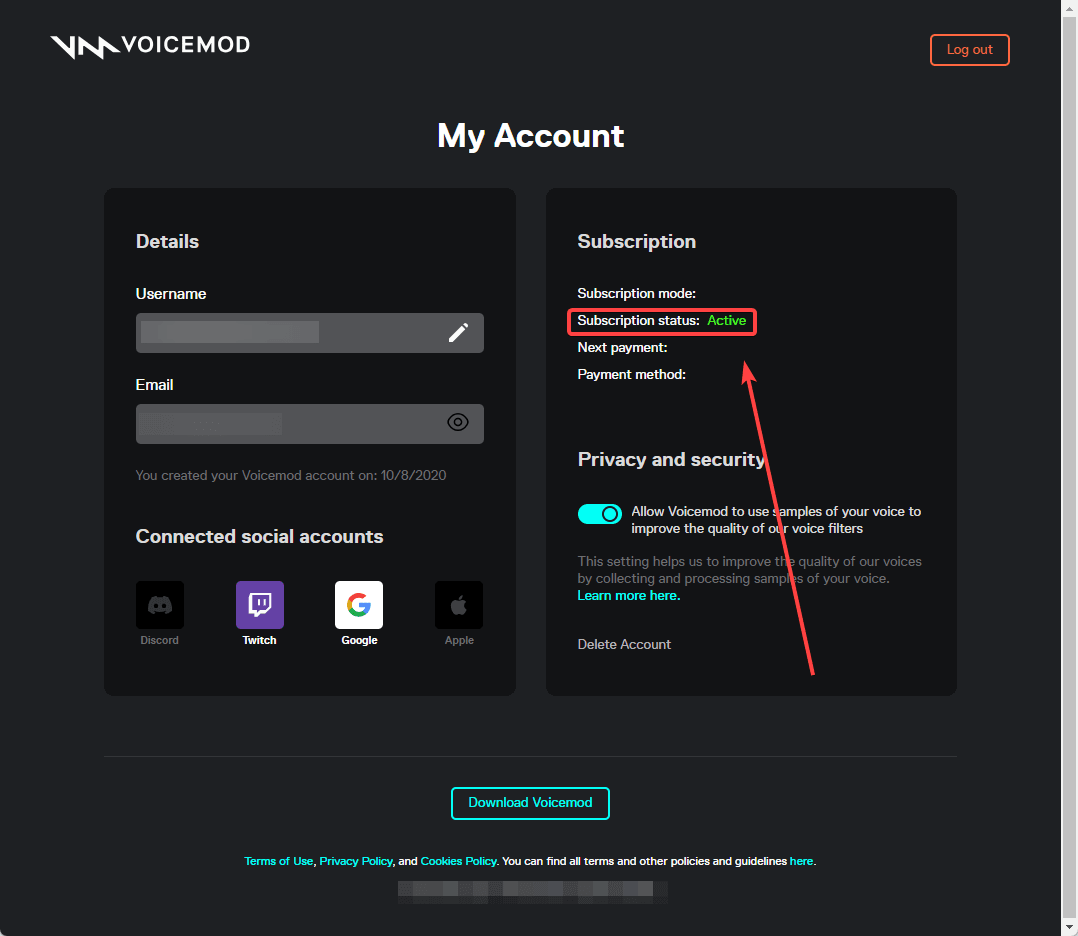
- Open the Voicemod application on your computer.
- Click the Settings icon (gear symbol) located in the lower-left corner of the interface.
- Navigate to the Account tab.
- If you are not signed in, create a free account or log in using your preferred email or linked platform profile.
- Locate your user profile details in this window. Once you receive your digital license key from BitTopup, paste the code into the license activation field to permanently bind PRO status to your profile.
Step-by-Step: How to Complete Your Voicemod Recharge on BitTopup
Getting your digital activation code on BitTopup takes only a few simple steps:
- Select Your Item: Choose the Voicemod PRO license or subscription duration on the BitTopup product page.
- Check Your Order Details: Confirm the item version and your contact email address for code receipt.
- Select a Payment Method: Choose your preferred payment option from the checkout screen.
- Complete Checkout: Finalize your order through our secure payment gateway.
- Receive and Redeem: Your license code will display on-screen immediately and be sent to your email. Copy the code into the Voicemod app to activate PRO.
Compatibility Guide: Using Voicemod on Discord, PC Gaming, and Consoles
Voicemod acts as a virtual audio cable on your computer, making it compatible with almost any program that accepts microphone input.
- Discord & TeamSpeak: Set your input device in Discord settings to Microphone (Voicemod Virtual Audio Device). Keep your regular headset microphone as the input inside the Voicemod software.
- PC Gaming (Valorant, Steam, Call of Duty, Fortnite): Open the in-game audio settings and set the default microphone to the Voicemod Virtual Audio Device. Keep Voicemod running in the background while you play.
- Consoles (PS5, PS4, Xbox Series X/S): Consoles do not run native Voicemod desktop apps. To use Voicemod on a console, connect your PC audio output to your console via an audio mixer, capture card, or through Remote Play streaming software.
- Operating System Support: Fully supported on Windows 10 and Windows 11 (64-bit). Beta and mobile companion tools are available for Mac and smartphone remote control.
Troubleshooting Voicemod Key Activation and Audio Driver Issues
If you run into issues after purchasing or installing your license, check the following common fixes:
- Invalid Key Error: Ensure there are no accidental spaces before or after the code when pasting. Check that your internet connection is active so the app can verify the key against the licensing server.
- No Audio Output: Open Windows Sound Settings. Verify that your real physical microphone is selected as the input inside Voicemod settings, and Voicemod Virtual Audio Device is selected in your communication app.
- Driver Not Detected: If the virtual audio driver fails to initialize, open Device Manager, uninstall the Voicemod Virtual Audio Device, restart your PC, and let Voicemod reinstall the driver on launch.
- Robotic Voice / High Latency: Open Voicemod Settings > Audio and adjust the sample rate buffer size. Lower buffer sizes reduce delay, while slightly higher buffers eliminate crackling on busy CPUs.
Safe and Secure Purchases: Why Choose BitTopup for Your Voicemod License
BitTopup provides a fast, transparent, and secure purchasing process for digital codes:
- No Account Passwords Needed: We never ask for your personal account passwords, linked platform logins, or remote desktop access. You receive a standalone digital key to redeem yourself.
- Direct Digital Delivery: Your code is generated and presented immediately after payment verification.
- Clear Pricing: All applicable charges are shown clearly at checkout with zero hidden surprises.
- Customer Support: Our 24/7 customer service team is available to assist you with order status, key verification, or redemption questions.
Frequently Asked Questions
Does Voicemod have a one-time purchase?
Yes. Voicemod offers a Lifetime PRO license that you buy once for permanent access without recurring monthly or yearly fees.
Is Voicemod PRO a one-time payment or a subscription?
Voicemod provides both options. You can choose a recurring subscription (quarterly or annual) if you only need temporary access, or choose the one-time Lifetime license for permanent ownership.
How much does a Voicemod subscription cost in 2026?
Voicemod pricing varies based on region and selected duration. Check the live product list on BitTopup for up-to-date 2026 prices and package options.
How do I activate my Voicemod PRO key after purchase?
Open the Voicemod desktop client, click the Settings gear icon, go to the Account section, and enter your purchased activation key into the license field.
Can you buy Voicemod permanently?
Yes. The Voicemod Lifetime key grants permanent PRO privileges to your registered Voicemod account, including all future feature updates and unlocked soundboard slots.
Is Voicemod free to use without paying for PRO?
Yes. The free version provides standard voice changers with a rotating daily selection and basic soundboard functionality. Buying PRO removes all rotation limits and gives access to Voicelab and unlimited custom sound boards.
Can I use Voicemod on consoles like PS5 and Xbox?
Voicemod cannot be installed directly onto consoles. However, you can route your PC audio into your console setup using an auxiliary audio splitter, external capture card, or via Remote Play applications on your PC.










































































































































