







Heroic Uncle Kim Top Up: Direct In-Game Recharge
Powering up your squad in Heroic Uncle Kim requires reliable access to premium resources, hero summons, and character growth materials. A direct Heroic Uncle Kim top up allows you to obtain in-game currency without waiting for slow daily grinds. BitTopup provides a direct recharge system designed to send packages straight to your account profile using only your User Account ID.
Whether you need diamonds for high-tier character pulls, stamina replenishments for stage clearing, or special growth packs, getting your top up processed reliably keeps your game progression moving forward smoothly.
How to Recharge Heroic Uncle Kim on BitTopup
Completing a recharge takes only a few quick steps. Follow this process to credit your account immediately:
- Select Your Item Package: Choose the diamond denomination or pack you want to purchase from the catalog above.
- Enter Your User Account: Input your exact Heroic Uncle Kim User Account into the required player field.
- Review Your Order: Double-check that your account ID matches your in-game profile to prevent delivery delays.
- Proceed to Checkout: Click the purchase button and select your preferred payment option on the live checkout screen.
- Receive In-Game Items: Once payment confirmation is complete, the purchased diamonds or packs will be sent directly to your in-game account.
Recharge Process Overview
| Step | Action Required | Expected Result |
|---|---|---|
| 1. Select Denomination | Pick desired diamond pack | Live price displayed at checkout |
| 2. Enter User Account | Fill in your in-game User Account | Direct destination assigned |
| 3. Checkout | Complete payment via gateway | Immediate transaction confirmation |
| 4. In-Game Check | Open game and check mailbox/balance | Currency available for immediate use |
How to Find Your Heroic Uncle Kim User Account
Your User Account is the unique identifier tied to your game profile. You do not need to share passwords or login credentials; this public ID is all that is required for delivery.
- Launch the Heroic Uncle Kim app on your mobile device.
- Tap your Player Avatar or profile icon located in the top corner of the main screen.
- Open the Account / Settings tab.
- Locate your User Account string displayed on the profile card.
- Tap the copy icon or carefully write down the exact sequence before pasting it into the BitTopup player field.
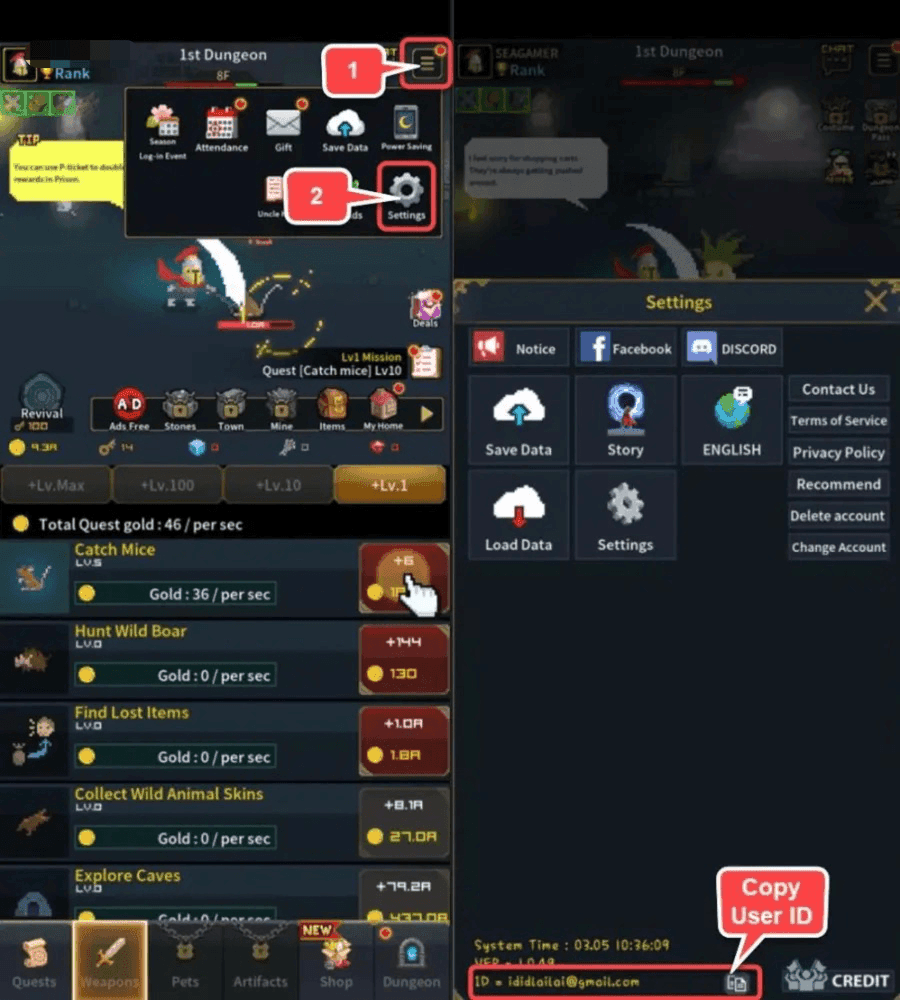
Double-check that there are no accidental spaces or transposed numbers when pasting your User Account into the input box.
Safe & Secure Recharge: Why Password-Free Top-Up Matters
Account safety is essential when purchasing in-game items online. BitTopup uses a direct-to-ID delivery model, which guarantees maximum security for your gaming profile:
- Zero Password Sharing: You will never be asked for your login password, social media credentials, or two-factor verification codes.
- No Account Handover: Your account stays entirely in your hands. You do not need to log out, share access, or risk unauthorized logins.
- Direct System Fulfillment: Purchases are credited directly through standard game server delivery routes tied to your User Account ID.
- Protection Against Phishing: By never providing login passwords on third-party pages, your account remains secure from unauthorized access attempts.
Heroic Uncle Kim Diamonds & Currency Uses in 2026
In 2026, staying competitive in Heroic Uncle Kim involves managing resources effectively. Premium currency obtained through recharges serves multiple vital functions:
- Hero Recruitment: Use diamonds to pull top-tier characters and complete your formation synergies.
- Equipment & Relic Upgrades: Purchase upgrade packs and refinement materials to maximize your combat power.
- Energy & Dungeon Resets: Buy daily stamina recharges and reset challenge dungeons to farm rare ascension materials.
- Limited-Time Events: Secure milestone rewards and participate in seasonal 2026 banner pulls that require focused premium investments.
- VIP & Growth Packages: Accelerate resource generation by activating growth passes and milestone reward tracks.
Payment Methods and Instant Processing for Heroic Uncle Kim
BitTopup supports a wide range of secure payment channels for global players. Exact local currency options, digital wallets, credit cards, and online banking methods are displayed directly on the live checkout screen.
All transactions are processed through encrypted gateways to ensure buyer protection. Because the system utilizes your User Account ID for direct crediting, there is no need to join external chat queues or contact off-site representatives to release your order. Once your payment clears, processing starts automatically.
Troubleshooting Common Heroic Uncle Kim Recharge Issues
If you experience any delay or issue during your recharge, consult these troubleshooting steps:
- Items Not Appearing Immediately: Close Heroic Uncle Kim completely and relaunch the application. Server sync often updates your currency wallet after a fresh restart.
- Checking In-Game Mail: Some items and event packs are delivered to your in-game mailbox rather than credited directly to the counter. Check your mailbox and claim all attachments.
- Incorrect User Account Entered: If you accidentally submitted an invalid or incorrect User Account ID, contact BitTopup customer support immediately with your order number and correct account details before the order finishes processing.
- Payment Verification Pending: In rare cases where your payment provider delays authorization, the order will automatically fulfill as soon as your bank or payment gateway releases the funds.
Frequently Asked Questions
How do I recharge Heroic Uncle Kim on BitTopup?
Select your desired diamond or item package, enter your Heroic Uncle Kim User Account in the required field, choose your payment method on the live checkout page, and complete your purchase. Your items will be delivered straight to your game profile.
Where can I find my Heroic Uncle Kim User Account?
Open Heroic Uncle Kim, tap your player avatar on the main screen, and view your profile information. Your User Account will be visible on the screen, ready to copy.
Do I need to share my password to recharge Heroic Uncle Kim?
No. BitTopup requires only your public User Account ID to fulfill your order. You should never share your password, login credentials, or security codes with anyone.
How long does it take for Heroic Uncle Kim recharge to be credited?
Orders process automatically upon successful payment confirmation. Most top-ups appear in your in-game account within moments of completing checkout.
What should I do if I entered the wrong User Account?
If you realize you entered an incorrect User Account, contact the BitTopup 24/7 customer support team right away with your transaction ID. If the order has not yet been processed by the automated system, support can assist in updating your account details.
Can I recharge Heroic Uncle Kim for another player?
Yes. Because the top-up process only requires the User Account ID, you can purchase diamonds or packs for friends, guildmates, or family members by entering their User Account ID at checkout.









































































































































