

Path to Nowhere Top Up: Get Ultracubes Fast on BitTopup
Ultracubes are the primary premium currency in Path to Nowhere, essential for expanding your roster of Sinners, securing high-tier surveillance supplies, and acquiring exclusive character attires. As the Chief of the Minos Bureau of Crisis Control (MBCC), managing your resources effectively is critical for progressing through challenging story chapters and high-risk containment zones.
BitTopup provides a direct Path to Nowhere top up service that credits Ultracubes straight to your game profile using only your User Account ID. With instant digital order processing, secure transactions, and zero requirement for account passwords, you can replenish your resources anytime and focus on commanding your Sinners in combat.
What Are Path to Nowhere Ultracubes and Their In-Game Uses
Ultracubes serve multiple critical functions across the Path to Nowhere economy. Understanding how to allocate them helps you optimize your progression and resource management:
- Hypercube Conversion: Ultracubes can be converted directly into Hypercubes at a 1:1 ratio. Hypercubes are used to purchase Arrest Warrants for standard and event gacha banners.
- Exclusive Attires (Skins): High-tier Sinners feature 2D live attires and dynamic combat models that can only be purchased directly with Ultracubes in the Supply Office.
- Surveillance Order Upgrades: Upgrade your seasonal Surveillance Order to unlock the Advanced or Collector's edition tracks, granting exclusive S-rank Sinner attires, Consciousness materials, and hypercube rewards.
- High-Value Supply Packs: The in-game store regularly refreshes limited event bundles, Disco development material packs, and stamina replenishment sets that require direct Ultracube balances.
- Stamina Refills: Convert your cubes to replenish your daily stamina (Warrant energy) to sweep stages for Mania Essence, DisCoins, and Skill Modules.
Path to Nowhere First Top-Up Bonus Tiers and Rewards
Every base Ultracube pack in Path to Nowhere features a one-time first-purchase bonus. When you recharge a tier for the first time, you receive a 100% bonus in the form of equivalent bonus cubes credited to your balance. These bonus multipliers reset periodically during major annual milestone updates.
| Ultracube Pack Tier | Base Ultracubes | First Recharge Bonus | Total Ultracubes Received |
|---|---|---|---|
| 60 Ultracubes | 60 | 60 | 120 |
| 300 Ultracubes | 300 | 300 | 600 |
| 980 Ultracubes | 980 | 980 | 1,960 |
| 1,980 Ultracubes | 1,980 | 1,980 | 3,960 |
| 3,280 Ultracubes | 3,280 | 3,280 | 6,560 |
| 6,480 Ultracubes | 6,480 | 6,480 | 12,960 |
Note: Live tier pricing is displayed in your local currency directly on the BitTopup checkout selection screen.
How to Find Your Path to Nowhere User Account
To ensure your Ultracubes arrive without delay, you only need to provide your in-game User Account (UID). Follow these simple steps to locate your information:
- Launch Path to Nowhere on your mobile device or emulator.
- In the main MBCC lobby screen, tap on your Chief Profile Avatar located in the top-left corner.
- Your Chief Profile card will open. Locate your User Account (an 8-to-10 digit number) displayed under your Chief Name and Level.
- Tap the small Copy icon next to your ID number to copy it directly to your clipboard.
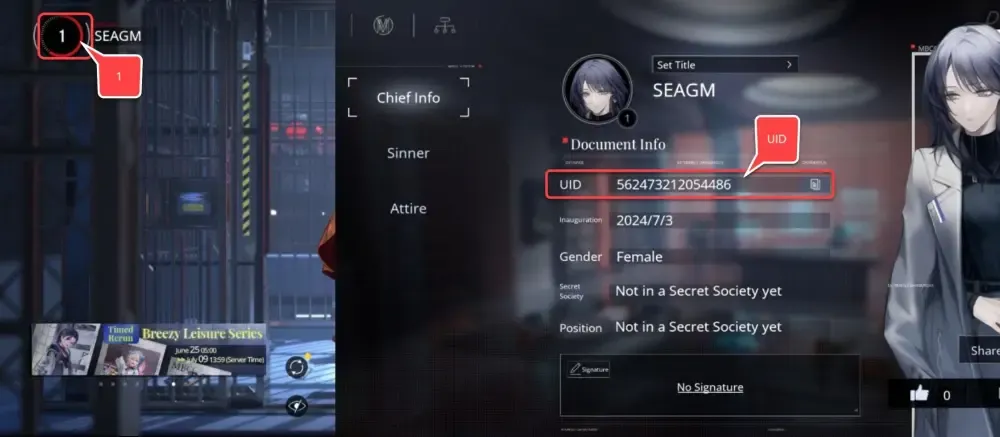
Paste this number into the User Account field on BitTopup before confirming your order.
Step-by-Step Guide: How to Recharge Path to Nowhere on BitTopup
Getting your Path to Nowhere recharge processed on BitTopup takes only a few moments:
- Select Your Pack: Choose the Ultracube tier or item bundle you want to purchase from the catalog.
- Enter Your User Account: Paste your Path to Nowhere User Account ID into the designated player input field.
- Verify Profile Details: Confirm that your numeric account ID is accurate to avoid misdirected deliveries.
- Select Payment Method: Pick your preferred payment method on the checkout screen.
- Complete Checkout: Finalize the payment. Once confirmed, your Ultracubes will be delivered automatically to your in-game account.
Account Safety: Why User Account Only Checkout Protects Your Data
BitTopup uses a direct API delivery system that requires only your public User Account ID. This guarantees complete account security:
- Zero Password Requirements: You never share your login credentials, passwords, third-party social logins (Google, Apple, Twitter/X), or authentication codes.
- No Risk of Account Takeover: Because our service never accesses your game client directly, your personal data and account ownership remain completely untouched.
- Official Server Crediting: Orders are processed through standard server fulfillment channels, keeping your MBCC profile fully compliant with game service terms.
Secure Payment Options and Real-Time Checkout for Ultracubes
BitTopup supports global and regional payment channels, giving you flexibility at checkout. All transactions are protected with industry-standard 256-bit SSL encryption to keep your billing information private.
Our system processes transactions in real time across all global servers (America, Europe, and Asia-Pacific). Live order tracking allows you to monitor the status of your purchase from submission to delivery confirmation.
Troubleshooting Common Path to Nowhere Delivery and Account Issues
If you experience any delay or issue with your Path to Nowhere top up, use the following troubleshooting checklist:
- Restart Your Game Client: In-game currency balances update when connecting to the server. If your balance does not reflect the new cubes immediately, close the Path to Nowhere app completely and relaunch it.
- Check In-Game Mailbox: Certain promotional packs or bonus rewards arrive through the MBCC in-game Bureau Mail system rather than directly into the currency display. Check your inbox and tap Claim All.
- Verify UID Accuracy: If an incorrect User Account number was submitted at checkout, reach out immediately to BitTopup customer support with your order number and transaction receipt so the support team can assist you before fulfillment.
- Server Maintenance Windows: During major Path to Nowhere game updates and patch deployments, game servers may temporarily queue incoming deliveries. Orders process automatically as soon as server maintenance concludes.
Frequently Asked Questions
How do I find my Path to Nowhere User Account?
Open Path to Nowhere and tap your Chief Avatar in the top-left corner of the main lobby. Your User Account is the 8-to-10 digit number displayed beneath your Chief name. Tap the copy icon next to it to copy your ID accurately.
How does the first-time recharge bonus work in Path to Nowhere?
Each Ultracube pack provides a one-time 100% bonus on your first purchase of that specific tier. If you buy the 980 Ultracube pack for the first time, you receive 980 base cubes plus 980 bonus cubes, totaling 1,960 cubes. Each tier's bonus is tracked independently.
Do I need to share my game password to top up Path to Nowhere?
No. BitTopup requires only your public User Account ID to credit your purchase. Never share your game password, email login, or verification codes with anyone.
What in-game items can I buy with Ultracubes?
Ultracubes can be converted 1:1 into Hypercubes for Sinner gacha banner pulls, or spent directly on exclusive character Attires (skins), monthly supply cards, Surveillance Order battle pass upgrades, and limited-time development packs.
Can I recharge Path to Nowhere if I play on PC or emulator?
Yes. As long as your account is connected to the global game servers, your User Account UID is universal across mobile devices, tablets, and emulators. Recharging on BitTopup updates your balance across all devices linked to that account.
What should I do if my Ultracubes do not arrive after payment?
First, restart the game to refresh your server connection and check your in-game mailbox. If the balance does not appear within a few minutes, contact BitTopup 24/7 customer support with your order number for immediate verification.