

How to Recharge and Buy Sid Meier's Civilization VII Top Up on BitTopup
Acquiring Sid Meier's Civilization® VII and its expansion packs on BitTopup is direct and secure. You receive an authentic digital activation key sent directly to your account dashboard and email address, removing any need to share private account credentials.
Follow these steps to complete your purchase:
- Select Your Edition or Content Pack: Choose between the Standard Edition, Deluxe Edition, Founders Edition, or specific Civilization VII Content Collections from the catalog.
- Verify Region and Platform: Confirm that the product matches your gaming platform (such as Steam on PC, PlayStation, or Xbox) and your account's geographical region.
- Review the Live Checkout Price: Check the real-time pricing displayed in your preferred regional currency on the checkout screen.
- Enter Your Delivery Details: Provide the email address where you want your activation code and receipt delivered.
- Complete the Payment: Finalize your transaction using the available payment options on BitTopup.
- Access Your Key: Retrieve your digital activation key immediately from your BitTopup order history or confirmation email.
Sid Meier's Civilization VII Editions, DLCs, and Content Collections in 2026
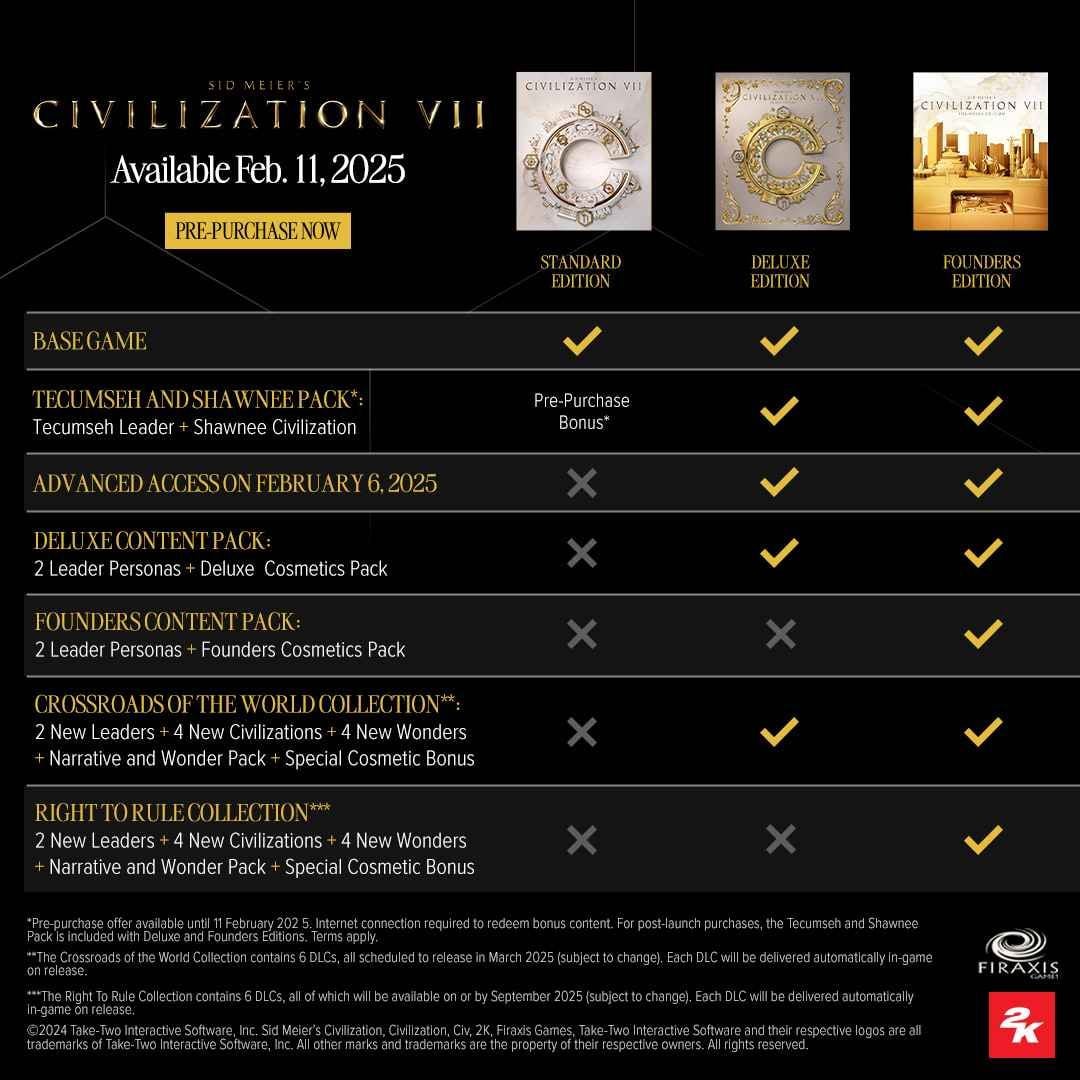
Civilization VII structures its content across distinct packages tailored to different strategic preferences. Understanding the contents of each bundle helps ensure you select the right version.
| Edition / Package | Base Game Access | DLC & Leader Packs | Content Collections Included | Recommended For |
|---|---|---|---|---|
| Standard Edition | Full Base Game | None (Standard Leaders) | Base Content Only | New players starting their strategic journey |
| Deluxe Edition | Full Base Game | Early DLC Leaders + Cosmetics | Crossroads of the World Collection | Players wanting expanded leader options |
| Founders Edition | Full Base Game | Full DLC Roster + Custom Skins | Crossroads + Right to Rule Collections | Complete experience with all launch-era expansions |
| Content Collections | Requires Base Game | Post-Launch Leader & Civ Packs | Standalone Thematic Expansions | Existing owners upgrading their civilization rosters |
Content Collections Overview
Content Collections introduce new historical civilizations, unique wonders, strategic resources, and alternate leader personas. Purchasing Content Collections allows players who own the Standard Edition to expand their game mechanics, civilization choices, and diplomatic options across the Antiquity, Exploration, and Modern Ages.
How to Find Your Player Details and Link Your 2K Account
Civilization VII relies on an integrated 2K Account to manage cross-play, cloud saves, and community rewards. While purchasing on BitTopup only requires your email address to receive your key, linking your platform account to 2K ensures synchronization across devices.
Finding Your 2K Account ID
- Launch Sid Meier's Civilization® VII on your PC or console.
- Open the Main Menu and select 2K Account in the lower-right corner.
- Your linked Account Name and unique 2K Display ID will appear on the profile overview screen.
- If your account is not linked, select Sign In or Create Account and follow the on-screen QR code or browser URL.
Step-by-Step Guide to Redeeming Your Civilization VII Game Code
Once you receive your digital code from BitTopup, follow the platform-specific instructions below to activate your game or Content Collection.
Redeeming on Steam (PC)
- Open the Steam Client on your computer and log into your account.
- Click on the Games menu located at the top bar.
- Select Activate a Product on Steam... and click Next through the terms.
- Paste or type your digital key into the Product Code field.
- Click Confirm. Civilization VII will be added to your Steam Library, ready for download.
Redeeming on PlayStation 5
- Go to the PlayStation Store from the PS5 home screen.
- Select your profile icon in the top-right corner and choose Redeem Code.
- Enter the 12-digit voucher code received from your order.
- Select Redeem to attach the game license or DLC pack to your PlayStation Network account.
Redeeming on Xbox Series X|S
- Press the Xbox Button on your controller to open the guide.
- Navigate to Store, then press the View Button to open the side menu.
- Select Redeem.
- Type the 25-character digital key and select Check Code, then confirm activation.
Safe and Secure Key Delivery: Protecting Your Account Without Passwords
Account safety is a core priority when buying digital games online. BitTopup distributes direct digital activation keys, which guarantees absolute safety for your platform accounts.
- Zero Password Sharing: You are never asked for your Steam, PlayStation, Xbox, or 2K Account passwords. All transactions take place externally.
- Direct Code Fulfillment: Digital keys are delivered straight to your verified user dashboard and email address, allowing you to redeem the code personally.
- Legitimate Activation Paths: Keys activate through official platform storefronts (Steam, PSN, Microsoft Store), preserving your account standing with zero risk of bans or administrative penalties.
- Clear Regional Tagging: All product listings clearly specify their region compatibility (Global, North America, Europe, Asia), preventing region-mismatch errors.
Platform Compatibility and Cross-Play Overview (PC, Consoles)
Sid Meier's Civilization® VII features full cross-platform multiplayer and cross-progression across PC (Steam, Epic Games Store), PlayStation 5, Xbox Series X|S, and Nintendo Switch.
Cross-Play Setup
To play multiplayer matches with friends on different platforms:1. Ensure all players have linked their platform accounts to their 2K Account.2. Create a multiplayer lobby and set the room visibility to Crossplay Enabled.3. Share the unique Lobby Join Code with your friends across PC and console systems.
Troubleshooting Desync and Connection Issues
- Version Mismatch: Ensure all players have updated their game client to the latest patch release.
- NAT Type Restrictions: If console players encounter join failures, switch the lobby host to a PC player with an open NAT configuration.
- DLC Verification: If playing a match featuring specific Content Collection civs, ensure the host enables the relevant content packages in the game setup screen.
Is Sid Meier's Civilization VII Worth It in 2026? Gameplay Features & Performance Updates
Sid Meier's Civilization® VII introduces significant structural evolutions to the 4X strategy genre. The game separates historical progress into three distinct, interconnected eras: the Antiquity Age, the Exploration Age, and the Modern Age.
Core Gameplay Innovations
- Age Progression System: Instead of managing a single unbroken civilization across 6,000 years, players transition between specialized civilizations suited to each historical era, preserving strategic dynamism.
- Decoupled Leaders and Civilizations: Leaders are no longer locked to specific nations. You can choose leaders based on tactical traits and pair them with distinct historical empires to test novel strategic combinations.
- Streamlined Commander Mechanics: Military units can be assigned to Army Commanders, drastically reducing unit movement clutter while introducing tactical army stances on the battlefield.
- Dynamic Crises and Diplomacy: Transitioning between eras triggers crisis mechanics, requiring strategic adaptation through resource management, social policy shifts, and military defense.
With ongoing balance patches and performance optimization throughout 2026, Civilization VII runs efficiently across standard PC hardware and modern consoles, delivering rich turn-based strategy for both solo campaigns and competitive multiplayer.
Frequently Asked Questions About Sid Meier's Civilization VII
Is Civilization 7 worth it in 2026?
Yes. The age-based progression structure, separated leader mechanics, and commander army system provide a modern strategic experience. Regular balance updates and expansion collections have refined gameplay stability and tactical depth.
Where can I buy Civilization 7 for the cheapest price?
You can check the live pricing for Sid Meier's Civilization VII editions and DLCs directly on BitTopup. The live checkout screen shows real-time rates across supported regional currencies with transparent delivery.
How do I activate and redeem my Sid Meier's Civilization VII key?
Copy the digital code from your BitTopup order confirmation. On PC, open Steam, select Games > Activate a Product on Steam, enter the key, and confirm. On consoles, use the Redeem Code option in the PlayStation Store or Microsoft Store.
Do I need to provide my Steam or 2K account password to recharge?
No. BitTopup operates on direct digital key delivery. You never need to share your account password, login credentials, or verification codes.
What comes included in the Civilization VII Content Collections?
Content Collections include post-launch leader packs, historical civilizations, unique wonder buildings, empire cosmetic skins, and exclusive policy cards designed to expand strategic variety across all three historical ages.
Does Sid Meier's Civilization VII support cross-play between PC and console?
Yes. Civilization VII supports cross-platform multiplayer across PC, PlayStation, Xbox, and Nintendo Switch using a shared 2K Account system and lobby join codes.