



What is Shopee Cash e-Voucher (SG) Top Up and How It Works
A Shopee Cash e-Voucher (SG) is a prepaid digital voucher code denominated in Singapore Dollars (SGD) created specifically for the Shopee Singapore shopping platform. When applied at checkout or saved to your account voucher wallet, it instantly deducts its face value from your total merchandise cost.
Unlike standard site-wide promotional vouchers that require specific bank card tie-ups or limited campaign timing, a prepaid Shopee Cash e-Voucher functions as direct shopping balance for items across thousands of authorized sellers, official brand stores on Shopee Mall, and local independent merchants.
After completing your Shopee Cash e-Voucher (SG) top up on BitTopup, you receive a unique alphanumeric redemption code. You enter this code directly into your Shopee mobile app to offset eligible shopping cart totals. It is the easiest way to manage your personal shopping budget, gift shopping credits to friends or family living in Singapore, and secure discounts on daily essentials, electronics, fashion, and lifestyle goods.
Step-by-Step Guide: How to Redeem Shopee Cash e-Voucher on Shopee SG App
Shopee Cash e-Vouchers for the Singapore region must be redeemed exclusively through the official Shopee Singapore Mobile App (available on iOS and Android). Digital voucher codes cannot be applied through desktop web browsers.
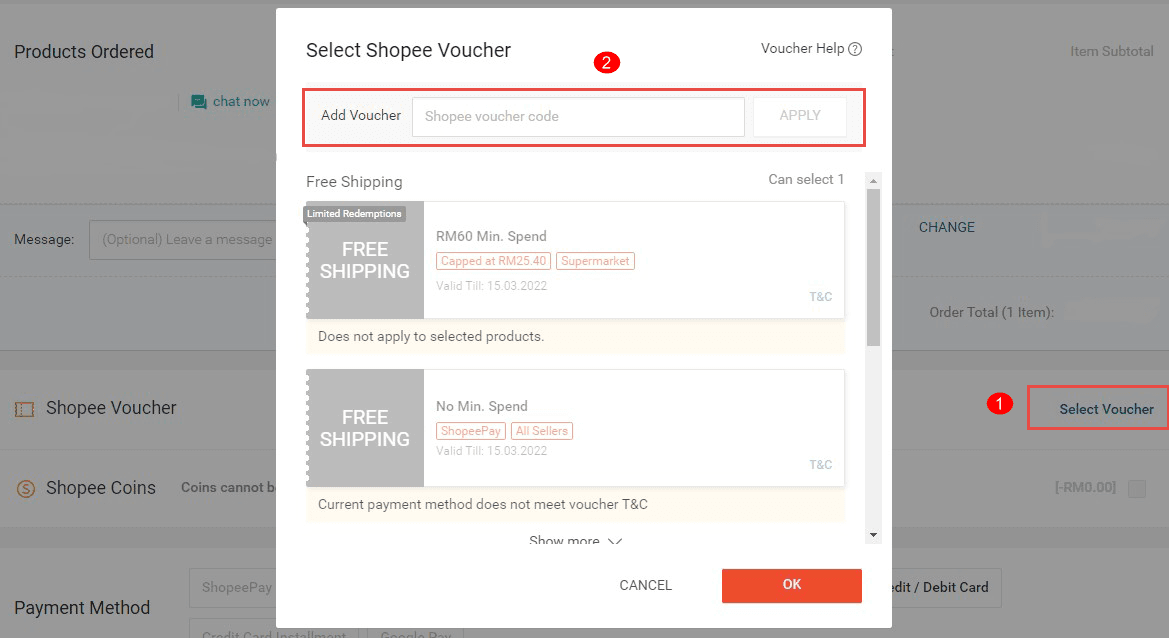
Method 1: Save Voucher Code to Your Voucher Wallet (Recommended)
- Open the Shopee App on your mobile device and log in to your Singapore account.
- Tap the Me icon located at the bottom-right corner of the home screen.
- Scroll down to the My Wallet section and select My Vouchers.
- Tap the text box at the top that says Input Voucher Code.
- Enter or paste the digital alphanumeric voucher code you received from BitTopup.
- Tap Save / Apply. The voucher is now stored in your account wallet and will appear automatically as an available selection during checkout for eligible items.
Method 2: Apply Directly During Checkout
- Add your desired eligible items to your shopping cart in the Shopee app.
- Go to your Shopping Cart and tap Check Out.
- On the Checkout summary screen, tap the Shopee Voucher / Platform Voucher field.
- Enter your voucher code into the input box at the top and tap Apply.
- Verify that the voucher discount appears in your order total breakdown before selecting Place Order.
Shopee Cash Voucher Terms, Conditions, and Category Exclusions
Shopee Singapore enforces specific terms of use and product exclusions across all platform cash e-vouchers. Review the following eligibility breakdown before attempting redemption:
| Parameter / Category | Eligibility Status | Policy Details |
|---|---|---|
| Region Lock | Singapore (SG) Only | Valid solely for registered Shopee SG accounts. Incompatible with other country domains. |
| Redemption Channel | Mobile App Only | Must be redeemed via the official Shopee App (iOS / Android). Desktop checkout does not support code entry. |
| Infant Nutrition | Excluded | Cannot be applied to Stage 1 and Stage 2 infant milk formulas per local marketing regulations. |
| Bullion & Precious Metals | Excluded | Ineligible for gold bars, gold coins, physical bullion, and select luxury investment items. |
| Digital Products & Top-ups | Excluded | Cannot be used to buy phone top-ups, game credits, e-vouchers, or pay utility bills. |
| Delivery / Shipping Fees | Excluded | Applies strictly to product subtotal. Shipping fees must be covered separately or via Free Shipping vouchers. |
| Voucher Stacking | Supported | Can be combined with individual Shop / Seller Vouchers and Free Shipping Vouchers in a single checkout. |
Stacking Rules and Residual Value
- Single Use Per Transaction: Each Shopee Cash e-Voucher code can only be used once. If your order subtotal is less than the voucher face value, any remaining balance is permanently forfeited and cannot be refunded or carried over to future purchases.
- Platform Voucher Stacking: You can stack one Shopee Cash e-Voucher (Platform Voucher) with one Shop Voucher (provided by the seller) and one Free Shipping Voucher on a single checkout, maximizing your total savings.
Voucher Expiry Rules and Validity Details
Every Shopee Cash e-Voucher comes with a strict validity period:* Validity Window: The expiration date is set upon voucher generation. Once saved to your Shopee app voucher wallet, you can view the exact expiration date and time directly on the voucher ticket under Me > My Vouchers.* Expired Vouchers: Once a voucher code expires, it automatically becomes invalid. Expired vouchers cannot be reactivated, reissued, or refunded.* Non-Refundable Policy: Digital codes represent single-use prepaid promotional credits. Once delivered, they cannot be exchanged for cash, returned, or credited back into a bank account or ShopeePay wallet balance.* Order Cancellation Rules: If an order containing an applied cash voucher is cancelled by the seller or approved for a full return and refund, the voucher validity follows Shopee platform policy. If the voucher has not passed its original expiration date, it typically returns to your voucher wallet within 24 to 48 hours; if the voucher has already passed its expiration date, it will not be reinstated.
Troubleshooting Common Shopee Voucher Redemption Issues
If you encounter an error when applying your code, consult the solutions below:
1. Error: "Voucher code is invalid or does not exist"
- Typo in Code: Check for accidental spaces before or after the code string. Ensure numbers like
0(zero) and letters likeOare not mixed up. - Case Sensitivity: Paste the code exactly as shown in your BitTopup order history without modifying capitalization.
2. Error: "Voucher cannot be applied to items in your cart"
- Category Exclusion: Check if your cart contains Stage 1 or 2 baby milk formula, gold bullion, or digital goods.
- Seller Exclusions: A small number of specialized sellers or offline promotional items are excluded from platform-wide discounts.
3. Error: "Minimum spend requirement not met"
- Ensure your cart subtotal (excluding shipping fees and shop discounts) meets the threshold specified for that voucher tier.
4. Error: "This voucher has already been claimed or used"
- Verify if you previously saved the voucher to your account under Me > My Vouchers. If already saved, do not type it into the promotional code box again; simply select the saved voucher from your list during checkout.
5. Error: "Region or currency mismatch"
- Confirm that your Shopee account is set to the Singapore region (
shopee.sg). Singapore cash vouchers cannot be used on Shopee Malaysia, Philippines, Thailand, Indonesia, Vietnam, or Taiwan accounts.
Why Buy Shopee Cash e-Vouchers on BitTopup
BitTopup provides a fast, reliable, and secure environment for purchasing Singapore digital shopping vouchers.
- Instant Digital Code Access: Your Shopee Cash e-Voucher codes are generated and made available in your BitTopup order dashboard immediately after payment verification.
- Zero Account Sharing Required: We never ask for your Shopee account login details, passwords, or personal credentials. You receive the raw digital code to redeem independently on your own account.
- Transparent Pricing: Check the live product selection page for current SGD denominations and pricing details before completing your order.
- Protected Transactions: All orders are processed through encrypted payment infrastructure supporting international and localized payment options.
- 24/7 Customer Assistance: If you have questions regarding order status or voucher code verification, the BitTopup support team is accessible round the clock to assist you.
Frequently Asked Questions
How to use a Shopee Cash e-voucher?
Open your Shopee Singapore mobile app, tap Me, go to My Vouchers, paste your code in the Input Voucher Code field, and tap Save. During checkout, tap the Shopee Voucher section and select the saved voucher to apply the discount to your order subtotal.
Can I convert a Shopee e-voucher to cash or ShopeePay?
No. Shopee Cash e-Vouchers cannot be converted, withdrawn, transferred, or exchanged for physical cash, bank transfers, or ShopeePay balance. They can only be used as a platform discount to pay for eligible physical merchandise on the Shopee SG app.
Can I use a Shopee SG voucher outside Singapore?
No. Shopee Cash e-Vouchers purchased for the SG region are strictly locked to the Shopee Singapore platform (shopee.sg). They will not work on Shopee platforms in Malaysia, Indonesia, the Philippines, Thailand, Vietnam, Taiwan, or Brazil.
Does the Shopee Cash e-Voucher cover shipping fees?
No. Shopee Cash e-Vouchers apply only to the merchandise subtotal of eligible items. Delivery and courier charges are calculated separately. You can combine your cash voucher with an eligible Shopee Free Shipping Voucher at checkout to reduce delivery costs.
Why is my Shopee voucher code not applying at checkout?
Common reasons include containing excluded items (such as Stage 1/2 baby formula or gold bullion), attempting to checkout on a desktop browser instead of the mobile app, failing to meet minimum spend requirements, or trying to use an SG voucher code on an account registered in another country.
Where can I buy Shopee vouchers securely online?
You can buy Shopee Cash e-Vouchers securely on BitTopup. Select your desired SGD denomination, complete payment through safe checkout channels, and receive your digital redemption code instantly without sharing your Shopee account login details.