


GrabGifts Cash Voucher (MY) Top Up: Overview and Supported Services
A GrabGifts Cash Voucher (MY) is a digital prepaid voucher designed for the Grab SuperApp in Malaysia. It functions as digital credit denominated in Malaysian Ringgit (MYR), allowing users to redeem discounts across core Grab on-demand services without linking personal credit cards or sharing bank details.
Grab operates as a multi-service platform across Southeast Asia, but vouchers are region-locked. A Malaysia GrabGifts voucher applies exclusively to transactions made within Malaysia under Malaysian Grab accounts. When you complete a GrabGifts Cash Voucher (MY) top up, you receive a digital activation link that lets you choose and apply voucher credits directly to your account.
Supported Grab Services in Malaysia
- GrabFood: Apply voucher credits toward restaurant orders, local hawker meals, and beverage deliveries.
- GrabTransport (GrabRide): Use credits for daily commutes, airport transfers (KLIA/KLIA2), JustGrab, GrabCar, and GrabTaxi rides.
- GrabMart: Purchase groceries, daily essentials, personal care items, and specialty retail goods from supported local merchants.
- GrabExpress: Book on-demand parcel, document, and package courier deliveries across Malaysian cities.
How to Buy GrabGifts Cash Voucher (MY) on BitTopup
Buying a digital Grab voucher through BitTopup takes only a few simple steps:
- Select the GrabGifts Cash Voucher (MY) denomination you want from the product catalog.
- Verify the item quantity and ensure your region is set to Malaysia (MYR).
- Proceed to checkout and pick your preferred payment method from the available options.
- Complete the payment process securely.
- Access your order receipt to view your unique GrabGifts digital activation URL immediately.
Step-by-Step Guide: How to Redeem GrabGifts Activation Link in the Grab App
Unlike direct in-game balance reloads, Grab vouchers are delivered as redemption URLs. Follow these steps to activate your voucher:
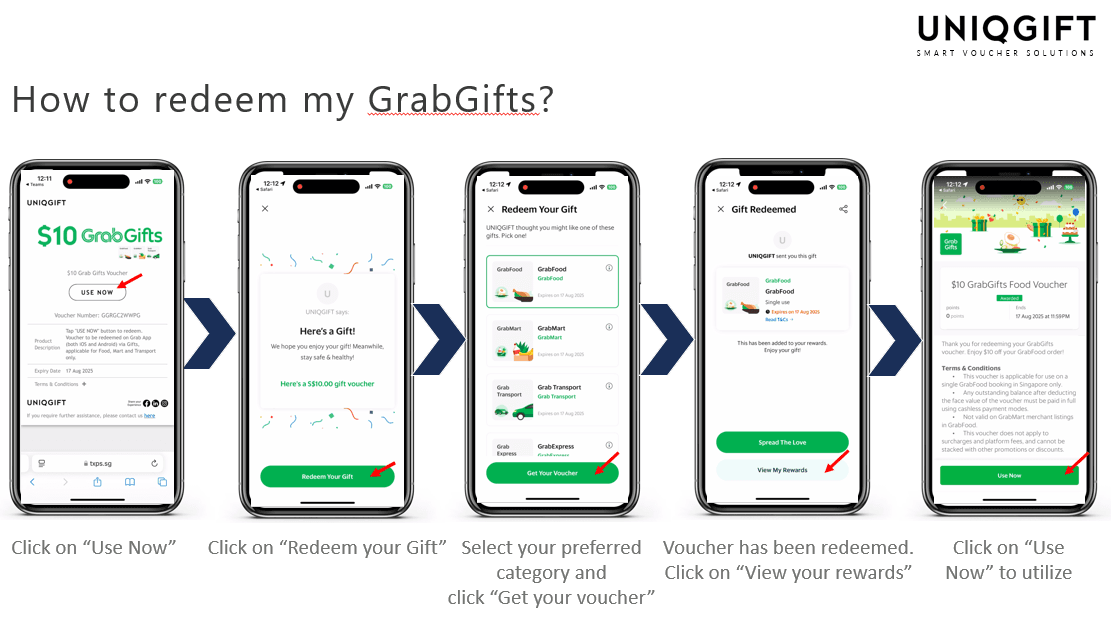
- Open your BitTopup order details to copy the unique GrabGifts redemption link.
- Open your web browser on your mobile device and paste the redemption URL.
- Tap Open in Grab App or log in to your Malaysian Grab account when prompted.
- You will see the unwrapping screen showing the voucher value in MYR.
- Select the specific service vertical you want to use the voucher for (e.g., GrabFood, GrabTransport, GrabMart, or GrabExpress).
- Confirm your selection. The digital voucher will automatically be added to your Grab app under Account > Offers / My Rewards.
- When placing an order in the Grab app, tap Offer on the checkout page and apply the saved voucher before placing your order.
Selecting Grab Services: Choosing Between Transport, Food, Mart, and Express
When unwrapping a GrabGifts voucher, you must designate the specific service you want the credit assigned to. This selection is permanent.
| Service Vertical | Best Used For | Key Usage Conditions |
|---|---|---|
| GrabFood | Restaurant orders, cafe delivery, bubble tea | Covers food subtotal; excludes platform & small order fees |
| GrabTransport | JustGrab, GrabCar, Grab6seater, GrabTaxi | Covers trip fare; excludes highway tolls unless specified |
| GrabMart | Supermarkets, pharmacies, convenience stores | Covers goods subtotal; merchant delivery fees apply |
| GrabExpress | Same-day parcel and package delivery | Covers courier fee base rate |
Critical Rules on Service Selection
- Irreversible Selection: Once you unwrap the link and assign it to GrabFood, you cannot convert it into a GrabRide or GrabMart voucher.
- Single-Use Rule: Each voucher code must be used in a single transaction. If your order total is lower than the face value of the voucher, any remaining balance is forfeited immediately.
- Non-Transferable: After claiming a voucher into your Grab account, it cannot be transferred to another user's Grab wallet or converted to transferable GrabPay credits.
GrabGifts Terms: Regional Limits, Fees, and Expiry Policies
To ensure an easy checkout experience, review the operational terms set by Grab Malaysia:
- Regional Exclusivity: GrabGifts Cash Voucher (MY) codes are valid strictly in Malaysia. They cannot be redeemed in Singapore, Thailand, Indonesia, the Philippines, or Vietnam.
- Platform and Service Fees: GrabGifts vouchers discount the base fare or order subtotal. Platform fees (typically RM 0.50 to RM 1.00), small order fees, and optional priority delivery surcharges are excluded from voucher coverage and must be paid using GrabPay, a linked payment card, or cash.
- Non-Stackable Policy: Grab vouchers cannot be combined with other promotional codes or merchant discount vouchers in a single order.
- Expiry Window: Every activation URL comes with a strict validity period. You must unwrap and add the voucher to your Grab app before the expiration date displayed on your BitTopup order receipt. Once claimed in the app, the in-app voucher carries its own usage expiration.
- Non-Refundable: Digital voucher codes are non-refundable and cannot be exchanged for physical cash or GrabPay wallet balance.
Troubleshooting Common GrabGift Voucher Errors in Malaysia
1. Error: "Voucher Not Applicable in Your Region"
- Cause: Your Grab app location is set outside Malaysia, or your phone's GPS is detecting a non-Malaysian IP address/network.
- Solution: Turn off active VPNs, verify your Grab account phone number is registered with a Malaysian country code (+60), and check that your current delivery address is inside Malaysia.
2. Error: "This Gift Has Already Been Redeemed"
- Cause: The activation URL was opened and accepted earlier, or it was claimed by another Grab profile on the same device.
- Solution: Open your Grab app, tap Account, go to Rewards / Offers, and check your active voucher list. The voucher may already be waiting in your inventory.
3. Error: "Voucher Cannot Be Applied to This Order"
- Cause: The order contains excluded fees, fails to meet minimum merchant requirements, or you selected the wrong vertical during unwrapping (e.g., trying to use a Transport voucher on a GrabFood checkout).
- Solution: Confirm the voucher type matches the service being booked. Ensure your secondary payment method covers platform fees and road tolls.
Why Buy Grab Vouchers on BitTopup
BitTopup provides a straightforward digital checkout experience for mobile credits, vouchers, and gaming items:
- Instant Digital Delivery: Get your GrabGifts redemption URLs immediately upon payment completion without delays.
- Zero Account Sharing Required: You never need to provide your Grab password, OTP, or personal account credentials. All redemptions happen via private links.
- Clear Checkout Pricing: The price you see on the live checkout screen is what you pay, with competitive rates across multiple denominations.
- Secure Payment Options: Choose from trusted local and global payment methods suited for regional transactions.
- Dedicated 24/7 Support: Reach our professional customer service team at any time if you encounter activation or delivery issues.
Frequently Asked Questions
How to redeem a Grabgifts cash voucher in Malaysia?
Open your digital redemption URL received from BitTopup in a mobile browser, tap the prompt to launch your Grab app, select your preferred service category (GrabFood, GrabTransport, GrabMart, or GrabExpress), and confirm. The credit will appear under your Grab app offers for checkout.
Can I use a GrabGifts Cash Voucher (MY) in Singapore or Thailand?
No. GrabGifts Cash Voucher (MY) codes are denominated in MYR and function strictly within Malaysia. They are invalid on Singapore, Thailand, or other regional Grab accounts.
Can I convert a Grab gift voucher to cash or transfer to GrabPay balance?
No. GrabGifts vouchers can only be used as discount codes against eligible Grab services. They cannot be cashed out, refunded, or transferred into a liquid GrabPay Wallet balance.
Can a GrabGifts voucher cover platform fees or small order fees?
No. Platform fees, driver tips, small order surcharges, and highway toll fees are not covered by voucher credits. These extra charges must be settled using GrabPay balance, credit/debit cards, or cash.
What happens if my order total is less than the GrabGifts voucher value?
GrabGifts vouchers are single-use. If you use an RM 20 voucher on an RM 15 order, the full voucher is consumed, and the remaining RM 5 balance is forfeited.
Can I change the service vertical after unwrapping my GrabGift voucher?
No. Once you select a category (such as GrabFood or GrabRide) during the unwrapping process, the selection is permanent and cannot be modified or exchanged for another service.