





Yango Play Subscription UAE/KSA Top Up: All-in-One Entertainment Access
Yango Play is the premier entertainment super-app built specifically for audiences across the Middle East and North Africa, featuring full service integration for users in the United Arab Emirates and Saudi Arabia. A single subscription grants unlimited access to Arabic and international blockbuster movies, exclusive series, curated music streaming, casual mini-games, and Yasmina, the bilingual Arabic-English AI assistant.
Purchasing a Yango Play subscription UAE/KSA top up code provides direct access to the platform's catalog without the need to tie a credit card to recurring monthly charges. BitTopup delivers genuine digital voucher codes that allow you to activate or extend your Yango Play service instantly.
Yango Play Subscription Features and Specifications
A prepaid voucher lets you enjoy the full suite of Yango Play entertainment with total control over your spending. Here is an overview of what the UAE/KSA subscription package includes:
| Feature | Details |
|---|---|
| Eligible Regions | United Arab Emirates (UAE) & Kingdom of Saudi Arabia (KSA) |
| Content Access | Movies, TV Series, Ad-free Music Streaming, Mini-Games |
| AI Assistant | Yasmina (Bilingual Arabic/English AI voice assistant) |
| Account Sharing | Up to 4 separate user profiles per subscription |
| Device Limit | Connect up to 20 devices per account |
| Billing Model | Prepaid digital voucher (No auto-debit / no recurring card charge) |
| Delivery | Instant digital delivery on BitTopup |
How to Find Your Yango Play Account Details
To ensure your subscription code activates smoothly on the correct profile, you should verify your registered phone number and account credentials before redeeming your voucher.
- Open the Yango Play app on your mobile device or visit the official Yango Play website on a desktop browser.
- Tap the Profile icon located in the bottom navigation bar or top corner of the screen.
- Verify the phone number linked to your account. For UAE accounts, the country code must be +971; for Saudi Arabia accounts, it must be +966.
- You can check your current subscription status and active devices directly within the Account Settings tab.
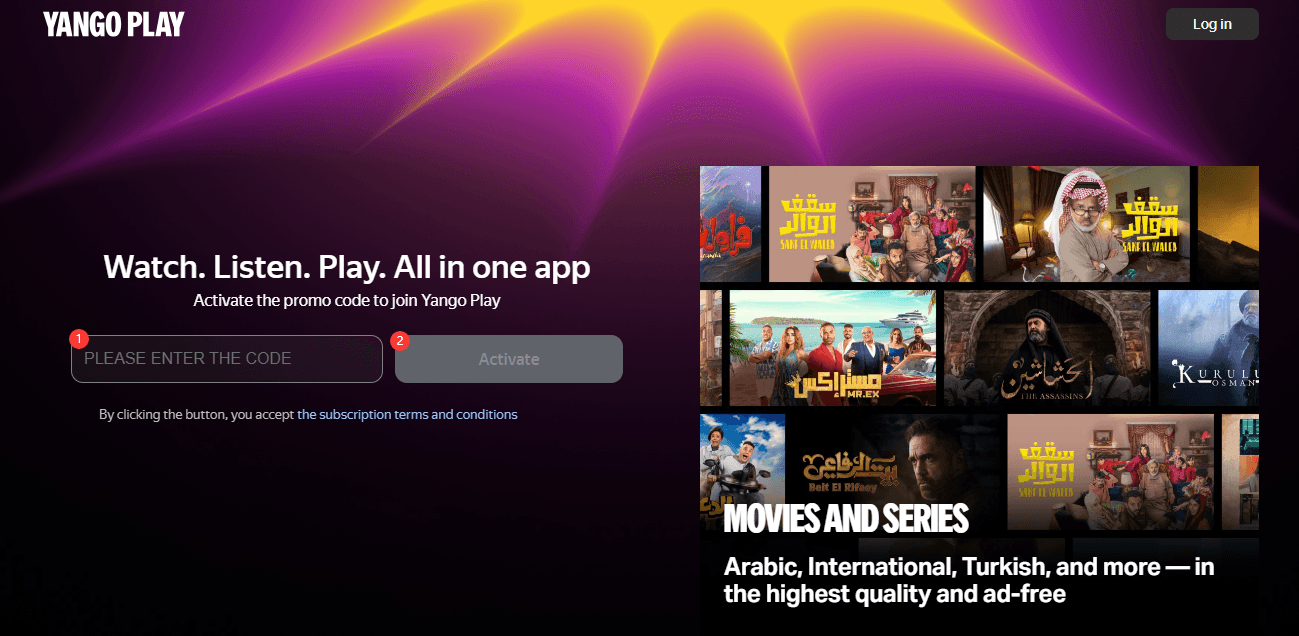
Step-by-Step Guide: How to Buy and Redeem Your Yango Play Code
BitTopup makes it straightforward to purchase and activate your subscription without complex verification steps.
Step 1: Purchase on BitTopup
- Select the Yango Play Subscription UAE/KSA product page.
- Choose your preferred subscription duration (such as a 12-month pass).
- Proceed to checkout and complete payment using your preferred payment method.
- Your digital voucher code will appear directly on your order confirmation screen and will be sent to your email inbox.
Step 2: Redeem Your Code via Web Browser
- Open your browser and navigate to the official Yango Play activation page:
play.yango.com/gift(or the redemption section within your account settings). - Sign in with your registered UAE or KSA mobile number.
- Enter the digital voucher code exactly as displayed on your BitTopup receipt.
- Click Apply or Activate to instantly credit your subscription.
Step 3: Redeem Your Code via Mobile App
- Launch the Yango Play app on your iOS or Android device.
- Go to Profile > Subscriptions / Promo Codes.
- Type or paste your digital voucher code into the input field.
- Confirm your redemption to unlock all video, music, and game content across your connected screens.
Regional Compatibility: UAE and KSA Accounts
Yango Play subscription codes sold under the UAE/KSA classification are geo-locked strictly to accounts registered in the United Arab Emirates and Saudi Arabia.
- Phone Number Requirements: Your Yango account must be registered with a valid UAE (+971) or KSA (+966) mobile number.
- IP & Location Matching: If you travel outside the region, you can continue streaming content on already-activated devices, but the initial voucher redemption must take place on an account recognized in the UAE or KSA zone.
- Cross-Region Limitations: Codes purchased for UAE/KSA cannot be applied to accounts registered under Egypt, GCC countries outside the coverage list, or international territories.
Multi-Device and Family Profile Management
A single Yango Play subscription is designed to support the entire household:
- 4 Independent Profiles: You can create up to 4 individual user profiles under one subscription. Each member maintains a private watch history, customized music playlists, personalized recommendations, and independent mini-game scores.
- 20 Registered Devices: You can link up to 20 devices simultaneously, including Apple iOS phones, Android smartphones, iPads, Android tablets, web browsers, and Smart TVs (Samsung Tizen, LG webOS, Android TV, and Apple TV).
- Simultaneous Streaming: Family members can stream different movies or listen to music on separate screens at the same time without playback interruptions.
Troubleshooting Yango Play Voucher Activation Issues
If you experience an error while redeeming your digital code, check the following solutions:
- "Invalid Code" or "Code Not Found": Verify that there are no extra spaces at the beginning or end of your voucher. Codes are case-sensitive; copy and paste directly from your BitTopup order details to avoid typos.
- "Region Not Supported" Error: Ensure you are logged into an account created with a +971 (UAE) or +966 (KSA) mobile number. Disable any active VPN or proxy connections that might route your IP address outside the UAE or Saudi Arabia.
- Active Existing Subscription Conflict: If you currently have an active recurring subscription billed via Apple App Store or Google Play, you may need to wait until the current billing cycle ends or cancel recurring billing before applying a prepaid voucher.
- Content Not Refreshing: If your code redemption succeeded but premium features remain locked, log out of the Yango Play app, close the app completely, and log back in to force an account status sync.
Why Buy Yango Play Subscriptions on BitTopup?
BitTopup provides a safe, quick, and reliable way to manage your digital streaming needs:
- Instant Digital Delivery: Your voucher code is generated immediately upon completed payment, allowing you to start streaming without delays.
- 100% Account Safety: BitTopup only issues official digital voucher codes. You never need to share your account password, login credentials, or private information.
- No Auto-Renewals: Enjoy complete control over your budget with one-off prepaid vouchers. You will never face unexpected recurring charges on your payment cards.
- Transparent Pricing: Current rates and duration options are displayed live on the checkout screen so you always know your exact cost.
- 24/7 Customer Support: Our dedicated customer care team is available around the clock to assist you with order status or activation inquiries.
Frequently Asked Questions
Does Yango Play work in Saudi Arabia and the UAE?
Yes. Yango Play is fully operational in both Saudi Arabia and the United Arab Emirates, offering Arabic and international entertainment, localized music libraries, and the bilingual Arabic AI assistant Yasmina.
How do I redeem my Yango Play subscription voucher code?
You can redeem your code by visiting the official Yango Play redemption portal at play.yango.com/gift or by going to Profile > Promo Codes inside the Yango Play mobile app. Log in with your UAE or KSA account, enter your code, and confirm.
How many devices and accounts are supported on a Yango Play subscription?
A single Yango Play subscription supports up to 4 individual family profiles and can be connected to up to 20 authorized devices, including smartphones, tablets, computers, and Smart TVs.
Can I use a UAE/KSA Yango Play subscription code in other countries?
No. These vouchers are region-locked specifically for accounts registered with UAE (+971) or Saudi Arabian (+966) phone numbers. They cannot be activated on accounts registered in other countries.
How long is the Yango Play subscription voucher code valid?
Voucher codes should be redeemed promptly after purchase. Once activated on your account, the subscription runs for the full duration of the purchased plan (for example, 12 months) from the exact date of redemption.
What should I do if my Yango Play activation code fails to redeem?
First, check that your account is registered in the UAE or KSA and disable any active VPN. Confirm that the code was entered accurately without extra spaces. If the issue persists, contact BitTopup 24/7 customer support with your order number for immediate assistance.











































































































































