



Mission EVO: Survivor's Battlegrounds EVO Cores Top Up
Acquiring premium currency in Mission EVO: Survivor's Battlegrounds allows you to customize your survivor, access exclusive gear, and unlock progression passes. BitTopup provides a direct recharge service for players seeking to top up their account balance quickly and safely. Using only your numeric Player ID, you can complete your purchase without sharing sensitive login details or third-party account access.
Whether you are gearing up for intense PvP skirmishes or securing your base against rival squads, having EVO Cores on hand ensures you never miss limited-time cosmetic drops, seasonal store rotations, or premium survival crates.
What Are Mission EVO EVO Cores and Their In-Game Utility
EVO Cores function as the primary premium currency in Mission EVO: Survivor's Battlegrounds. While survival on Emberland depends entirely on your gathering, shooting, and building skills, EVO Cores give you access to aesthetic and quality-of-life enhancements.
- Exclusive Character Outfits: Stand out in the wasteland with tactical apparel, protective suit cosmetics, and unique character models.
- Weapon and Tool Skins: Apply distinct finishes to your assault rifles, sniper rifles, melee weapons, and building tools.
- Battle Pass Progression: Unlock the premium tier of seasonal battle passes to earn rewards across every level milestone.
- Base Customization Options: Modify the appearance of structures, storage units, and vehicles to personalize your camp.
- Survival Crates and Mystery Boxes: Open store crates containing rare weapon attachments, blueprints, and emotes.
Because EVO Cores do not alter core weapon damage or survival stats, they offer cosmetic personalization and convenience while maintaining fair competitive balance.
How to Recharge Mission EVO: Survivor's Battlegrounds EVO Cores on BitTopup
To complete an EVO Cores order on BitTopup, follow these straightforward steps:
- Select Denomination: Choose the amount of EVO Cores you wish to purchase from the product catalog.
- Enter Player ID: Input your Mission EVO numeric Player ID into the designated field.
- Select Payment Option: Review your order details and pick your preferred payment channel at checkout.
- Confirm and Pay: Complete the transaction through the secure checkout screen.
- Check Balance: Open Mission EVO: Survivor's Battlegrounds to confirm your newly credited EVO Cores.
| Order Stage | Required Information | Processing Details |
|---|---|---|
| Core Selection | Pack denomination | Prices displayed on live checkout |
| Account Verification | In-game Player ID (UID) | No passwords or login credentials needed |
| Payment Processing | Selected billing method | Secure gateway verification |
| Delivery | In-game mailbox / Direct credit | Instant automated injection |
How to Find Your Mission EVO Player ID
Locating your Player ID requires only a few taps inside the game lobby. Follow this walkthrough to ensure your ID is entered correctly:
- Launch Mission EVO: Survivor's Battlegrounds on your mobile device.
- From the main menu lobby, tap your Profile Avatar located in the top-left corner of the screen.
- In your Profile overview tab, find your numeric Player ID (UID) displayed directly below your player name.
- Tap the Copy icon next to the number to copy it to your clipboard.
- Paste the ID into the BitTopup order page to avoid manual typing errors.
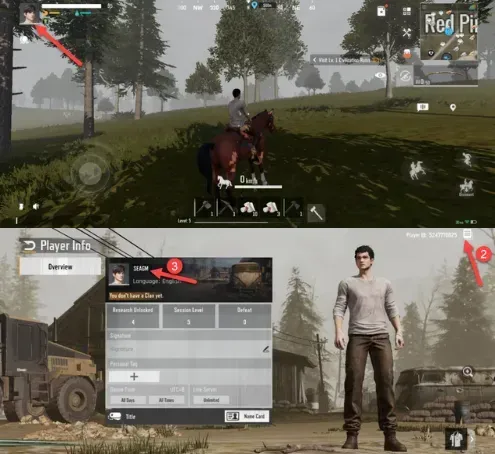
Double-check that the ID matches your in-game profile before proceeding to checkout, as orders are processed directly to the provided account identifier.
Accepted Payment Methods and Instant Checkout Process
BitTopup supports a broad range of domestic and international payment solutions to serve players worldwide. The checkout system automatically detects your region and presents available local payment channels, digital wallets, credit cards, and online banking options.
All real-time currency conversions, regional tax inclusions, and final totals are shown directly on the live checkout interface before you authorize payment. Transactions run through encrypted payment gateways to protect your financial information at every stage.
Current Service Status and Availability for Mission EVO in 2026
Following regional publishing shifts and server realignments over the past few seasons, player communities continue to access active servers across supported global regions. In 2026, BitTopup remains committed to supporting active survivors by maintaining direct recharge channels for registered Player IDs.
If you have an active account on any operational server region, your EVO Cores top-up will credit directly to your account balance. In the event of scheduled server maintenance by the game operators, incoming core deliveries will finalize as soon as the maintenance window concludes.
Account Safety: Why You Never Need to Share Passwords
Account security is critical in survival games where hundreds of hours are invested into blueprint unlocks, base designs, and inventory caches. BitTopup relies exclusively on an ID-based delivery model.
- Zero Password Requirements: You will never be asked for your game password, Google account, Apple ID, or social media credentials.
- No Account Handover: Your account remains strictly in your hands. You do not need to log out or allow third parties to access your profile.
- Secure Delivery Pipeline: EVO Cores are credited directly through the game's system using only your public Player ID.
- Protection from Phishing: Keeping your login details private protects your account from unauthorized transfers or compromised gear.
Troubleshooting and Support for EVO Cores Delivery
If your EVO Cores do not reflect on your balance immediately after completing checkout, use these troubleshooting steps:
- Restart the Application: Completely close the Mission EVO app from your device's background tasks and relaunch it to refresh your server connection.
- Check In-Game Mail: Certain items or balance updates appear in your system mailbox; check for any uncollected attachments.
- Verify Your Player ID: Check your BitTopup order confirmation receipt to ensure the submitted Player ID matches your profile.
- Contact Support: If the currency has not arrived after a short period, reach out to the 24/7 BitTopup customer support team with your order number and Player ID for rapid resolution.
Frequently Asked Questions
Is Mission EVO: Survivor's Battlegrounds still available to play in 2026?
Yes. Active players on regional servers and supported game versions can continue playing, building, and competing in matches. Top-up services on BitTopup remain active for all valid, operational Player IDs.
How do I find my Player ID to recharge Mission EVO EVO Cores?
Open Mission EVO, tap your profile avatar in the upper-left corner of the lobby screen, and locate the numeric UID under your character name. Tap the copy button to grab your exact ID.
Do I need to provide my password to recharge EVO Cores on BitTopup?
No. BitTopup only requires your numeric Player ID. You will never need to provide your password, security questions, or linked social media accounts.
What payment methods can I use to buy Mission EVO Cores?
BitTopup offers multiple payment options, including major credit/debit cards, regional digital wallets, and online payment systems. The full list of available methods for your country appears directly on the checkout screen.
What should I do if my EVO Cores do not appear immediately?
Restart your game client to refresh your balance data. If the cores are still missing, check your in-game mailbox. For further assistance, contact BitTopup customer support with your order ID.
Is Mission EVO available for download on Google Play?
Availability on official app stores can vary by region and publishing status. Players typically access the game through authorized regional distribution portals or direct package installers provided by the official community channels.